Trouble printing PDF files

fmb419

New member
Local time
10:11 AM
Messages
7
Hello

Here's my problem in a nutshell. I can't print PDF files on my computer.
I can print TXT and JPG files, however.
I can print the same PDF file from my sons computer which is connected to the same printer.

So far I've tried the following:
Been in contact with HP. Done all their diagnostics and found the printer to be set up properly. (HP PSC 1410). Apparently the problem is not there)

Been in contact with Adobe. Went through all their Trouble shooting steps and every thing checked out OK. Uninstalled and reinstalled Adobe Reader II.

The printer is set up as the default printer and I have stopped and started the print spooler a number of times.

When I try to print a PDF I don't get any error message! I click the printer icon and get the print dialog screen giving me print options. I don't change anything. When I click PRINT, the screen goes away and NOTHING happens! No error message or anything else that might tell me what is happening. The printer shows the print que is empty. This happens on any PDF file I try to print. Again, I can print the same files on another computer and can print TXT and JPG files from my computer.

Running Win7.

Hope someone can point me in the right direction.

Thanks
Frank
 

My Computer My Computer

Computer type
Laptop
Computer Manufacturer/Model Number
Gateway NV59
OS
windows 7 home premium 64bit
CPU
m430
Memory
4.00 GB
Antivirus
Kasperski
Browser
Firefox
You might want to test printing a PDF file from another Windows user account on the problematic computer. If you do not have another Windows user account, create one just as a test. You can remove it later if you wish. Testing with another Windows user account should let us know if the problem is computer wide or just with your user profile.


Another test would be to try and print any PDF while using another PDF reader. SumatraPDF would be a good PDF reader to test with because the installation process will not try and take over any settings from Adobe's PDF reader. The Adobe reader will remain the default application for PDF files.

To test with SumatraPDF, manually open SumatrPDF and then manually open any PDF. Try to print from there.

If SumatraPDF works for you, then consider uninstalling Adobe's PDF reader and making SumatraPDF the default app for PDF files (via Settings > Options). SumatraPDF does far less than Adobe's PDF reader - so, SumatraPDF does not have the security issues that Adobe has. The only feature that people sometimes miss is the ability to type in fields in some PDFs.
 

My Computer My Computer

Computer type
Laptop
Computer Manufacturer/Model Number
Employer provided Dell Latitude
OS
W7 Pro SP1 64bit
CPU
i7
Memory
8GB
Graphics Card(s)
Intel HD Graphics
Hard Drives
crappy SSD
Antivirus
Employer mandated Symantec Endpoint Protection
Browser
Pale Moon 64bit, IE11 64bit & Chrome 64bit
Hi, Frank:

UNI's suggestions seem to be "on the money", as usual.:)

But one stupid question: are you trying to print these PDF files from within a browser, or do you first save them to your computer?

<just curious and trying to learn>

Crawls back under rock,
 

My Computer My Computer

Computer type
PC/Desktop
Computer Manufacturer/Model Number
Dell Studio XPS 8500
OS
OEM Windows 7 Ult (x64) SP1
CPU
Intel Core-i7 3770 @ 3.4 GHz
Motherboard
"Dell" branded
Memory
16 GB DDR3 SDRAM @ 1333 MHz
Graphics Card(s)
NVidia GeForce GT620 1 GB
Sound Card
THX TruStudio PC
Monitor(s) Displays
Dell U2410 Full HD
Hard Drives
2.0 TB SATA2 @ 7200 RPM
PSU
350W
Keyboard
MS 4000 Ergon - Wired
Mouse
Logitech Anywhere MX
Internet Speed
Cable HSI w/Turbo (router)
Antivirus
KIS-MBAM Premium-MBAE Premium
Browser
Fx (current version); IE
Other Info
And a Win7/64 Pro laptop; And a Win10/64 Pro desktop.
Thanks for the fast reply guys!
I was outside mowing and doing yard work and stopped in to see if I had any replies.

USER, I will try your suggestions. I have a feeling we are getting close to finding out what's behind this. I really have to get done outside but when I get back I'll get to it. I know you'll be hearing back from me since I'm a complete noob and I anticipate problems setting up another user account but I will try.

MOXIEMOMMA I've been trying to print files saved on computer. Not sure what you mean by "printing from within the browser"

I'll be BAACK!

Frank
 

My Computer My Computer

Computer type
Laptop
Computer Manufacturer/Model Number
Gateway NV59
OS
windows 7 home premium 64bit
CPU
m430
Memory
4.00 GB
Antivirus
Kasperski
Browser
Firefox
You can try SumatraPDF first. It is a simpler test than creating a new user.

If the PDF fails to print while using SumatraPDF,
then you can consult this tutorial to help you create a new user:
http://www.sevenforums.com/tutorials/181024-user-account-create.html

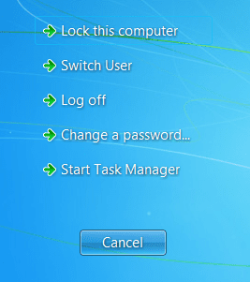
After completing those steps, you can user Switch user to get to the new user account.
(Press Ctrl + Alt + Del and select Switch User from the from that screen.)


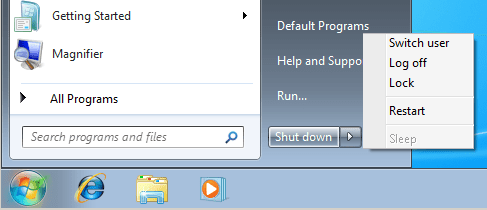
As a totally useless sidebar, I just noticed that the letter U is capitalized in Switch User on that screen...

u1.PNG

...but it is not capitalized on the Power button.

u2.PNG

:::bored:::
 

My Computer My Computer

Computer type
Laptop
Computer Manufacturer/Model Number
Employer provided Dell Latitude
OS
W7 Pro SP1 64bit
CPU
i7
Memory
8GB
Graphics Card(s)
Intel HD Graphics
Hard Drives
crappy SSD
Antivirus
Employer mandated Symantec Endpoint Protection
Browser
Pale Moon 64bit, IE11 64bit & Chrome 64bit
Told you I'd be back!

Well, tried both suggestions and neither one had any effect!

Are we out of ideas?

Question... When downloading Sumatra, I was prompted to download Windows 7 Driver Optimizer. I didn't download it but it looked interesting. It offered to "Optimize Hardware Drivers (Printers, Scanners, Mouse, etc)". It sounds like that could have some bearing on my problem. Is it worth trying?

Also, I did notice something strange. HP has a site called "HP Solution Center" that shows info about the current status of the printer. Oddly enough it shows that my printer is "disconnected" which is obviously a lie since it is connected and I can print txt files etc. I'm going back to HP with this info to see what they have to say.

Frank
 

My Computer My Computer

Computer type
Laptop
Computer Manufacturer/Model Number
Gateway NV59
OS
windows 7 home premium 64bit
CPU
m430
Memory
4.00 GB
Antivirus
Kasperski
Browser
Firefox
I would avoid the Optimizer scam.


I have more ideas:
Convert this computer into a boat anchor at your nearest lake :-)


Take the computer off of the internet.
Uninstall Kasperski antivirus.
Test printing a PDF file.
(You other computer that does print PDF files might also be using Kasperki, but your configuration might differ a bit.)


If it fails to print, re-install Kasperski and uninstall every app related to the HP printer. Also un-install every app related to any old printer that might still be around. After restarting the computer, see if Window 7 will find and install the bare minimum printerDrivers. If it does, see if a PDF file will print. If it does not, install the bare minimum HP software needed to print stuff.

If all of the above fails, try these steps: http://www.sevenforums.com/tutorial...ation-conflicts-performing-clean-startup.html
 
Last edited:

My Computer My Computer

Computer type
Laptop
Computer Manufacturer/Model Number
Employer provided Dell Latitude
OS
W7 Pro SP1 64bit
CPU
i7
Memory
8GB
Graphics Card(s)
Intel HD Graphics
Hard Drives
crappy SSD
Antivirus
Employer mandated Symantec Endpoint Protection
Browser
Pale Moon 64bit, IE11 64bit & Chrome 64bit
Back
Top