Trouble with Intermediate Progress bar (Black Border around image)

SnackCabinet

Banned
Local time
5:42 PM
Messages
139
Location
Indiana
Hello.
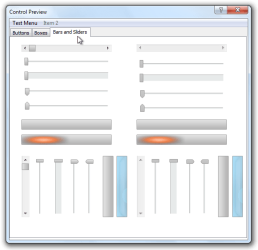
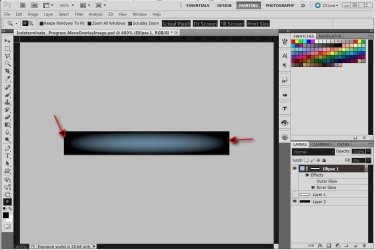
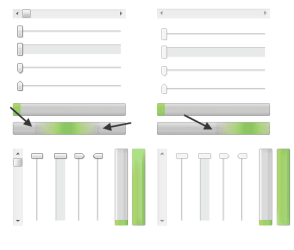
I was wandering if you could help me out with a problem. When I was imaging the loading bars in my theme I came across a problem. See in the picture provided, my slider has these nasty black lines around it. It doesn't show it on photoshop though.
Any reason why?
 

Attachments
  • 9-12-2012 10-29-03 AM.png
    9-12-2012 10-29-03 AM.png
    7.1 KB · Views: 12

My Computer My Computer

Computer Manufacturer/Model Number
Acer / PEW76(B)
OS
Microsoft Windows 7 Home Premium 64-bit SP1
CPU
AMD K10 (45nm Technology)
Motherboard
Acer JE51_DN (Socket S1G4)
Memory
4.00 GB Dual-Channel DDR3 @ 536MHz (7-7-7-20)
Graphics Card(s)
ATI Mobility Radeon HD 4200 Series (Acer Incorporated [ALI])
Sound Card
AMD High Definition Audio Device
Monitor(s) Displays
Generic PnP Monitor on ATI Mobility Radeon HD 4200 Series
Screen Resolution
Dual Monitor: 1366x768 / 1440 x 900
Hard Drives
298GB TOSHIBA MK3275GSX SATA Disk Device (SATA)
PSU
6-Cell Li-ion Battery
Put the images from (below) in a zip folder and post it here, I will look at them.

Buttons, Boxes & Controls > Progress Bars > Indeterminate > MoveOverlay

Buttons, Boxes & Controls > Progress Bars > Normal > PulseOverlay

Buttons, Boxes & Controls > Progress Bars > Normal > MoveOverlay

Jerry
 

My Computer My Computer

Computer type
Laptop
Computer Manufacturer/Model Number
Sager NP9170
OS
Win 7 Pro x64 / Win 10 Pro
CPU
Intel(R) Core(TM) i7-3630QM CPU @ 2.40GHz
Motherboard
CLEVO P170EM
Memory
12 GB
Graphics Card(s)
(1) Intel(R) HD Graphics 4000 (2) NVIDIA GeForce GTX 675M
Sound Card
(1) Realtek High Definition Audio (2) Intel(R) Display Aud
Monitor(s) Displays
17.3
Screen Resolution
1920x1080
Hard Drives
(1) Samsung 860 EVO 500GB(OS) (1) Samsung 860 EVO 500GB(Data)
Keyboard
Backlite
Antivirus
MSE, Malwarebytes Pro
Browser
Firefox
Other Info
DESKTOP: Custom-built.
OS: Win 10 Pro x64.
CASE: Rosewill R5.
CPU: Intel I5 4670K CPU @ 3.40GHz.
CPU COOLER: Cool Master Hyper 212 EVO.
MOTHERBOARD: Asus Z87-A.
MEMORY: Kingston HyperX 2x4 GB.
GPU: Nvidia Geforce 650 TI.
PSU: Corsair TX750.
DRIVES: (1) Samsung 840 120 GB SSD (2) Western Digital blue 500 GB 7200 RPM.
I'm only working with the Indeterminate > MoveOverlay, Normal > PulseOverlayVertical, and Normal > MoveOverlayVertical, but here is the compressed folder with the images.
 

Attachments

My Computer My Computer

Computer Manufacturer/Model Number
Acer / PEW76(B)
OS
Microsoft Windows 7 Home Premium 64-bit SP1
CPU
AMD K10 (45nm Technology)
Motherboard
Acer JE51_DN (Socket S1G4)
Memory
4.00 GB Dual-Channel DDR3 @ 536MHz (7-7-7-20)
Graphics Card(s)
ATI Mobility Radeon HD 4200 Series (Acer Incorporated [ALI])
Sound Card
AMD High Definition Audio Device
Monitor(s) Displays
Generic PnP Monitor on ATI Mobility Radeon HD 4200 Series
Screen Resolution
Dual Monitor: 1366x768 / 1440 x 900
Hard Drives
298GB TOSHIBA MK3275GSX SATA Disk Device (SATA)
PSU
6-Cell Li-ion Battery
I cannot reproduce that effect with your images.
Zip up the theme .msstyles and posted here so I can get a better look at it.

Jerry
 

My Computer My Computer

Computer type
Laptop
Computer Manufacturer/Model Number
Sager NP9170
OS
Win 7 Pro x64 / Win 10 Pro
CPU
Intel(R) Core(TM) i7-3630QM CPU @ 2.40GHz
Motherboard
CLEVO P170EM
Memory
12 GB
Graphics Card(s)
(1) Intel(R) HD Graphics 4000 (2) NVIDIA GeForce GTX 675M
Sound Card
(1) Realtek High Definition Audio (2) Intel(R) Display Aud
Monitor(s) Displays
17.3
Screen Resolution
1920x1080
Hard Drives
(1) Samsung 860 EVO 500GB(OS) (1) Samsung 860 EVO 500GB(Data)
Keyboard
Backlite
Antivirus
MSE, Malwarebytes Pro
Browser
Firefox
Other Info
DESKTOP: Custom-built.
OS: Win 10 Pro x64.
CASE: Rosewill R5.
CPU: Intel I5 4670K CPU @ 3.40GHz.
CPU COOLER: Cool Master Hyper 212 EVO.
MOTHERBOARD: Asus Z87-A.
MEMORY: Kingston HyperX 2x4 GB.
GPU: Nvidia Geforce 650 TI.
PSU: Corsair TX750.
DRIVES: (1) Samsung 840 120 GB SSD (2) Western Digital blue 500 GB 7200 RPM.
I have to tell you though, it's a work in progress.
 

Attachments

My Computer My Computer

Computer Manufacturer/Model Number
Acer / PEW76(B)
OS
Microsoft Windows 7 Home Premium 64-bit SP1
CPU
AMD K10 (45nm Technology)
Motherboard
Acer JE51_DN (Socket S1G4)
Memory
4.00 GB Dual-Channel DDR3 @ 536MHz (7-7-7-20)
Graphics Card(s)
ATI Mobility Radeon HD 4200 Series (Acer Incorporated [ALI])
Sound Card
AMD High Definition Audio Device
Monitor(s) Displays
Generic PnP Monitor on ATI Mobility Radeon HD 4200 Series
Screen Resolution
Dual Monitor: 1366x768 / 1440 x 900
Hard Drives
298GB TOSHIBA MK3275GSX SATA Disk Device (SATA)
PSU
6-Cell Li-ion Battery
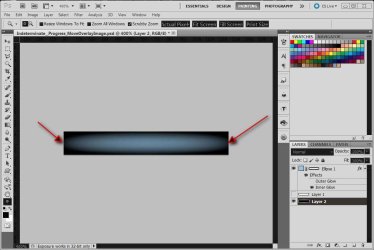
I recolored the image at Buttons, Boxes & Controls > Progress Bars > Indeterminate > MoveOverlay for a test and got 1st screenshot I can see the dark edge then I erased part of the edges 2nd screenshot you can see it changed, so there is a shadow on the ends of the image.

Jerry
3.png

6.png
 

My Computer My Computer

Computer type
Laptop
Computer Manufacturer/Model Number
Sager NP9170
OS
Win 7 Pro x64 / Win 10 Pro
CPU
Intel(R) Core(TM) i7-3630QM CPU @ 2.40GHz
Motherboard
CLEVO P170EM
Memory
12 GB
Graphics Card(s)
(1) Intel(R) HD Graphics 4000 (2) NVIDIA GeForce GTX 675M
Sound Card
(1) Realtek High Definition Audio (2) Intel(R) Display Aud
Monitor(s) Displays
17.3
Screen Resolution
1920x1080
Hard Drives
(1) Samsung 860 EVO 500GB(OS) (1) Samsung 860 EVO 500GB(Data)
Keyboard
Backlite
Antivirus
MSE, Malwarebytes Pro
Browser
Firefox
Other Info
DESKTOP: Custom-built.
OS: Win 10 Pro x64.
CASE: Rosewill R5.
CPU: Intel I5 4670K CPU @ 3.40GHz.
CPU COOLER: Cool Master Hyper 212 EVO.
MOTHERBOARD: Asus Z87-A.
MEMORY: Kingston HyperX 2x4 GB.
GPU: Nvidia Geforce 650 TI.
PSU: Corsair TX750.
DRIVES: (1) Samsung 840 120 GB SSD (2) Western Digital blue 500 GB 7200 RPM.
I remade the the whole Icon it's self. It's Styles Builder that puts it the shadow around it. I think it has to do with the image being somewhat transparent. Is there a certain color on Windows or Styles Builder that is transparent?
Here is the PSD and the image of before the image was put into the theme.
(Hoping you have Photoshop).
 

Attachments

My Computer My Computer

Computer Manufacturer/Model Number
Acer / PEW76(B)
OS
Microsoft Windows 7 Home Premium 64-bit SP1
CPU
AMD K10 (45nm Technology)
Motherboard
Acer JE51_DN (Socket S1G4)
Memory
4.00 GB Dual-Channel DDR3 @ 536MHz (7-7-7-20)
Graphics Card(s)
ATI Mobility Radeon HD 4200 Series (Acer Incorporated [ALI])
Sound Card
AMD High Definition Audio Device
Monitor(s) Displays
Generic PnP Monitor on ATI Mobility Radeon HD 4200 Series
Screen Resolution
Dual Monitor: 1366x768 / 1440 x 900
Hard Drives
298GB TOSHIBA MK3275GSX SATA Disk Device (SATA)
PSU
6-Cell Li-ion Battery
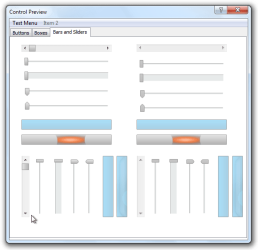
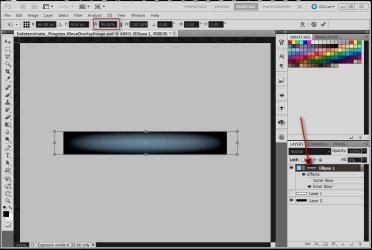
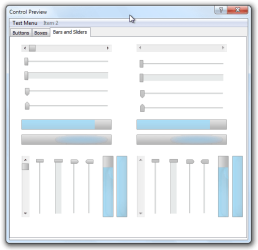
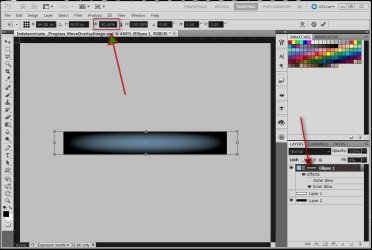
I took your PSD and added a black layer underneath your image so I can see what it looked like, then I reduced the width to 90% on your image layer saved it and imported it into your theme and tested it and to me it looks a little better, it could be that you had colored that image all the way to the edge. Here are the screenshots of what I did and what I got. Just for your information that is one of the hardest areas to get the look you want.

Jerry
ps1.JPG

ps2.JPG

ps3.JPG

Control Preview.png
 

My Computer My Computer

Computer type
Laptop
Computer Manufacturer/Model Number
Sager NP9170
OS
Win 7 Pro x64 / Win 10 Pro
CPU
Intel(R) Core(TM) i7-3630QM CPU @ 2.40GHz
Motherboard
CLEVO P170EM
Memory
12 GB
Graphics Card(s)
(1) Intel(R) HD Graphics 4000 (2) NVIDIA GeForce GTX 675M
Sound Card
(1) Realtek High Definition Audio (2) Intel(R) Display Aud
Monitor(s) Displays
17.3
Screen Resolution
1920x1080
Hard Drives
(1) Samsung 860 EVO 500GB(OS) (1) Samsung 860 EVO 500GB(Data)
Keyboard
Backlite
Antivirus
MSE, Malwarebytes Pro
Browser
Firefox
Other Info
DESKTOP: Custom-built.
OS: Win 10 Pro x64.
CASE: Rosewill R5.
CPU: Intel I5 4670K CPU @ 3.40GHz.
CPU COOLER: Cool Master Hyper 212 EVO.
MOTHERBOARD: Asus Z87-A.
MEMORY: Kingston HyperX 2x4 GB.
GPU: Nvidia Geforce 650 TI.
PSU: Corsair TX750.
DRIVES: (1) Samsung 840 120 GB SSD (2) Western Digital blue 500 GB 7200 RPM.
How would I not color it all the way to the edge?
 

My Computer My Computer

Computer Manufacturer/Model Number
Acer / PEW76(B)
OS
Microsoft Windows 7 Home Premium 64-bit SP1
CPU
AMD K10 (45nm Technology)
Motherboard
Acer JE51_DN (Socket S1G4)
Memory
4.00 GB Dual-Channel DDR3 @ 536MHz (7-7-7-20)
Graphics Card(s)
ATI Mobility Radeon HD 4200 Series (Acer Incorporated [ALI])
Sound Card
AMD High Definition Audio Device
Monitor(s) Displays
Generic PnP Monitor on ATI Mobility Radeon HD 4200 Series
Screen Resolution
Dual Monitor: 1366x768 / 1440 x 900
Hard Drives
298GB TOSHIBA MK3275GSX SATA Disk Device (SATA)
PSU
6-Cell Li-ion Battery
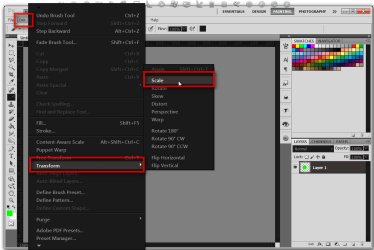
Just not paint to the edges.
Or
Scale the layer (screenshots)

Jerry
ps2.JPG

Untitled-1 @ 100% (Layer 1, RGB8).png
 

My Computer My Computer

Computer type
Laptop
Computer Manufacturer/Model Number
Sager NP9170
OS
Win 7 Pro x64 / Win 10 Pro
CPU
Intel(R) Core(TM) i7-3630QM CPU @ 2.40GHz
Motherboard
CLEVO P170EM
Memory
12 GB
Graphics Card(s)
(1) Intel(R) HD Graphics 4000 (2) NVIDIA GeForce GTX 675M
Sound Card
(1) Realtek High Definition Audio (2) Intel(R) Display Aud
Monitor(s) Displays
17.3
Screen Resolution
1920x1080
Hard Drives
(1) Samsung 860 EVO 500GB(OS) (1) Samsung 860 EVO 500GB(Data)
Keyboard
Backlite
Antivirus
MSE, Malwarebytes Pro
Browser
Firefox
Other Info
DESKTOP: Custom-built.
OS: Win 10 Pro x64.
CASE: Rosewill R5.
CPU: Intel I5 4670K CPU @ 3.40GHz.
CPU COOLER: Cool Master Hyper 212 EVO.
MOTHERBOARD: Asus Z87-A.
MEMORY: Kingston HyperX 2x4 GB.
GPU: Nvidia Geforce 650 TI.
PSU: Corsair TX750.
DRIVES: (1) Samsung 840 120 GB SSD (2) Western Digital blue 500 GB 7200 RPM.
So you want me to scale it down with the Black background and might I ask why doesn't the black background show up?
 

My Computer My Computer

Computer Manufacturer/Model Number
Acer / PEW76(B)
OS
Microsoft Windows 7 Home Premium 64-bit SP1
CPU
AMD K10 (45nm Technology)
Motherboard
Acer JE51_DN (Socket S1G4)
Memory
4.00 GB Dual-Channel DDR3 @ 536MHz (7-7-7-20)
Graphics Card(s)
ATI Mobility Radeon HD 4200 Series (Acer Incorporated [ALI])
Sound Card
AMD High Definition Audio Device
Monitor(s) Displays
Generic PnP Monitor on ATI Mobility Radeon HD 4200 Series
Screen Resolution
Dual Monitor: 1366x768 / 1440 x 900
Hard Drives
298GB TOSHIBA MK3275GSX SATA Disk Device (SATA)
PSU
6-Cell Li-ion Battery
I just used the black background layer just to see the image layer, I deselected the black layer before I saved it.

Jerry
 

My Computer My Computer

Computer type
Laptop
Computer Manufacturer/Model Number
Sager NP9170
OS
Win 7 Pro x64 / Win 10 Pro
CPU
Intel(R) Core(TM) i7-3630QM CPU @ 2.40GHz
Motherboard
CLEVO P170EM
Memory
12 GB
Graphics Card(s)
(1) Intel(R) HD Graphics 4000 (2) NVIDIA GeForce GTX 675M
Sound Card
(1) Realtek High Definition Audio (2) Intel(R) Display Aud
Monitor(s) Displays
17.3
Screen Resolution
1920x1080
Hard Drives
(1) Samsung 860 EVO 500GB(OS) (1) Samsung 860 EVO 500GB(Data)
Keyboard
Backlite
Antivirus
MSE, Malwarebytes Pro
Browser
Firefox
Other Info
DESKTOP: Custom-built.
OS: Win 10 Pro x64.
CASE: Rosewill R5.
CPU: Intel I5 4670K CPU @ 3.40GHz.
CPU COOLER: Cool Master Hyper 212 EVO.
MOTHERBOARD: Asus Z87-A.
MEMORY: Kingston HyperX 2x4 GB.
GPU: Nvidia Geforce 650 TI.
PSU: Corsair TX750.
DRIVES: (1) Samsung 840 120 GB SSD (2) Western Digital blue 500 GB 7200 RPM.
So how am I suppose to make this black background?
 

My Computer My Computer

Computer Manufacturer/Model Number
Acer / PEW76(B)
OS
Microsoft Windows 7 Home Premium 64-bit SP1
CPU
AMD K10 (45nm Technology)
Motherboard
Acer JE51_DN (Socket S1G4)
Memory
4.00 GB Dual-Channel DDR3 @ 536MHz (7-7-7-20)
Graphics Card(s)
ATI Mobility Radeon HD 4200 Series (Acer Incorporated [ALI])
Sound Card
AMD High Definition Audio Device
Monitor(s) Displays
Generic PnP Monitor on ATI Mobility Radeon HD 4200 Series
Screen Resolution
Dual Monitor: 1366x768 / 1440 x 900
Hard Drives
298GB TOSHIBA MK3275GSX SATA Disk Device (SATA)
PSU
6-Cell Li-ion Battery
You got me confused now, why do you need the black background?
The only reason I used the black background (it is a new layer I created under the original image and filled it with black) was so I could see what your original image you made look like, it was so transparent and light in color I used the black background layer just see it.

Jerry
 

My Computer My Computer

Computer type
Laptop
Computer Manufacturer/Model Number
Sager NP9170
OS
Win 7 Pro x64 / Win 10 Pro
CPU
Intel(R) Core(TM) i7-3630QM CPU @ 2.40GHz
Motherboard
CLEVO P170EM
Memory
12 GB
Graphics Card(s)
(1) Intel(R) HD Graphics 4000 (2) NVIDIA GeForce GTX 675M
Sound Card
(1) Realtek High Definition Audio (2) Intel(R) Display Aud
Monitor(s) Displays
17.3
Screen Resolution
1920x1080
Hard Drives
(1) Samsung 860 EVO 500GB(OS) (1) Samsung 860 EVO 500GB(Data)
Keyboard
Backlite
Antivirus
MSE, Malwarebytes Pro
Browser
Firefox
Other Info
DESKTOP: Custom-built.
OS: Win 10 Pro x64.
CASE: Rosewill R5.
CPU: Intel I5 4670K CPU @ 3.40GHz.
CPU COOLER: Cool Master Hyper 212 EVO.
MOTHERBOARD: Asus Z87-A.
MEMORY: Kingston HyperX 2x4 GB.
GPU: Nvidia Geforce 650 TI.
PSU: Corsair TX750.
DRIVES: (1) Samsung 840 120 GB SSD (2) Western Digital blue 500 GB 7200 RPM.
Back
Top