trouble with start up!!!

pierce

New member
Local time
3:33 AM
Messages
3
i changed my screen resolution, now i am getting the message "video mode not supported", so i was able to start with the safe mode option , i changed the resolution to the one i was using before.The problem now is that whenever i try to start with the normal mode option, i get the same message"video mode not supported". Please help
i am using windows 7 64.:(
 

My Computer

OS
windows 7 home basic 64 bit

My Computer

Computer type
PC/Desktop
Computer Manufacturer/Model Number
Dell XPS 420
OS
Windows 10, Home Clean Install
CPU
Intel Core2 processsor Q8200(2.33Ghz 1333FSB) Quad Core Tech
Motherboard
Dell
Memory
6 gb
Graphics Card(s)
ATI Radeon 256MB HD3650
Sound Card
Intergrated 7.1 Channel Audio
Monitor(s) Displays
Dell SP2009W 20"
Hard Drives
640 GB Serial ATA Hard drive
Cooling
Fan
Keyboard
Dell USB Keyboard
Mouse
Dell Premium Optical USB
Internet Speed
DSL 2.85
i have no restore points..
 

My Computer

OS
windows 7 home basic 64 bit
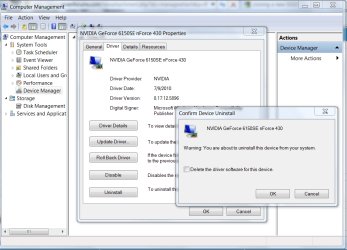
Reinstall the display driver after uninstalling with restart in Device Manager.

Check for a newer driver on the Support Downloads webpage for your model computer or display chip/card.

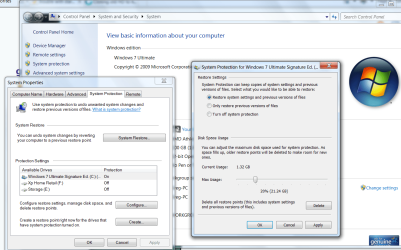
Turn on System Restore and apportion more HD space (10-20%) for restore points if you can afford it at Computer>Properties>Advanced settings>System Protection>Configure.

Capture1.PNG
Capture.PNG
 
What is the monitor?
 

My Computer

Computer Manufacturer/Model Number
DIY #3, #2
OS
W7 Ulti/64, XP Pro/32
CPU
INTEL i7 920 DO, Core2 Duo 6400
Motherboard
GIGABYTE EX58 UD3R-SLI, EP45-UD3R
Memory
KINGSTON DDR3 1333MHz, CORSAIR DDR2 800MHz
Graphics Card(s)
EVGA GTX 260 x2, 8800 GTX
Sound Card
REALTEK HD onboard, ditto
Monitor(s) Displays
SONY 40" BRAVIA LCD
Screen Resolution
1360 X 768
Hard Drives
OCZ VERTEX/RAID0 -3, Vertex 30GB
PSU
COOLERMASTER 900W, ENERMAX 850W
Case
COOLERMASTER HAF 932 x2
Cooling
stock
Keyboard
MS
Mouse
MS
Internet Speed
ADSL 3MB/768KBs
Other Info
amateur enthusiast
32 inch phillps lcd
 

My Computer

OS
windows 7 home basic 64 bit
Try changing the refresh rate in Screen Res>Advanced settings

If this fails lower the screen resolution some.
 
Try changing the refresh rate in Screen Res>Advanced settings

If this fails lower the screen resolution some.

Good advice, Greg. I've found that I have to bump mine up from 60 Hz to 75 Hz to get the best picture on one of my monitors.

Also, checking the "Hide modes that [sic] this monitor cannot display" will help prevent such an occurrence from happening again.
 

My Computer

Computer Manufacturer/Model Number
Toshiba L355D
OS
Windows 7 Ultimate x64 SP1
CPU
Core2 Duo
Motherboard
Intel
Memory
4 GB
Graphics Card(s)
GM965 on-board
Sound Card
RealTek on-board
Monitor(s) Displays
19"+17"(laptop)
Screen Resolution
1440x900 (x 2)
Hard Drives
500GB Ext. 200GB Internal
PSU
N/A
Case
N/A
Cooling
N/A
Back
Top