Troubles sharing external hard drive.

dayoshir

New member
Local time
8:58 AM
Messages
2
I have a Seagate FreeAgent Desktop 500gtb external hard drive. I have recently bought a pc and put windows 7 on it (had a multiple license).

Me and t'other half use laptops most of the time, we wanted a pc to put all our external drives on (both the seagate ones) for ease of access.

When either of us try and connect to it from our laptops it says that we dont have permission. Have been into the network properties and set it to allow everyone to connect (the one about requiring a password) but its still not letting either of us in?

Tis getting somewhat annoying now as we went down this route to make access a little easier! lol

ATB

Dan
 

My Computer

OS
Windows 7 Home Premium 32bit
Forgot to add, all of the laptops are using windows 7.
 

My Computer

OS
Windows 7 Home Premium 32bit
I have a Seagate FreeAgent Desktop 500gtb external hard drive. I have recently bought a pc and put windows 7 on it (had a multiple license).

Me and t'other half use laptops most of the time, we wanted a pc to put all our external drives on (both the seagate ones) for ease of access.

When either of us try and connect to it from our laptops it says that we dont have permission. Have been into the network properties and set it to allow everyone to connect (the one about requiring a password) but its still not letting either of us in?

Tis getting somewhat annoying now as we went down this route to make access a little easier! lol

ATB

Dan

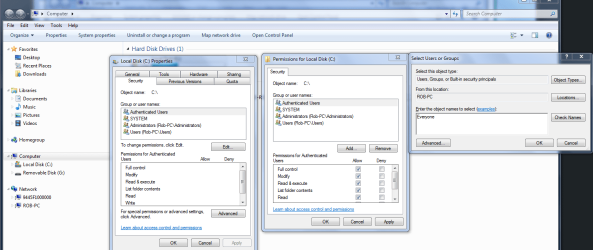
If you need full access to the drive from all machines, besides the usual permission settings which you already enabled you need to use the Security tab for full drive access.

High light "Authenticated Users" then click on the "Edit" button, click "allow" to fill in the check marks for full access, after that hit the "Add" button then type "Everyone" into the access list where the picture shows it. Don't forget to hit the "Apply" and OK buttons.

You should be able to access the drive from all machines on your network now.

The picture below makes it more clear.
 

Attachments

  • Sharing entire C drive authenticated users.PNG
    Sharing entire C drive authenticated users.PNG
    65.4 KB · Views: 399

My Computer

Computer type
PC/Desktop
Computer Manufacturer/Model Number
Home built
OS
Windows 7 Ult, Windows 8.1 Pro,
CPU
Q9650-4.275GHz, E8600 4.5GHz, E6750-3.8GHz
Motherboard
Evga 780i FTW
Memory
G.Skill PC2 9600 1200Mhz 5 5 5 15 2T
Graphics Card(s)
GTX480
Sound Card
Asus Xonar D2
Monitor(s) Displays
HannsG
Screen Resolution
1680X1050
Hard Drives
GSkill Phoenix Pro 120GB SSD
PSU
ThermalTake Toughpower 1000Watt modular
Case
ThermalTake XaserV
Cooling
Xigmatek S1283
Keyboard
Logitech G15
Mouse
Logitech G9
Internet Speed
T1
Back
Top