Troubles with file sharing

Navig

New member
Local time
3:44 AM
Messages
4
Hi!

Having some basic troubles with file sharing on my home network after (mostly) switching out from Windows XP.

My main system is Windows 7 Ultimate x64. I'm on an Asus Sabertooth P67 mobo with an i7 26k. The OS is installed on a Vertex 3. But I have a 2TB storage drive with a folder titled "Sabertooth Network" which has my music and DVD collection.

My network is wired CAT 6 with a Netgear Gigabit switch and a Netgear gigabit router.

Router is hooked to a digitalpath receiver for internet access.


My wife's computer is a Windows 7 pro x64 on a Gigabyte mobo with a core 2 duo.


What I've done.

I have a workgroup titled MSHOME.

I rt clicked on my folder "Sabertooth Network" and set Share with Home group (read/write).


On my wife's computer I set the homegroup to MSHOME.

I open Network connections and see "Sabertooth Network". When I open the folder, I get "You do not have permission to access this folder".


There are probably details I am forgetting to mention, so please let me know.

Thanks is advance.


Navig
 

My Computer

Computer Manufacturer/Model Number
Project Resilience
OS
windows 7 ultimate x64
CPU
i7 26k
Motherboard
sabertooth p67
Memory
8gb corsair vengeance
Graphics Card(s)
6950 2gb
Hard Drives
Vertex 3 240gb
PSU
Corsair AX750
Case
Project Resilience
Cooling
Thermalright
Is that a typo? They both should be on either workgroup or homegroup. I'm not sure you can mix the two.
 

My Computer

Computer type
PC/Desktop
Computer Manufacturer/Model Number
dell precision t3400 tower
OS
Linux Lite 3.2 x64; Windows 7, 8.1
CPU
Core2Duo 2.4
Memory
6GB ddr2
Graphics Card(s)
nVidia
Hard Drives
120gb SSD, 1TB HD, 2TB HD; sata II
Internet Speed
12/2
Browser
Vivaldi, Slimjet (Chromium) x64
This might help (I learned this on the forum some time ago):

Right click on the Sabertooth Network folder > click on properties. Be sure permissions are set - not only in the "Sharing" tab, but you must ALSO check/edit permissions in the "Security" tab. If I remember correctly, you only had to set permissions only for "Sharing" in Win XP.
 

My Computer

Computer type
PC/Desktop
Computer Manufacturer/Model Number
Custom Build
OS
Windows 7 Professional 64 Bit SP1
CPU
Intel i7-3770K. Mild Overclock to 4.2 Ghz
Motherboard
ASUS Sabertooth Z77
Memory
Crucial Ballistix Sport 32GB DDR3-1600 (PC3-12800)
Graphics Card(s)
Intel 4000 - On CPU
Sound Card
On Board
Monitor(s) Displays
HP w2408h
Screen Resolution
1920 x 1200
Hard Drives
Samsung 840 Pro 256Gb SSD, --
Two - WDC WD1001FALS-00J7B0 SATA
PSU
Antec EarthWatts Green Series 650 Watt ATX
Case
Fractal Design Core 3000 ATX
Cooling
Corsair H80i Water Cooled
Keyboard
Logitech Illuminated
Mouse
Logitech Wireless Trackball M570 + Touchpad T650
Internet Speed
9.5 Mbps down - 25.4 Mbps upload
Antivirus
MSE
Browser
IE 10, Chrome
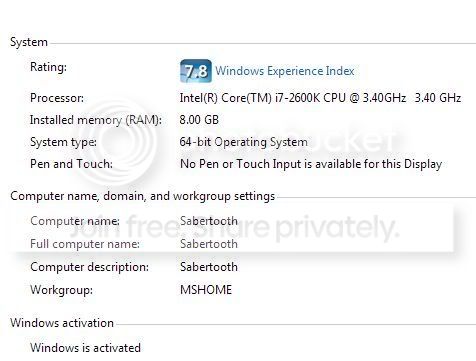
On my Sabertooth/Win7ultimate system, if I right click on Computer, the Computer name is Sabertooth and it lists "Workgroup: MSHOME".

When I go to the Network and Sharing Center, under the View your active networks, it lists "Network Home Network". To the right HomeGroup: Joined

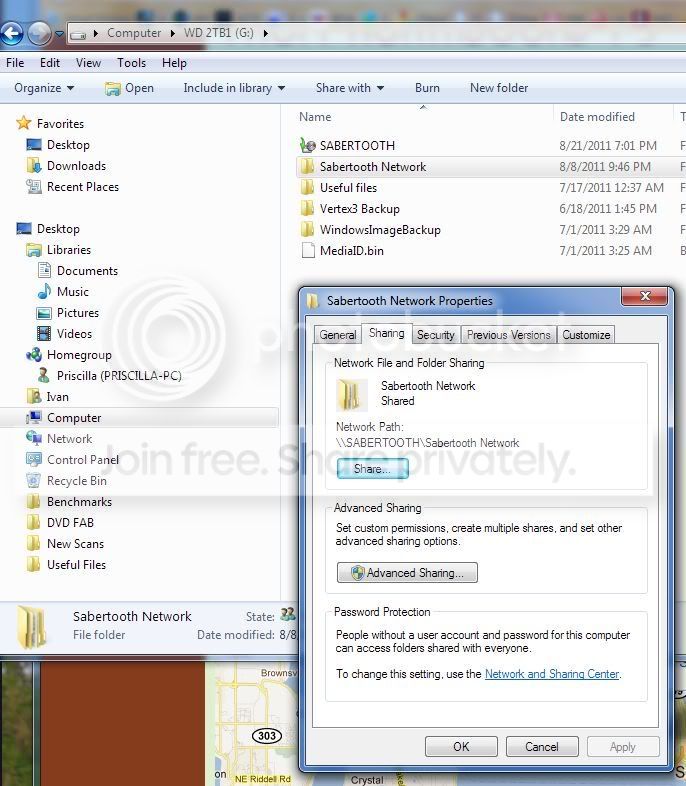
When I right click on the folder I wish to share, "Sabertooth Network"
in the Sharing tab, it is listed as "Shared" Network path \\SABERTOOTH\Sabertooth Network.
in the Security Tab it lists these Group or user names:
SYSTEM
Ivan (Sabertooth\\Ivan)
HomeUseres (Sabertooth\HomeUsers)
Administrators (Sabertooth\Administrators)
The permissions are all set to Allow


Navig
 

My Computer

Computer Manufacturer/Model Number
Project Resilience
OS
windows 7 ultimate x64
CPU
i7 26k
Motherboard
sabertooth p67
Memory
8gb corsair vengeance
Graphics Card(s)
6950 2gb
Hard Drives
Vertex 3 240gb
PSU
Corsair AX750
Case
Project Resilience
Cooling
Thermalright
Here are some screen caps:

Computer properties on my main system:
Sabertoothinfo.jpg


Network map
Sabertoothnetworkmap.jpg


Sharing tab for the folder I wished shared:
Sabertoothnetworksharing.jpg


Security tab:
Sabertoothsecuritytab.jpg
 

My Computer

Computer Manufacturer/Model Number
Project Resilience
OS
windows 7 ultimate x64
CPU
i7 26k
Motherboard
sabertooth p67
Memory
8gb corsair vengeance
Graphics Card(s)
6950 2gb
Hard Drives
Vertex 3 240gb
PSU
Corsair AX750
Case
Project Resilience
Cooling
Thermalright
Strange. Try editing - in the security tab - and add "Everyone" to the group list with full permissions.
 

My Computer

Computer type
PC/Desktop
Computer Manufacturer/Model Number
Custom Build
OS
Windows 7 Professional 64 Bit SP1
CPU
Intel i7-3770K. Mild Overclock to 4.2 Ghz
Motherboard
ASUS Sabertooth Z77
Memory
Crucial Ballistix Sport 32GB DDR3-1600 (PC3-12800)
Graphics Card(s)
Intel 4000 - On CPU
Sound Card
On Board
Monitor(s) Displays
HP w2408h
Screen Resolution
1920 x 1200
Hard Drives
Samsung 840 Pro 256Gb SSD, --
Two - WDC WD1001FALS-00J7B0 SATA
PSU
Antec EarthWatts Green Series 650 Watt ATX
Case
Fractal Design Core 3000 ATX
Cooling
Corsair H80i Water Cooled
Keyboard
Logitech Illuminated
Mouse
Logitech Wireless Trackball M570 + Touchpad T650
Internet Speed
9.5 Mbps down - 25.4 Mbps upload
Antivirus
MSE
Browser
IE 10, Chrome
For starters I would set all computers networks to Workgroup, not homegroup. I'm not sure about the inconsistency between the two that different dialogs are showing you, but it's suspicious, and I think the first step is to make everything Workgroup. Then add Everyone to Permissions, both under the Advanced Sharing and Security tabs.
 

My Computer

Computer type
PC/Desktop
Computer Manufacturer/Model Number
dell precision t3400 tower
OS
Linux Lite 3.2 x64; Windows 7, 8.1
CPU
Core2Duo 2.4
Memory
6GB ddr2
Graphics Card(s)
nVidia
Hard Drives
120gb SSD, 1TB HD, 2TB HD; sata II
Internet Speed
12/2
Browser
Vivaldi, Slimjet (Chromium) x64
Adding "Everybody" did in fact work, allowing access to folder.

Thanks!


But, is that a security risk? I do have some wireless elements, but to be honest, I doubt even my nearest neighbor would be within range. However, could somebody remote desktop into one of my pc's then theoretically have access to my crappy music collection?

Does "Everybody" simply mean every one on my homegroup?


I think I may also try setting the networks to Workgroup just to to see if that also works.

Again, thanks.
 

My Computer

Computer Manufacturer/Model Number
Project Resilience
OS
windows 7 ultimate x64
CPU
i7 26k
Motherboard
sabertooth p67
Memory
8gb corsair vengeance
Graphics Card(s)
6950 2gb
Hard Drives
Vertex 3 240gb
PSU
Corsair AX750
Case
Project Resilience
Cooling
Thermalright
I am in a similar boat as you, but from what I can research is for someone to have access to your network the also have to know what your homegroup or workgroup is called.
 

My Computer

OS
Windows 7 pro x64
I have found that sharing with MS, short of using a domain, is an all-or-nothing affair. I can't even get modulations as simple as using passwords to work reliably. Speccing Everyone gives the entire LAN access to shared folders, and I would NOT count on the workgroup's name definition to provide privacy. I've seen it blatantly ignored.

If you want more LAN security, use a good router admin password, and a good wireless protocol (wpa2, or failing that, wpa) with a good, complex key. There are also other things you can do at the router level, such as requiring MAC addresses.
 

My Computer

Computer type
PC/Desktop
Computer Manufacturer/Model Number
dell precision t3400 tower
OS
Linux Lite 3.2 x64; Windows 7, 8.1
CPU
Core2Duo 2.4
Memory
6GB ddr2
Graphics Card(s)
nVidia
Hard Drives
120gb SSD, 1TB HD, 2TB HD; sata II
Internet Speed
12/2
Browser
Vivaldi, Slimjet (Chromium) x64
Adding "Everybody" did in fact work, allowing access to folder.

Thanks!


But, is that a security risk? I do have some wireless elements, but to be honest, I doubt even my nearest neighbor would be within range. However, could somebody remote desktop into one of my pc's then theoretically have access to my crappy music collection?

Does "Everybody" simply mean every one on my homegroup?

I think I may also try setting the networks to Workgroup just to to see if that also works.

Again, thanks.

If security is a concern, you may want to try adding PRISCILLA-PC to your permissions list, and deleting EVERYONE. See if that works.
 

My Computer

Computer type
PC/Desktop
Computer Manufacturer/Model Number
Custom Build
OS
Windows 7 Professional 64 Bit SP1
CPU
Intel i7-3770K. Mild Overclock to 4.2 Ghz
Motherboard
ASUS Sabertooth Z77
Memory
Crucial Ballistix Sport 32GB DDR3-1600 (PC3-12800)
Graphics Card(s)
Intel 4000 - On CPU
Sound Card
On Board
Monitor(s) Displays
HP w2408h
Screen Resolution
1920 x 1200
Hard Drives
Samsung 840 Pro 256Gb SSD, --
Two - WDC WD1001FALS-00J7B0 SATA
PSU
Antec EarthWatts Green Series 650 Watt ATX
Case
Fractal Design Core 3000 ATX
Cooling
Corsair H80i Water Cooled
Keyboard
Logitech Illuminated
Mouse
Logitech Wireless Trackball M570 + Touchpad T650
Internet Speed
9.5 Mbps down - 25.4 Mbps upload
Antivirus
MSE
Browser
IE 10, Chrome
Back
Top