

RocketFlamingo
New member
- Local time
- 6:05 PM
- Messages
- 27
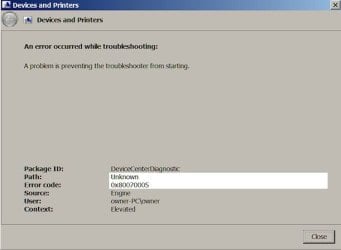
None of my troubleshooters run. It used to be error code 0x80070005 religiously. I don't recall what I did, but I ran some programs and that code went away - mostly. But it did not change the fact that none of the troubleshooters would run. If I try to troubleshoot something now, it either won't open, takes a really long time to start, or gives me the error code above. Most of the posts I've read about this are years old, why is this happening now? I appreciate the assistance.
Lisa
Lisa
Attachments
Last edited:
My Computer
At a glance
Windows 7 Home Premium 64 bitIntel Core i7-3610QM CPU @ 2.30GHz12.0 GB RAMGeForce GTX 660M, NVIDIA compatible
- Computer type
- Laptop
- Computer Manufacturer/Model Number
- ASUS G75VW
- OS
- Windows 7 Home Premium 64 bit
- CPU
- Intel Core i7-3610QM CPU @ 2.30GHz
- Motherboard
- IRQ 4294967294 Intel(R) 7 Series Chipset Family SATA AHCI Co
- Memory
- 12.0 GB RAM
- Graphics Card(s)
- GeForce GTX 660M, NVIDIA compatible
- Sound Card
- NVIDIA High Definition Audio
- Monitor(s) Displays
- 17.3" HD with EWV (1366 x 768) / FHD 3D LED Backlight
- Screen Resolution
- 1600 x 900 x 32 bits (4294967296 colors) @ 60 Hz
- Hard Drives
- ATA Samsung SSD 840 SCSI Disk Device
ATA Toshiba MQ01ABD0 SCSI Disk Device
- PSU
- Output : 19 V DC, A, 180 W Input : 100 -240 V AC, 50/60 Hz u
- Keyboard
- PC/AT Enhanced PS/2 Keyboard (101/102-Key)
- Mouse
- Synaptics PS/2 Port TouchPad
- Internet Speed
- 72.2 Mbps
- Antivirus
- Malwarebytes, Bitdefender, Advanced System Care
- Browser
- Firefox, Opera Stable


