Troubleshooting heavy disk activity

SailingNut

New member
Member
VIP
Local time
3:20 PM
Messages
127
Hi all,

I'm seeing some pretty heavy disk activity on my machine and I'm wondering what methods others out there use to troubleshoot a situation like this.

I've tried using task manager and adding the IO stats so that I can sort based on that, but that does not seem to work very well.

TIA!
 

My Computer

Computer Manufacturer/Model Number
Home Build
OS
Windows 7 Ultimate x64
CPU
Core i5 760
Motherboard
Biostar T5XE (P55)
Memory
2x2GB Mushkin PC3-10666
Graphics Card(s)
GeForce GTX 460
Internet Speed
FiOS 25Gbps down & up
Process Explorer and Process Monitor...both freeware from microsoft.com
 

My Computer

Computer type
PC/Desktop
OS
Microsoft Windows 10 Professional / Windows 7 Professional
CPU
Intel i5-3570
Motherboard
Lenovo Mahobay
Memory
16GB DDR3
Graphics Card(s)
AMD Radeon HD 7850 2GB
Sound Card
(1) Realtek HD Audio (2) AMD HD Audio
Monitor(s) Displays
LG LS192WS
Screen Resolution
1440 x 900 @ 32bit color
Hard Drives
(1) SUV300S37A/120G (2) ST3500413AS SATA Disk Device AHCI mode enabled.
PSU
Corsair HX620
Case
Thermaltake V4 Black Edition
Cooling
Cooler Master Hyper 212 + Artic Silver 5 on CPU/GPU
Keyboard
Dell SK-8115
Mouse
Razer Copperhead with MAPED mat (awesome!)
Internet Speed
100 Mbps up/down
Browser
Chrome
Ctrl+Shift+Esc > click the performance tab > click on resource monitor. in the disk section you will get detailed information on which files are being read/written to.
 

My Computer

Computer Manufacturer/Model Number
HP z800
OS
Windows 7 Professional 64 bit
CPU
xeon x5680 x2
Motherboard
hp
Memory
96 GB
Graphics Card(s)
nVidia quadro FX 5800 x2
Monitor(s) Displays
HP zr30w x4
Hard Drives
4 HP SAS 600GB HDDs RAID 0
PSU
1100w
Case
ATX
Cooling
factory installed liquid cooling
Type Resource Manager in Start Search bar click it to open. Click on disk tab.
Now you can see what is running.
Click memory tab and see what resources are being used there also.
Mike
 
Last edited:

My Computer

Computer Manufacturer/Model Number
Hopalong/ Godzilla
OS
Windows7 Pro 64bit SP-1; Windows XP Pro 32bit
CPU
Intel Core i7-870 Lynnfield 2.93GHz LGA 1156 95W Quad-Core
Motherboard
ASUS P7P55D-E PRO
Memory
8GB@1400MHz Crucial Ballistix DDR3-1600 4x2GB
Graphics Card(s)
ASUS ENGTX460 DirectCU/2DI/1GD5 1GB 256-bit GDDR5
Sound Card
VIA Onboard
Monitor(s) Displays
Asus VS248H-P 24"; Samsung SyncMaster 941BW 19"ws
Screen Resolution
1920x1080; 1440x900
Hard Drives
Samsung 830 120GB SSD
Intel 320 120GB SSD
Western Digital Caviar Black WD7501AALS 750GB 7200 RPM SATA 3.0Gb/s
Western Digital Caviar Black WD6401AALS 640GB 7200 RPM SATA 3.0Gb/s
PSU
COOLER MASTER Silent Pro RS850-AMBAJ3-US 850W Modular
Case
COOLER MASTER HAF 932 RC-932-KKN5-GP Black
Cooling
Scythe "Mugen-2 Rev.B" (2 ScytheKaze-Jyuni PWM fans)
Keyboard
Logitech K-320
Mouse
Kensington
Antivirus
Avast Inernet Suite
Browser
IE 9 ; Chrome
Thanks for the suggestions!

Now for what I consider to be really odd. The process doing all of the disk activity is Explorer.exe! I'm not copying any files or anything. I do have an explorer window open, but would not expect it to be hammering the drive just sitting there.

Any suggestions?
 

My Computer

Computer Manufacturer/Model Number
Home Build
OS
Windows 7 Ultimate x64
CPU
Core i5 760
Motherboard
Biostar T5XE (P55)
Memory
2x2GB Mushkin PC3-10666
Graphics Card(s)
GeForce GTX 460
Internet Speed
FiOS 25Gbps down & up

My Computer

Computer Manufacturer/Model Number
Hopalong/ Godzilla
OS
Windows7 Pro 64bit SP-1; Windows XP Pro 32bit
CPU
Intel Core i7-870 Lynnfield 2.93GHz LGA 1156 95W Quad-Core
Motherboard
ASUS P7P55D-E PRO
Memory
8GB@1400MHz Crucial Ballistix DDR3-1600 4x2GB
Graphics Card(s)
ASUS ENGTX460 DirectCU/2DI/1GD5 1GB 256-bit GDDR5
Sound Card
VIA Onboard
Monitor(s) Displays
Asus VS248H-P 24"; Samsung SyncMaster 941BW 19"ws
Screen Resolution
1920x1080; 1440x900
Hard Drives
Samsung 830 120GB SSD
Intel 320 120GB SSD
Western Digital Caviar Black WD7501AALS 750GB 7200 RPM SATA 3.0Gb/s
Western Digital Caviar Black WD6401AALS 640GB 7200 RPM SATA 3.0Gb/s
PSU
COOLER MASTER Silent Pro RS850-AMBAJ3-US 850W Modular
Case
COOLER MASTER HAF 932 RC-932-KKN5-GP Black
Cooling
Scythe "Mugen-2 Rev.B" (2 ScytheKaze-Jyuni PWM fans)
Keyboard
Logitech K-320
Mouse
Kensington
Antivirus
Avast Inernet Suite
Browser
IE 9 ; Chrome
Hi, I didn't bother attaching the file since it's small. It says nothing found, so that would not seem to be the problem. Find the results below:

Malwarebytes' Anti-Malware 1.50.1.1100
www.malwarebytes.org
Database version: 5507
Windows 6.1.7600
Internet Explorer 8.0.7600.16385
1/12/2011 1:47:16 PM
mbam-log-2011-01-12 (13-47-16).txt
Scan type: Full scan (C:\|)
Objects scanned: 341859
Time elapsed: 48 minute(s), 27 second(s)
Memory Processes Infected: 0
Memory Modules Infected: 0
Registry Keys Infected: 0
Registry Values Infected: 0
Registry Data Items Infected: 0
Folders Infected: 0
Files Infected: 0
Memory Processes Infected:
(No malicious items detected)
Memory Modules Infected:
(No malicious items detected)
Registry Keys Infected:
(No malicious items detected)
Registry Values Infected:
(No malicious items detected)
Registry Data Items Infected:
(No malicious items detected)
Folders Infected:
(No malicious items detected)
Files Infected:
(No malicious items detected)
 

My Computer

Computer Manufacturer/Model Number
Home Build
OS
Windows 7 Ultimate x64
CPU
Core i5 760
Motherboard
Biostar T5XE (P55)
Memory
2x2GB Mushkin PC3-10666
Graphics Card(s)
GeForce GTX 460
Internet Speed
FiOS 25Gbps down & up
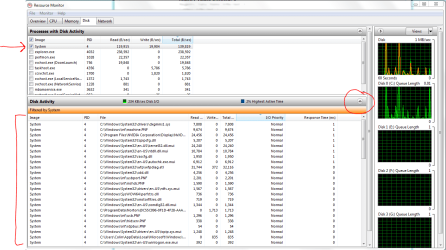
UPDATE: I used resource monitor like hopalong x suggested and now I see that system seems to be a big "user" of disk I/O. It's writing quite a bit of information.
 

My Computer

Computer Manufacturer/Model Number
Home Build
OS
Windows 7 Ultimate x64
CPU
Core i5 760
Motherboard
Biostar T5XE (P55)
Memory
2x2GB Mushkin PC3-10666
Graphics Card(s)
GeForce GTX 460
Internet Speed
FiOS 25Gbps down & up
Mmmm....in Resource Monitor, place a tick in System, then expand the list as shown in the image. Scroll through the files shown.....do any appear suspicious to you? Can you list the files, and perhaps a trained eye could spot potential problems.........
 

Attachments

  • Capture.PNG
    Capture.PNG
    48.2 KB · Views: 280

My Computer

Computer type
PC/Desktop
Computer Manufacturer/Model Number
Golden Mk. I.4
OS
Windows 10 Pro x64 ; Xubuntu x64
CPU
Intel i7 860 @ 2.80 GHz O/C'ed to 4.0GHz
Motherboard
Gigabyte P55A-UD3R Rev.1. Award BIOS F13
Memory
16GB Corsair Vengance DDR3 @ 661 MHz Dual Channel (9-9-9-24)
Graphics Card(s)
EVGA NVidia GTX 560 1024MB
Sound Card
Realtek Integrated
Monitor(s) Displays
Dual Samsung SyncMaster 2494HS
Screen Resolution
1920*1080 and 1920*1080
Hard Drives
1*Samsung 840 EVO 120GB SSD;
1*OCZ Vertex 2 60GB SSD;
2*Samsung F3 SpinPoint 1TB in RAID0;
1*Samsung F1 SpinPoint 1TB;
2*Western Digital 1TB External USB 3.0
1*Western Digital 500GB External USB 3.0
1*Seagate 500GB External USB 2.0
PSU
Thermaltake ToughPower QFan 750W
Case
Thermaltake Element S VK60001W2Z
Cooling
Corsair H60 Water Cooling, 2*230mm and 2*80mm case fans
Keyboard
Logitech G110
Mouse
Logitech MX518
If you have recently installed windows, the disk activity you're seeing is probably normal and will decrease after indexing, pagefile allocation, and updates are complete.
 

My Computer

Computer Manufacturer/Model Number
HP z800
OS
Windows 7 Professional 64 bit
CPU
xeon x5680 x2
Motherboard
hp
Memory
96 GB
Graphics Card(s)
nVidia quadro FX 5800 x2
Monitor(s) Displays
HP zr30w x4
Hard Drives
4 HP SAS 600GB HDDs RAID 0
PSU
1100w
Case
ATX
Cooling
factory installed liquid cooling
Sailing Nut

Glad to see malwarebytes clear.
Good idea to eliminate this possiblity at least.

Mike
 

My Computer

Computer Manufacturer/Model Number
Hopalong/ Godzilla
OS
Windows7 Pro 64bit SP-1; Windows XP Pro 32bit
CPU
Intel Core i7-870 Lynnfield 2.93GHz LGA 1156 95W Quad-Core
Motherboard
ASUS P7P55D-E PRO
Memory
8GB@1400MHz Crucial Ballistix DDR3-1600 4x2GB
Graphics Card(s)
ASUS ENGTX460 DirectCU/2DI/1GD5 1GB 256-bit GDDR5
Sound Card
VIA Onboard
Monitor(s) Displays
Asus VS248H-P 24"; Samsung SyncMaster 941BW 19"ws
Screen Resolution
1920x1080; 1440x900
Hard Drives
Samsung 830 120GB SSD
Intel 320 120GB SSD
Western Digital Caviar Black WD7501AALS 750GB 7200 RPM SATA 3.0Gb/s
Western Digital Caviar Black WD6401AALS 640GB 7200 RPM SATA 3.0Gb/s
PSU
COOLER MASTER Silent Pro RS850-AMBAJ3-US 850W Modular
Case
COOLER MASTER HAF 932 RC-932-KKN5-GP Black
Cooling
Scythe "Mugen-2 Rev.B" (2 ScytheKaze-Jyuni PWM fans)
Keyboard
Logitech K-320
Mouse
Kensington
Antivirus
Avast Inernet Suite
Browser
IE 9 ; Chrome
If you have recently installed windows, the disk activity you're seeing is probably normal and will decrease after indexing, pagefile allocation, and updates are complete.

How long is "recent?" I did just install this machine right before the 1st of the year, but I would hope it's done with all of that stuff by now. It stays on 24x7 so it's had plenty of time to "settle down"

I did see a couple of oddball things in the system list for files so, I'm doing a full McAfee scan now to double check on the Malwarebytes result.
 

My Computer

Computer Manufacturer/Model Number
Home Build
OS
Windows 7 Ultimate x64
CPU
Core i5 760
Motherboard
Biostar T5XE (P55)
Memory
2x2GB Mushkin PC3-10666
Graphics Card(s)
GeForce GTX 460
Internet Speed
FiOS 25Gbps down & up
Depending on your hardware, the programs you've installed and how much media you have on your HDD(s) it can sometimes take a couple of weeks for the system to settle down, especially on an upgrade install but even on a system with a clean, bare install of windows, it sometimes takes a few days after the first series of updates before everything is normalized. I wouldn't rule out malware yet, but malwarebytes is one of the best products out there. McAfee probably won't find anything either. Is the HDD activity constant or mainly when you're not doing anything with the system? If it's mainly when your system is idle, I wouldn't worry too much, because it will settle down.
 

My Computer

Computer Manufacturer/Model Number
HP z800
OS
Windows 7 Professional 64 bit
CPU
xeon x5680 x2
Motherboard
hp
Memory
96 GB
Graphics Card(s)
nVidia quadro FX 5800 x2
Monitor(s) Displays
HP zr30w x4
Hard Drives
4 HP SAS 600GB HDDs RAID 0
PSU
1100w
Case
ATX
Cooling
factory installed liquid cooling

My Computer

Computer type
PC/Desktop
Computer Manufacturer/Model Number
Custom
OS
Windows 10 Pro x64
CPU
Intel Core i7 4790K @ 4.5GHz
Motherboard
Asus Maximus Hero VII
Memory
32GB DDR3
Graphics Card(s)
Nvidia GeForce GTX970
Sound Card
Realtek HD Audio
Screen Resolution
1920x1200
Hard Drives
1x Samsung 250GB SSD
4x WD RE 2TB (RAIDZ)
PSU
Corsair AX760i
Case
Fractal Design Define R4
Cooling
Noctua NH-D15
I noticed you said you are using McAfee...
 

My Computer

Computer type
PC/Desktop
Computer Manufacturer/Model Number
Alienware Aurora ALX R4
OS
Windows 10 Pro (x64)
CPU
Intel Core i7-3930K (3.2GHz - 4.5GHz)
Motherboard
Alienware Aurora-R4 x79
Memory
4x Samsung 4GB PC3-12800 DDR3 (16GB 1600MHz)
Graphics Card(s)
Nvidia Geforce GTX 690
Sound Card
SteelSeries Siberia Elite
Monitor(s) Displays
Dell UltraSharp U3011
Screen Resolution
2560x1600
Hard Drives
Samsung 850 Pro 256 GB, Seagate 1TB Desktop Hybrid HDD, 2x Western Digital 4TB Green HDD
PSU
875W Some Dell PSU <.<
Case
Alienware Aurora ALX
Cooling
Custom Liquid Cooling (EK CPU & GPU blocks) dual EK 480RAD
Keyboard
Logitech G710+ Mechanical
Mouse
Logitech G700s
Internet Speed
Verizon Fios (50 mbps average)
Other Info
Server: Intel NUC D54250WYK: i5-4250U, 16GB, 256 GB mSATA, Windows Server 2012 R2
Back
Top