System Restore causing heavy disk use after several years. Why now?

rhodesengr

New member
Local time
6:20 PM
Messages
24
I have had a Windows 7 desktop system running at home for several years. In just the last few weeks, I noticed very slow system performance and noticed the disk usage light was on pretty much constantly.

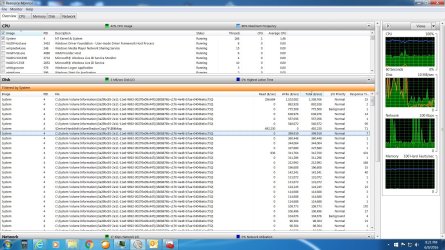
So I started looking at Resource Monitor and found that all the excess disk usage was due to pid 4 and using file names all starting with “System Volume Information”. See the screen shot below.

With a little research I found this was all due to the System Restore feature. When I disabled SR, the heavy disk use stopped and my performance returned to nice and snappy.

My question though is why now after several years did System Restore start causing problems? I have never touched the SR setting before. It never seemed to cause problem before.


attachment.php
 

Attachments

  • SR disk usage.jpg
    SR disk usage.jpg
    353.7 KB · Views: 29

My Computer My Computer

Computer Manufacturer/Model Number
QES Computers at home Dell at work
OS
W7 pro at home, W7 Enterprise at work
CPU
i7 at home
no one?
 

My Computer My Computer

Computer Manufacturer/Model Number
QES Computers at home Dell at work
OS
W7 pro at home, W7 Enterprise at work
CPU
i7 at home
Check Task Scheduler.

Task Scheduler - look under Microsoft \ Windows \ SystemRestore in the left-hand pane.

Highlight SytemRestore and check "Triggers" in the right pane to see how often restore points are scheduled to be created.
 

My Computer My Computer

Computer type
Laptop
Computer Manufacturer/Model Number
ASUS
OS
Microsoft Windows 7 Home Premium 64-bit 7601 Multiprocessor Free Service Pack 1
CPU
AMD C-60 APU with Radeon(tm) HD Graphics
Motherboard
ASUSTeK COMPUTER INC. X501U
Memory
4.00 GB
Graphics Card(s)
AMD Radeon HD 6290 Graphics
Sound Card
(1) AMD High Definition Audio Device (2) Realtek High Defi
Screen Resolution
1366 x 768 x 32 bits (4294967296 colors) @ 60 Hz
Hard Drives
Hitachi HTS545050A7E380 SATA Disk Device
Antivirus
Comodo CIS & FW, SecureAplus App Whitelisting, Threatfire
Browser
Cyberfox 64bit, Opera 64bit, Airfox
Other Info
Spy-The-Spy, HitmanPro.Alert, Norton Connect Safe, MJRegWatcher, BitDefender TrafficLight, Voodoo Shield, Zemana AntiMalware
Hi Rhodes,
most of us here tend to use a system image for backup purposes,
either Macrium or Ameobi.

That doesnt answer your problem thou,
Anything changed system wise about the time this started, if not .
Have you had a problem with with windows updates failing,
close to filling up your memory.
New SSD hard drive
Are you infected, (virus/malware)
(run a scan using Malwarebytes free, uncheck trial, enable rootkit detection via dashboard>settings)

Depending on your requirements you could reduce/increase the size of the system restore option

Roy
 

My Computer My Computer

Computer type
PC/Desktop
Computer Manufacturer/Model Number
medionl/Aspire 6930G/acer x55a
OS
W7 home premium 32bit/W7HP 64bit/w10 tp insider ring
CPU
E5300 dual core
Motherboard
medion MS7366
Memory
3gb
Graphics Card(s)
Nvidia Geforce 7100 Nforce 630i
Monitor(s) Displays
avixc
Internet Speed
n (isp resticted to 72)
Antivirus
mse/pands
Browser
palemoon
Other Info
Belkin Fd7050 n USB using Railink RT2870 drivers, more upto date
really the only thing that was different was I started using a Syslogy NAS drive a few weeks before for backup synchronizing among other things. I thought maybe it was the Synology causing all the disk use but as posted it was System Restore. So unless the Synology triggers constant SR's, it doesn't seem to be due to the NAS.
 

My Computer My Computer

Computer Manufacturer/Model Number
QES Computers at home Dell at work
OS
W7 pro at home, W7 Enterprise at work
CPU
i7 at home
Back
Top