Information
This list compiles useful Troubleshooting Steps for performance issues with Win7. It will show you how to test hardware, utilize built-in System resources to find solutions to problems, access and interpret the logs, use various tools and fixes.
While General Troubleshooting is useful for serious problems, when a Blue Screen occurs it is best to also post for analysis in our Crashes forum using this tool:
Blue Screen of Death (BSOD) Posting Instructions - Windows 7 Forums.
When Win7 fails to boot then start with the steps given here: Troubleshooting Windows 7 Failure to Boot - Windows 7 Forums
To find a location (e.g. Event Viewer, msconfig) type it in Start rb: Search box.
While General Troubleshooting is useful for serious problems, when a Blue Screen occurs it is best to also post for analysis in our Crashes forum using this tool:
Blue Screen of Death (BSOD) Posting Instructions - Windows 7 Forums.
When Win7 fails to boot then start with the steps given here: Troubleshooting Windows 7 Failure to Boot - Windows 7 Forums
To find a location (e.g. Event Viewer, msconfig) type it in Start
rb: Search box.The steps begin with checking over the hardware. If you own an HP, Dell or some other PC brands you can reboot into the BIOS Boot Menu to run Diagnostics (on Dells also from the Utility partition) to test the hardware. If you know your hardware is good you can skip to Step 4.
1. Test the hard drive using maker's HD Diagnostics diagnostics/repair extended CD scan. Burn ISO to CD using Windows Image Burner then boot the disk to run extended Scan. Then run a full Disk Check on all partitions, if necessary from System Recovery Options Command Line.
2. Test your RAM - Test with Memtest86+ CD for 7 or more passes, or overnight.. The tutorial will show you how to test individual RAM sticks and slots. Check the slots for debris.
3. Check all cabling is securely connected and in good condition, try reinstalling suspect hardware, swap RAM sticks, unplug extra HD's, peripherals, CD/DVD drive to see if problems disappear. Unplug or remove any floppy drive.
4. Check temps for overheating by installing Core Temp which will allow monitoring temps from System Tray. If running hot blow dust out of the case using canned air or clean out laptop dust, check all connections carefully avoiding static discharge to components by touching case first, upgrade or reseat RAM checking for debris in slot.
5. Check for infection by downloading, installing (declining trial), update, run a Full Scan with the free scanners from Malwarebytes and SUPERAntiSpyware, in Safe Mode with Networking if necessary.
6. Many issues can be solved by running a free lightweight AV like Microsoft Security Essentials with the Windows 7 Firewall for best performance. You can uninstall your AV to run this as a test to be sure. Yours may also need an Uninstaller (removal tools) for common antivirus software - ESET Knowledgebase
A more aggressive free AV that similarly allows best Win7 performance is Panda Cloud.
7. Establish a Clean Boot by un-checking everything in msconfig>Startup except AV: Startup Programs - Change. After reboot enter msconfig>Services, check the box to "Hide All MS Services," repeat above steps.
Check back periodically that nothing has written itself into either list, if so turn it off in its Program Preferences or Uninstall it. A program can wait to start until you click on it. Freeloaders slow startup, can be a drag on CPU/RAM, cause issues and spy on you.
If you have a question about an item Google its name to find out what it does.
8. Run SFC /SCANNOW Command - System File Checker to repair any damaged or corrupt OS files. If it won't run in Win7 then try from DVD or System Repair Disk Command Line using SFC /SCANNOW Run in Command Prompt at Boot .
9. You can try System Restore to a point before the problem occurred, if necessary running it from System Recovery Options.
This step offers a chance to restore to a previous configuration, but System Restore limitations should be noted as in the first four boxes of System Restore Point - Create.
Always make sure you have as much space apportioned for restore points as you can afford at System Protection - Change Disk Space Usage
10. Enable hardware auto-updating to make sure you're getting the latest drivers via Windows Updates - which should also be set to Automatic - then Check for Updates. Install all Important and Optional Updates, after reboot Check for Updates again until there are no more.
Any missing drivers can be found on the Support Downloads webpage for your computer or device model. Driver Install - Device Manager
11. Check for newer display driver, or roll back to the previous version or try another Windows 7 or Vista driver. Turn off or uninstall the accompanying software package. Driver Install - Device Manager
12. Use Process Monitor for Application Failures, File System issues, Registry issues, Boot logging, Memory Stack issues, and misleading Error messages which is demonstrated in this Process Monitor Demo - YouTube. Type Resource Monitor in Start Search box to narrow down resource hogs.
13. Type "Solutions" in Startrb: Search box to see if any have been queued for Problems reported or not. Look at the Troubleshooters available on that page to see if one might help. Always report problems when asked as Windows 7 is interactive this way.
14. Some of these steps suggested to Clean Up Factory Bloatware might help. On weaker hardware you can improve performance by editing Visual Effects of Sliding, Fading, Animation, Dragging Intact and Selection Rectangle as shown in Optimize Windows 7 - Windows 7 Forums
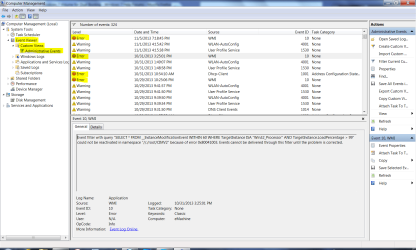
15. Study the Event Viewer>Custom>Admin view for repeat errors to google verbatim text and ID# to find out how others have resolved them. Event Viewer - Open and Use in Windows 7
For example: for the repeat errors highlighted below, googling the text will auto-complete showing others have searched for it, then take you to discussion threads which point to a MS Fixit for the problem.
16. Check also the Performance log on Advanced Tools page accessed by clicking your WEI score link at Computer>Properties. Check for queued issues at top of Tools page, Generate A System Health Report.
17. Look for issues cued in Action Center in bottom-right System Tray.
18. Type "Troubleshoot" in Startrb: Search box, then View All on left hand menu. Run any Troubleshooters for your suspected problems which can repair or clue you to issues.
19. As a last resort before reinstall try a Repair Install which can fix most problems, as it re-installs the OS while keeping all programs, files and settings in place.
20. Consider a Clean Reinstall which is actually better than getting a new computer with today's bloated factory pre-install's. The tutorial compiles everything that works best in tens of thousands of installs we've directly helped with here, and has been used by over a million consumers without a single complaint or return with problems if they stick with the tools and methods given.
Special thanks to Steve (Anak) for suggesting sequencing Edits that prioritize hardware testing.
2. Test your RAM - Test with Memtest86+ CD for 7 or more passes, or overnight.. The tutorial will show you how to test individual RAM sticks and slots. Check the slots for debris.
3. Check all cabling is securely connected and in good condition, try reinstalling suspect hardware, swap RAM sticks, unplug extra HD's, peripherals, CD/DVD drive to see if problems disappear. Unplug or remove any floppy drive.
4. Check temps for overheating by installing Core Temp which will allow monitoring temps from System Tray. If running hot blow dust out of the case using canned air or clean out laptop dust, check all connections carefully avoiding static discharge to components by touching case first, upgrade or reseat RAM checking for debris in slot.
5. Check for infection by downloading, installing (declining trial), update, run a Full Scan with the free scanners from Malwarebytes and SUPERAntiSpyware, in Safe Mode with Networking if necessary.
6. Many issues can be solved by running a free lightweight AV like Microsoft Security Essentials with the Windows 7 Firewall for best performance. You can uninstall your AV to run this as a test to be sure. Yours may also need an Uninstaller (removal tools) for common antivirus software - ESET Knowledgebase
A more aggressive free AV that similarly allows best Win7 performance is Panda Cloud.
7. Establish a Clean Boot by un-checking everything in msconfig>Startup except AV: Startup Programs - Change. After reboot enter msconfig>Services, check the box to "Hide All MS Services," repeat above steps.
Check back periodically that nothing has written itself into either list, if so turn it off in its Program Preferences or Uninstall it. A program can wait to start until you click on it. Freeloaders slow startup, can be a drag on CPU/RAM, cause issues and spy on you.
If you have a question about an item Google its name to find out what it does.
8. Run SFC /SCANNOW Command - System File Checker to repair any damaged or corrupt OS files. If it won't run in Win7 then try from DVD or System Repair Disk Command Line using SFC /SCANNOW Run in Command Prompt at Boot .
9. You can try System Restore to a point before the problem occurred, if necessary running it from System Recovery Options.
This step offers a chance to restore to a previous configuration, but System Restore limitations should be noted as in the first four boxes of System Restore Point - Create.
Always make sure you have as much space apportioned for restore points as you can afford at System Protection - Change Disk Space Usage
10. Enable hardware auto-updating to make sure you're getting the latest drivers via Windows Updates - which should also be set to Automatic - then Check for Updates. Install all Important and Optional Updates, after reboot Check for Updates again until there are no more.
Any missing drivers can be found on the Support Downloads webpage for your computer or device model. Driver Install - Device Manager
11. Check for newer display driver, or roll back to the previous version or try another Windows 7 or Vista driver. Turn off or uninstall the accompanying software package. Driver Install - Device Manager
12. Use Process Monitor for Application Failures, File System issues, Registry issues, Boot logging, Memory Stack issues, and misleading Error messages which is demonstrated in this Process Monitor Demo - YouTube. Type Resource Monitor in Start Search box to narrow down resource hogs.
13. Type "Solutions" in Start
rb: Search box to see if any have been queued for Problems reported or not. Look at the Troubleshooters available on that page to see if one might help. Always report problems when asked as Windows 7 is interactive this way.14. Some of these steps suggested to Clean Up Factory Bloatware might help. On weaker hardware you can improve performance by editing Visual Effects of Sliding, Fading, Animation, Dragging Intact and Selection Rectangle as shown in Optimize Windows 7 - Windows 7 Forums
15. Study the Event Viewer>Custom>Admin view for repeat errors to google verbatim text and ID# to find out how others have resolved them. Event Viewer - Open and Use in Windows 7
For example: for the repeat errors highlighted below, googling the text will auto-complete showing others have searched for it, then take you to discussion threads which point to a MS Fixit for the problem.
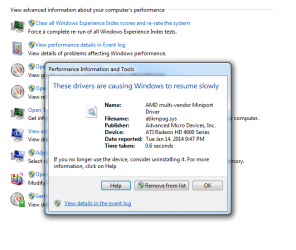
16. Check also the Performance log on Advanced Tools page accessed by clicking your WEI score link at Computer>Properties. Check for queued issues at top of Tools page, Generate A System Health Report.
17. Look for issues cued in Action Center in bottom-right System Tray.
18. Type "Troubleshoot" in Start
rb: Search box, then View All on left hand menu. Run any Troubleshooters for your suspected problems which can repair or clue you to issues.19. As a last resort before reinstall try a Repair Install which can fix most problems, as it re-installs the OS while keeping all programs, files and settings in place.
20. Consider a Clean Reinstall which is actually better than getting a new computer with today's bloated factory pre-install's. The tutorial compiles everything that works best in tens of thousands of installs we've directly helped with here, and has been used by over a million consumers without a single complaint or return with problems if they stick with the tools and methods given.
Special thanks to Steve (Anak) for suggesting sequencing Edits that prioritize hardware testing.
Related Tutorials
- Troubleshooting Windows 7 Failure to Boot
- How to Open Troubleshooting - Windows 7 Forums
- How to Create a Aero Troubleshoot Shortcut in Windows 7
- How to Create a Connection to Workplace using DirectAccess Troubleshoot Shortcut in Windows 7
- How to Create a Devices and Printers Troubleshoot Shortcut in Windows 7
- How to Create a Hardware and Devices Troubleshoot Shortcut in Windows 7
- How to Create a HomeGroup Troubleshoot Shortcut in Windows 7
- How to Create a Incoming Connections Troubleshoot Shortcut in Windows 7
- How to Create a Internet Connections Troubleshoot Shortcut in Windows 7
- How to Create a Network Adapter Troubleshoot Shortcut in Windows 7
- How to Create a Performance Troubleshoot Shortcut in Windows 7
- How to Create a Playing Audio Troubleshoot Shortcut in Windows 7
- How to Create a Power Troubleshoot Shortcut in Windows 7
- How to Create a Printing Troubleshoot Shortcut in Windows 7
- How to Create a Program Compatibility Troubleshoot Shortcut in Windows 7
- How to Create a Recording Audio Troubleshoot Shortcut in Windows 7
- How to Create a Search and Indexing Troubleshoot Shortcut in Windows 7
- How to Create a Shared Folders Troubleshoot Shortcut in Windows 7
- How to Create a System Maintenance Troubleshoot Shortcut in Windows 7
- How to Create a Windows Media Player DVD Troubleshoot Shortcut in Windows 7
- How to Create a Windows Media Player Library Troubleshoot Shortcut in Windows 7
- How to Create a Windows Media Player Settings Troubleshoot Shortcut in Windows 7
- How to Create a Windows Update Troubleshoot Shortcut in Windows 7
- How to Add or Remove "Troubleshoot compatibility" from the Context Menu in Windows 7
- How to Turn the "System Maintenance Troubleshooter" On or Off in Windows 7
- How to Troubleshoot a Problem by Performing a Clean Startup in Windows 7 or Vista
Last edited: