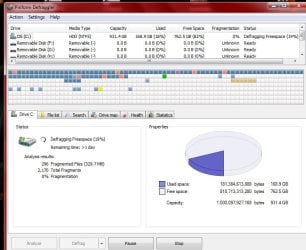
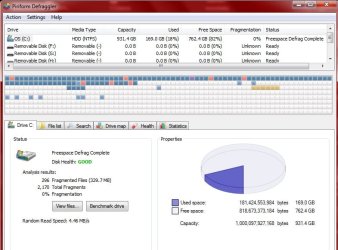
Uh, I do remember it asking me about freeing up space. I said yeah >.< I was just coming to tell you 3 hours and 10 mins left. Now I don't know if it's even running right.
When the main defrag is done
Open the Action menu
Mouse over the Advanced menu pick to expand the sub menu
Select Defrag Freespace
I just started the above.
Thanks.
Ok, just so I'm clear...
You ran Defraggler once (the main defrag as in your quote above) and that took quite a while.
I'm confused by your statement I do remember it asking me about freeing up space ... that sounds like a different utility.
This is why I said we need to go step by step and only run one thing at a time. You can help me out by using the name of the utility you're running (not it asked or it's running ..). I'm also helping other members and I can get confused between threads

Since you're on the Defraggler step, where are you in the process?
1) Main defrag done or running
2) Freespace done or running?
Let me know when both defrags are done. You're inches away from the goal line!
Thanks,
Bill
.
My Computer
- Computer type
- Laptop
- Computer Manufacturer/Model Number
- HP Pavilion dv6-6c10us
- OS
- x64 (6.3.9600) Win8.1 Pro & soon dual boot x64 (6.1.7601) Win7_SP1 HomePrem
- CPU
- AMD A6-3420M APU with Radeon(tm) HD Graphics
- Motherboard
- Hewlett-Packard 1805
- Memory
- 6.00 GB
- Graphics Card(s)
- AMD Radeon(TM) HD 6520G
- Sound Card
- (1) AMD High Definition Audio Device (2) IDT High Definiti
- Monitor(s) Displays
- HP W2072a 20" LCD (1600 x 900) @ 60 Hz
- Screen Resolution
- 1366 x 768 x 32 bits (4294967296 colors) @ 60 Hz
- Hard Drives
- ST640LM0 00 HM641JI SATA Disk Device
- Keyboard
- Logitech k520 wireless KB
- Mouse
- Logitech m320 wireless mouse (bundled with KB)
- Internet Speed
- 15/5 | 54 MB Wireless 'n'
- Antivirus
- Realtime: Defender or Avast | On-demand: Malwarebytes, ESET
- Browser
- IE 11 on Win8, IE 10 on win 7
- Other Info
- Media: [Gimp, Audacity, VLC] || Comm: [WEmail 2012, Skype] || Productivity: [OpenOffice,| Textpad] || Utils: [Sysinternals, cCleaner, Speccy, Defraggler]


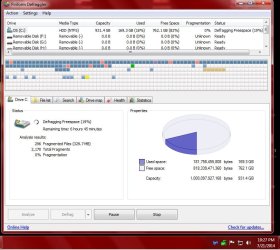
 This has been running all night, btw. My disk was badly fragmented??? How come? Even though I just did a clean install?? Can I do your above direction while this thing is scanning for another day???