
Trovi Virus - help to remove please

I looked at some of the logs above. I have no idea what this Jewel Quest is. And iwin is just a thorn in the side!

I held down shift and scrolled up or down to highlight the info so it should all be there.

This is what happened when I clicked on the ApnRemover.exe

Jewel Quest is a MS game, I think. Where do you see that?

Ok, good - then that's all herdProtect reported. Nothing further down the list when you scroll.

ApnRemover.exe - it's basically saying that it didn't find anything to uninstall.
Go through the link I provided and follow the instructions for each browser you have installed. There might be nothing you have to do, but please check how each is configured with regards to search and homepage.

Let's try this a different way.
Follow steps 1 & 2 only in http://www.sevenforums.com/tutorials/394-hidden-files-folders-show-hide.html
The picture shows Don't show hidden files, you want Show hidden files.....
The instructions in 2.a are correct, the picture might be confusing.

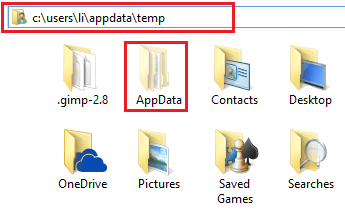
Once this is set, you can see your Appdata folder.
Navigate to C:\USERS\LI\APPDATA\LOCAL\TEMP
Select Quarantine
press the delete key
Select Askslib.dll
Press the delete key

The temp folder hold intermediate files - it's fairly safe to delete anything in the TEMP folder. Some files might be in use and they won't be deleted until they are released (close the application using it)

Just be sure that you are in the TEMP folder.

I'll look into iWin - I thought it was a bugger, but you have some games that I thought might use it. I'll post what I find in a bit.

Finish up the Ask instructions, then clean up your TEMP folder. By that time I should have something on iWin.

Bill
 

My Computer My Computer

Computer type
Laptop
Computer Manufacturer/Model Number
HP Pavilion dv6-6c10us
OS
x64 (6.3.9600) Win8.1 Pro & soon dual boot x64 (6.1.7601) Win7_SP1 HomePrem
CPU
AMD A6-3420M APU with Radeon(tm) HD Graphics
Motherboard
Hewlett-Packard 1805
Memory
6.00 GB
Graphics Card(s)
AMD Radeon(TM) HD 6520G
Sound Card
(1) AMD High Definition Audio Device (2) IDT High Definiti
Monitor(s) Displays
HP W2072a 20" LCD (1600 x 900) @ 60 Hz
Screen Resolution
1366 x 768 x 32 bits (4294967296 colors) @ 60 Hz
Hard Drives
ST640LM0 00 HM641JI SATA Disk Device
Keyboard
Logitech k520 wireless KB
Mouse
Logitech m320 wireless mouse (bundled with KB)
Internet Speed
15/5 | 54 MB Wireless 'n'
Antivirus
Realtime: Defender or Avast | On-demand: Malwarebytes, ESET
Browser
IE 11 on Win8, IE 10 on win 7
Other Info
Media: [Gimp, Audacity, VLC] || Comm: [WEmail 2012, Skype] || Productivity: [OpenOffice,| Textpad] || Utils: [Sysinternals, cCleaner, Speccy, Defraggler]
Here's a guide for removing iWin
How to easily remove iWin Toolbar (Removal Guide)

Part of the cleanup is running malware scanners - yeah... I know... but there is a reason to follow the guide step by step even though you already ran most of the scanners already.

Somewhere along the way, you picked up a new bug - iWin. The only way to be sure that it is removed is to run the scanners in the guide. You can run straight through the guide without waiting for a SF member to look at the logs. It would be great if you post the logs, just for another pair of eyes looking at the output, but just follow the guide - do every step in the order given and iWin should be gone.

Download the scanners from the link given in the guide (remember AdwCleaner - the bogus one - don't do that again!). The links in the guide give you the site you want to download from. Get a fresh version when following the guide. Don't take any shortcuts at this point - you're almost home.

Remember, you can ask any questions you have - but it's easier if you ask first. That way, you don't have to repeat steps in case something was not understood and new issues are created by a misstep.

Bill
.
 

My Computer My Computer

Computer type
Laptop
Computer Manufacturer/Model Number
HP Pavilion dv6-6c10us
OS
x64 (6.3.9600) Win8.1 Pro & soon dual boot x64 (6.1.7601) Win7_SP1 HomePrem
CPU
AMD A6-3420M APU with Radeon(tm) HD Graphics
Motherboard
Hewlett-Packard 1805
Memory
6.00 GB
Graphics Card(s)
AMD Radeon(TM) HD 6520G
Sound Card
(1) AMD High Definition Audio Device (2) IDT High Definiti
Monitor(s) Displays
HP W2072a 20" LCD (1600 x 900) @ 60 Hz
Screen Resolution
1366 x 768 x 32 bits (4294967296 colors) @ 60 Hz
Hard Drives
ST640LM0 00 HM641JI SATA Disk Device
Keyboard
Logitech k520 wireless KB
Mouse
Logitech m320 wireless mouse (bundled with KB)
Internet Speed
15/5 | 54 MB Wireless 'n'
Antivirus
Realtime: Defender or Avast | On-demand: Malwarebytes, ESET
Browser
IE 11 on Win8, IE 10 on win 7
Other Info
Media: [Gimp, Audacity, VLC] || Comm: [WEmail 2012, Skype] || Productivity: [OpenOffice,| Textpad] || Utils: [Sysinternals, cCleaner, Speccy, Defraggler]
Tousdae, if you want and actively use tool bars, that's your choice. However, you don't absolutely need them. Think of them as the equivalent of having someone behind you with a notepad writing down every place you visit on the net. All in all, it's best to steer clear of them. They can also introduce new malware to your system without your knowlidge.

Once you have done a clean install, there should be nothing on the system save for the default programs that came from the windows disk. If right after doing a clean install, you import your personal files or install something that has PUP's, you're right back where you started from.

If you want to do a clean install, there is a tutorial on this site. Once you have done that, consult with Slartybart or gregrocker (or me if I'm online) about which software you want to put on the system & provide the link. We can have a look & tell you if it is the site is the actual manufacturers site & look up & see if any unwanted extras are included.

One tip I will give you, when you install something, do NOT use the standard install (usually recommended). It's recommended so that you blindly install it without being aware of the extras it bundles in. Instead, go to the custom install & un-check anything it's trying to slip by you, toolbars, scanners, etc.

Have a look at this link & you'll see just how many PUPs a program might be trying to put on your PC.

How to spot and avoid installing potentially unwanted programs | PCWorld
 

My Computer My Computer

Computer type
PC/Desktop
Computer Manufacturer/Model Number
Dell Hell oh Well
OS
Win 7 32 Home Premium, Win 7 64 Pro, Win 8.1, Win 10
CPU
Intel Core 2 Duo 2.93GHz
Memory
Not much with my ADHD
Graphics Card(s)
ATI Radeon HD 4350
Monitor(s) Displays
24" HDTV/Monitor
Screen Resolution
Blurry after a Scotch or 2
Hard Drives
1 HDD 250 GB, 1 HDD 1 TB, 3 - 1 TB Externals
Case
Don't get on my case...man :D
Cooling
I have an Air Conditioner & Diet Pepsi
Keyboard
Saitek Cyborg
Mouse
10 yr old MS optical mouse that still works
Internet Speed
Never fast enough
Antivirus
Various
Browser
Various
Borg, I DESPISE tool bars (except gamers unite is a good tool for the games) and remove them asap when they attach.

Well, Greg had me scan and clean the external hard drive that I keep my files on. I'm thinking because of that I don't need to do your step?

Yeah, that's what aggravates me. I always pick custom install and still manage to sometimes neglect the bad stuff.

----------

Bill,

I saw that jewel quest in the last few lines of the last log I posted up for you. No no I'm very confused by your directions. I'm sorry. I know you're so thorough in your posts. It just might be that today is harder for me to connect info yanno? :(
 

My Computer My Computer

Computer type
PC/Desktop
Computer Manufacturer/Model Number
(1) Hitachi HDP725050GLA360 ATA Device (2) ST31000528AS ATA Device (3) Generic USB CF Reader USB
OS
Windows 7 Professional 64 bit
CPU
AMD Phenom(tm) II X4 955 Processor
Motherboard
ASUSTeK Computer INC. M3A78-CM
Memory
8 GB
Graphics Card(s)
XFX Radeon R7 260 X 1GB
Sound Card
AMD High Definition Audio Device
Monitor(s) Displays
Westinghouse TV 26"
Screen Resolution
1366x768
Hard Drives
1TB SATA
PSU
Corsair CX 750 ATX 80 Plus
Keyboard
Standard PS/2
Mouse
Standard
Internet Speed
80-100
Antivirus
Defender
Browser
Opera and Firefox
Guys, I don't have the iWin tool bar installed.
 

My Computer My Computer

Computer type
PC/Desktop
Computer Manufacturer/Model Number
(1) Hitachi HDP725050GLA360 ATA Device (2) ST31000528AS ATA Device (3) Generic USB CF Reader USB
OS
Windows 7 Professional 64 bit
CPU
AMD Phenom(tm) II X4 955 Processor
Motherboard
ASUSTeK Computer INC. M3A78-CM
Memory
8 GB
Graphics Card(s)
XFX Radeon R7 260 X 1GB
Sound Card
AMD High Definition Audio Device
Monitor(s) Displays
Westinghouse TV 26"
Screen Resolution
1366x768
Hard Drives
1TB SATA
PSU
Corsair CX 750 ATX 80 Plus
Keyboard
Standard PS/2
Mouse
Standard
Internet Speed
80-100
Antivirus
Defender
Browser
Opera and Firefox
Reagrding iWin: herdProtect reported iwinarcadelauncher.
I see now where Jewel Quest is - thanks.

I might have pointed you to the wrong solution, but I think it's still part of iWin, even though you don't have the toolbar.
I'll look again to see if there's more information I gave give you.

I've given you a lot, sometimes more words confuse the issue at hand.

One question, one answer might be better in the short term.

Step 1
Follow steps 1 & 2 only in http://www.sevenforums.com/tutorials/394-hidden-files-folders-show-hide.html
The picture shows Don't show hidden files, you want Show hidden files.....
The instructions in 2.a are correct, the picture might be confusing.

Once this is set, you can see your Appdata folder.
Navigate to C:\USERS\LI\APPDATA\LOCAL\TEMP
Untitled2.png
Select Quarantine
press the delete key
Select Askslib.dll
Press the delete key
 

My Computer My Computer

Computer type
Laptop
Computer Manufacturer/Model Number
HP Pavilion dv6-6c10us
OS
x64 (6.3.9600) Win8.1 Pro & soon dual boot x64 (6.1.7601) Win7_SP1 HomePrem
CPU
AMD A6-3420M APU with Radeon(tm) HD Graphics
Motherboard
Hewlett-Packard 1805
Memory
6.00 GB
Graphics Card(s)
AMD Radeon(TM) HD 6520G
Sound Card
(1) AMD High Definition Audio Device (2) IDT High Definiti
Monitor(s) Displays
HP W2072a 20" LCD (1600 x 900) @ 60 Hz
Screen Resolution
1366 x 768 x 32 bits (4294967296 colors) @ 60 Hz
Hard Drives
ST640LM0 00 HM641JI SATA Disk Device
Keyboard
Logitech k520 wireless KB
Mouse
Logitech m320 wireless mouse (bundled with KB)
Internet Speed
15/5 | 54 MB Wireless 'n'
Antivirus
Realtime: Defender or Avast | On-demand: Malwarebytes, ESET
Browser
IE 11 on Win8, IE 10 on win 7
Other Info
Media: [Gimp, Audacity, VLC] || Comm: [WEmail 2012, Skype] || Productivity: [OpenOffice,| Textpad] || Utils: [Sysinternals, cCleaner, Speccy, Defraggler]
Well, Greg had me scan and clean the external hard drive that I keep my files on. I'm thinking because of that I don't need to do your step?

That's only a suggestion to re-install windows. At this point though, since you were re-infected, it's possible that those files on the external HDD are infected again.

You really have to watch out which sites you go to. Firefox has an add on called WOT (Web of Trust). It's not infallible, but it can help.

I have a suggestion. D/L & install Malwarebytes, the free version button is the one you click, but when it is done installing allow the 14 day free trial. This, for the time being, will give you active background scanning of your PC & monitor the websites you go to. Once it's installed, run a full system scan including your external HDD. Hopefully, it can weed out the problems & during the trial period, should you go to a questionable website, it will warn you. You can purchase a license from Malwarebytes should you wish to continue to use the pro features.

What Anti Virus are you using currently?
 

My Computer My Computer

Computer type
PC/Desktop
Computer Manufacturer/Model Number
Dell Hell oh Well
OS
Win 7 32 Home Premium, Win 7 64 Pro, Win 8.1, Win 10
CPU
Intel Core 2 Duo 2.93GHz
Memory
Not much with my ADHD
Graphics Card(s)
ATI Radeon HD 4350
Monitor(s) Displays
24" HDTV/Monitor
Screen Resolution
Blurry after a Scotch or 2
Hard Drives
1 HDD 250 GB, 1 HDD 1 TB, 3 - 1 TB Externals
Case
Don't get on my case...man :D
Cooling
I have an Air Conditioner & Diet Pepsi
Keyboard
Saitek Cyborg
Mouse
10 yr old MS optical mouse that still works
Internet Speed
Never fast enough
Antivirus
Various
Browser
Various
Once this is set, you can see your Appdata folder.
Navigate to C:\USERS\LI\APPDATA\LOCAL\TEMP

Select Quarantine
press the delete key
Select Askslib.dll
Press the delete key

Steps 1 and 2 are done. I get to temp folder and then what? Where is "quarantine" coming from? :huh:
 

My Computer My Computer

Computer type
PC/Desktop
Computer Manufacturer/Model Number
(1) Hitachi HDP725050GLA360 ATA Device (2) ST31000528AS ATA Device (3) Generic USB CF Reader USB
OS
Windows 7 Professional 64 bit
CPU
AMD Phenom(tm) II X4 955 Processor
Motherboard
ASUSTeK Computer INC. M3A78-CM
Memory
8 GB
Graphics Card(s)
XFX Radeon R7 260 X 1GB
Sound Card
AMD High Definition Audio Device
Monitor(s) Displays
Westinghouse TV 26"
Screen Resolution
1366x768
Hard Drives
1TB SATA
PSU
Corsair CX 750 ATX 80 Plus
Keyboard
Standard PS/2
Mouse
Standard
Internet Speed
80-100
Antivirus
Defender
Browser
Opera and Firefox
Borg, I'm using microsoft security. Malwarebytes has been installed :)
 

My Computer My Computer

Computer type
PC/Desktop
Computer Manufacturer/Model Number
(1) Hitachi HDP725050GLA360 ATA Device (2) ST31000528AS ATA Device (3) Generic USB CF Reader USB
OS
Windows 7 Professional 64 bit
CPU
AMD Phenom(tm) II X4 955 Processor
Motherboard
ASUSTeK Computer INC. M3A78-CM
Memory
8 GB
Graphics Card(s)
XFX Radeon R7 260 X 1GB
Sound Card
AMD High Definition Audio Device
Monitor(s) Displays
Westinghouse TV 26"
Screen Resolution
1366x768
Hard Drives
1TB SATA
PSU
Corsair CX 750 ATX 80 Plus
Keyboard
Standard PS/2
Mouse
Standard
Internet Speed
80-100
Antivirus
Defender
Browser
Opera and Firefox
Please download Junkware Removal Tool Download
Junkware Removal Tool to your desktop.
  • Shut down your protection software now to avoid potential conflicts.
  • Run the tool by double-clicking it. If you are using Windows Vista, 7, or 8; instead of double-clicking, right-mouse click JRT.exe and select "Run as Administrator".
  • The tool will open and start scanning your system.
  • Please be patient as this can take a while to complete depending on your system's specifications.
  • On completion, a log (JRT.txt) is saved to your desktop and will automatically open.
  • Post the contents of JRT.txt into your next message.
 

My Computer My Computer

Computer type
PC/Desktop
Computer Manufacturer/Model Number
Bruce ... somewhere in his 40's
OS
Windows 7 Ultimate 32bit SP1
CPU
Intel(R) Core(TM)2 Quad CPU @ 2.40GHz, 2400 MHz
Motherboard
INTEL/D975XBX2
Memory
4 GB
Graphics Card(s)
ATI Radeon HD 2600 Pro
Monitor(s) Displays
Samsung SyncMaster 914v
Screen Resolution
1280 x 1024
Hard Drives
2/500GB each ... ST3500630AS ATA Device.
One is not connected
PSU
Rocketfish 700 W
Case
G.Skill Gigabyte Chassis
Keyboard
Standard PS/2 Keyboard
Mouse
Microsoft PS/2 Mouse
Internet Speed
DSL
Antivirus
Avira Internet Security
Browser
IE 11
Other Info
ATI HDMI Audio
Thanks for stopping in again Jacee.

Tousdae,

Follow Jacee's instructions. She is part of the Security team here on Seven forums.

We'll come back to the clean up if any is necessary after you run the Junkware Removal Tool. It was part of the iWin removal guide anyway.

I'm off post until Jacee signals that she is done. Then just a few housekeeping things.

Bill
.
 

My Computer My Computer

Computer type
Laptop
Computer Manufacturer/Model Number
HP Pavilion dv6-6c10us
OS
x64 (6.3.9600) Win8.1 Pro & soon dual boot x64 (6.1.7601) Win7_SP1 HomePrem
CPU
AMD A6-3420M APU with Radeon(tm) HD Graphics
Motherboard
Hewlett-Packard 1805
Memory
6.00 GB
Graphics Card(s)
AMD Radeon(TM) HD 6520G
Sound Card
(1) AMD High Definition Audio Device (2) IDT High Definiti
Monitor(s) Displays
HP W2072a 20" LCD (1600 x 900) @ 60 Hz
Screen Resolution
1366 x 768 x 32 bits (4294967296 colors) @ 60 Hz
Hard Drives
ST640LM0 00 HM641JI SATA Disk Device
Keyboard
Logitech k520 wireless KB
Mouse
Logitech m320 wireless mouse (bundled with KB)
Internet Speed
15/5 | 54 MB Wireless 'n'
Antivirus
Realtime: Defender or Avast | On-demand: Malwarebytes, ESET
Browser
IE 11 on Win8, IE 10 on win 7
Other Info
Media: [Gimp, Audacity, VLC] || Comm: [WEmail 2012, Skype] || Productivity: [OpenOffice,| Textpad] || Utils: [Sysinternals, cCleaner, Speccy, Defraggler]
Ok. Thanks
 

Attachments

My Computer My Computer

Computer type
PC/Desktop
Computer Manufacturer/Model Number
(1) Hitachi HDP725050GLA360 ATA Device (2) ST31000528AS ATA Device (3) Generic USB CF Reader USB
OS
Windows 7 Professional 64 bit
CPU
AMD Phenom(tm) II X4 955 Processor
Motherboard
ASUSTeK Computer INC. M3A78-CM
Memory
8 GB
Graphics Card(s)
XFX Radeon R7 260 X 1GB
Sound Card
AMD High Definition Audio Device
Monitor(s) Displays
Westinghouse TV 26"
Screen Resolution
1366x768
Hard Drives
1TB SATA
PSU
Corsair CX 750 ATX 80 Plus
Keyboard
Standard PS/2
Mouse
Standard
Internet Speed
80-100
Antivirus
Defender
Browser
Opera and Firefox
Good! Now right click on TFC by Old Timer TFC - Temp File Cleaner by OldTimer - Geeks to Go Forum that you saved to your desktop. Choose to run as Administer.


Click the Start button to begin the cleaning process and let it run uninterrupted to completion.

Important! Manually reboot the machine to ensure a complete clean.


Next, Copy and paste these lines in Note pad.


@Echo on
pushd\windows\system32\drivers\etc
attrib -h -s -r hosts
echo 127.0.0.1 localhost>HOSTS
attrib +r +h +s hosts
popd
ipconfig /release
ipconfig /renew
ipconfig /flushdns
netsh winsock reset all
netsh int ip reset all
shutdown -r -t 1
del %0


Save as flush.bat to your desktop. Right click and choose to run as Administrator.
Your computer will reboot itself.


Let me know when you have completed both instructions, above.
 

My Computer My Computer

Computer type
PC/Desktop
Computer Manufacturer/Model Number
Bruce ... somewhere in his 40's
OS
Windows 7 Ultimate 32bit SP1
CPU
Intel(R) Core(TM)2 Quad CPU @ 2.40GHz, 2400 MHz
Motherboard
INTEL/D975XBX2
Memory
4 GB
Graphics Card(s)
ATI Radeon HD 2600 Pro
Monitor(s) Displays
Samsung SyncMaster 914v
Screen Resolution
1280 x 1024
Hard Drives
2/500GB each ... ST3500630AS ATA Device.
One is not connected
PSU
Rocketfish 700 W
Case
G.Skill Gigabyte Chassis
Keyboard
Standard PS/2 Keyboard
Mouse
Microsoft PS/2 Mouse
Internet Speed
DSL
Antivirus
Avira Internet Security
Browser
IE 11
Other Info
ATI HDMI Audio
... The steps are done and I rebooted to 800x600 resolution even though it says it's 1366x768. Can I change it back......
 

My Computer My Computer

Computer type
PC/Desktop
Computer Manufacturer/Model Number
(1) Hitachi HDP725050GLA360 ATA Device (2) ST31000528AS ATA Device (3) Generic USB CF Reader USB
OS
Windows 7 Professional 64 bit
CPU
AMD Phenom(tm) II X4 955 Processor
Motherboard
ASUSTeK Computer INC. M3A78-CM
Memory
8 GB
Graphics Card(s)
XFX Radeon R7 260 X 1GB
Sound Card
AMD High Definition Audio Device
Monitor(s) Displays
Westinghouse TV 26"
Screen Resolution
1366x768
Hard Drives
1TB SATA
PSU
Corsair CX 750 ATX 80 Plus
Keyboard
Standard PS/2
Mouse
Standard
Internet Speed
80-100
Antivirus
Defender
Browser
Opera and Firefox
Yes, change it to the setting you prefer.... or you may need to reboot once again.
 

My Computer My Computer

Computer type
PC/Desktop
Computer Manufacturer/Model Number
Bruce ... somewhere in his 40's
OS
Windows 7 Ultimate 32bit SP1
CPU
Intel(R) Core(TM)2 Quad CPU @ 2.40GHz, 2400 MHz
Motherboard
INTEL/D975XBX2
Memory
4 GB
Graphics Card(s)
ATI Radeon HD 2600 Pro
Monitor(s) Displays
Samsung SyncMaster 914v
Screen Resolution
1280 x 1024
Hard Drives
2/500GB each ... ST3500630AS ATA Device.
One is not connected
PSU
Rocketfish 700 W
Case
G.Skill Gigabyte Chassis
Keyboard
Standard PS/2 Keyboard
Mouse
Microsoft PS/2 Mouse
Internet Speed
DSL
Antivirus
Avira Internet Security
Browser
IE 11
Other Info
ATI HDMI Audio
Ok. All set.
 

My Computer My Computer

Computer type
PC/Desktop
Computer Manufacturer/Model Number
(1) Hitachi HDP725050GLA360 ATA Device (2) ST31000528AS ATA Device (3) Generic USB CF Reader USB
OS
Windows 7 Professional 64 bit
CPU
AMD Phenom(tm) II X4 955 Processor
Motherboard
ASUSTeK Computer INC. M3A78-CM
Memory
8 GB
Graphics Card(s)
XFX Radeon R7 260 X 1GB
Sound Card
AMD High Definition Audio Device
Monitor(s) Displays
Westinghouse TV 26"
Screen Resolution
1366x768
Hard Drives
1TB SATA
PSU
Corsair CX 750 ATX 80 Plus
Keyboard
Standard PS/2
Mouse
Standard
Internet Speed
80-100
Antivirus
Defender
Browser
Opera and Firefox
Let's take a look at the programs that are running...


Download DDS from one of these links:
DDS.com
DDS.pif
  • Disable any script blocking protection
  • Double click the dds icon to run the tool.
  • When done, DDS will open two (2) logs:
    1. DDS.txt
    2. Attach.txt <--- will be minimized in the task tray
  • Save both reports to your desktop.
Include the contents of both logs in your next post.
The scan will instruct you to post Attach.txt as an attachment.
 

My Computer My Computer

Computer type
PC/Desktop
Computer Manufacturer/Model Number
Bruce ... somewhere in his 40's
OS
Windows 7 Ultimate 32bit SP1
CPU
Intel(R) Core(TM)2 Quad CPU @ 2.40GHz, 2400 MHz
Motherboard
INTEL/D975XBX2
Memory
4 GB
Graphics Card(s)
ATI Radeon HD 2600 Pro
Monitor(s) Displays
Samsung SyncMaster 914v
Screen Resolution
1280 x 1024
Hard Drives
2/500GB each ... ST3500630AS ATA Device.
One is not connected
PSU
Rocketfish 700 W
Case
G.Skill Gigabyte Chassis
Keyboard
Standard PS/2 Keyboard
Mouse
Microsoft PS/2 Mouse
Internet Speed
DSL
Antivirus
Avira Internet Security
Browser
IE 11
Other Info
ATI HDMI Audio
May I ask why we are heading in this direction?
 

My Computer My Computer

Computer type
PC/Desktop
Computer Manufacturer/Model Number
(1) Hitachi HDP725050GLA360 ATA Device (2) ST31000528AS ATA Device (3) Generic USB CF Reader USB
OS
Windows 7 Professional 64 bit
CPU
AMD Phenom(tm) II X4 955 Processor
Motherboard
ASUSTeK Computer INC. M3A78-CM
Memory
8 GB
Graphics Card(s)
XFX Radeon R7 260 X 1GB
Sound Card
AMD High Definition Audio Device
Monitor(s) Displays
Westinghouse TV 26"
Screen Resolution
1366x768
Hard Drives
1TB SATA
PSU
Corsair CX 750 ATX 80 Plus
Keyboard
Standard PS/2
Mouse
Standard
Internet Speed
80-100
Antivirus
Defender
Browser
Opera and Firefox
Because I haven't seen any running programs or installed Programs and Features, yet. DDS will just show me this and not do anything else. :)
 

My Computer My Computer

Computer type
PC/Desktop
Computer Manufacturer/Model Number
Bruce ... somewhere in his 40's
OS
Windows 7 Ultimate 32bit SP1
CPU
Intel(R) Core(TM)2 Quad CPU @ 2.40GHz, 2400 MHz
Motherboard
INTEL/D975XBX2
Memory
4 GB
Graphics Card(s)
ATI Radeon HD 2600 Pro
Monitor(s) Displays
Samsung SyncMaster 914v
Screen Resolution
1280 x 1024
Hard Drives
2/500GB each ... ST3500630AS ATA Device.
One is not connected
PSU
Rocketfish 700 W
Case
G.Skill Gigabyte Chassis
Keyboard
Standard PS/2 Keyboard
Mouse
Microsoft PS/2 Mouse
Internet Speed
DSL
Antivirus
Avira Internet Security
Browser
IE 11
Other Info
ATI HDMI Audio
Here are the logs
 

Attachments

My Computer My Computer

Computer type
PC/Desktop
Computer Manufacturer/Model Number
(1) Hitachi HDP725050GLA360 ATA Device (2) ST31000528AS ATA Device (3) Generic USB CF Reader USB
OS
Windows 7 Professional 64 bit
CPU
AMD Phenom(tm) II X4 955 Processor
Motherboard
ASUSTeK Computer INC. M3A78-CM
Memory
8 GB
Graphics Card(s)
XFX Radeon R7 260 X 1GB
Sound Card
AMD High Definition Audio Device
Monitor(s) Displays
Westinghouse TV 26"
Screen Resolution
1366x768
Hard Drives
1TB SATA
PSU
Corsair CX 750 ATX 80 Plus
Keyboard
Standard PS/2
Mouse
Standard
Internet Speed
80-100
Antivirus
Defender
Browser
Opera and Firefox
Back
Top