
Try and try and try...

The ATI driver is the one causing all the problems. I disabled it and where before I had dotted lines on the Windows 7 splash screen... which obviously signaled that something was not right, now that is no longer happening and I've yet to crash the machine, no matter how many HD videos I look at.

Of course, many of the eye-candy in Win7 is now gone, because it has lower resolution but I have another ATI card (older than the 9600 :)) with many less features and if I can squeeze a good picture and resolution, I might stick with that. I'll just have to open up the AGP Aperture to 256 in the BIOS (does that make sense) because that other card has only 32 RAM, which is very little.

Now, if you know where I can find a good driver for the 9600 because the one that installed with Win7 is simply not working. Look great, buy only until you push it.

The AMD site will not allow me to download another driver for some reason.

Many Thanks!

McQ
 

My Computer

Computer Manufacturer/Model Number
asus p4s800 dx
OS
xp / win7
CPU
Intel P4 CPU 3.00GHz, 3000 Mhz, 1 Core, 2 logical processors
Motherboard
asus p4s800dx
Memory
4GB
Graphics Card(s)
ATI Radeon 9600
Sound Card
Creative SB X-Fi ExtremeMusic - onboard SoundMax
Monitor(s) Displays
Sceptre
Screen Resolution
1360x768
Hard Drives
1 SATA 500GB
1 SATA 1Tb
Keyboard
Logitech
Mouse
Logitech
Internet Speed
Cable modem
Other Info
Slightly old but clean, mean machine
At last I was able to install the ATI Radeon Catalyst driver that is supposed to work with the board. It is a 100% improvement on before, including the dotted lines at the beginning of the splash screen. They are gone and Win7 opens smoothly. However, every so often, again, while viewing HD in Utube or other video sources, the program crashes.

In XP it never does this. What is going on in Win7 that is charging the environment so much that it crashes?

McQ
 

My Computer

Computer Manufacturer/Model Number
asus p4s800 dx
OS
xp / win7
CPU
Intel P4 CPU 3.00GHz, 3000 Mhz, 1 Core, 2 logical processors
Motherboard
asus p4s800dx
Memory
4GB
Graphics Card(s)
ATI Radeon 9600
Sound Card
Creative SB X-Fi ExtremeMusic - onboard SoundMax
Monitor(s) Displays
Sceptre
Screen Resolution
1360x768
Hard Drives
1 SATA 500GB
1 SATA 1Tb
Keyboard
Logitech
Mouse
Logitech
Internet Speed
Cable modem
Other Info
Slightly old but clean, mean machine
That card is not an HD card, so that's why it's struggling very much to play anything in HD.

When it was made, DVD was the most demanding format of the time.

You could check to see that you're using the latest Adobe Flash, but that isn't going to do much good.
 

My Computer

Computer Manufacturer/Model Number
self built
OS
7600.20510 x86
CPU
P4 550 3.4 GHz HT running at 3.5 GHz
Motherboard
MSI PM8M3-V (MS-7211 v1.x) Micro-ATX mainboard
Memory
OCZ 2 GB(2x1GB) DDR400mHz running @ 414 mHz
Graphics Card(s)
HIS Radeon HD 3850 IceQ 3 Turbo HDMI Dual DL-DVI AGP
Sound Card
MOTU Traveler firewire studio interface 192 kHz 24 bit
Monitor(s) Displays
22" widescreen Acer X223W LCD, 17" Compaq P75 CRT
Screen Resolution
1680x1050 and 1280x1024
Hard Drives
SATA I x2 WD, 400 GB and 120 GB, SATA 2 WD Caviar Black 1 TB
PSU
350W generic
Case
Cybertronpc, it glows blue
Cooling
stock cpu fan, Ice-Q 3 gpu and system, many case fans
Keyboard
Logitch Classical Keyboard 200
Mouse
Logitech Mediaplay cordless
Internet Speed
1792/448 kbits/sec
Other Info
SATA II PCI fake RAID adapter, 1 GB Readyboost, original ATI Remote Wonder (even works with WMC perfectly), Logitech Rumblepad 2 game controller x2
But why does it play in XP? The same videos, etc... And I've never had a crash on XP.

Yes, I have the latest Flash plugins...

I just crashed the machine and it was only scrolling a page in a browser.

McQ
 

My Computer

Computer Manufacturer/Model Number
asus p4s800 dx
OS
xp / win7
CPU
Intel P4 CPU 3.00GHz, 3000 Mhz, 1 Core, 2 logical processors
Motherboard
asus p4s800dx
Memory
4GB
Graphics Card(s)
ATI Radeon 9600
Sound Card
Creative SB X-Fi ExtremeMusic - onboard SoundMax
Monitor(s) Displays
Sceptre
Screen Resolution
1360x768
Hard Drives
1 SATA 500GB
1 SATA 1Tb
Keyboard
Logitech
Mouse
Logitech
Internet Speed
Cable modem
Other Info
Slightly old but clean, mean machine
But why does it play in XP? The same videos, etc... And I've never had a crash on XP.

Yes, I have the latest Flash plugins...

I just crashed the machine and it was only scrolling a page in a browser.

McQ

Type system information into the start menu search box. Hit enter. Than ctrl+s on the screen that opens. Compress the saved file to .zip or .rar and attach to a post. I could probably find things to make your system better.

I don't know why it worked on XP, although I really don't think it ever should have. Are you sure you were playing HD vids on XP with that card?

It all comes down to the fact that the card is a really weak solution for Win 7.

There are some awesome AGP cards available (like mine or any 4xxx using 256 bit memory) if that's the slot you're currently using.
 

My Computer

Computer Manufacturer/Model Number
self built
OS
7600.20510 x86
CPU
P4 550 3.4 GHz HT running at 3.5 GHz
Motherboard
MSI PM8M3-V (MS-7211 v1.x) Micro-ATX mainboard
Memory
OCZ 2 GB(2x1GB) DDR400mHz running @ 414 mHz
Graphics Card(s)
HIS Radeon HD 3850 IceQ 3 Turbo HDMI Dual DL-DVI AGP
Sound Card
MOTU Traveler firewire studio interface 192 kHz 24 bit
Monitor(s) Displays
22" widescreen Acer X223W LCD, 17" Compaq P75 CRT
Screen Resolution
1680x1050 and 1280x1024
Hard Drives
SATA I x2 WD, 400 GB and 120 GB, SATA 2 WD Caviar Black 1 TB
PSU
350W generic
Case
Cybertronpc, it glows blue
Cooling
stock cpu fan, Ice-Q 3 gpu and system, many case fans
Keyboard
Logitch Classical Keyboard 200
Mouse
Logitech Mediaplay cordless
Internet Speed
1792/448 kbits/sec
Other Info
SATA II PCI fake RAID adapter, 1 GB Readyboost, original ATI Remote Wonder (even works with WMC perfectly), Logitech Rumblepad 2 game controller x2
For what its worth, i have been running win7 64bit flawlessly with a GeForce 8500Gt 512. its only 128 bit, but it has HD support, DX10, openGL 2, and you can get one for about $50. nVidia has had the Windows 7 drivers out for a month. I just moved up to Windows 7 Ultimate 64bit RTM last week, and it is a huge improvement over XP. Performance is roughly a wash, but the features alone are, in my opinion, completely worth it. I havent had so much as a single hiccup yet, let alone a crash. i know you werent looking ot drop money on this issue, but i just figured i'd throw it out there :-)

Good luck with your problems, i hope you get everything worked out soon enough!
 

My Computer

Computer Manufacturer/Model Number
Custom
OS
Dual Boot XP 64bit/Win7 Ultimate
CPU
C2Q Q6600 2.4
Motherboard
Intel DG45ID
Memory
4gb, soon to be 8
Graphics Card(s)
saving up for my quadro!
Monitor(s) Displays
23" Syncmaster 2333
Hard Drives
300GB V-Raptor
640GB Caviar Blue
PSU
Antec 380watt
Case
Antec New Solution
Cooling
Antec
Not only do I use the card with XP, but I work with Premiere Pro CS4 and After Effects CS4, doing video editing, etc. In addition, I've been viewing HD videos on Utube... which I don't think are truly HD when you view them, only when they are produced, since after compression for the web, they are reduced greatly.

Again, thank you all for the help. I am determined to make this work.

McQ
 

Attachments

My Computer

Computer Manufacturer/Model Number
asus p4s800 dx
OS
xp / win7
CPU
Intel P4 CPU 3.00GHz, 3000 Mhz, 1 Core, 2 logical processors
Motherboard
asus p4s800dx
Memory
4GB
Graphics Card(s)
ATI Radeon 9600
Sound Card
Creative SB X-Fi ExtremeMusic - onboard SoundMax
Monitor(s) Displays
Sceptre
Screen Resolution
1360x768
Hard Drives
1 SATA 500GB
1 SATA 1Tb
Keyboard
Logitech
Mouse
Logitech
Internet Speed
Cable modem
Other Info
Slightly old but clean, mean machine
Type regedit into start menu search box. Hit enter. Navigate to

HKEY_LOCAL_MACHINE\SOFTWARE\Microsoft\Windows\CurrentVersion\Run

and delete the following entries:

SunJavaUpdateSched
GoogleDesktopSearch <<<(You may leave this if you like the functionality.)
Ptiupbmd <<< This might be malware. If it's to Promise fake Raid controller, leave it.

Scan with Malwarebytes on full system scan after updating to latest definitions.

In start menu, go to all programs, then startup folder. Delete Logitech Product Registration and Yahoo Widgets. You may leave Yahoo if you like the functionality.


Type services.msc into start menu search box. Hit enter.

Disable the following services:

ATI Extrernal Event Utility
(If you don't use Homegroup, then disable....) IP Helper, Homegroup Listener, Homegroup Provider


Install drivers for Multimedia Controller, Multimedia Video Controller and the camera. Those first two might be some kind of tv card in the system. Let me know if you need help finding drivers.
 

My Computer

Computer Manufacturer/Model Number
self built
OS
7600.20510 x86
CPU
P4 550 3.4 GHz HT running at 3.5 GHz
Motherboard
MSI PM8M3-V (MS-7211 v1.x) Micro-ATX mainboard
Memory
OCZ 2 GB(2x1GB) DDR400mHz running @ 414 mHz
Graphics Card(s)
HIS Radeon HD 3850 IceQ 3 Turbo HDMI Dual DL-DVI AGP
Sound Card
MOTU Traveler firewire studio interface 192 kHz 24 bit
Monitor(s) Displays
22" widescreen Acer X223W LCD, 17" Compaq P75 CRT
Screen Resolution
1680x1050 and 1280x1024
Hard Drives
SATA I x2 WD, 400 GB and 120 GB, SATA 2 WD Caviar Black 1 TB
PSU
350W generic
Case
Cybertronpc, it glows blue
Cooling
stock cpu fan, Ice-Q 3 gpu and system, many case fans
Keyboard
Logitch Classical Keyboard 200
Mouse
Logitech Mediaplay cordless
Internet Speed
1792/448 kbits/sec
Other Info
SATA II PCI fake RAID adapter, 1 GB Readyboost, original ATI Remote Wonder (even works with WMC perfectly), Logitech Rumblepad 2 game controller x2
I've tried about 6 times to install win7 on my system and I gave up.

SYSTEM:
Motherboard: ASUS p4s800 dx
RAM: 4Mb
Video card: ATI Radeon 9600 with 256 of memory
2 SATA HD: 500 gb & 1 tb
PROMISE SATA CARD: Original drivers.
Sound card: Creative X-FI Music (drivers for Vista because there are no drivers available for Win7 as of now.

The problem is that no sooner do I have Win7 ultimate installed, it crashes over and over. Last time it happened just as I chose a background for the desktop. So, I changed the desktop and the system was working nicely, until I installed Java.

I use Opera browser but the crashes are frequent and they happen also when using IE.

I have mutlthreading in the Bios but disabled it.

Frankly, I don't know what else to do and have now gone back to my faithful XP which is almost crash proof.

Any advice? Thanks in advance.

McQ

RAM = 4MB :sarc::sarc:
 

My Computer

OS
Windows 7
CPU
Core 2 Duo
Motherboard
ASUS P5GC-MX
Memory
King Max
Graphics Card(s)
Intel(R) 82945G Express Chipset Family
Sound Card
C-Media PCI Audio Device
Monitor(s) Displays
Sam Sung
Have you tried turning off 'Transparency' and see if things work better?
 

My Computer

Computer Manufacturer/Model Number
Dell XPS420
OS
Vista Ult 64 bit Seven Ult RTM x64
CPU
Intel Core2 Quad Q6600 2.40 gigahertz
Memory
Crucial Ballistix 4x2GB PC2 6400
Graphics Card(s)
NVIDIA GeForce 8600 GTS 256 MB
Sound Card
Creative SB X-Fi audio
Monitor(s) Displays
HP w2207 + HPvs15
Screen Resolution
1680x1050 + 1024x768
Hard Drives
2-WD5000AAKS-500 GB
WD5000AAV-500 GB external
Keyboard
Microsoft Comfort Curve
Mouse
MX Revolution
Other Info
Wacom Intuos 2 Graphics Tablet
Experience Index=5.5
I've tried about 6 times to install win7 on my system and I gave up.

SYSTEM:
Motherboard: ASUS p4s800 dx
RAM: 4Mb
Video card: ATI Radeon 9600 with 256 of memory
2 SATA HD: 500 gb & 1 tb
PROMISE SATA CARD: Original drivers.
Sound card: Creative X-FI Music (drivers for Vista because there are no drivers available for Win7 as of now.

The problem is that no sooner do I have Win7 ultimate installed, it crashes over and over. Last time it happened just as I chose a background for the desktop. So, I changed the desktop and the system was working nicely, until I installed Java.

I use Opera browser but the crashes are frequent and they happen also when using IE.

I have mutlthreading in the Bios but disabled it.

Frankly, I don't know what else to do and have now gone back to my faithful XP which is almost crash proof.

Any advice? Thanks in advance.

McQ

RAM = 4MB :sarc::sarc:

If you read the whole thread you'd have seen it was a typo and is 4 ghz

Smitty
 

My Computer

Computer Manufacturer/Model Number
Dell XPS 730
OS
Windows 7 Home Premium 64 bit
CPU
Intel Core 2 quad Extreme Q9770 @ 3.2 GHz
Memory
4x2 GB Muskin 1600 MHz ram
Graphics Card(s)
NVidia GTX 250
Sound Card
Soundblaster X-Fi Fatality Champion
Monitor(s) Displays
2 Dell 2007WFP Ultrascans
Screen Resolution
3360 x 1050
Hard Drives
WD Black 1TB sata, 2-WD Black 500 sata, 2-Seagate 500 Go external
PSU
1000 Watt
Cooling
air
Keyboard
MS Natrual Keyboard Pro
Mouse
Logitech Wireless Trackball
Internet Speed
DSL Elite
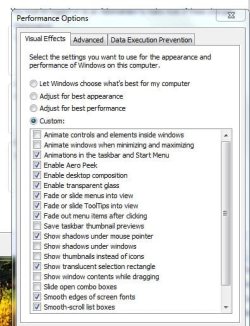
I found what was causing the problem - at least with the video card. I've uploading a picture for all to see the features that work, at least in my system, with the Radeon 9600. I've pushed the card very hard with the parameters in the picture, and the system has not crashed.

Evidently, at least in my case, the first two animation features crash my system and there is no way around it.

On the Creative card side, I installed the drivers from the Creative site but cannot get the card to work they way it did... back when I began playing around with Win7. Back then, the sound worked great but I thought there was a problem with the card because the system crashed so often, and at times, made a piercing sound.

If anyone out the has the Daniel K drivers for the SB X-FI ExtremeMusic card, I would certainly appreciated. Those drivers are now in Rapidshare or something and they demand payment. Frankly, I'm a little hesitant to pay for something that doesn't have a return ticket if it doesn't work. :)

In any case, the WIN7 video tragedy in my system seems to be over.

Thank you all for your help!

McQ
 

Attachments

  • CaptureGood.JPG
    CaptureGood.JPG
    50 KB · Views: 3
Last edited:

My Computer

Computer Manufacturer/Model Number
asus p4s800 dx
OS
xp / win7
CPU
Intel P4 CPU 3.00GHz, 3000 Mhz, 1 Core, 2 logical processors
Motherboard
asus p4s800dx
Memory
4GB
Graphics Card(s)
ATI Radeon 9600
Sound Card
Creative SB X-Fi ExtremeMusic - onboard SoundMax
Monitor(s) Displays
Sceptre
Screen Resolution
1360x768
Hard Drives
1 SATA 500GB
1 SATA 1Tb
Keyboard
Logitech
Mouse
Logitech
Internet Speed
Cable modem
Other Info
Slightly old but clean, mean machine
I left out that since trying it the system out with the parameters you see in the picture, I've clicked on every one of the features except the first two and the system is working fine. So, as far as I'm concerned, those two animation features are a royal pain... at least for my type of system.

McQ
 

My Computer

Computer Manufacturer/Model Number
asus p4s800 dx
OS
xp / win7
CPU
Intel P4 CPU 3.00GHz, 3000 Mhz, 1 Core, 2 logical processors
Motherboard
asus p4s800dx
Memory
4GB
Graphics Card(s)
ATI Radeon 9600
Sound Card
Creative SB X-Fi ExtremeMusic - onboard SoundMax
Monitor(s) Displays
Sceptre
Screen Resolution
1360x768
Hard Drives
1 SATA 500GB
1 SATA 1Tb
Keyboard
Logitech
Mouse
Logitech
Internet Speed
Cable modem
Other Info
Slightly old but clean, mean machine
This soap opera doesn't end! :) The only problem I'm having now... is that ONLY when I try to see a utube video, the sound card crashes the system.

Otherwise, everything is working fine, as stated earlier. I even looked at a Utube video from outside Utube... (by link) and everything worked fine.

Just to make sure I installed the very latest flash for Vista and Opera browser, but again, the only problem is in the Utube site.

Has anyone else had a similar problem?

To refresh everybody's memory, my sound card is a Creative SB X-Fi ExtremeMusic. I'm still trying to find Daniel K's drivers. Maybe that will help. And...this problem never surfaced under XP.

Thanks in advance...
McQ
 

My Computer

Computer Manufacturer/Model Number
asus p4s800 dx
OS
xp / win7
CPU
Intel P4 CPU 3.00GHz, 3000 Mhz, 1 Core, 2 logical processors
Motherboard
asus p4s800dx
Memory
4GB
Graphics Card(s)
ATI Radeon 9600
Sound Card
Creative SB X-Fi ExtremeMusic - onboard SoundMax
Monitor(s) Displays
Sceptre
Screen Resolution
1360x768
Hard Drives
1 SATA 500GB
1 SATA 1Tb
Keyboard
Logitech
Mouse
Logitech
Internet Speed
Cable modem
Other Info
Slightly old but clean, mean machine
Use the free rapidshare account if you find a link. It works fine. Otherwise, remove the card and enable onboard sound.
 

My Computer

Computer Manufacturer/Model Number
Sony Vaio Z46GDU
OS
Windows 7 Ultimate x86-64
CPU
[email protected] 1066MHz FSB
Motherboard
Sony branded
Memory
6GB DDR3 1066MHz
Graphics Card(s)
9300M GS 256MB Dedicated (Speed) + Intel4500MHD (Stamina)
Sound Card
Realtek HD Audio
Monitor(s) Displays
13.1' WXGA
Screen Resolution
1600x900
Hard Drives
320GB 7200RPM w/ 16MB cache
Internet Speed
1MB/s
Unfortunately, the onboard sound card, so far, doesn't work with Win7 or XP SP3, the reason I had to get a sound card. :)

At this point I would love to use the onboard sound card, but I've been unable to make it work.

McQ
 

My Computer

Computer Manufacturer/Model Number
asus p4s800 dx
OS
xp / win7
CPU
Intel P4 CPU 3.00GHz, 3000 Mhz, 1 Core, 2 logical processors
Motherboard
asus p4s800dx
Memory
4GB
Graphics Card(s)
ATI Radeon 9600
Sound Card
Creative SB X-Fi ExtremeMusic - onboard SoundMax
Monitor(s) Displays
Sceptre
Screen Resolution
1360x768
Hard Drives
1 SATA 500GB
1 SATA 1Tb
Keyboard
Logitech
Mouse
Logitech
Internet Speed
Cable modem
Other Info
Slightly old but clean, mean machine
Try installing from here for the onboard sound.

Microsoft Update Catalog


You'll need to use I.E. for that link.

Best one to try first is second one down. Extract from it. Then open the first .inf in numberical/alphabetical order and edit one of the strings to match yours, then save.

Yours = VEN_1039&DEV_7012&SUBSYS_00000000

Then install by using the device manager. Right click on it. Update driver software. Browse. Let me pick. Hvae disk. Browse. Find and double click the .inf you edited. Hit ok.
 

My Computer

Computer Manufacturer/Model Number
self built
OS
7600.20510 x86
CPU
P4 550 3.4 GHz HT running at 3.5 GHz
Motherboard
MSI PM8M3-V (MS-7211 v1.x) Micro-ATX mainboard
Memory
OCZ 2 GB(2x1GB) DDR400mHz running @ 414 mHz
Graphics Card(s)
HIS Radeon HD 3850 IceQ 3 Turbo HDMI Dual DL-DVI AGP
Sound Card
MOTU Traveler firewire studio interface 192 kHz 24 bit
Monitor(s) Displays
22" widescreen Acer X223W LCD, 17" Compaq P75 CRT
Screen Resolution
1680x1050 and 1280x1024
Hard Drives
SATA I x2 WD, 400 GB and 120 GB, SATA 2 WD Caviar Black 1 TB
PSU
350W generic
Case
Cybertronpc, it glows blue
Cooling
stock cpu fan, Ice-Q 3 gpu and system, many case fans
Keyboard
Logitch Classical Keyboard 200
Mouse
Logitech Mediaplay cordless
Internet Speed
1792/448 kbits/sec
Other Info
SATA II PCI fake RAID adapter, 1 GB Readyboost, original ATI Remote Wonder (even works with WMC perfectly), Logitech Rumblepad 2 game controller x2
I did as instructed and now I have 2 soundboard in my system. :) Thank you very much, TorrentG. My machine, old as it is, is working like a charm.

I'm very grateful to everyone who commented and made suggestions, but especially to TorrentG who made my inboard soundboard come alive once more. I guess the people at Asus and MS felt it was not necessary to go the extra inch with systems that are a little past their prime.

And as it happens often with PCs, I finally discovered that what was crashing my machine from the beginning was... in order of gravity:

1- Incompatible video drivers. At long last, I secured the Vista Catalyst and they did the trick.

2- The incompatible sound board drivers were a nuisance but once I downloaded the drivers from Creative, and now with the onboard sound system working - thanks to TorrentG - everything began to fall into place.

HOWEVER... the problem with viewing Utube persisted. It was only after I clicked off the famous Performance Options in System Properties (one at a time) was I able to find what was crashing the system every time I viewed a Utube video:

The problem was the unforgiving "ENABLE DESKTOP COMPOSITION."

This feature alone, I found out, is responsible for crashing most machines out there that are of a certain vintage.

To Microsoft: Come on, guys! That feature should be in bold red letters!

In any case, thanks to you all... if not for you I would not be installing my programs on Win7 and would still have to rely on old and dependable XP.

Keep up the good work.

McQ
 

My Computer

Computer Manufacturer/Model Number
asus p4s800 dx
OS
xp / win7
CPU
Intel P4 CPU 3.00GHz, 3000 Mhz, 1 Core, 2 logical processors
Motherboard
asus p4s800dx
Memory
4GB
Graphics Card(s)
ATI Radeon 9600
Sound Card
Creative SB X-Fi ExtremeMusic - onboard SoundMax
Monitor(s) Displays
Sceptre
Screen Resolution
1360x768
Hard Drives
1 SATA 500GB
1 SATA 1Tb
Keyboard
Logitech
Mouse
Logitech
Internet Speed
Cable modem
Other Info
Slightly old but clean, mean machine
Back
Top