Trying to get 2.1 Speakers Sandstorm working

Newbie PC

New member
Local time
8:06 AM
Messages
3
Hello all,

I am new to this forum.

I have try to click on Control Panel >> Sound and have check everythings but I couldn't get the sound out of the 2.1 PC Speakers sandstorm.

Could anyone know how to get the sound out of the 2.1 Speakers Sandstorm?

cheers:D
 

My Computer My Computer

At a glance

Windows 7 Ultimate2GHZ3GBGEFORCE 9600M GT 512MB
Computer Manufacturer/Model Number
Acer 6935
OS
Windows 7 Ultimate
CPU
2GHZ
Memory
3GB
Graphics Card(s)
GEFORCE 9600M GT 512MB
Monitor(s) Displays
1366 X 768
Hard Drives
160GB
PSU
40 Watts
To verify if the PC sound is set up correctly, connect a headphone to the GREEN Speaker jack on the rear of the PC (where you would plug in your Sandstorm speakers) and see if you get sound. If you do, the PC is OK and the problem is in the speaker system.

If the problem is in the speaker system, go back over the connections instructions and make sure eveything is correctly wired, and that you have plugged the power into the AC Mains.
 

My Computer My Computer

At a glance

Windows 10 64 bitIntel i7 6700K16GB Corsair DominatorIntel CPU Graphics
Computer type
PC/Desktop
Computer Manufacturer/Model Number
My Own Build
OS
Windows 10 64 bit
CPU
Intel i7 6700K
Motherboard
ASUS ROG Maximus VIII Hero
Memory
16GB Corsair Dominator
Graphics Card(s)
Intel CPU Graphics
Sound Card
RealTek
Monitor(s) Displays
27" Dell S2719dgf
Screen Resolution
2560X1440
Hard Drives
1 TB Samsung 850 EVO SSD for Win 10 Pro
500GB Samsung 850 EVO SSD for Win 10 Insider
2 TB drive for backup
PSU
EVGA Supernova 750G2
Case
BeQuiet Silent Base 600
Cooling
Deepcool Captain 120EX
Keyboard
Microsoft Wireless 2000
Mouse
Microsoft wireless
Internet Speed
100 MB/sec (Cable)
Antivirus
Microsoft Defender and Malwarebytes
Browser
Edge/Firefox
Other Info
Cakewalk (Sonar) by BandLab and Studio One 4.1 Pro recording studio software. MOTU 896Mk3 Hybrid recording interface, Frontier Tranzport wireless control unit, Behringer X-Touch Control Surface.
Five USB connected optical drives for CD Audio production using Nero BurningROM
Hiya there,

To verify if the PC sound is set up correctly, connect a headphone to the GREEN Speaker jack on the rear of the PC (where you would plug in your Sandstorm speakers) and see if you get sound. If you do, the PC is OK and the problem is in the speaker system.

If the problem is in the speaker system, go back over the connections instructions and make sure eveything is correctly wired, and that you have plugged the power into the AC Mains.

I got the green plug that plug to my Laptop(Acer 6935) and got my 2 speakers plugs into Speaker system and when I play the music and it not coming out of the 2.1 PC Speakers sandstorm. I dont know why! :(

Do you have tutorials on how to get sounds coming out of the 2.1 pc speakers sandstorm?
 

My Computer My Computer

At a glance

Windows 7 Ultimate2GHZ3GBGEFORCE 9600M GT 512MB
Computer Manufacturer/Model Number
Acer 6935
OS
Windows 7 Ultimate
CPU
2GHZ
Memory
3GB
Graphics Card(s)
GEFORCE 9600M GT 512MB
Monitor(s) Displays
1366 X 768
Hard Drives
160GB
PSU
40 Watts
Does the sound work OK with the Internal laptop's speakers?

The Sandstorm is a Europe only sold model. I found the Sandstorm web site but it did not have anything on how the system is connected. However, there should be one cable from the speakers to the PC, and if it's color coded correctly it should be a Green connector. Internally, there should be cables connected between the bass speaker and the two smaller Left and Right speakers, and a connection to the AC power mains, either directly or with a transformer unit. There should be a power on/off switch and a volume control (may be on the same control). Make sure it's powered on and the volume adjusted on the speaker system.

Maybe you can find more information on how to connect this Sandstorm speaker system by doing a google search.
 

My Computer My Computer

At a glance

Windows 10 64 bitIntel i7 6700K16GB Corsair DominatorIntel CPU Graphics
Computer type
PC/Desktop
Computer Manufacturer/Model Number
My Own Build
OS
Windows 10 64 bit
CPU
Intel i7 6700K
Motherboard
ASUS ROG Maximus VIII Hero
Memory
16GB Corsair Dominator
Graphics Card(s)
Intel CPU Graphics
Sound Card
RealTek
Monitor(s) Displays
27" Dell S2719dgf
Screen Resolution
2560X1440
Hard Drives
1 TB Samsung 850 EVO SSD for Win 10 Pro
500GB Samsung 850 EVO SSD for Win 10 Insider
2 TB drive for backup
PSU
EVGA Supernova 750G2
Case
BeQuiet Silent Base 600
Cooling
Deepcool Captain 120EX
Keyboard
Microsoft Wireless 2000
Mouse
Microsoft wireless
Internet Speed
100 MB/sec (Cable)
Antivirus
Microsoft Defender and Malwarebytes
Browser
Edge/Firefox
Other Info
Cakewalk (Sonar) by BandLab and Studio One 4.1 Pro recording studio software. MOTU 896Mk3 Hybrid recording interface, Frontier Tranzport wireless control unit, Behringer X-Touch Control Surface.
Five USB connected optical drives for CD Audio production using Nero BurningROM
No sound at all?

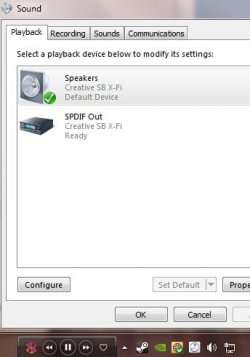
Is it showing your soundcard/speakers as the default device in playback devices?
Capture.JPG
 

My Computer My Computer

At a glance

Windows 7 Home Premium 64bitIntel Core i7 2700k8GB Mushkin Redline Ridgebacks @1866EVGA GTX570 SC
Computer Manufacturer/Model Number
Custom (Self Build)
OS
Windows 7 Home Premium 64bit
CPU
Intel Core i7 2700k
Motherboard
eVGA P67 SLI
Memory
8GB Mushkin Redline Ridgebacks @1866
Graphics Card(s)
EVGA GTX570 SC
Sound Card
XiFi Titanium HD
Monitor(s) Displays
LG W2453V
Screen Resolution
1920x1080
Hard Drives
Intel 320 80GB -- Intel X25-V 40GB --WD Black 1TB x2 -- WD Blue 640GB
PSU
Seasonic x750
Case
Corsair 600T SE White
Cooling
eVGA Superclocked CPU Cooler
Keyboard
Saitek Cyborg
Antivirus
Kaspersky
Browser
IE
Other Info
LG BD/DVD
Does the sound work OK with the Internal laptop's speakers?
Do you mean Sound coming out of the laptop? Yes but it not coming out of my 2.1 PC Speakers Sandstorm!! :(

I have put Two picture blow and hopefully you may find a clue on why sound doesnt come out of the 2.1 PC Speakers Sandstorm!! ;)

There is proof that the sound work out of the front laptop speakers
http://www1.picturepush.com/photo/a/6005699/img/Anonymous/Untitled.png

Why my 2.1 Sound system(2.1 PC Speakers Sandstorm is being switch on and also green plug is in the laptop!) isnt working When the music is on :(
http://www2.picturepush.com/photo/a/6005660/img/Anonymous/Untitled.png

I feel like pulling my hair out to know what the problem is :(
 
Last edited:

My Computer My Computer

At a glance

Windows 7 Ultimate2GHZ3GBGEFORCE 9600M GT 512MB
Computer Manufacturer/Model Number
Acer 6935
OS
Windows 7 Ultimate
CPU
2GHZ
Memory
3GB
Graphics Card(s)
GEFORCE 9600M GT 512MB
Monitor(s) Displays
1366 X 768
Hard Drives
160GB
PSU
40 Watts
You have yet to confirm that the Speaker out jack is working and thus have not isolated the problem. Plug a headset or another speaker system into the Speaker Out jack and see if you get sound. If you her sound in the headphone then then PC sound and Speaker out jack are working and the problem is either in the connecting cable for the speaker system or something in the speaker system. This is as far as we can help you with the problem.
 

My Computer My Computer

At a glance

Windows 10 64 bitIntel i7 6700K16GB Corsair DominatorIntel CPU Graphics
Computer type
PC/Desktop
Computer Manufacturer/Model Number
My Own Build
OS
Windows 10 64 bit
CPU
Intel i7 6700K
Motherboard
ASUS ROG Maximus VIII Hero
Memory
16GB Corsair Dominator
Graphics Card(s)
Intel CPU Graphics
Sound Card
RealTek
Monitor(s) Displays
27" Dell S2719dgf
Screen Resolution
2560X1440
Hard Drives
1 TB Samsung 850 EVO SSD for Win 10 Pro
500GB Samsung 850 EVO SSD for Win 10 Insider
2 TB drive for backup
PSU
EVGA Supernova 750G2
Case
BeQuiet Silent Base 600
Cooling
Deepcool Captain 120EX
Keyboard
Microsoft Wireless 2000
Mouse
Microsoft wireless
Internet Speed
100 MB/sec (Cable)
Antivirus
Microsoft Defender and Malwarebytes
Browser
Edge/Firefox
Other Info
Cakewalk (Sonar) by BandLab and Studio One 4.1 Pro recording studio software. MOTU 896Mk3 Hybrid recording interface, Frontier Tranzport wireless control unit, Behringer X-Touch Control Surface.
Five USB connected optical drives for CD Audio production using Nero BurningROM
Back
Top