Trying to install windows 7 over linux

tablesalt

New member
Local time
4:52 AM
Messages
1
hello, I currently have linux mint 15 on my pc, but now I want to install windows 7 over it.
i can't install it because it says windows must be installed to a partition formatted as NTFS.
there's 2 options to install it disk 0 partition 1: 927.5 GB or Disk 0 partition 2: 4.0 GB.
What am I supposed to do here? Do I delete these two partitions? Or how do I format it to NTFS?
 

My Computer

Computer type
PC/Desktop
OS
windows 7
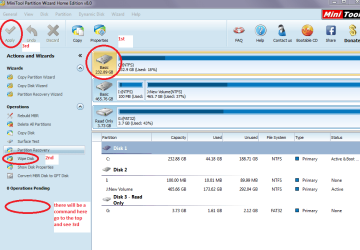
Hello and welcome tablesalt mate if you want to install the 7 only you need to wipe that drive and format it before you do anything.
You can do that using the command prompt or the Partition Wizard wipe feature.

See this and my pic Best Free Partition Manager Freeware and free partition magic for Windows 7, Windows 8, Windows Vista and Windows XP 32 bit & 64 bit. MiniTool Free Partition Manager Software Home Edition.

and

http://www.sevenforums.com/tutorials/52129-disk-clean-clean-all-diskpart-command.html

Pick either

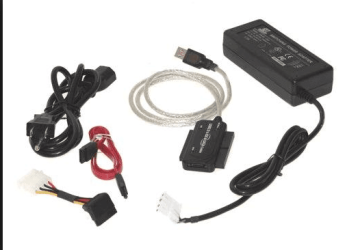
They will take some time to do and you will need to use a USB to SATA adaptor and another machine.

PS I meant to add you can format with Partition Wizard too if you like
 

Attachments

  • WIPE.PNG
    WIPE.PNG
    116.1 KB · Views: 1
  • USB.PNG
    USB.PNG
    142.3 KB · Views: 34

My Computer

Computer type
PC/Desktop
Computer Manufacturer/Model Number
Own build (new) Desk1 / Asus ROG Win 7 / Desk2 1st build
OS
Desk1 7 Home Prem / Desk2 10 Pro / Main lap Asus ROG 10 Pro 2 laptop Toshiba 7 Pro Asus P2520 7 & 10
CPU
Desk1 i5 3750K / Laptop i7 GTX 860M / Desk2 i5 2500
Motherboard
Desk1 Asus P877-V / Desk2 Gigabyte H67 UD3H / Laptop ?
Memory
Desk1 8GB (1866) / Desk2 16GB (1333) / Laptop 8Gb DDR3
Graphics Card(s)
Desk 1& 2NVidia GTX 650 & Laptops on board Intel
Sound Card
Desk 1 & 2 -XONAR DG Realtek High Def audio Laptop
Monitor(s) Displays
Desk 1 Benq HD 2450 / Desk2 Philips 24" / Laptop 17.5"
Screen Resolution
1920x1080 D1 & D2 & Laptop 1
Hard Drives
Desk1 Samsung 120GB 830 SSD
Asus ROG 256GB 850 Pro SSD
Desk2 Samsung 840 256 SSD
Toshiba 120GB EVO
PSU
Desk 1 Corsair HX 1050/ Laptop ? / Desk 2 Corsair HX 650
Case
Desk 1 Cooler HAF XM ? Toshiba laptop / Desk2 Coolermaster
Cooling
Fans on all Desk1 -2 Desk2 - all Coolermasters 5 Laptop ?
Keyboard
Desk 1 MS Sidewinder X6 Desk 2 MS Sidewinder X 4
Mouse
Desk 1&2 - Gigabyte MS 900 gamer - laptop - Logitec wireless
Internet Speed
ADSL2+
Other Info
One other Desktop (tester) and spare Toshba laptop both with SSD's
Running Kaspersky 2016 ISS on all machines config'd identically
Logitec audio stereo systems on each machine (x3)
Canon MG5250MFC
Router/modem TP-Link running WPA2SK
Welcome to the forum tablesalt. If you are not confortable running partitioning software you can "install it disk 0 partition 1: 927.5 GB". The installer well format the space before it instals the software. This well leave a 4gb partition unused, no big deal on a 1tb drive. This is th\e easy way if you don't have experience with drive partitioning. Otherwise I would partion the drive in to two partions, 250+/- for the Windows OS and core software and the remains 750gb for data and general software. You would have a "C:\" drive and a "D:\" drive...or you could keep the Linux installed and build a new partition for Windows and duel boot.
 

My Computer

Computer type
PC/Desktop
Computer Manufacturer/Model Number
Custom, Dell and Lenono LT's
OS
Win8/8.1,Win7-U64, Vista U64, uncounted Linux distor's
CPU
AMD and Intell, 9590, 8350, i5 3570k
Motherboard
CFVFZ, GA990FXA, Z77e-itx
Memory
Corsair G Skill
Graphics Card(s)
Crossfired Sapphire HD 7950 Vapor-X, ASUS R9 280X TOP
Sound Card
Realtek ALC889
Monitor(s) Displays
ViewSonic VX2770SMH 27" / ViewSonic VX2433 LCD 24"
Screen Resolution
1080i HD
Hard Drives
Samsung SSD 840 Pro
OCZ Agility 3's
OCZ Vector's
WD's Blue, red, green, Velociraptors
Seagate USB3 & Hybrid's
ASUS Blu-Ray
ASUS DVD
PSU
Corsair AX1200i, Seasonice 850 Gold
Case
Cooler Master HAF 922 & HAF 932, Lian Li Train case.
Cooling
Air, Glacer 240L expanded, custom EK loop with duel D5's
Keyboard
Microsoft SideWinder X4 USB Keyboard / Logitech 250 PS2
Mouse
Logitech G500 / MS wireless 5000
Internet Speed
Best of 5ms / 75+ dn / 12+ up More or less.
Antivirus
MS esentials-MalwareBytes
Browser
Firefox Chromebook

My Computer

OS
ME/XP/Vista/Win7
hello, I currently have linux mint 15 on my pc, but now I want to install windows 7 over it.
i can't install it because it says windows must be installed to a partition formatted as NTFS.
there's 2 options to install it disk 0 partition 1: 927.5 GB or Disk 0 partition 2: 4.0 GB.
What am I supposed to do here? Do I delete these two partitions? Or how do I format it to NTFS?


Yes, you should always delete all partitions after booting the installer, using the Drive Options at Steps 7 and 8 of Clean Install Windows 7.

Then you can use the same Drive Options to Create and Format your partitions as you wish, or if you have no partition scheme in mind just click Next to let the installer create and format your install partition for you and begin.

Other tips here to get and keep a perfect Clean Reinstall - Factory OEM Windows 7, same for retail.
 
Last edited:
Well that should sort you out tablesalt - I wasn't so sure if the Linux stuff would be a problem thats the only reason I posted what I did - good luck!:)
 

My Computer

Computer type
PC/Desktop
Computer Manufacturer/Model Number
Own build (new) Desk1 / Asus ROG Win 7 / Desk2 1st build
OS
Desk1 7 Home Prem / Desk2 10 Pro / Main lap Asus ROG 10 Pro 2 laptop Toshiba 7 Pro Asus P2520 7 & 10
CPU
Desk1 i5 3750K / Laptop i7 GTX 860M / Desk2 i5 2500
Motherboard
Desk1 Asus P877-V / Desk2 Gigabyte H67 UD3H / Laptop ?
Memory
Desk1 8GB (1866) / Desk2 16GB (1333) / Laptop 8Gb DDR3
Graphics Card(s)
Desk 1& 2NVidia GTX 650 & Laptops on board Intel
Sound Card
Desk 1 & 2 -XONAR DG Realtek High Def audio Laptop
Monitor(s) Displays
Desk 1 Benq HD 2450 / Desk2 Philips 24" / Laptop 17.5"
Screen Resolution
1920x1080 D1 & D2 & Laptop 1
Hard Drives
Desk1 Samsung 120GB 830 SSD
Asus ROG 256GB 850 Pro SSD
Desk2 Samsung 840 256 SSD
Toshiba 120GB EVO
PSU
Desk 1 Corsair HX 1050/ Laptop ? / Desk 2 Corsair HX 650
Case
Desk 1 Cooler HAF XM ? Toshiba laptop / Desk2 Coolermaster
Cooling
Fans on all Desk1 -2 Desk2 - all Coolermasters 5 Laptop ?
Keyboard
Desk 1 MS Sidewinder X6 Desk 2 MS Sidewinder X 4
Mouse
Desk 1&2 - Gigabyte MS 900 gamer - laptop - Logitec wireless
Internet Speed
ADSL2+
Other Info
One other Desktop (tester) and spare Toshba laptop both with SSD's
Running Kaspersky 2016 ISS on all machines config'd identically
Logitec audio stereo systems on each machine (x3)
Canon MG5250MFC
Router/modem TP-Link running WPA2SK
Back
Top