Solved Trying to install Windows 7 x64 on my Lenovo ThinkPad L460

userandaname

New member
Member
Local time
11:42 PM
Messages
55
Hello everybody, I just was wondering how I should install Windows 7 x64 on my Lenovo ThinkPad L460.

I am trying to install it on a external HDD so that I don't destroy my Windows 10 x64 installation.

I also know about dual-booting however I don't feel like doing a dual-boot however if that is the only way to go then I might consider it.

The thing is though is that my system uses UEFI but it does have CSM.

The problem is that when I boot off of my Windows 7 installation with CSM enabled it BSODs and doesn't want to boot.

I have done some research and found out that this may be an ACPI related issue but now I am not sure where to go from here.

Any tips would be very appreciated.

Thank you very much.
 
Last edited:

My Computer My Computer

At a glance

N/A
OS
N/A
I am trying to install it on a external HDD

Thats why.

Simplest way:

Boot into win 10

Apply the win7 image to a spare partition on your internal hard disk.

Add a boot menu entry.

You could use winntsetup to do both of the above.
https://mega.nz/folder/zWIXgaqT#rdX_-WE7dH0iAcIt3qqUZQ


Lenovo has drivers for win7, you can integrate those after applying the image and before booting into win7 if you like.
 

My Computers My Computers

  • At a glance

    7 X64i5 84002x8gb 3200mhz
    Computer type
    PC/Desktop
    OS
    7 X64
    CPU
    i5 8400
    Motherboard
    gigabyte b365m ds3h
    Memory
    2x8gb 3200mhz
    Hard Drives
    various
    PSU
    pure power 11 400w cm
    Case
    Coolermaster
    Cooling
    cryorig m9i
  • At a glance

    7x64g54008gb ddr4 2400
    Computer type
    PC/Desktop
    OS
    7x64
    CPU
    g5400
    Motherboard
    ga b365m ds3h
    Memory
    8gb ddr4 2400
    PSU
    xfx pro 450w
Question

Does this install Windows or does it install the drivers for Windows 7 to run properly?

I can install Windows using DISM just fine. I am just wondering to figure out where I have to go from here. Also are the NVMe drivers necessary? I am using an SSD as my normal boot drive
 

My Computer My Computer

At a glance

N/A
OS
N/A
Apply the image, add a boot menu entry, boot into win7 and it completes the installation. I always do this.

That will have the drivers that come included in the win7 installation media.

If you want extra drivers, you can integrate them into the wim, or integrate them after applying , or install them after booting into win7. You will probably want 3rd party video and net drivers

Lenovo has them here:
SCCM Package for Windows 7 (32-bit, 64-bit) - ThinkPad L460 - Lenovo Support GB

Those come as an .exe pack. edit: these are easy - The lenovo .exe is self extracting, run it and select a folder to extract the drivers to.

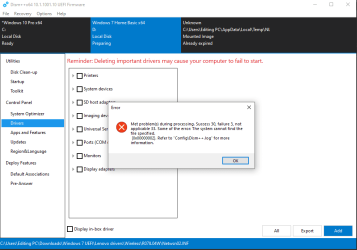
Then one way is to use dism++.
It will list windows installations in the top pane.
Click the win7 installation in the top pane to highlight it in blue.
Click Open Session.
Click Drivers in the left pane.
Click ADD.
Browse to the folder of drivers you extracted.

dism++ SCREENSHOTS
 

My Computers My Computers

  • At a glance

    7 X64i5 84002x8gb 3200mhz
    Computer type
    PC/Desktop
    OS
    7 X64
    CPU
    i5 8400
    Motherboard
    gigabyte b365m ds3h
    Memory
    2x8gb 3200mhz
    Hard Drives
    various
    PSU
    pure power 11 400w cm
    Case
    Coolermaster
    Cooling
    cryorig m9i
  • At a glance

    7x64g54008gb ddr4 2400
    Computer type
    PC/Desktop
    OS
    7x64
    CPU
    g5400
    Motherboard
    ga b365m ds3h
    Memory
    8gb ddr4 2400
    PSU
    xfx pro 450w
Thank you, I will try that and I will let you know if it works!
 

My Computer My Computer

At a glance

N/A
OS
N/A
There are mass storage drivers in the lenovo pack, so integrate them with dism++ into the applied image before booting into win7
 

My Computers My Computers

  • At a glance

    7 X64i5 84002x8gb 3200mhz
    Computer type
    PC/Desktop
    OS
    7 X64
    CPU
    i5 8400
    Motherboard
    gigabyte b365m ds3h
    Memory
    2x8gb 3200mhz
    Hard Drives
    various
    PSU
    pure power 11 400w cm
    Case
    Coolermaster
    Cooling
    cryorig m9i
  • At a glance

    7x64g54008gb ddr4 2400
    Computer type
    PC/Desktop
    OS
    7x64
    CPU
    g5400
    Motherboard
    ga b365m ds3h
    Memory
    8gb ddr4 2400
    PSU
    xfx pro 450w
I will keep that in mind!
 

My Computer My Computer

At a glance

N/A
OS
N/A
ThinkPad L460 is a Skylake computer, so it's Win 7 compatible.

Last week I have converted a Skylake Samsung laptop from Win 10 to Win 7.
For the updates use Single file with all updates - Simplix

I suggest you do a Disk image. Better be safe than sorry.
 

My Computers My Computers

  • At a glance

    Windows 7 HP 64i5 6600K - 800MHz to 4200MHz4+4G GSkill DDR4 3000IG - Intel 530
    Computer type
    PC/Desktop
    Computer Manufacturer/Model Number
    custom build
    OS
    Windows 7 HP 64
    CPU
    i5 6600K - 800MHz to 4200MHz
    Motherboard
    GA-Z170-HD3P
    Memory
    4+4G GSkill DDR4 3000
    Graphics Card(s)
    IG - Intel 530
    Monitor(s) Displays
    Samsung 226BW
    Screen Resolution
    1680x1050
    Hard Drives
    (1) -1 SM951 – 128GB M.2 AHCI PCIe SSD drive for Windows 7 and Lubuntu
    (2) -1 WD SATA 3 - 1T for Data
    (3) -1 WD SATA 3 - 1T for backup
    PSU
    Thermaltake 450W TR2 gold
    Keyboard
    Old and good Chicony mechanical keyboard
    Mouse
    Logitech mX performance - 9 buttons (had to disable some)
    Internet Speed
    500Mb/s
    Browser
    Firefox 64
    Other Info
    TinyWall firewall
  • At a glance

    Windows 7 Proi7-4500U 800MHz to 3.0GHz(4+4)G DDR3 1600IG intel 4400 + NVIDIA GeForce GT 745M
    Computer type
    Laptop
    System Manufacturer/Model Number
    Asus Q550LF
    OS
    Windows 7 Pro
    CPU
    i7-4500U 800MHz to 3.0GHz
    Motherboard
    Asus Q550LF
    Memory
    (4+4)G DDR3 1600
    Graphics Card(s)
    IG intel 4400 + NVIDIA GeForce GT 745M
    Sound Card
    Realtek
    Monitor(s) Displays
    LG Display LP156WF4-SPH1
    Screen Resolution
    1920 x 1080
    Hard Drives
    BX500 120G SSD for Windows and programs +
    1T HDD for data
    Internet Speed
    500 Mb/s
    Browser
    Firefox
    Other Info
    TinyWall firewall
Failure!

When I first tried this project I got the 0x0000007b BSOD and it happened again however this time it does try to boot for a little bit longer but it does BSOD.
I have CSM enabled.

Any more tips?
 

My Computer My Computer

At a glance

N/A
OS
N/A
You have done something wrong. Follow the instructions carefully.

Also check your bios settings
 

My Computers My Computers

  • At a glance

    7 X64i5 84002x8gb 3200mhz
    Computer type
    PC/Desktop
    OS
    7 X64
    CPU
    i5 8400
    Motherboard
    gigabyte b365m ds3h
    Memory
    2x8gb 3200mhz
    Hard Drives
    various
    PSU
    pure power 11 400w cm
    Case
    Coolermaster
    Cooling
    cryorig m9i
  • At a glance

    7x64g54008gb ddr4 2400
    Computer type
    PC/Desktop
    OS
    7x64
    CPU
    g5400
    Motherboard
    ga b365m ds3h
    Memory
    8gb ddr4 2400
    PSU
    xfx pro 450w

My Computers My Computers

  • At a glance

    7 X64i5 84002x8gb 3200mhz
    Computer type
    PC/Desktop
    OS
    7 X64
    CPU
    i5 8400
    Motherboard
    gigabyte b365m ds3h
    Memory
    2x8gb 3200mhz
    Hard Drives
    various
    PSU
    pure power 11 400w cm
    Case
    Coolermaster
    Cooling
    cryorig m9i
  • At a glance

    7x64g54008gb ddr4 2400
    Computer type
    PC/Desktop
    OS
    7x64
    CPU
    g5400
    Motherboard
    ga b365m ds3h
    Memory
    8gb ddr4 2400
    PSU
    xfx pro 450w

My Computers My Computers

  • At a glance

    7 X64i5 84002x8gb 3200mhz
    Computer type
    PC/Desktop
    OS
    7 X64
    CPU
    i5 8400
    Motherboard
    gigabyte b365m ds3h
    Memory
    2x8gb 3200mhz
    Hard Drives
    various
    PSU
    pure power 11 400w cm
    Case
    Coolermaster
    Cooling
    cryorig m9i
  • At a glance

    7x64g54008gb ddr4 2400
    Computer type
    PC/Desktop
    OS
    7x64
    CPU
    g5400
    Motherboard
    ga b365m ds3h
    Memory
    8gb ddr4 2400
    PSU
    xfx pro 450w

My Computers My Computers

  • At a glance

    7 X64i5 84002x8gb 3200mhz
    Computer type
    PC/Desktop
    OS
    7 X64
    CPU
    i5 8400
    Motherboard
    gigabyte b365m ds3h
    Memory
    2x8gb 3200mhz
    Hard Drives
    various
    PSU
    pure power 11 400w cm
    Case
    Coolermaster
    Cooling
    cryorig m9i
  • At a glance

    7x64g54008gb ddr4 2400
    Computer type
    PC/Desktop
    OS
    7x64
    CPU
    g5400
    Motherboard
    ga b365m ds3h
    Memory
    8gb ddr4 2400
    PSU
    xfx pro 450w
Sorry for possibly wasting your time SIW2!

I just have 2 more questions for you but if you want me to set this as resolved then we can do that too. (Those questions are about this conversation by the way.)

What do you say?
 

My Computer My Computer

At a glance

N/A
OS
N/A
Bye!

I will now set this post as resolved.

Thank you for fixing my problem and goodbye!

If anyone has any more questions about this then you can reply.
 

My Computer My Computer

At a glance

N/A
OS
N/A
This is a forum. It is for asking questions.:confused:
 

My Computers My Computers

  • At a glance

    7 X64i5 84002x8gb 3200mhz
    Computer type
    PC/Desktop
    OS
    7 X64
    CPU
    i5 8400
    Motherboard
    gigabyte b365m ds3h
    Memory
    2x8gb 3200mhz
    Hard Drives
    various
    PSU
    pure power 11 400w cm
    Case
    Coolermaster
    Cooling
    cryorig m9i
  • At a glance

    7x64g54008gb ddr4 2400
    Computer type
    PC/Desktop
    OS
    7x64
    CPU
    g5400
    Motherboard
    ga b365m ds3h
    Memory
    8gb ddr4 2400
    PSU
    xfx pro 450w
Okay but still sorry!

Thanks for the help!
 

My Computer My Computer

At a glance

N/A
OS
N/A
Back
Top