Trying to push old gen PC for gaming

Alquidreo

New member
Local time
4:09 PM
Messages
9
Location
Potato village
Hi everyone, this is my first post in here so I hope I don't mess it up too badly.

As I said in the title, I currently own an old gen PC and right now I can't afford the money needed to change it, so I'm trying to improve it as much as I can within its limitations.

The specs of the computer are in my profile but I'll upload an image to make it more easy:
specs.PNG

The games I usually play and the ones I'd like to play are as follow.

Current games I play: Guild Wars 2, Pillars of Eternity II: Deadfire, Skyrim, Fallout New Vegas, Black Desert Online, BlazBlue: Central Fiction

Games I'd like to play (if possible): Final Fantasy XIV, Fallout 4, Dark Souls 3, Granblue Fantasy Versus

I normally run them in low to medium quality.

I was thinking about buying a GTX 750Ti or a GTX 950 (and changing the PSU if needed as friend of mine could have a spare one with enough power) but before buying anything I would rather have the opinion of more knowlegdable people than me as I'm rather new into this (my current computer was given to me for free, so I don't think I can complaint at all). Also, waiting a few more years (3-4) until I have enough money to make the change would be better?


All help is welcome, and I apologize for any bad writing I could have done (english is not my native language).
 

My Computer My Computer

Computer type
PC/Desktop
Computer Manufacturer/Model Number
Dell Optiplex 380 Mini-Tower
OS
Windows 7 Home Premium 64 bit
CPU
Intel Core2 Quad Q9650
Motherboard
Dell 0hn7xn A01
Memory
khx1600c9d3/4gx (2 slots) (8Gb total)
Graphics Card(s)
GeForce GT 730
Monitor(s) Displays
LG 24MK600M
Screen Resolution
1920x1080
Hard Drives
toshiba tr200 (240Gb)
wdc wd10ezex 08wn4a0 (1Tb)
PSU
305W
Cooling
Fans
These are the current specs of your computer:

8 GB(4 GB x 2) DDR3-1600 MHz RAM
305W power supply
 

Attachments

  • cpu.JPG
    cpu.JPG
    12.2 KB · Views: 11
  • gpu.JPG
    gpu.JPG
    13.8 KB · Views: 10

My Computer My Computer

Computer type
PC/Desktop
Computer Manufacturer/Model Number
Dell OptiPlex 9020
OS
Windows 7 Professional SP1 64-bit
CPU
Intel Core i7-4790 3.60 GHz
Memory
32 GB DDR3-1600 MHz
Graphics Card(s)
Integrated Intel HD Graphics 4600
Monitor(s) Displays
Viewsonic 32" LCD
Hard Drives
Kingston SATA 3 240 GB SSD
Internet Speed
Spectrum Internet 1000 Mbps
Even if you upgrade to one of these much better performing graphics cards, the weak performance of the processor will bottleneck the entire system and prevent you from having a quality gaming experience.
 

Attachments

  • gpu2.JPG
    gpu2.JPG
    13.7 KB · Views: 11
  • gpu3.JPG
    gpu3.JPG
    13.5 KB · Views: 11

My Computer My Computer

Computer type
PC/Desktop
Computer Manufacturer/Model Number
Dell OptiPlex 9020
OS
Windows 7 Professional SP1 64-bit
CPU
Intel Core i7-4790 3.60 GHz
Memory
32 GB DDR3-1600 MHz
Graphics Card(s)
Integrated Intel HD Graphics 4600
Monitor(s) Displays
Viewsonic 32" LCD
Hard Drives
Kingston SATA 3 240 GB SSD
Internet Speed
Spectrum Internet 1000 Mbps
Thank you very much for the quick answer.

So you're saying that even if I were to buy one of those GPUs, I couldn't be able to play any of those games right? Well, it doesn't surprise me that much but I still was hoping for a slim chance of success.

Would the Q9650 bottleneck that badly? I saw on other forums that it could do well with the GTX 750 Ti and I used a few bottleneck online calculators to some reasonable choices (I also saw that those online calculators were not that accurate but I thought I could use them to have a general idea of the possible performance).

Sadly because of the motherboard that CPU is the highest I could aim for.

I'll still leave this forum open a bit more to see if someone else wants to give their opinion on this matter.
 
Last edited:

My Computer My Computer

Computer type
PC/Desktop
Computer Manufacturer/Model Number
Dell Optiplex 380 Mini-Tower
OS
Windows 7 Home Premium 64 bit
CPU
Intel Core2 Quad Q9650
Motherboard
Dell 0hn7xn A01
Memory
khx1600c9d3/4gx (2 slots) (8Gb total)
Graphics Card(s)
GeForce GT 730
Monitor(s) Displays
LG 24MK600M
Screen Resolution
1920x1080
Hard Drives
toshiba tr200 (240Gb)
wdc wd10ezex 08wn4a0 (1Tb)
PSU
305W
Cooling
Fans
Thanks for the quick answer.


The video was very informative on certain aspects, but my main problem is if the GPUs I listed could be enough to let me play any of the games I mentioned I'd like to or if I'm better off just waiting until I have the money to buy a new computer and stick with the GT 730 for a few more years.
 

My Computer My Computer

Computer type
PC/Desktop
Computer Manufacturer/Model Number
Dell Optiplex 380 Mini-Tower
OS
Windows 7 Home Premium 64 bit
CPU
Intel Core2 Quad Q9650
Motherboard
Dell 0hn7xn A01
Memory
khx1600c9d3/4gx (2 slots) (8Gb total)
Graphics Card(s)
GeForce GT 730
Monitor(s) Displays
LG 24MK600M
Screen Resolution
1920x1080
Hard Drives
toshiba tr200 (240Gb)
wdc wd10ezex 08wn4a0 (1Tb)
PSU
305W
Cooling
Fans
You should be able to play Final Fantasy at low or medium. Requirements: FINAL FANTASY XIV(R) Recommended System Requirements


Fall Out 4 is a no go. Requirements: Fallout 4 system requirements | Can I Run Fallout 4


Dark Souls 3 is a no go. Requirements: Dark Souls 3 system requirements | Can I Run Dark Souls 3


Granblue Fantasy: Versus is a no go. Requirements: Granblue Fantasy: Versus system requirements | Can I Run Granblue Fantasy: Versus

If you click the "can I run it" link that'll tell you.

Now in large part the games will run and maybe just at very low settings and even at that it may be very choppy. I'm not sure.


According to this and this, your current 305 watt PSU will run a 750TI.

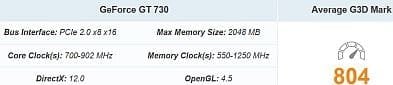
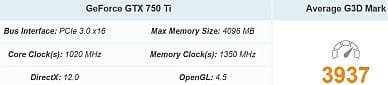
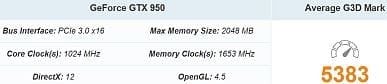
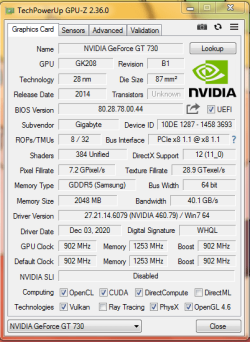
According to Passmark, a 750TI would be a significant upgrade. But I have searched high and low to see if your PCIe slot is a 2 or 3 and couldn't find out. So run GPU-Z and towards the top right where it says bus interface does it say 3.0 or 2.0? That will be a factor on bandwidth for the GPU. How much I'm not sure. I'd have to look up the spec. and do some math. GPU-Z Graphics Card GPU Information Utility

Will the 750TI be a bottle neck for your CPU? Perhaps, but with those old games I wouldn't think it be such an issue and would be a nice upgrade.
 

My Computer My Computer

Computer type
PC/Desktop
OS
Windows 7 Ultimate x64
If you build or have a computer shop build you a new PC, look for an AMD CPU. Right now they are on par to higher priced Intel's at a more affordable price. I wouldn't go with an AMD GPU though. Stick with Nvidea.
 

My Computer My Computer

Computer type
PC/Desktop
OS
Windows 7 Ultimate x64
Thanks a lot for leaving a comment.

I think the PCIe is 1.0, or at least according to this document (around the end of the page 43):
https://www.mrmemory.co.uk/downloads/memory-configurations/75393.pdf

I also found out the manual for the computer, which may be specifying it as well (beginning of page 13):
https://www.dell.com/downloads/global/products/optix/en/optiplex-380-tech-guide.pdf

Additionally, I took a screen shot from the GPU-Z Graphics Card GPU Information Utility:
v.PNG

However I don't know how badly it will affect the performance, I'm very much a rookie in all of this.

I also heard that newer GPUs are still compatible with older types of PCIs.

And if anyone is asking about the bottleneck references I took:
(Q9650 / GTX 750 Ti):Core2 Quad Q9650 & GeForce GTX 750 Ti | Bottleneck calculator | PC Builds
(Q9650 / GTX 950):Core2 Quad Q9650 & GeForce GTX 950 | Bottleneck calculator | PC Builds


Once again, thank you all for taking some time to help me.
 

My Computer My Computer

Computer type
PC/Desktop
Computer Manufacturer/Model Number
Dell Optiplex 380 Mini-Tower
OS
Windows 7 Home Premium 64 bit
CPU
Intel Core2 Quad Q9650
Motherboard
Dell 0hn7xn A01
Memory
khx1600c9d3/4gx (2 slots) (8Gb total)
Graphics Card(s)
GeForce GT 730
Monitor(s) Displays
LG 24MK600M
Screen Resolution
1920x1080
Hard Drives
toshiba tr200 (240Gb)
wdc wd10ezex 08wn4a0 (1Tb)
PSU
305W
Cooling
Fans
or if I'm better off just waiting until I have the money to buy a new computer


I think you might be better getting a newer pc instead of wasting anything on your existing one. There are second hand pcs available which are much newer than what you have now.
 

My Computers My Computers

System One System Two

  • Computer type
    PC/Desktop
    OS
    7 X64
    CPU
    i5 8400
    Motherboard
    gigabyte b365m ds3h
    Memory
    2x8gb 3200mhz
    Hard Drives
    various
    PSU
    pure power 11 400w cm
    Case
    Coolermaster
    Cooling
    cryorig m9i
  • Computer type
    PC/Desktop
    OS
    7x64
    CPU
    g5400
    Motherboard
    ga b365m ds3h
    Memory
    8gb ddr4 2400
    PSU
    xfx pro 450w
Thanks for the reply.


That was an option I had in mind, but with a 70€ (around 85 USD$) budget it seems I'll have to wait for a long time for it.


Still, if possible, I'd like to leave this thread open for a few more days to see if someone else writes a comment on it.
 

My Computer My Computer

Computer type
PC/Desktop
Computer Manufacturer/Model Number
Dell Optiplex 380 Mini-Tower
OS
Windows 7 Home Premium 64 bit
CPU
Intel Core2 Quad Q9650
Motherboard
Dell 0hn7xn A01
Memory
khx1600c9d3/4gx (2 slots) (8Gb total)
Graphics Card(s)
GeForce GT 730
Monitor(s) Displays
LG 24MK600M
Screen Resolution
1920x1080
Hard Drives
toshiba tr200 (240Gb)
wdc wd10ezex 08wn4a0 (1Tb)
PSU
305W
Cooling
Fans
You might be able to pick up pc with a 3rd gen cpu and 8gb ram in that budget, but then you would need to buy a graphics card as well. I have seen lower spec optiplex 3020 and hp 8300 machines at that sort of price, but without graphics cards.
 

My Computers My Computers

System One System Two

  • Computer type
    PC/Desktop
    OS
    7 X64
    CPU
    i5 8400
    Motherboard
    gigabyte b365m ds3h
    Memory
    2x8gb 3200mhz
    Hard Drives
    various
    PSU
    pure power 11 400w cm
    Case
    Coolermaster
    Cooling
    cryorig m9i
  • Computer type
    PC/Desktop
    OS
    7x64
    CPU
    g5400
    Motherboard
    ga b365m ds3h
    Memory
    8gb ddr4 2400
    PSU
    xfx pro 450w
That is very interesting, I might have to give it a look since it could put me out of the CPU limitation and even if it makes me have to hold to the GT 730 for a while I can see it paying it off well at the end.

When you mention the 8GB memory, does it mean my current memory would be in need of a change as well?

Once again, thank you all for commenting here, it really helps me since it's my first time going so thoroughly with PC improvements, until now I just simply buyed whatever was in my budget range and I thought was better than the component I had.
 

My Computer My Computer

Computer type
PC/Desktop
Computer Manufacturer/Model Number
Dell Optiplex 380 Mini-Tower
OS
Windows 7 Home Premium 64 bit
CPU
Intel Core2 Quad Q9650
Motherboard
Dell 0hn7xn A01
Memory
khx1600c9d3/4gx (2 slots) (8Gb total)
Graphics Card(s)
GeForce GT 730
Monitor(s) Displays
LG 24MK600M
Screen Resolution
1920x1080
Hard Drives
toshiba tr200 (240Gb)
wdc wd10ezex 08wn4a0 (1Tb)
PSU
305W
Cooling
Fans
Your current memory is probably ddr2.

3rd ( and 4th ) gen machines use ddr3 memory.

ddr2 and ddr3 are not interchangeable.
 

My Computers My Computers

System One System Two

  • Computer type
    PC/Desktop
    OS
    7 X64
    CPU
    i5 8400
    Motherboard
    gigabyte b365m ds3h
    Memory
    2x8gb 3200mhz
    Hard Drives
    various
    PSU
    pure power 11 400w cm
    Case
    Coolermaster
    Cooling
    cryorig m9i
  • Computer type
    PC/Desktop
    OS
    7x64
    CPU
    g5400
    Motherboard
    ga b365m ds3h
    Memory
    8gb ddr4 2400
    PSU
    xfx pro 450w
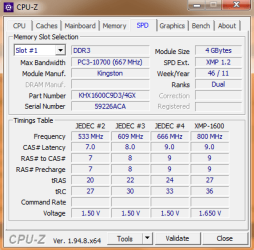
I think my current memory is DDR3, or at least it what it says in here:
111.PNG

I hope the memory is good enough to be saved for future use.

Also, would this mean this is a 3rd gen machine?
 

My Computer My Computer

Computer type
PC/Desktop
Computer Manufacturer/Model Number
Dell Optiplex 380 Mini-Tower
OS
Windows 7 Home Premium 64 bit
CPU
Intel Core2 Quad Q9650
Motherboard
Dell 0hn7xn A01
Memory
khx1600c9d3/4gx (2 slots) (8Gb total)
Graphics Card(s)
GeForce GT 730
Monitor(s) Displays
LG 24MK600M
Screen Resolution
1920x1080
Hard Drives
toshiba tr200 (240Gb)
wdc wd10ezex 08wn4a0 (1Tb)
PSU
305W
Cooling
Fans
Last edited:

My Computers My Computers

System One System Two

  • Computer type
    PC/Desktop
    OS
    7 X64
    CPU
    i5 8400
    Motherboard
    gigabyte b365m ds3h
    Memory
    2x8gb 3200mhz
    Hard Drives
    various
    PSU
    pure power 11 400w cm
    Case
    Coolermaster
    Cooling
    cryorig m9i
  • Computer type
    PC/Desktop
    OS
    7x64
    CPU
    g5400
    Motherboard
    ga b365m ds3h
    Memory
    8gb ddr4 2400
    PSU
    xfx pro 450w
Ok, thanks for the explanation about intel generations. It seems that this computer is below those gens then.

And I'm supposing the memory could be used for the new PC, correct?.

Thanks again for stopping by in this post and help me to have a clear idea of my situation and choices.
 

My Computer My Computer

Computer type
PC/Desktop
Computer Manufacturer/Model Number
Dell Optiplex 380 Mini-Tower
OS
Windows 7 Home Premium 64 bit
CPU
Intel Core2 Quad Q9650
Motherboard
Dell 0hn7xn A01
Memory
khx1600c9d3/4gx (2 slots) (8Gb total)
Graphics Card(s)
GeForce GT 730
Monitor(s) Displays
LG 24MK600M
Screen Resolution
1920x1080
Hard Drives
toshiba tr200 (240Gb)
wdc wd10ezex 08wn4a0 (1Tb)
PSU
305W
Cooling
Fans
The Intel Core 2 Quad Q9650 processor your computer has is a "legacy generation" 1333 MHz FSB model which was introduced in the 3rd quarter of 2008.

SIW2 gave you a good example of how you can tell which generation an Intel Core i3 or i5 or i7 processor is.
 

My Computer My Computer

Computer type
PC/Desktop
Computer Manufacturer/Model Number
Dell OptiPlex 9020
OS
Windows 7 Professional SP1 64-bit
CPU
Intel Core i7-4790 3.60 GHz
Memory
32 GB DDR3-1600 MHz
Graphics Card(s)
Integrated Intel HD Graphics 4600
Monitor(s) Displays
Viewsonic 32" LCD
Hard Drives
Kingston SATA 3 240 GB SSD
Internet Speed
Spectrum Internet 1000 Mbps
Ok, I think I get the intel generation idea now.

What I'm trying to know right now is what components I could use for the time when I buy a new PC.

Thanks for the help.
 

My Computer My Computer

Computer type
PC/Desktop
Computer Manufacturer/Model Number
Dell Optiplex 380 Mini-Tower
OS
Windows 7 Home Premium 64 bit
CPU
Intel Core2 Quad Q9650
Motherboard
Dell 0hn7xn A01
Memory
khx1600c9d3/4gx (2 slots) (8Gb total)
Graphics Card(s)
GeForce GT 730
Monitor(s) Displays
LG 24MK600M
Screen Resolution
1920x1080
Hard Drives
toshiba tr200 (240Gb)
wdc wd10ezex 08wn4a0 (1Tb)
PSU
305W
Cooling
Fans
From your screenshot, the bus speed from the PCIe slot is 1.1. This WOULD have an impact on GPU performance. Yes, they are all interchangeable and PCIe 1 can be used with 2 and 3. I think 4 is out now or is coming out.

A 750TI right now might be an improvement absent of a whole new computer build. For that 70€ budget you have now you might be able to find a used 750TI on eBay. But you need to look at the seller's feedback and make sure the GPU won't give you any issues where you have to make a return.

Now I don't know what your source of income is so it might be prudent to just hold on to that precious 70€ and add to it for a whole new computer. Like I said, I'd look into a current AMD class of CPU and stick with an Nvidea GPU. You'll want a minimum of 16GB of RAM. I don't know if this will work for you, but the pcpartpicker.com website may help and list PC vendors in Europe or your area. Watch YouTube videos and read websites on how to put it all together. It's really not hard. Do not cheap out on the PSU. You'll want name brands like Antec, Corsair, Thermaltake, etc.
 

My Computer My Computer

Computer type
PC/Desktop
OS
Windows 7 Ultimate x64
Back
Top