Trying to read an old Windows 3.1 Hard Drive

scoostraw

New member
Local time
5:33 AM
Messages
32
I pulled the hard drive out of my old Windows 3.1 computer with the idea of retrieving some old data off of it.

It is a Western Digital Caviar 2420 425mb drive. I'm using an adapter to plug into my usb port (Toshiba NB505 Netbook running Windows 7).

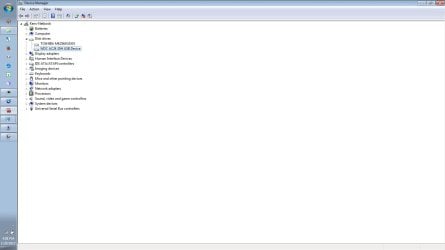
The drive shows up in Device Manager as: WDC AC24 20H USB Device
Under Properties it says that the device is working properly.
When I first plugged it in, Windows did a driver install and then a subsequent message that the device is available to use.

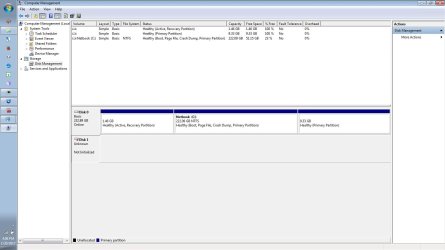
This all sounds good, but the drive appears in Disk Manager as "Unknown" and "Not Initialized".

What do I do (??)
 

Attachments
  • Caviar.jpeg
    Caviar.jpeg
    83.3 KB · Views: 5
  • Caviar_2.jpeg
    Caviar_2.jpeg
    46.8 KB · Views: 3

My Computer My Computer

At a glance

Windows 7 32bit
Computer Manufacturer/Model Number
Toshiba NB505 Netbook
OS
Windows 7 32bit
Hello scoostraw mate if you want to get data off that drive use this
BOOTABLE UBUNTU
Make a bootable Ubuntu disk Download Ubuntu Desktop | Download | Ubuntu
Set the BIOS to boot from the optical when the machine boots it will show you a screen with TRY or INSTALL > select TRY not INSTALL
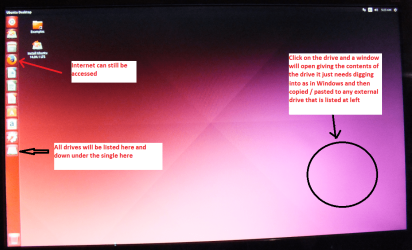
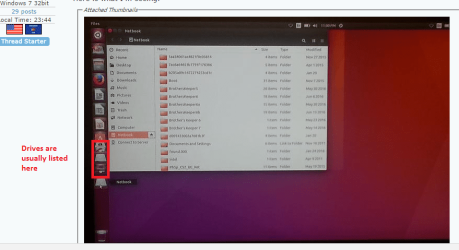
When it is finished - it takes very little time you will get a screen like in the pic .
Open the drive you want > User and dig down until you get to the data / settings you may be able to copy / paste the material you want to an external source or other installed drive doing this.
I am not sure if it will but I have recovered tons of data etc using this method both on "dead" or just plain drives that you cannot get data from using Windows.
Or there is this Emergency Kit - save your files from a dead OS I prefer Ubuntu a tad easier to set up but this does the same thing

You can use a stick if you want but I prefer a disk the choice is yours of course.
 

Attachments

  • UBUNTU SCREEN X2.PNG
    UBUNTU SCREEN X2.PNG
    272.7 KB · Views: 1

My Computer My Computer

At a glance

Desk1 7 Home Prem / Desk2 10 Pro / Main lap A...Desk1 i5 3750K / Laptop i7 GTX 860M / Desk2 i...Desk1 8GB (1866) / Desk2 16GB (1333) / Laptop...Desk 1& 2NVidia GTX 650 & Laptops on board Intel
Computer type
PC/Desktop
Computer Manufacturer/Model Number
Own build (new) Desk1 / Asus ROG Win 7 / Desk2 1st build
OS
Desk1 7 Home Prem / Desk2 10 Pro / Main lap Asus ROG 10 Pro 2 laptop Toshiba 7 Pro Asus P2520 7 & 10
CPU
Desk1 i5 3750K / Laptop i7 GTX 860M / Desk2 i5 2500
Motherboard
Desk1 Asus P877-V / Desk2 Gigabyte H67 UD3H / Laptop ?
Memory
Desk1 8GB (1866) / Desk2 16GB (1333) / Laptop 8Gb DDR3
Graphics Card(s)
Desk 1& 2NVidia GTX 650 & Laptops on board Intel
Sound Card
Desk 1 & 2 -XONAR DG Realtek High Def audio Laptop
Monitor(s) Displays
Desk 1 Benq HD 2450 / Desk2 Philips 24" / Laptop 17.5"
Screen Resolution
1920x1080 D1 & D2 & Laptop 1
Hard Drives
Desk1 Samsung 120GB 830 SSD
Asus ROG 256GB 850 Pro SSD
Desk2 Samsung 840 256 SSD
Toshiba 120GB EVO
PSU
Desk 1 Corsair HX 1050/ Laptop ? / Desk 2 Corsair HX 650
Case
Desk 1 Cooler HAF XM ? Toshiba laptop / Desk2 Coolermaster
Cooling
Fans on all Desk1 -2 Desk2 - all Coolermasters 5 Laptop ?
Keyboard
Desk 1 MS Sidewinder X6 Desk 2 MS Sidewinder X 4
Mouse
Desk 1&2 - Gigabyte MS 900 gamer - laptop - Logitec wireless
Internet Speed
ADSL2+
Other Info
One other Desktop (tester) and spare Toshba laptop both with SSD's
Running Kaspersky 2016 ISS on all machines config'd identically
Logitec audio stereo systems on each machine (x3)
Canon MG5250MFC
Router/modem TP-Link running WPA2SK
Hello ICIT2LOL thanks for the reply.

My netbook does not have an optical drive, so if I use my USB external drive - do I just select USB in the BIOS as the "drive" to boot from?
 

My Computer My Computer

At a glance

Windows 7 32bit
Computer Manufacturer/Model Number
Toshiba NB505 Netbook
OS
Windows 7 32bit

My Computers My Computers

  • At a glance

    Windows 7 HP 64i5 6600K - 800MHz to 4200MHz4+4G GSkill DDR4 3000IG - Intel 530
    Computer type
    PC/Desktop
    Computer Manufacturer/Model Number
    custom build
    OS
    Windows 7 HP 64
    CPU
    i5 6600K - 800MHz to 4200MHz
    Motherboard
    GA-Z170-HD3P
    Memory
    4+4G GSkill DDR4 3000
    Graphics Card(s)
    IG - Intel 530
    Monitor(s) Displays
    Samsung 226BW
    Screen Resolution
    1680x1050
    Hard Drives
    (1) -1 SM951 – 128GB M.2 AHCI PCIe SSD drive for Windows 7 and Lubuntu
    (2) -1 WD SATA 3 - 1T for Data
    (3) -1 WD SATA 3 - 1T for backup
    PSU
    Thermaltake 450W TR2 gold
    Keyboard
    Old and good Chicony mechanical keyboard
    Mouse
    Logitech mX performance - 9 buttons (had to disable some)
    Internet Speed
    500Mb/s
    Browser
    Firefox 64
    Other Info
    TinyWall firewall
  • At a glance

    Windows 7 Proi7-4500U 800MHz to 3.0GHz(4+4)G DDR3 1600IG intel 4400 + NVIDIA GeForce GT 745M
    Computer type
    Laptop
    System Manufacturer/Model Number
    Asus Q550LF
    OS
    Windows 7 Pro
    CPU
    i7-4500U 800MHz to 3.0GHz
    Motherboard
    Asus Q550LF
    Memory
    (4+4)G DDR3 1600
    Graphics Card(s)
    IG intel 4400 + NVIDIA GeForce GT 745M
    Sound Card
    Realtek
    Monitor(s) Displays
    LG Display LP156WF4-SPH1
    Screen Resolution
    1920 x 1080
    Hard Drives
    BX500 120G SSD for Windows and programs +
    1T HDD for data
    Internet Speed
    500 Mb/s
    Browser
    Firefox
    Other Info
    TinyWall firewall
Ahh ok got it. I will try this later today when I am home.

As a related question - I am able to read a Windows 3.1 floppy disk just fine using a USB floppy drive. What is the reason that the hard drive cannot be read the same way via USB?
 

My Computer My Computer

At a glance

Windows 7 32bit
Computer Manufacturer/Model Number
Toshiba NB505 Netbook
OS
Windows 7 32bit
Ok mate as Megahertz has said to do a stick is fine. An alternative of course is to get an external optical drive but that is a by the by.

The hard drive if you were going to read it via USB would need a USB to SATA adaptor and another machine to hook it up to. Your floppy drive I am assuming is an external device.

This way you boot into a Linux based OS it is entirely independent of Windows so the Ubuntu or the other Linux Mint OS just sees your hard drive more or less the way that any computer would see a plugged in external drive as in Windows, and in a way how you see the floppy drive using Windows - if that makes sense.

Just do remember not to INSTALL the Ubuntu OS always the TRY = a handy tool to keep up your sleeve. Of course if you were interested in having a go with Ubuntu you clould always use a spare drive and install it. ;) It is a bit fiddly for me so I have gone with another Linux based OS that is more like Windows.
 

My Computer My Computer

At a glance

Desk1 7 Home Prem / Desk2 10 Pro / Main lap A...Desk1 i5 3750K / Laptop i7 GTX 860M / Desk2 i...Desk1 8GB (1866) / Desk2 16GB (1333) / Laptop...Desk 1& 2NVidia GTX 650 & Laptops on board Intel
Computer type
PC/Desktop
Computer Manufacturer/Model Number
Own build (new) Desk1 / Asus ROG Win 7 / Desk2 1st build
OS
Desk1 7 Home Prem / Desk2 10 Pro / Main lap Asus ROG 10 Pro 2 laptop Toshiba 7 Pro Asus P2520 7 & 10
CPU
Desk1 i5 3750K / Laptop i7 GTX 860M / Desk2 i5 2500
Motherboard
Desk1 Asus P877-V / Desk2 Gigabyte H67 UD3H / Laptop ?
Memory
Desk1 8GB (1866) / Desk2 16GB (1333) / Laptop 8Gb DDR3
Graphics Card(s)
Desk 1& 2NVidia GTX 650 & Laptops on board Intel
Sound Card
Desk 1 & 2 -XONAR DG Realtek High Def audio Laptop
Monitor(s) Displays
Desk 1 Benq HD 2450 / Desk2 Philips 24" / Laptop 17.5"
Screen Resolution
1920x1080 D1 & D2 & Laptop 1
Hard Drives
Desk1 Samsung 120GB 830 SSD
Asus ROG 256GB 850 Pro SSD
Desk2 Samsung 840 256 SSD
Toshiba 120GB EVO
PSU
Desk 1 Corsair HX 1050/ Laptop ? / Desk 2 Corsair HX 650
Case
Desk 1 Cooler HAF XM ? Toshiba laptop / Desk2 Coolermaster
Cooling
Fans on all Desk1 -2 Desk2 - all Coolermasters 5 Laptop ?
Keyboard
Desk 1 MS Sidewinder X6 Desk 2 MS Sidewinder X 4
Mouse
Desk 1&2 - Gigabyte MS 900 gamer - laptop - Logitec wireless
Internet Speed
ADSL2+
Other Info
One other Desktop (tester) and spare Toshba laptop both with SSD's
Running Kaspersky 2016 ISS on all machines config'd identically
Logitec audio stereo systems on each machine (x3)
Canon MG5250MFC
Router/modem TP-Link running WPA2SK

My Computer My Computer

At a glance

Windows 7 32bit
Computer Manufacturer/Model Number
Toshiba NB505 Netbook
OS
Windows 7 32bit
Ok mate yep that model is exactly the same as one that I have and having tried some cheaper Chinese sourced brands would advise anyone to go with this particular brand;)
 

My Computer My Computer

At a glance

Desk1 7 Home Prem / Desk2 10 Pro / Main lap A...Desk1 i5 3750K / Laptop i7 GTX 860M / Desk2 i...Desk1 8GB (1866) / Desk2 16GB (1333) / Laptop...Desk 1& 2NVidia GTX 650 & Laptops on board Intel
Computer type
PC/Desktop
Computer Manufacturer/Model Number
Own build (new) Desk1 / Asus ROG Win 7 / Desk2 1st build
OS
Desk1 7 Home Prem / Desk2 10 Pro / Main lap Asus ROG 10 Pro 2 laptop Toshiba 7 Pro Asus P2520 7 & 10
CPU
Desk1 i5 3750K / Laptop i7 GTX 860M / Desk2 i5 2500
Motherboard
Desk1 Asus P877-V / Desk2 Gigabyte H67 UD3H / Laptop ?
Memory
Desk1 8GB (1866) / Desk2 16GB (1333) / Laptop 8Gb DDR3
Graphics Card(s)
Desk 1& 2NVidia GTX 650 & Laptops on board Intel
Sound Card
Desk 1 & 2 -XONAR DG Realtek High Def audio Laptop
Monitor(s) Displays
Desk 1 Benq HD 2450 / Desk2 Philips 24" / Laptop 17.5"
Screen Resolution
1920x1080 D1 & D2 & Laptop 1
Hard Drives
Desk1 Samsung 120GB 830 SSD
Asus ROG 256GB 850 Pro SSD
Desk2 Samsung 840 256 SSD
Toshiba 120GB EVO
PSU
Desk 1 Corsair HX 1050/ Laptop ? / Desk 2 Corsair HX 650
Case
Desk 1 Cooler HAF XM ? Toshiba laptop / Desk2 Coolermaster
Cooling
Fans on all Desk1 -2 Desk2 - all Coolermasters 5 Laptop ?
Keyboard
Desk 1 MS Sidewinder X6 Desk 2 MS Sidewinder X 4
Mouse
Desk 1&2 - Gigabyte MS 900 gamer - laptop - Logitec wireless
Internet Speed
ADSL2+
Other Info
One other Desktop (tester) and spare Toshba laptop both with SSD's
Running Kaspersky 2016 ISS on all machines config'd identically
Logitec audio stereo systems on each machine (x3)
Canon MG5250MFC
Router/modem TP-Link running WPA2SK
Ok an unexpected fly in the ointment..

For some reason my Toshiba flash-screen is not appearing when I power up. It goes straight to Windows. I have seen this Toshiba screen many many times (where you hold the Fx key to enter setup mode).

Any thoughts on why I'm not seeing it now? And how to get it back?
 

My Computer My Computer

At a glance

Windows 7 32bit
Computer Manufacturer/Model Number
Toshiba NB505 Netbook
OS
Windows 7 32bit
Ok mate now is it absolutely necessary for the Toshiba screen to show? As long as it is booting into Windows I wouldn't be worrying too much.

Now of I am not very much mistaken the splash screen is usually turned off in the BIOS if you so want. I take it you have not done anything like that in the BIOS?

Plus is this the first time it has done this if so just try a reboot.

Just a by the by that model I see comes with a mile of bloatware - not that that is surprising because I have had a few Toshibas myself and all of them I have done a clean install which of course gets rid of all that clutter.

If you ever need drivers for that machine this is it http://support.toshiba.com/support/modelHome?freeText=2861099&osId=29 I see there are quite a lot that are recent additions too and you can also see the amount of bloatware there is in that link.
 

My Computer My Computer

At a glance

Desk1 7 Home Prem / Desk2 10 Pro / Main lap A...Desk1 i5 3750K / Laptop i7 GTX 860M / Desk2 i...Desk1 8GB (1866) / Desk2 16GB (1333) / Laptop...Desk 1& 2NVidia GTX 650 & Laptops on board Intel
Computer type
PC/Desktop
Computer Manufacturer/Model Number
Own build (new) Desk1 / Asus ROG Win 7 / Desk2 1st build
OS
Desk1 7 Home Prem / Desk2 10 Pro / Main lap Asus ROG 10 Pro 2 laptop Toshiba 7 Pro Asus P2520 7 & 10
CPU
Desk1 i5 3750K / Laptop i7 GTX 860M / Desk2 i5 2500
Motherboard
Desk1 Asus P877-V / Desk2 Gigabyte H67 UD3H / Laptop ?
Memory
Desk1 8GB (1866) / Desk2 16GB (1333) / Laptop 8Gb DDR3
Graphics Card(s)
Desk 1& 2NVidia GTX 650 & Laptops on board Intel
Sound Card
Desk 1 & 2 -XONAR DG Realtek High Def audio Laptop
Monitor(s) Displays
Desk 1 Benq HD 2450 / Desk2 Philips 24" / Laptop 17.5"
Screen Resolution
1920x1080 D1 & D2 & Laptop 1
Hard Drives
Desk1 Samsung 120GB 830 SSD
Asus ROG 256GB 850 Pro SSD
Desk2 Samsung 840 256 SSD
Toshiba 120GB EVO
PSU
Desk 1 Corsair HX 1050/ Laptop ? / Desk 2 Corsair HX 650
Case
Desk 1 Cooler HAF XM ? Toshiba laptop / Desk2 Coolermaster
Cooling
Fans on all Desk1 -2 Desk2 - all Coolermasters 5 Laptop ?
Keyboard
Desk 1 MS Sidewinder X6 Desk 2 MS Sidewinder X 4
Mouse
Desk 1&2 - Gigabyte MS 900 gamer - laptop - Logitec wireless
Internet Speed
ADSL2+
Other Info
One other Desktop (tester) and spare Toshba laptop both with SSD's
Running Kaspersky 2016 ISS on all machines config'd identically
Logitec audio stereo systems on each machine (x3)
Canon MG5250MFC
Router/modem TP-Link running WPA2SK
I guess I don't know of another way to change the bios so the netbook will boot from the usb stick I just made.

I tried both reboot and shutdown - when the system comes back up it goes right into Windows.

{edit} I got it. Held down F2 during power up and the setup screen appeared.
 

My Computer My Computer

At a glance

Windows 7 32bit
Computer Manufacturer/Model Number
Toshiba NB505 Netbook
OS
Windows 7 32bit
Ok I'm in ubunto. I see my system files but I don't see the hard drive - or the usb stick either. Maybe I'm not looking in the right place?

Here is what I'm seeing:
 

Attachments

  • ubunto.jpeg
    ubunto.jpeg
    243.2 KB · Views: 2

My Computer My Computer

At a glance

Windows 7 32bit
Computer Manufacturer/Model Number
Toshiba NB505 Netbook
OS
Windows 7 32bit
Ok mate now have a look at my pic that is where drives are usually at. Now I am thinking because you are using Ubuntu on the machine itself it may be different to what I have done in the past and that is to hook a drive up to a machine running Ubuntu via an adaptor.

In your pic can you click on Computer in the Ubuntu and let us know what comes up and I am thinking it should show you any drives as it does in Windows.

Now you should be able to open Documents and Settings and then retrieve data but lets just find the drives first..
 

Attachments

  • DRIVER SEARCH.PNG
    DRIVER SEARCH.PNG
    108.1 KB · Views: 2

My Computer My Computer

At a glance

Desk1 7 Home Prem / Desk2 10 Pro / Main lap A...Desk1 i5 3750K / Laptop i7 GTX 860M / Desk2 i...Desk1 8GB (1866) / Desk2 16GB (1333) / Laptop...Desk 1& 2NVidia GTX 650 & Laptops on board Intel
Computer type
PC/Desktop
Computer Manufacturer/Model Number
Own build (new) Desk1 / Asus ROG Win 7 / Desk2 1st build
OS
Desk1 7 Home Prem / Desk2 10 Pro / Main lap Asus ROG 10 Pro 2 laptop Toshiba 7 Pro Asus P2520 7 & 10
CPU
Desk1 i5 3750K / Laptop i7 GTX 860M / Desk2 i5 2500
Motherboard
Desk1 Asus P877-V / Desk2 Gigabyte H67 UD3H / Laptop ?
Memory
Desk1 8GB (1866) / Desk2 16GB (1333) / Laptop 8Gb DDR3
Graphics Card(s)
Desk 1& 2NVidia GTX 650 & Laptops on board Intel
Sound Card
Desk 1 & 2 -XONAR DG Realtek High Def audio Laptop
Monitor(s) Displays
Desk 1 Benq HD 2450 / Desk2 Philips 24" / Laptop 17.5"
Screen Resolution
1920x1080 D1 & D2 & Laptop 1
Hard Drives
Desk1 Samsung 120GB 830 SSD
Asus ROG 256GB 850 Pro SSD
Desk2 Samsung 840 256 SSD
Toshiba 120GB EVO
PSU
Desk 1 Corsair HX 1050/ Laptop ? / Desk 2 Corsair HX 650
Case
Desk 1 Cooler HAF XM ? Toshiba laptop / Desk2 Coolermaster
Cooling
Fans on all Desk1 -2 Desk2 - all Coolermasters 5 Laptop ?
Keyboard
Desk 1 MS Sidewinder X6 Desk 2 MS Sidewinder X 4
Mouse
Desk 1&2 - Gigabyte MS 900 gamer - laptop - Logitec wireless
Internet Speed
ADSL2+
Other Info
One other Desktop (tester) and spare Toshba laptop both with SSD's
Running Kaspersky 2016 ISS on all machines config'd identically
Logitec audio stereo systems on each machine (x3)
Canon MG5250MFC
Router/modem TP-Link running WPA2SK
Yes that's exactly where I looked. There are 2 separate icons for my netbook, one for trash and one for system settings. In my photo I have clicked on one of the netbook icons (contents seem to be identical).

I see no drives.
 

My Computer My Computer

At a glance

Windows 7 32bit
Computer Manufacturer/Model Number
Toshiba NB505 Netbook
OS
Windows 7 32bit
Ok I did a system search for .iso and it came up with an icon "Disks". And at that point the icon I think you are referring to appears in the sidebar.

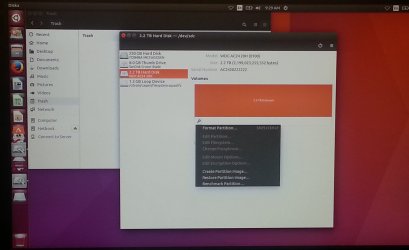
I see the Toshiba hard drive, thumb drive, and the drive I'm trying to extract from. But I see no way to view the contents. The options I have are Format partition, Create partition image, Restore partition image, and Benchmark Partition.
 

Attachments

  • ubunto_2.jpg
    ubunto_2.jpg
    260.8 KB · Views: 4
Last edited:

My Computer My Computer

At a glance

Windows 7 32bit
Computer Manufacturer/Model Number
Toshiba NB505 Netbook
OS
Windows 7 32bit
Well, I see one thing that is wrong. Ubuntu is seeing that disk as a 2.2 TB drive, not 425 MB like it is supposed to be. Something is either wrong with your drive, adapter, or the OS.

At this point, I would connect the drive to a desktop, not a laptop, to a real SATA or IDE port (if you can find a PC that has an IDE port) and try to copy the files from that configuration. A lot of IDE to SATA/USB adapters do not read the drive properly. In my experience, they often have to reformat the drive with the adapter attached before they will read as initialized (which is counter-intuitive, and very annoying). Obviously, that will destroy your data, so you don't want to do that.

But right now, the disk is reading as a larger device than it really is. You'll have to solve that problem before you are able to retrieve the files.
 

My Computer My Computer

At a glance

Win 7 Pro x64/Win 10 Pro x64 dual bootAMD FX 8350 Vishera @ 420016 GB Mushkin Blackline DDR3-2400 @ 1866 (9-1...XFX Radeon R9 280 Double D Black Edition
Computer type
PC/Desktop
Computer Manufacturer/Model Number
Mellon Labs (custom build)
OS
Win 7 Pro x64/Win 10 Pro x64 dual boot
CPU
AMD FX 8350 Vishera @ 4200
Motherboard
ASUS M5A97 R2.0
Memory
16 GB Mushkin Blackline DDR3-2400 @ 1866 (9-10-10-10-31)
Graphics Card(s)
XFX Radeon R9 280 Double D Black Edition
Sound Card
Realtek HD Audio on MB. Sounds great.
Monitor(s) Displays
Acer 24", Acer 22"
Screen Resolution
3840 x 1080
Hard Drives
1 x Mushkin Chronos 120 GB SSD (Win 10)
1 x Samsung 850 EVO 250 GB SSD (Win 7)
1 x WD 1TB SATA Blue
1 x WD 1TB SATA Green
PSU
Corsair TX-750
Case
CoolerMaster HAF 912+
Cooling
Coolermaster Seidon 240M Liquid AIO. 6 case fans
Keyboard
Logitech G710+
Mouse
Logitech G500s
Internet Speed
Much better since I got fiber, but still way overpriced.
Antivirus
MSE, Malware Bytes for scanning
Browser
Firefox
Other Info
Corsair VOID USB headphones.

A Mellon Labs X-1 - LCD Smartie driven system status display.

Brought to you by the letter E
Yeah I noticed that also. I thought maybe it was because it was such an old drive and formatted with the old OS.

Someone else mentioned the idea of installing Windows Virtual PC on my netbook and make an XP VM. The thinking being that XP would recognize the drive.

Or maybe I could stop at a computer shop. They must have old machines on hand for things like this.
 

My Computer My Computer

At a glance

Windows 7 32bit
Computer Manufacturer/Model Number
Toshiba NB505 Netbook
OS
Windows 7 32bit
.......Or maybe I could stop at a computer shop. They must have old machines on hand for things like this.

Yep, that is good idea to try.If you are unable to find such a shop, please comeback. And then we can try to change the Disk Geometry and check whether your drive can be read.

For your drive: Cylinders 989 Heads 15 Sectors 56 We can change all this with TestDisk and see whether your disk can be read. The only grey area is the file format. Was it FAT32 or FAT16 and what is the cluster size? It could be 4KB if FAT32 and 8KB for FAT16. Changing the cluster size to a wrong value will destroy the data. So I will hesitate to change the cluster size without knowing it for sure. But for that we can change the other values and check.
 

My Computer My Computer

At a glance

Windows 7 Home Premium 32 bit
OS
Windows 7 Home Premium 32 bit
Back
Top