Trying to reinstall Win 7 SP1 and not lost my stuff

Do take note that if you made a lot changes in the system, do a backup.

Before you do the backup, it is better to do a shutdown, then turn on.

This is to ensure everything is in order.

Also if you can, do create a system restore point, as system restore would be quite helpful.
 

My Computer My Computer

At a glance

Windows 7 x64
Computer type
Laptop
Computer Manufacturer/Model Number
Toshiba L630 and L735
OS
Windows 7 x64
Hard Drives
240 GB SSD
Do take note that if you made a lot changes in the system, do a backup.

Before you do the backup, it is better to do a shutdown, then turn on.

This is to ensure everything is in order.

Also if you can, do create a system restore point, as system restore would be quite helpful.


Windows will automatically create some System Restore points, but I always do one every Wednesday just to make sure there is one at least every week.
 

My Computer My Computer

At a glance

Windows 7 Home Premium 32-Bit - Build 7600 SP1Intel Core i3-2120 3.30GhzKingston 4 GB DDR3 1333 mhzAMD Radeon HD6670
Computer type
PC/Desktop
Computer Manufacturer/Model Number
Custom Build
OS
Windows 7 Home Premium 32-Bit - Build 7600 SP1
CPU
Intel Core i3-2120 3.30Ghz
Motherboard
Asus P8Z68-V LX Intel Z68 Socket H2 ATX
Memory
Kingston 4 GB DDR3 1333 mhz
Graphics Card(s)
AMD Radeon HD6670
Sound Card
Sound Blaster Audigy SE 24-Bit
Monitor(s) Displays
Asus VE228
Screen Resolution
1440 X 900
Hard Drives
OCZ Vertex 3 120 GB Sata 3 SSD ==
Kingston SH103/S3 120 G Hyper X 120 GB SSD ==
Western Digital 500 GB Caviar Green 7200 RPM ==
PSU
Corsair CX600M == 600 Watt
Case
NZXT Apollo - Silver with Clear Side Panel
Cooling
Three 120 mm Fans
Keyboard
Microsoft Natural 4000
Mouse
Microsoft Custom Optical 3000
Internet Speed
AT&T Fiber Optic Wireless Network
Antivirus
Microsoft Security Essentials
Browser
Chrome
Other Info
120 mm Blue LED Fan -- Three Blue LED Lazer Light Sticks
Thanks much for the Macrium tip. I'll get it.
 

My Computer My Computer

At a glance

Windows 7.... 64 bit6 Gig
Computer Manufacturer/Model Number
HP Pavilian
OS
Windows 7.... 64 bit
Memory
6 Gig
Ok, so if you backup your entire computer, I have a main C Drive and 2 other drives which makes up my computer.

Do I backup everything or just the C drive? Which is where my system is?

Say I want to backup my C drive. I back it up to my D drive. If I have a crash and have to format and reinstall my system 7 from the OEM DVD, I would just have to reinstall Macrium Reflect and run it then restore the C drive correct?

I am just trying to give myself peace of mind and know that Macrium is doing it's job and I have no worries.

Thanks much....
 

My Computer My Computer

At a glance

Windows 7.... 64 bit6 Gig
Computer Manufacturer/Model Number
HP Pavilian
OS
Windows 7.... 64 bit
Memory
6 Gig
You install windows and get it exactly how you want it, all your programs, all your updates installed etc. and of course a perfect system file check.

You then create an image of your C partition and the System Reserved Partition if you have one. That`s it nothing else.

You store that image on another drive.

Now if you ever screw up windows, all you have to do is boot from the windows install dvd or a system repair disc, which you create from within windows.

You then simply restore windows back to A1 perfectly working condition from the image you created earlier instead of installing windows all over again.

Windows native built in imaging and Macrium Reflect both work great and you should make images with both programs.

Here`s my layout and Disk 1 is dedicated to images, made by both Windows and Macrium. I personally have never had an issue using windows imaging.

And after a week or 2 or after a new nvidia driver is installed and checks out ok after a few days, I`ll format my image drive and create 2 new images.
 

Attachments

  • DM.jpg
    DM.jpg
    198.1 KB · Views: 4

My Computer My Computer

At a glance

Windows 10 Pro x64Intel Core i7 6700KGSkill TridentZ RGB 16GB 3600 16-16-16-36EVGA GTX 980 Ti SC x2
Computer type
PC/Desktop
Computer Manufacturer/Model Number
Skylake Special #666
OS
Windows 10 Pro x64
CPU
Intel Core i7 6700K
Motherboard
Asus Sabertooth Z170 Mark 1
Memory
GSkill TridentZ RGB 16GB 3600 16-16-16-36
Graphics Card(s)
EVGA GTX 980 Ti SC x2
Sound Card
Realtek High Definition
Monitor(s) Displays
AOC G2460PG
Screen Resolution
1920 x 1080 144Hz
Hard Drives
Samsung 860 Pro 256GB, Seagate Barracuda 4TB x2
PSU
EVGA 1000 P2, EVGA White Custom Braided Cables
Case
Corsair Vengeance C70 Gunmetal Black
Cooling
Corsair H100i v2, Corsair ML120 x2, Thermal Grizzly Kryonaut
Keyboard
Logitech G910 Orion Spectrum
Mouse
Logitech G700s
Internet Speed
Verizon Fios Quantum Gateway 75/75
Antivirus
Windows Defender, Malwarebytes Free 3.8.3
Browser
Chrome
Other Info
Corsair SP120 x4, LG Blu-ray Drive, Durabrand HT-395 100 Watt Dolby Digital Amp, Corsair H2100 Wireless 7.1 Headset
Ok, so if you backup your entire computer, I have a main C Drive and 2 other drives which makes up my computer.

Do I backup everything or just the C drive? Which is where my system is?

Say I want to backup my C drive. I back it up to my D drive. If I have a crash and have to format and reinstall my system 7 from the OEM DVD, I would just have to reinstall Macrium Reflect and run it then restore the C drive correct?

I am just trying to give myself peace of mind and know that Macrium is doing it's job and I have no worries.

Thanks much....

You should create a bootable Macrium Rescue CD.
It's in the Macrium Menu > Other Tasks > Create Rescue Media

Then if Windows can't boot, you boot with the Macrium Rescue CD and restore the Macrium backup image.

Post a maximized/resized screen print of Disk Management for help on what you need to image.
http://www.sevenforums.com/tutorials/274797-disk-management-post-screen-capture-image.html
 

My Computer My Computer

At a glance

Multi-Boot W7_Pro_x64 W8.1_Pro_x64 W10_Pro_x6...AMD Athlon II x4 6206GB GSkill DDR2 800AMD 4670 GPU + AMD 4200 IGP
Computer type
PC/Desktop
Computer Manufacturer/Model Number
home built
OS
Multi-Boot W7_Pro_x64 W8.1_Pro_x64 W10_Pro_x64 +Linux_VMs +Chromium_VM
CPU
AMD Athlon II x4 620
Motherboard
Gigabyte GA-MA785G-UD3H
Memory
6GB GSkill DDR2 800
Graphics Card(s)
AMD 4670 GPU + AMD 4200 IGP
Sound Card
on board Realtek ALC889A
Monitor(s) Displays
RCA 40" LCD TV, Insignia 32" LCD TV, HP 15" LCD monitor
Screen Resolution
1680 x 1050
Hard Drives
OCZ Vertex 3 120GB,
Samsung F3 1TB (3),
Several others - WD, Seagate, Hitachi, ...
PSU
Corsair 500 W
Case
Rosewill mid tower
Cooling
CM 90mm rifle
Keyboard
Gyration wireless, Logitech wireless, Dell USB wired
Mouse
Gyration wireless, Logitech wireless, V7 USB wired
Internet Speed
Spectrum - 100Mbps D / 10Mbps U
Antivirus
Avast, MBAM3, EMET, WinPatrol
Browser
Pale Moon, Firefox, IE
Other Info
2 multi-boot PC's
Mainly HTPC/Office/Gen purpose (no gaming).
Trendnet USB KVM.
LG DVD burner/Blue Ray Player.
Tray system for removable SATA backup drives.

Not currently OCd, under-volted.
I use Hybrid sleep, rarely re-boot or shutdown.

Hauppauge HD-PVR, Avermedia PCIe TV Tuner, Hauppauge PCI TV Tuner.
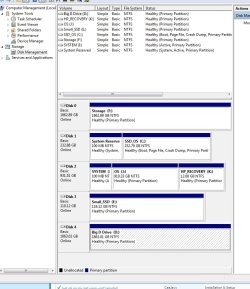
Got ya' I get it now. I did not know that Macrium created a startup disk.

Thanks for the info... Also please let me know how to start the backup from this screen.
 

Attachments

  • Computer_Management.jpg
    Computer_Management.jpg
    90.7 KB · Views: 1
Last edited:

My Computer My Computer

At a glance

Windows 7.... 64 bit6 Gig
Computer Manufacturer/Model Number
HP Pavilian
OS
Windows 7.... 64 bit
Memory
6 Gig
Ok, so if you backup your entire computer, I have a main C Drive and 2 other drives which makes up my computer.

Do I backup everything or just the C drive? Which is where my system is?

Say I want to backup my C drive. I back it up to my D drive. If I have a crash and have to format and reinstall my system 7 from the OEM DVD, I would just have to reinstall Macrium Reflect and run it then restore the C drive correct?

I am just trying to give myself peace of mind and know that Macrium is doing it's job and I have no worries.

Thanks much....

When you say you have three drives I am assuming you mean three physical drives, not three partitions. I have two drives. One for my OS on C: drive and a separate D: drive for Documents, Pictures Etc.. I have a third drive E: that is for my backup. I back up both C: and D: once a week to E: Then once a month I have an external drive that I back up C: and D: to just in case my whole computer is fried one day. You do want to backup all of your drives. I feel sure all information is important to you.
 

My Computer My Computer

At a glance

Windows 7 Home Premium 32-Bit - Build 7600 SP1Intel Core i3-2120 3.30GhzKingston 4 GB DDR3 1333 mhzAMD Radeon HD6670
Computer type
PC/Desktop
Computer Manufacturer/Model Number
Custom Build
OS
Windows 7 Home Premium 32-Bit - Build 7600 SP1
CPU
Intel Core i3-2120 3.30Ghz
Motherboard
Asus P8Z68-V LX Intel Z68 Socket H2 ATX
Memory
Kingston 4 GB DDR3 1333 mhz
Graphics Card(s)
AMD Radeon HD6670
Sound Card
Sound Blaster Audigy SE 24-Bit
Monitor(s) Displays
Asus VE228
Screen Resolution
1440 X 900
Hard Drives
OCZ Vertex 3 120 GB Sata 3 SSD ==
Kingston SH103/S3 120 G Hyper X 120 GB SSD ==
Western Digital 500 GB Caviar Green 7200 RPM ==
PSU
Corsair CX600M == 600 Watt
Case
NZXT Apollo - Silver with Clear Side Panel
Cooling
Three 120 mm Fans
Keyboard
Microsoft Natural 4000
Mouse
Microsoft Custom Optical 3000
Internet Speed
AT&T Fiber Optic Wireless Network
Antivirus
Microsoft Security Essentials
Browser
Chrome
Other Info
120 mm Blue LED Fan -- Three Blue LED Lazer Light Sticks
Got ya' I get it now. I did not know that Macrium created a startup disk.

Thanks for the info... Also please let me know how to start the backup from this screen.


When you backup your files to Macrium, you then take a blank cd and make a Rescue CD. This is used so that if your PC will not boot, you can boot from the Rescue CD and restore your backups.
This site explains it. Starting with the rescue CD
 

My Computer My Computer

At a glance

Windows 7 Home Premium 32-Bit - Build 7600 SP1Intel Core i3-2120 3.30GhzKingston 4 GB DDR3 1333 mhzAMD Radeon HD6670
Computer type
PC/Desktop
Computer Manufacturer/Model Number
Custom Build
OS
Windows 7 Home Premium 32-Bit - Build 7600 SP1
CPU
Intel Core i3-2120 3.30Ghz
Motherboard
Asus P8Z68-V LX Intel Z68 Socket H2 ATX
Memory
Kingston 4 GB DDR3 1333 mhz
Graphics Card(s)
AMD Radeon HD6670
Sound Card
Sound Blaster Audigy SE 24-Bit
Monitor(s) Displays
Asus VE228
Screen Resolution
1440 X 900
Hard Drives
OCZ Vertex 3 120 GB Sata 3 SSD ==
Kingston SH103/S3 120 G Hyper X 120 GB SSD ==
Western Digital 500 GB Caviar Green 7200 RPM ==
PSU
Corsair CX600M == 600 Watt
Case
NZXT Apollo - Silver with Clear Side Panel
Cooling
Three 120 mm Fans
Keyboard
Microsoft Natural 4000
Mouse
Microsoft Custom Optical 3000
Internet Speed
AT&T Fiber Optic Wireless Network
Antivirus
Microsoft Security Essentials
Browser
Chrome
Other Info
120 mm Blue LED Fan -- Three Blue LED Lazer Light Sticks
Ok, so if you backup your entire computer, I have a main C Drive and 2 other drives which makes up my computer.

Do I backup everything or just the C drive? Which is where my system is?

Say I want to backup my C drive. I back it up to my D drive. If I have a crash and have to format and reinstall my system 7 from the OEM DVD, I would just have to reinstall Macrium Reflect and run it then restore the C drive correct?

I am just trying to give myself peace of mind and know that Macrium is doing it's job and I have no worries.

Thanks much....

For you, the simplest and safest way to do a "System Backup" is include the Disk 1 System Reserved and partitions in the backup image. The System Reserved Partition has the bootloader, and the [C] partition has Windows. Save the backup image to your [D] drive. [QUOTE="rbaron, post: 3263818, member: 125856"]Also please let me know how to start the backup from this screen.[/QUOTE] You can't start Macrium from the DM screen print you posted in post #27. You can start Macrium from the Start Orb / All Programs / Macrium. You can save a shortcut to start Macrium from your desktop, a Quick Launch toolbar, or whatever is easiest for you. I use a "Quick Launch" type toolbar, and that's the easiest/quickest way for me to start Macrium. ALSO, asking what you want to do with Disk 2 opens a new can of worms, adds more confusion :zip:
 

My Computer My Computer

At a glance

Multi-Boot W7_Pro_x64 W8.1_Pro_x64 W10_Pro_x6...AMD Athlon II x4 6206GB GSkill DDR2 800AMD 4670 GPU + AMD 4200 IGP
Computer type
PC/Desktop
Computer Manufacturer/Model Number
home built
OS
Multi-Boot W7_Pro_x64 W8.1_Pro_x64 W10_Pro_x64 +Linux_VMs +Chromium_VM
CPU
AMD Athlon II x4 620
Motherboard
Gigabyte GA-MA785G-UD3H
Memory
6GB GSkill DDR2 800
Graphics Card(s)
AMD 4670 GPU + AMD 4200 IGP
Sound Card
on board Realtek ALC889A
Monitor(s) Displays
RCA 40" LCD TV, Insignia 32" LCD TV, HP 15" LCD monitor
Screen Resolution
1680 x 1050
Hard Drives
OCZ Vertex 3 120GB,
Samsung F3 1TB (3),
Several others - WD, Seagate, Hitachi, ...
PSU
Corsair 500 W
Case
Rosewill mid tower
Cooling
CM 90mm rifle
Keyboard
Gyration wireless, Logitech wireless, Dell USB wired
Mouse
Gyration wireless, Logitech wireless, V7 USB wired
Internet Speed
Spectrum - 100Mbps D / 10Mbps U
Antivirus
Avast, MBAM3, EMET, WinPatrol
Browser
Pale Moon, Firefox, IE
Other Info
2 multi-boot PC's
Mainly HTPC/Office/Gen purpose (no gaming).
Trendnet USB KVM.
LG DVD burner/Blue Ray Player.
Tray system for removable SATA backup drives.

Not currently OCd, under-volted.
I use Hybrid sleep, rarely re-boot or shutdown.

Hauppauge HD-PVR, Avermedia PCIe TV Tuner, Hauppauge PCI TV Tuner.
Back
Top