Solved Trying to repair install Windows 7 Home Premium 64 Bit.

SlickClyde

New member
Local time
2:02 AM
Messages
12
Please read in its entirety before posting anything. As I will chronologically take you through my issue. Also I am very long winded but that is only because I am trying to be as clears as I possibly can be. For that, I apologize.

Note, This is information anyone planning on posting might need to know about my situation.
1) I do not have the Windows 7 installation disc
2) I do not have a system repair disc that was made from my laptop.
3)I do have a system repair disc made from an Acer desktop. (Important to note that)
4) My internal disc drive no longer works, However I have an external drive that I've been using.

I have a Dell Inspiron laptop and Dell computers have a factory image you can restore to through the advanced boot options (Pressing or Holding F8 at startup when the manufacturer logo appears) and selecting "Repair your computer at the top of the screen and then selecting the factory restore using "Dell Datasafe local backup". Initially I was having issues with selecting that option. When I would select it, I would get the error message "Windows failed to start. A recent hardware or software change might be the cause" and at the bottom of the screen it would say "Status: 0xc000000f". I wouldn't be able to do anything but restart the computer.

I made a repair disc from an acer desktop with the exact same version of Windows 7 and had hopes of it working, though it did boot to the same "system recovery options" menu that the "repair your computer" option would have if it worked. In the past I restored my laptop several times by selecting the "Dell datasafe restore and Emergency backup". Instead this time that option was replaced with "Acer eRecovery management" as the repair disc was from a acer desktop, obviously. When I clicked it, all the options were grayed out as it may have been trying to boot from a recovery partition setup by acer. It could not access the recovery partition set up by Dell, So that's out of the question. I cannot create a system repair disc from my laptop either because I get the same 0xc000000f error as I do with the F8 boot options.

I posted a thread earlier this month inquiring on how to fix it. Here is a link to it as it may have more information on my situation, I'm trying to factory reset my Laptop - Windows 7 Help Forums

Through some suggestions, I was going through the disc management portion of Windows, assigning letters to my recovery partition, making the OS (C: ) partition active and as far as I can remember that is all I did. I no longer have a letter assigned to my recovery partition and I have not resized, moved nor formatted any of my partitions.

I then found another forum on another site that addressed my issue and it had to do with going into an Elevated Command Prompt and using bcdedit /enum all and then posting the results from the thread. Here's a link to it: Windows 7, F8 boot option not working (SOLVED) | Acronis Forum .

I tried the bcdedit command myself and compared what I was getting to those that posted on the thread. On the thread, the scans I saw people posted was on their C: partitions, my scans were on, if I remember correctly, partition D: ) which I'm pretty sure is my internal dvd drive. I did not know how to get it to scan partition C: ) so I decided to restore my laptop back a few days before I messed with disc management (BIG MISTAKE!)

The restore failed and windows failed to boot and I would get an error "bootmgr is missing"

Using the system repair disc I made from the acer, I ran a "startup repair" diagnostic and now it boots normally again. However, now when I try to press F8 at startup, the "repair my computer" option no longer exists.

Now I need help getting that to show up again.

Here is what I need help with:
1)If someone could help fix the missing repair option at the advanced boot options menu or
2) help on how to use bcdedit in the command prompt or
3) Any other solution that would help either access my factory image or
4) A solution that would allow a repair install of windows 7

I am a NOVICE at all this command prompt/disc management and abbreviations people tend to use on these forums. I require CRYSTAL CLEAR instructions on how to work my way around the more advanced portion of windows. I know it will be a pain to and I am sorry in advance.Again, I suggest that people check out my previous thread I made in the link above for more info. Thanks

If anyone could help me with these problems I would really appreciate it.

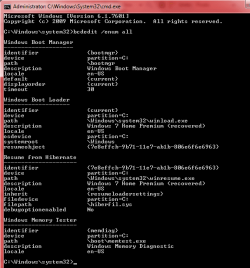
Also here is how both my disc management window and the results of my bcdedit /enum all scan look if anyone needs them.
 

Attachments

  • dsc mgnt.png
    dsc mgnt.png
    18.1 KB · Views: 3
  • cmd bcd.png
    cmd bcd.png
    14.9 KB · Views: 42

My Computer My Computer

At a glance

Windows 7 Home Premium x64
OS
Windows 7 Home Premium x64
Hi again Slick.

READ THIS FIRST

DELL ARE A PAIN.

Unlike other OEM's they play more radically with thier BIOS, and they dont play well with other OEM recovery software, but im not entirely sure if they remove, "Grey Out", the MS option..

As you now have 3 Recovery system options on your comp, i suspect they are interferring with each other
1) Dell, 2) Acer 3) MS,

I take it you did not follow my advice in the earlier thread and download the OS to a USB

In your situation i would start from scratch
Clean Reinstall - Factory OEM Windows 7 - Windows 7 Help Forums

The above tutorial is Extensive, it includes ALL the actions to be taken Before and After, as well as suggestions for retrieving your data after a catastrophic failure.
see the specific comment re Dell machines.

Please note
IF you decide to clean install from a USB >>> UNPLUG your external caddy <<<


Roy
 

My Computer My Computer

At a glance

W7 home premium 32bit/W7HP 64bit/w10 tp insid...E5300 dual core3gbNvidia Geforce 7100 Nforce 630i
Computer type
PC/Desktop
Computer Manufacturer/Model Number
medionl/Aspire 6930G/acer x55a
OS
W7 home premium 32bit/W7HP 64bit/w10 tp insider ring
CPU
E5300 dual core
Motherboard
medion MS7366
Memory
3gb
Graphics Card(s)
Nvidia Geforce 7100 Nforce 630i
Monitor(s) Displays
avixc
Internet Speed
n (isp resticted to 72)
Antivirus
mse/pands
Browser
palemoon
Other Info
Belkin Fd7050 n USB using Railink RT2870 drivers, more upto date
I would suggest that you create a set or two of factory restore DVDs. There should be an option for this in Windows. If you have no way of making these disks yourself, then you can purchase a set from Dell for your laptop.

Then use the Dell factory restore disks to do a factory restore.
 

My Computer My Computer

At a glance

Linux Mint 18.2 xfce 64-bit (VMWare host) / W...Haswell4 GB
Computer type
PC/Desktop
Computer Manufacturer/Model Number
Dell
OS
Linux Mint 18.2 xfce 64-bit (VMWare host) / Windows 8.1 Pro 32-bit (VMWare guest)
CPU
Haswell
Memory
4 GB
Monitor(s) Displays
Acer 23"
Screen Resolution
1920 x 1080
Hard Drives
Two hard drives, 1TB each: One for Linux, one for my data.
Keyboard
IBM Model M
Antivirus
Sophos (Linux), Trend Micro (Windows)
Browser
Firefox, Opera
Other Info
I use Samba to share my data drive with the other computers at my house and with my guest session in VMWare Workstation Player.
Please explain:
- "4) My internal disc drive no longer works, However I have an external drive that I've been using."
- From witch drive did you booted to get the disk management image?
- What do you want to do, repair your windows installation or do a Dell factory recover?
 

My Computers My Computers

  • At a glance

    Windows 7 HP 64i5 6600K - 800MHz to 4200MHz4+4G GSkill DDR4 3000IG - Intel 530
    Computer type
    PC/Desktop
    Computer Manufacturer/Model Number
    custom build
    OS
    Windows 7 HP 64
    CPU
    i5 6600K - 800MHz to 4200MHz
    Motherboard
    GA-Z170-HD3P
    Memory
    4+4G GSkill DDR4 3000
    Graphics Card(s)
    IG - Intel 530
    Monitor(s) Displays
    Samsung 226BW
    Screen Resolution
    1680x1050
    Hard Drives
    (1) -1 SM951 – 128GB M.2 AHCI PCIe SSD drive for Windows 7 and Lubuntu
    (2) -1 WD SATA 3 - 1T for Data
    (3) -1 WD SATA 3 - 1T for backup
    PSU
    Thermaltake 450W TR2 gold
    Keyboard
    Old and good Chicony mechanical keyboard
    Mouse
    Logitech mX performance - 9 buttons (had to disable some)
    Internet Speed
    500Mb/s
    Browser
    Firefox 64
    Other Info
    TinyWall firewall
  • At a glance

    Windows 7 Proi7-4500U 800MHz to 3.0GHz(4+4)G DDR3 1600IG intel 4400 + NVIDIA GeForce GT 745M
    Computer type
    Laptop
    System Manufacturer/Model Number
    Asus Q550LF
    OS
    Windows 7 Pro
    CPU
    i7-4500U 800MHz to 3.0GHz
    Motherboard
    Asus Q550LF
    Memory
    (4+4)G DDR3 1600
    Graphics Card(s)
    IG intel 4400 + NVIDIA GeForce GT 745M
    Sound Card
    Realtek
    Monitor(s) Displays
    LG Display LP156WF4-SPH1
    Screen Resolution
    1920 x 1080
    Hard Drives
    BX500 120G SSD for Windows and programs +
    1T HDD for data
    Internet Speed
    500 Mb/s
    Browser
    Firefox
    Other Info
    TinyWall firewall
Please explain:
- "4) My internal disc drive no longer works, However I have an external drive that I've been using."
- From witch drive did you booted to get the disk management image?
- What do you want to do, repair your windows installation or do a Dell factory recover?

I meant optical drive that is built in the laptop no longer reads or writes disks. I use an external optical drive.

What I want to do is Factory restore my laptop. The repair installation is just an attempt to get the "repair my computer" to show up again and work.
 

My Computer My Computer

At a glance

Windows 7 Home Premium x64
OS
Windows 7 Home Premium x64

My Computer My Computer

At a glance

Linux Mint 18.2 xfce 64-bit (VMWare host) / W...Haswell4 GB
Computer type
PC/Desktop
Computer Manufacturer/Model Number
Dell
OS
Linux Mint 18.2 xfce 64-bit (VMWare host) / Windows 8.1 Pro 32-bit (VMWare guest)
CPU
Haswell
Memory
4 GB
Monitor(s) Displays
Acer 23"
Screen Resolution
1920 x 1080
Hard Drives
Two hard drives, 1TB each: One for Linux, one for my data.
Keyboard
IBM Model M
Antivirus
Sophos (Linux), Trend Micro (Windows)
Browser
Firefox, Opera
Other Info
I use Samba to share my data drive with the other computers at my house and with my guest session in VMWare Workstation Player.
You made a big mistake using the Acer disk to repair your Dell.
Your OEM partition that has the program to launch the Factory recover does not work any more.
I can see three options:
- Launch the Factory recover from windows. It must be somewhere under Dell links under Start menu.
- use Siw2 option I'm trying to factory reset my Laptop - Windows 7 Help Forums to launch the Factory recover.
- Download the win 7 iso and install on your computer. Use the license on COA sticker to activate.
 
Last edited:

My Computers My Computers

  • At a glance

    Windows 7 HP 64i5 6600K - 800MHz to 4200MHz4+4G GSkill DDR4 3000IG - Intel 530
    Computer type
    PC/Desktop
    Computer Manufacturer/Model Number
    custom build
    OS
    Windows 7 HP 64
    CPU
    i5 6600K - 800MHz to 4200MHz
    Motherboard
    GA-Z170-HD3P
    Memory
    4+4G GSkill DDR4 3000
    Graphics Card(s)
    IG - Intel 530
    Monitor(s) Displays
    Samsung 226BW
    Screen Resolution
    1680x1050
    Hard Drives
    (1) -1 SM951 – 128GB M.2 AHCI PCIe SSD drive for Windows 7 and Lubuntu
    (2) -1 WD SATA 3 - 1T for Data
    (3) -1 WD SATA 3 - 1T for backup
    PSU
    Thermaltake 450W TR2 gold
    Keyboard
    Old and good Chicony mechanical keyboard
    Mouse
    Logitech mX performance - 9 buttons (had to disable some)
    Internet Speed
    500Mb/s
    Browser
    Firefox 64
    Other Info
    TinyWall firewall
  • At a glance

    Windows 7 Proi7-4500U 800MHz to 3.0GHz(4+4)G DDR3 1600IG intel 4400 + NVIDIA GeForce GT 745M
    Computer type
    Laptop
    System Manufacturer/Model Number
    Asus Q550LF
    OS
    Windows 7 Pro
    CPU
    i7-4500U 800MHz to 3.0GHz
    Motherboard
    Asus Q550LF
    Memory
    (4+4)G DDR3 1600
    Graphics Card(s)
    IG intel 4400 + NVIDIA GeForce GT 745M
    Sound Card
    Realtek
    Monitor(s) Displays
    LG Display LP156WF4-SPH1
    Screen Resolution
    1920 x 1080
    Hard Drives
    BX500 120G SSD for Windows and programs +
    1T HDD for data
    Internet Speed
    500 Mb/s
    Browser
    Firefox
    Other Info
    TinyWall firewall
You can borrow my boot media. It has explorer, diskmgmt, internet browser, audio, ets. Also includes Winntsetup ( under Startmenu>Install ), which can be used to install from a .wim, or.swms or .esd files.

You can use that to install the dell factory.wim (which is on your recovery partition ) to your windows OS partition. (recovery Partition\Dell\Image\Factory.wim ). You want install image 1 from the factory.wim

Or you could use dism++ in my boot media to do the same thing.

Winntsetup may be simpler as it will also automatically correct the boot menu entry ( if needed)

boot media 17514x64-v4.iso
 
Last edited:

My Computers My Computers

  • At a glance

    7 X64i5 84002x8gb 3200mhz
    Computer type
    PC/Desktop
    OS
    7 X64
    CPU
    i5 8400
    Motherboard
    gigabyte b365m ds3h
    Memory
    2x8gb 3200mhz
    Hard Drives
    various
    PSU
    pure power 11 400w cm
    Case
    Coolermaster
    Cooling
    cryorig m9i
  • At a glance

    7x64g54008gb ddr4 2400
    Computer type
    PC/Desktop
    OS
    7x64
    CPU
    g5400
    Motherboard
    ga b365m ds3h
    Memory
    8gb ddr4 2400
    PSU
    xfx pro 450w
You can borrow my boot media. It has explorer, diskmgmt, internet browser, audio, ets. Also includes Winntsetup ( under Startmenu>Install ), which can be used to install from a .wim, or.swms or .esd files.

You can use that to install the dell factory.wim (which is on your recovery partition ) to your windows OS partition. (recovery Partition\Dell\Image\Factory.wim ). You want install image 1 from the factory.wim

Or you could use dism++ in my boot media to do the same thing.

Winntsetup may be simpler as it will also automatically correct the boot menu entry ( if needed)

boot media 17514x64-v4.iso


So do I use the boot media? Do I put it on a usb drive and boot from it at start up? Also, as for the recovery partition, I couldn't search inside of it, even after assigning a letter to the partition. This is what I mean when I need crystal clear instructions as I am not used to this. Thanks again.
 

My Computer My Computer

At a glance

Windows 7 Home Premium x64
OS
Windows 7 Home Premium x64
Did you try to launch the Factory recover from windows. It must be somewhere under Dell links under Start menu.
 

My Computers My Computers

  • At a glance

    Windows 7 HP 64i5 6600K - 800MHz to 4200MHz4+4G GSkill DDR4 3000IG - Intel 530
    Computer type
    PC/Desktop
    Computer Manufacturer/Model Number
    custom build
    OS
    Windows 7 HP 64
    CPU
    i5 6600K - 800MHz to 4200MHz
    Motherboard
    GA-Z170-HD3P
    Memory
    4+4G GSkill DDR4 3000
    Graphics Card(s)
    IG - Intel 530
    Monitor(s) Displays
    Samsung 226BW
    Screen Resolution
    1680x1050
    Hard Drives
    (1) -1 SM951 – 128GB M.2 AHCI PCIe SSD drive for Windows 7 and Lubuntu
    (2) -1 WD SATA 3 - 1T for Data
    (3) -1 WD SATA 3 - 1T for backup
    PSU
    Thermaltake 450W TR2 gold
    Keyboard
    Old and good Chicony mechanical keyboard
    Mouse
    Logitech mX performance - 9 buttons (had to disable some)
    Internet Speed
    500Mb/s
    Browser
    Firefox 64
    Other Info
    TinyWall firewall
  • At a glance

    Windows 7 Proi7-4500U 800MHz to 3.0GHz(4+4)G DDR3 1600IG intel 4400 + NVIDIA GeForce GT 745M
    Computer type
    Laptop
    System Manufacturer/Model Number
    Asus Q550LF
    OS
    Windows 7 Pro
    CPU
    i7-4500U 800MHz to 3.0GHz
    Motherboard
    Asus Q550LF
    Memory
    (4+4)G DDR3 1600
    Graphics Card(s)
    IG intel 4400 + NVIDIA GeForce GT 745M
    Sound Card
    Realtek
    Monitor(s) Displays
    LG Display LP156WF4-SPH1
    Screen Resolution
    1920 x 1080
    Hard Drives
    BX500 120G SSD for Windows and programs +
    1T HDD for data
    Internet Speed
    500 Mb/s
    Browser
    Firefox
    Other Info
    TinyWall firewall
Did you try to launch the Factory recover from windows. It must be somewhere under Dell links under Start menu.

Do you mean the dell datasafe local backup? If so, yes I tried. When I go to create system recovery media I cannot select Usb or Discs. It is not registering my clicks therefore I cannot select "Next".
 

My Computer My Computer

At a glance

Windows 7 Home Premium x64
OS
Windows 7 Home Premium x64
So do I use the boot media? Do I put it on a usb drive and boot from it at start up? Also, as for the recovery partition, I couldn't search inside of it, even after assigning a letter to the partition. This is what I mean when I need crystal clear instructions as I am not used to this. Thanks again.

You can burn the boot media to cd - or extract it to usb using e.g. Rufus.

You will be able to see the contents of the recovery partition from the booted media.
 

My Computers My Computers

  • At a glance

    7 X64i5 84002x8gb 3200mhz
    Computer type
    PC/Desktop
    OS
    7 X64
    CPU
    i5 8400
    Motherboard
    gigabyte b365m ds3h
    Memory
    2x8gb 3200mhz
    Hard Drives
    various
    PSU
    pure power 11 400w cm
    Case
    Coolermaster
    Cooling
    cryorig m9i
  • At a glance

    7x64g54008gb ddr4 2400
    Computer type
    PC/Desktop
    OS
    7x64
    CPU
    g5400
    Motherboard
    ga b365m ds3h
    Memory
    8gb ddr4 2400
    PSU
    xfx pro 450w
You can burn the boot media to cd - or extract it to usb using e.g. Rufus.

You will be able to see the contents of the recovery partition from the booted media.

Okay I booted from your media you linked to. Under the start menu I clicked on Install\ WinNTSetup...

Where it says "Select the Location of Windows installation files" I select the location of the factory.wim? I found it right where you said it would be. Recovery/dell/Image/Factory.wim

Where it says "select the location of the boot drive, that would be the OS partition right? Any specific place it must be?

What about the installation drive? which location? So many variables..
 

My Computer My Computer

At a glance

Windows 7 Home Premium x64
OS
Windows 7 Home Premium x64
Where it says "Select the Location of Windows installation files" I select the location of the factory.wim?

Yes.

It usually finds the boot drive automatically ( that is the volume where the boot critical files are located). In your case that is the OS partition.

The installation drive is where you want to install windows. So that will also be your OS partition.

Then just click Setup. You don't need to bother with any other options during installation.


[ If the factory wim has more than one image, you want the first one listed in the "Editions" dropdown. The first image will be there automatically shown in the "Editions" dropdown, so you shouldn't need to change it.

The defaults are fine - it will also update the bootcode by default, so just Ok when it asks ]
 
Last edited:

My Computers My Computers

  • At a glance

    7 X64i5 84002x8gb 3200mhz
    Computer type
    PC/Desktop
    OS
    7 X64
    CPU
    i5 8400
    Motherboard
    gigabyte b365m ds3h
    Memory
    2x8gb 3200mhz
    Hard Drives
    various
    PSU
    pure power 11 400w cm
    Case
    Coolermaster
    Cooling
    cryorig m9i
  • At a glance

    7x64g54008gb ddr4 2400
    Computer type
    PC/Desktop
    OS
    7x64
    CPU
    g5400
    Motherboard
    ga b365m ds3h
    Memory
    8gb ddr4 2400
    PSU
    xfx pro 450w
The only thing you have to decide is if you want to format the OS partition first. The OEM factory restore would do that.

So if you want the same thing as OEM factory restore, then format the OS partition before installing. You may want to copy any important files/documents you wish to save before formatting.
 

My Computers My Computers

  • At a glance

    7 X64i5 84002x8gb 3200mhz
    Computer type
    PC/Desktop
    OS
    7 X64
    CPU
    i5 8400
    Motherboard
    gigabyte b365m ds3h
    Memory
    2x8gb 3200mhz
    Hard Drives
    various
    PSU
    pure power 11 400w cm
    Case
    Coolermaster
    Cooling
    cryorig m9i
  • At a glance

    7x64g54008gb ddr4 2400
    Computer type
    PC/Desktop
    OS
    7x64
    CPU
    g5400
    Motherboard
    ga b365m ds3h
    Memory
    8gb ddr4 2400
    PSU
    xfx pro 450w
The only thing you have to decide is if you want to format the OS partition first. The OEM factory restore would do that.

So if you want the same thing as OEM factory restore, then format the OS partition before installing. You may want to copy any important files/documents you wish to save before formatting.

I would like to format the OS, Is there a way to do that from the boot media? Do I use disc management?
 

My Computer My Computer

At a glance

Windows 7 Home Premium x64
OS
Windows 7 Home Premium x64
The only thing you have to decide is if you want to format the OS partition first. The OEM factory restore would do that.

So if you want the same thing as OEM factory restore, then format the OS partition before installing. You may want to copy any important files/documents you wish to save before formatting.

Ignore my last post, I Finally got it formatted and restored ! Thank you!
 

My Computer My Computer

At a glance

Windows 7 Home Premium x64
OS
Windows 7 Home Premium x64
You're welcome :)
 

My Computers My Computers

  • At a glance

    7 X64i5 84002x8gb 3200mhz
    Computer type
    PC/Desktop
    OS
    7 X64
    CPU
    i5 8400
    Motherboard
    gigabyte b365m ds3h
    Memory
    2x8gb 3200mhz
    Hard Drives
    various
    PSU
    pure power 11 400w cm
    Case
    Coolermaster
    Cooling
    cryorig m9i
  • At a glance

    7x64g54008gb ddr4 2400
    Computer type
    PC/Desktop
    OS
    7x64
    CPU
    g5400
    Motherboard
    ga b365m ds3h
    Memory
    8gb ddr4 2400
    PSU
    xfx pro 450w
Back
Top