
Trying to understand the 2 directions of a backup-from A to B & B to A

pintree3

Mich
Member
VIP
Local time
3:03 PM
Messages
394
Location
Canada
Trying to understand the 2 directions of a backup-from A to B & B to A

I create a back up and then in due time the original files are either renamed or moved or deleted. Would I be correct in assuming that the backup copy could not know of these changes. In other words when it's time to do a 2nd back up, I believe at this point it would be called 'Incremental back up if one does not want to copy over the same files, then changed files would be copied over the original files would they not? thus giving you 2 copies of the file (the 1st one which you named abcd.doc and the 2nd one which you renamed, fgh.doc) And also if you deleted some files in your original then when you make a 2nd backup, the backup would not delete as well this file.
And vice versa as well (from your backup to your PC).
If this sounds confusing, I am assuming that outside of full backups, it is not possible for backup software to determine what files have changed name or place and can not tell either what you deleted and still want or don't want. [A reply to this will help me determine a new strategy of naming files renaming etc.] Thank you
 

My Computer My Computer

At a glance

Windows 7 Home Premium 64Intel Core i5 760 @ 2800MHz12288MBAMD Radeon HD 7800 Series
Computer type
PC/Desktop
Computer Manufacturer/Model Number
OEM Designed by me :-)
OS
Windows 7 Home Premium 64
CPU
Intel Core i5 760 @ 2800MHz
Motherboard
Asus P7P55D-E LX
Memory
12288MB
Graphics Card(s)
AMD Radeon HD 7800 Series
Sound Card
ASUS Xonar DG
Monitor(s) Displays
ViewSonic VX2453 Series, HDMI 1080p Full HD
Screen Resolution
1920X1080
Hard Drives
Samsung SSD 840 EVO 250GB& two others
PSU
Tagan BZ Series, TG800-BZ 800W
Keyboard
Logitech MK250
Mouse
Logitech M310
Internet Speed
toppest, mostest :-) <-- bad, but fun English
Browser
Firefox, Crrome, IE
Your post is quite confusing. In a nutshell, if you rename backed up files, then run the backup again, it adds to the existing backup so its not incremental.

Forget the "renaming strategy" - its inefficient and more work than is necessary. Simply use a program that syncs the files automatically. One option is the free SyncToy if you want to try that.

http://www.sevenforums.com/tutorials/278866-synctoy-backup-user-data.html
 

My Computer My Computer

At a glance

Windows 10 Pro x64 ; Xubuntu x64Intel i7 860 @ 2.80 GHz O/C'ed to 4.0GHz16GB Corsair Vengance DDR3 @ 661 MHz Dual Cha...EVGA NVidia GTX 560 1024MB
Computer type
PC/Desktop
Computer Manufacturer/Model Number
Golden Mk. I.4
OS
Windows 10 Pro x64 ; Xubuntu x64
CPU
Intel i7 860 @ 2.80 GHz O/C'ed to 4.0GHz
Motherboard
Gigabyte P55A-UD3R Rev.1. Award BIOS F13
Memory
16GB Corsair Vengance DDR3 @ 661 MHz Dual Channel (9-9-9-24)
Graphics Card(s)
EVGA NVidia GTX 560 1024MB
Sound Card
Realtek Integrated
Monitor(s) Displays
Dual Samsung SyncMaster 2494HS
Screen Resolution
1920*1080 and 1920*1080
Hard Drives
1*Samsung 840 EVO 120GB SSD;
1*OCZ Vertex 2 60GB SSD;
2*Samsung F3 SpinPoint 1TB in RAID0;
1*Samsung F1 SpinPoint 1TB;
2*Western Digital 1TB External USB 3.0
1*Western Digital 500GB External USB 3.0
1*Seagate 500GB External USB 2.0
PSU
Thermaltake ToughPower QFan 750W
Case
Thermaltake Element S VK60001W2Z
Cooling
Corsair H60 Water Cooling, 2*230mm and 2*80mm case fans
Keyboard
Logitech G110
Mouse
Logitech MX518
Are you talking about data backup, system backup or both.
 

My Computer My Computer

At a glance

Vista, Windows7, Mint Mate, Zorin, Windows 8from 1.6GHz Duo to i7
Computer Manufacturer/Model Number
HP, Dell, Gateway, Toshiba - 4 laptops and 2 desktops
OS
Vista, Windows7, Mint Mate, Zorin, Windows 8
CPU
from 1.6GHz Duo to i7
Monitor(s) Displays
2x HP w2207
Hard Drives
5x HDD, 7x SSD, 12x Externals
Keyboard
with trackball - no mices
Mouse
Trackball mice
Internet Speed
DSL 6000
Thanks and sorry for the confusion. By back up I mean (data) backing up my folders which contains movies, photos, Word Doc files and stuff like that. As to why I rename--well for example I may upload files from my camera which by their defaults are just a few letters and numbers. If I do my back up then, these files, are meaningless until I see them. Hence, they would be changed to something meaningful like MimiAtThebeach.jpg (Yes, I do usually rename them before a backup but don't always have the time to do everything at once) OR what also happens is that after a while I realize the naming is not good enough and rename it to something like Holiday-Haiti-2013MimiBeach.jpg But how, why and when I rename my files is not the question here is it? :-) As to SyncToy thanks- I will look into it. Now I've been using 'Coybian BackUp' which I find too slow--and am presentl trying BackUp Maker and see how that works.
 

My Computer My Computer

At a glance

Windows 7 Home Premium 64Intel Core i5 760 @ 2800MHz12288MBAMD Radeon HD 7800 Series
Computer type
PC/Desktop
Computer Manufacturer/Model Number
OEM Designed by me :-)
OS
Windows 7 Home Premium 64
CPU
Intel Core i5 760 @ 2800MHz
Motherboard
Asus P7P55D-E LX
Memory
12288MB
Graphics Card(s)
AMD Radeon HD 7800 Series
Sound Card
ASUS Xonar DG
Monitor(s) Displays
ViewSonic VX2453 Series, HDMI 1080p Full HD
Screen Resolution
1920X1080
Hard Drives
Samsung SSD 840 EVO 250GB& two others
PSU
Tagan BZ Series, TG800-BZ 800W
Keyboard
Logitech MK250
Mouse
Logitech M310
Internet Speed
toppest, mostest :-) <-- bad, but fun English
Browser
Firefox, Crrome, IE
I may be different, but I like to keep all my data together and make full backups. That's why all my data is in a separate partition (which is good practice anyhow) and I image that whole partition.

Since imaging can run in the background, it does not bother me how long it takes. But it is usually only 10 to 20 minutes for a 40GB image. And since the imaging program freezes the image at the beginning of the process, I can continue working with that data whilst it makes the image.

Then when I need anything from the image, I just mount the image (2 clicks) and I can pick and choose. Another advantage is, since I always have all data imaged, I can retrieve deleted files weeks later. That is not possible if you use sync programs.

I use this program and usually keep 10 images. So I have a whole history.

http://www.sevenforums.com/tutorials/73828-imaging-free-macrium.html?ltr=I
 

My Computer My Computer

At a glance

Vista, Windows7, Mint Mate, Zorin, Windows 8from 1.6GHz Duo to i7
Computer Manufacturer/Model Number
HP, Dell, Gateway, Toshiba - 4 laptops and 2 desktops
OS
Vista, Windows7, Mint Mate, Zorin, Windows 8
CPU
from 1.6GHz Duo to i7
Monitor(s) Displays
2x HP w2207
Hard Drives
5x HDD, 7x SSD, 12x Externals
Keyboard
with trackball - no mices
Mouse
Trackball mice
Internet Speed
DSL 6000
Backing up is making an extra copy of whatever you think it's ie a file, a pic, a folder, a whole disc, a whole whatever.Blah!blah!blah!blah!.

If you back up another copy of a same item without changing the name, the new item will overwrite the old item.
For example: Mimi.jpg saved on 6th Dec. raw will be overwritten by Mimi.jpg saved on 7th Dec after being edited when you backed up.
However, the story is different is you save it on a different folder, partition, or HDD, and not the same HDD or partition.

Imaging in a different partition or HDD will be easier as the file will not be overwritten unless you forgot and write on the same partition.I did that once and boy that really wasted my time. For example, the first imaging was Jan-June 2013 and the second imaging is from July-Nov. 2013 all the same items but on different partition.
 

My Computer My Computer

At a glance

Windows 7 Home Premium 64bitIntel Core 2 Duo T6600 2.2 GHz 800MHz4GBNvidia Geforce G105M
Computer type
Laptop
Computer Manufacturer/Model Number
Acer Aspire 4736G
OS
Windows 7 Home Premium 64bit
CPU
Intel Core 2 Duo T6600 2.2 GHz 800MHz
Motherboard
Intel PM65
Memory
4GB
Graphics Card(s)
Nvidia Geforce G105M
Hard Drives
Toshiba MK5055GSX 99FKS993S LBAS 976773167
Antivirus
AVG Free AV 2015
Browser
IE & Chrome
Thanks people :-) Truly appreciate. Am not sure what an image is. I thought it was taking the whole thing, like your C: drive and all its settings, registry etc. And did not think an image could be just for data files so now am need to look this up I guess. I do, BTW have all data in different hard drives, partitions-- Audio-video stuff in one. and ebooks, word docs and software in another. My backups go on one internal hard drive and 2 external hard drives (no longer take chances after having lost 700 Gig worth of stuff years ago. And it is about 700Gig in total that I back up (I have a huge photo collection (200 Gig or so) and MP3 collection as well as movie collection (Transferred from CDs, VCDs, and DVDs) and all my software is legit-legally bought as well, which includes Adobe Suite and Office Suite
 

My Computer My Computer

At a glance

Windows 7 Home Premium 64Intel Core i5 760 @ 2800MHz12288MBAMD Radeon HD 7800 Series
Computer type
PC/Desktop
Computer Manufacturer/Model Number
OEM Designed by me :-)
OS
Windows 7 Home Premium 64
CPU
Intel Core i5 760 @ 2800MHz
Motherboard
Asus P7P55D-E LX
Memory
12288MB
Graphics Card(s)
AMD Radeon HD 7800 Series
Sound Card
ASUS Xonar DG
Monitor(s) Displays
ViewSonic VX2453 Series, HDMI 1080p Full HD
Screen Resolution
1920X1080
Hard Drives
Samsung SSD 840 EVO 250GB& two others
PSU
Tagan BZ Series, TG800-BZ 800W
Keyboard
Logitech MK250
Mouse
Logitech M310
Internet Speed
toppest, mostest :-) <-- bad, but fun English
Browser
Firefox, Crrome, IE
And did not think an image could be just for data files so now am need to look this up I guess.
An image takes a 'picture' of the whole partition. So if you want to image the data only, you need to put the data into it's own partition - which is anyhow advisable for a variety of reasons.

But since you seem to have your data in different partitions already, there should be no problem.

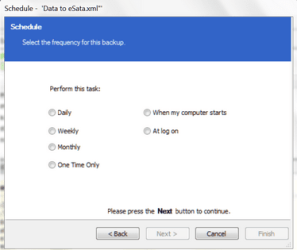
Btw: Macrium images you can schedule.
 

Attachments

  • 2013-12-08_1321.png
    2013-12-08_1321.png
    11.7 KB · Views: 9

My Computer My Computer

At a glance

Vista, Windows7, Mint Mate, Zorin, Windows 8from 1.6GHz Duo to i7
Computer Manufacturer/Model Number
HP, Dell, Gateway, Toshiba - 4 laptops and 2 desktops
OS
Vista, Windows7, Mint Mate, Zorin, Windows 8
CPU
from 1.6GHz Duo to i7
Monitor(s) Displays
2x HP w2207
Hard Drives
5x HDD, 7x SSD, 12x Externals
Keyboard
with trackball - no mices
Mouse
Trackball mice
Internet Speed
DSL 6000
Back
Top