Trying to upgrade Virtual PC 2007 for Win 7

badboy

New member
Local time
9:58 AM
Messages
15
I have a virtual pc 2007 w/ ms server 2003 on it and an app that i can't easily get replaced. i pasted the vpc onto my new Win7 desktop. it works, but unfortunately there's no intergration with the host pc w/ win7 on it. i'v downloaded x-mode and the new virtual-pc, which works fine, but the older virsion still won't intergrate. i've been trying to update the older version, but the update wizard keeps asking for "usbhub.sys". i've been scouring the internet looking for it, but i still can't locate it.

Any ideas as to what to do?:confused:
 

My Computer My Computer

Computer Manufacturer/Model Number
microsoft
OS
windows7 pro 64 bit
CPU
ADM Phenom II X4 965 3.4GHZ
Motherboard
MSI 790GX-G65
Memory
8 ram
Monitor(s) Displays
accer p244w lcd
Hard Drives
Western Digital Caviar Black 1 TB Bulk/OEM Hard Drive 3.5 Inch, 32 MB Cache, 7200 RPM SATA II WD1001FALS
PSU
Thermaltake W0117RU ToughPower 750W Black PFC Power Supply w
Case
Antec Three Hundred Gaming Case
You can use Virtual PC 2007 virtual machines in the new Virtual PC, so in your case I would uninstall Virtual PC 2007 from Win7, install the new Windows XP Mode and Virtual PC and move the Server 2003 vhd from old machine to Windows 7.

Try this:
  • Open the virtual machines you want to migrate to Win7 (in this case Server 2003) in Virtual PC 2007
  • Uninstall Virtual Machine Additions (must be uninstalled before you can use the vhd in the new Virtual PC!)
  • Shut down virtual machine. DO NOT HIBERNATE!
  • Copy the Virtual PC 2007 vhd's you want to migrate to C:\Users\Your_Username\AppData\Local\Microsoft\Windows Virtual PC\Virtual Machines
  • Uninstall Virtual PC 2007 from the Windows 7
  • Download and install Virtual PC and XP Mode
  • Go to C:\Users\Your_Username\Virtual Machines, click Create virtual machine
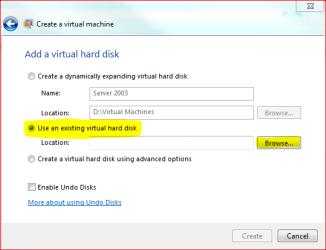
  • When asked the location of the new virtual hard disk, choose Use an existing virtual hard disk and browse to vhd you want

Should work.

Kari
 

Attachments

  • use_existing.PNG
    use_existing.PNG
    13.9 KB · Views: 28

My Computer My Computer

Computer type
Laptop
Computer Manufacturer/Model Number
HP ENVY 17-1150eg
OS
Windows 10 Pro x64 EN-GB
CPU
1.6 GHz Intel Core i7-720QM Processor
Memory
6 GB
Graphics Card(s)
ATI Mobility Radeon HD 5850 Graphics
Sound Card
Beats sound system with integrated subwoofer
Monitor(s) Displays
17" laptop display, 22" LED and 32" Full HD TV through HDMI
Screen Resolution
1600*900 (1), 1920*1080 (2&3)
Hard Drives
Internal: 2 x 500 GB SATA Hard Disk Drive 7200 rpm
External: 2TB for backups, 3TB USB3 network drive for media
Cooling
As Envy runs a bit warm, I have it on a Cooler Master pad
Keyboard
Logitech diNovo Media Desktop Laser (bluetooth)
Mouse
Logitech Performance Mouse MX
Internet Speed
50/10 Mbps VDSL
Antivirus
Windows Defender 4.3.9431.0
Browser
Maxthon 3.5.2., IE11
Thanks,
very cool idea.
 

My Computer My Computer

Computer Manufacturer/Model Number
microsoft
OS
windows7 pro 64 bit
CPU
ADM Phenom II X4 965 3.4GHZ
Motherboard
MSI 790GX-G65
Memory
8 ram
Monitor(s) Displays
accer p244w lcd
Hard Drives
Western Digital Caviar Black 1 TB Bulk/OEM Hard Drive 3.5 Inch, 32 MB Cache, 7200 RPM SATA II WD1001FALS
PSU
Thermaltake W0117RU ToughPower 750W Black PFC Power Supply w
Case
Antec Three Hundred Gaming Case
Still can't get the intergration features working.

I was able to create a new Virt_PC using the old .vhd file. I went into settings and enabled the integration features then shut down the computer and rebooted it. After rebooting, I was asked to upgrade the integration components. I declined to see if I could copy and paste into the new virt_pc. No luck.
So I went into tools and clicked the upgrade option. I get a Vert_pc Integration Component box and click next. It does its thing, then asks me to restart. After restarting, the same box reappears, with a message, "Supported OSs:-WinXP, WinVista, Win7." I click next, and I get a message telling me the mouse will be captured by the vert-pc machine. After I click ok, the mouse is trapped, and I have to hit ctrl+alt+delete to escape.
Next, I get a message that I need 'usbhub.sys' on Service Pack1 CD-ROM' to continue, with a request for a path to the file. When I look specifically for the 'usbhub.sys' online, I can't find it.

Any ideas?

:shock:
 

My Computer My Computer

Computer Manufacturer/Model Number
microsoft
OS
windows7 pro 64 bit
CPU
ADM Phenom II X4 965 3.4GHZ
Motherboard
MSI 790GX-G65
Memory
8 ram
Monitor(s) Displays
accer p244w lcd
Hard Drives
Western Digital Caviar Black 1 TB Bulk/OEM Hard Drive 3.5 Inch, 32 MB Cache, 7200 RPM SATA II WD1001FALS
PSU
Thermaltake W0117RU ToughPower 750W Black PFC Power Supply w
Case
Antec Three Hundred Gaming Case
To Continue:
When I try to access Integration Features again, they're unavailable. When I try to shut down, the vert pc only allows me to turn off or power down. And when I open it again, I'm stuck with a vert pc that has no integration with its host.
 

My Computer My Computer

Computer Manufacturer/Model Number
microsoft
OS
windows7 pro 64 bit
CPU
ADM Phenom II X4 965 3.4GHZ
Motherboard
MSI 790GX-G65
Memory
8 ram
Monitor(s) Displays
accer p244w lcd
Hard Drives
Western Digital Caviar Black 1 TB Bulk/OEM Hard Drive 3.5 Inch, 32 MB Cache, 7200 RPM SATA II WD1001FALS
PSU
Thermaltake W0117RU ToughPower 750W Black PFC Power Supply w
Case
Antec Three Hundred Gaming Case
Did you first uninstall Virtual Machine Additions? Before you can use your Virtual PC 2007 vhd in the new Virtual PC, you have to boot it (in Virtual PC 2007), uninstall Virtual Machine Additions and shut down. Only then copy it to new Virtual PC.

Other than that, installing and enabling integration features should be straight forward. First time you run a virtual machine, you have to install them:

IC_1.png

After reboot, you can then enable them:

IC_2.png

Kari
 

My Computer My Computer

Computer type
Laptop
Computer Manufacturer/Model Number
HP ENVY 17-1150eg
OS
Windows 10 Pro x64 EN-GB
CPU
1.6 GHz Intel Core i7-720QM Processor
Memory
6 GB
Graphics Card(s)
ATI Mobility Radeon HD 5850 Graphics
Sound Card
Beats sound system with integrated subwoofer
Monitor(s) Displays
17" laptop display, 22" LED and 32" Full HD TV through HDMI
Screen Resolution
1600*900 (1), 1920*1080 (2&3)
Hard Drives
Internal: 2 x 500 GB SATA Hard Disk Drive 7200 rpm
External: 2TB for backups, 3TB USB3 network drive for media
Cooling
As Envy runs a bit warm, I have it on a Cooler Master pad
Keyboard
Logitech diNovo Media Desktop Laser (bluetooth)
Mouse
Logitech Performance Mouse MX
Internet Speed
50/10 Mbps VDSL
Antivirus
Windows Defender 4.3.9431.0
Browser
Maxthon 3.5.2., IE11
I've tried what you suggested and have ended up with a virtual pc that locks the cursor in the virtual window. I have to hit ctrl+alt+delete to get it to escape. Also, graphics seem to be effected - the screen is choppy.
After doing some research online, I've found that the new Window Virtual PC doesn't support Server 2003, so I think I'm out of luck.
If you have any other ideas, let me know.

Thanks for the help
 

My Computer My Computer

Computer Manufacturer/Model Number
microsoft
OS
windows7 pro 64 bit
CPU
ADM Phenom II X4 965 3.4GHZ
Motherboard
MSI 790GX-G65
Memory
8 ram
Monitor(s) Displays
accer p244w lcd
Hard Drives
Western Digital Caviar Black 1 TB Bulk/OEM Hard Drive 3.5 Inch, 32 MB Cache, 7200 RPM SATA II WD1001FALS
PSU
Thermaltake W0117RU ToughPower 750W Black PFC Power Supply w
Case
Antec Three Hundred Gaming Case
Also,
when trying to install the updates, I received files need notices that prevent the installation of the integration components:

Program Files\virtual pc integration components \i386

I looked up the notice online and found that the new Windows Virtual PC only supports XP sp2 and up. So alas, it doesn't look too good for my Server 2003.
 

My Computer My Computer

Computer Manufacturer/Model Number
microsoft
OS
windows7 pro 64 bit
CPU
ADM Phenom II X4 965 3.4GHZ
Motherboard
MSI 790GX-G65
Memory
8 ram
Monitor(s) Displays
accer p244w lcd
Hard Drives
Western Digital Caviar Black 1 TB Bulk/OEM Hard Drive 3.5 Inch, 32 MB Cache, 7200 RPM SATA II WD1001FALS
PSU
Thermaltake W0117RU ToughPower 750W Black PFC Power Supply w
Case
Antec Three Hundred Gaming Case
Out of ideas. I checked, you are right. You can run Server 2003 in VPC but it seems integration does not work.

I'll be back if I find something.

Kari
 

My Computer My Computer

Computer type
Laptop
Computer Manufacturer/Model Number
HP ENVY 17-1150eg
OS
Windows 10 Pro x64 EN-GB
CPU
1.6 GHz Intel Core i7-720QM Processor
Memory
6 GB
Graphics Card(s)
ATI Mobility Radeon HD 5850 Graphics
Sound Card
Beats sound system with integrated subwoofer
Monitor(s) Displays
17" laptop display, 22" LED and 32" Full HD TV through HDMI
Screen Resolution
1600*900 (1), 1920*1080 (2&3)
Hard Drives
Internal: 2 x 500 GB SATA Hard Disk Drive 7200 rpm
External: 2TB for backups, 3TB USB3 network drive for media
Cooling
As Envy runs a bit warm, I have it on a Cooler Master pad
Keyboard
Logitech diNovo Media Desktop Laser (bluetooth)
Mouse
Logitech Performance Mouse MX
Internet Speed
50/10 Mbps VDSL
Antivirus
Windows Defender 4.3.9431.0
Browser
Maxthon 3.5.2., IE11
Thanks dude.
 

My Computer My Computer

Computer Manufacturer/Model Number
microsoft
OS
windows7 pro 64 bit
CPU
ADM Phenom II X4 965 3.4GHZ
Motherboard
MSI 790GX-G65
Memory
8 ram
Monitor(s) Displays
accer p244w lcd
Hard Drives
Western Digital Caviar Black 1 TB Bulk/OEM Hard Drive 3.5 Inch, 32 MB Cache, 7200 RPM SATA II WD1001FALS
PSU
Thermaltake W0117RU ToughPower 750W Black PFC Power Supply w
Case
Antec Three Hundred Gaming Case
OK, not a fix but a working alternative.

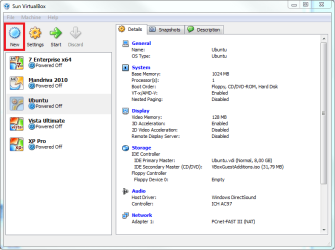
Download and install Sun VirtualBox. Create a virtual machine:

VB1.png

Choose Windows 2003 as operating system, name your virtual machine and click Next:

VB2.png

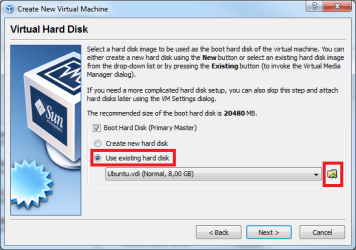
Assign RAM (give enough!), click Next. Choose Use existing hard disk, click browse button:

VB3.png

Click Add:

VB4.png

Browse to your Windows 2003 Server vhd-file. Click Select, follow the instructions given.

This should work. Really! Please remember VirtualBox and Virtual PC can not be running at the same time. If you have other Virtual PC machines (XP mode etc.) running, those must be shut down or hibernated before you can launch a VirtualBox machine.

This method can cause you need to re-activate your Windows Server 2003 because of the (virtual) hardware change. In worst case you can do it by choosing phone activation in the activation dialog.

Kari
 

My Computer My Computer

Computer type
Laptop
Computer Manufacturer/Model Number
HP ENVY 17-1150eg
OS
Windows 10 Pro x64 EN-GB
CPU
1.6 GHz Intel Core i7-720QM Processor
Memory
6 GB
Graphics Card(s)
ATI Mobility Radeon HD 5850 Graphics
Sound Card
Beats sound system with integrated subwoofer
Monitor(s) Displays
17" laptop display, 22" LED and 32" Full HD TV through HDMI
Screen Resolution
1600*900 (1), 1920*1080 (2&3)
Hard Drives
Internal: 2 x 500 GB SATA Hard Disk Drive 7200 rpm
External: 2TB for backups, 3TB USB3 network drive for media
Cooling
As Envy runs a bit warm, I have it on a Cooler Master pad
Keyboard
Logitech diNovo Media Desktop Laser (bluetooth)
Mouse
Logitech Performance Mouse MX
Internet Speed
50/10 Mbps VDSL
Antivirus
Windows Defender 4.3.9431.0
Browser
Maxthon 3.5.2., IE11
Back
Top