Turning On The Windows Firewall

ColinWG

New member
Local time
2:32 PM
Messages
29
Probably a lame title that's been recycled a bunch of times, but none of the other answers seem to properly address this issue.

Just how does one turn on the firewall?

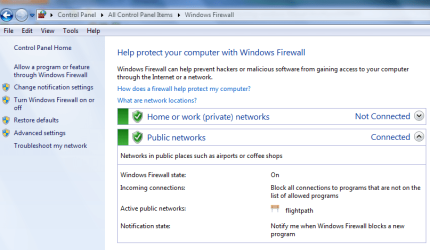
The shields are green, I check what programs are permitted to access the internet.

Internet Explorer access's the internet.

Internet Explorer is not on the list of programs that are permitted to access the internet.

Therefor: Firewall is off.
 

My Computer My Computer

At a glance

Windows 7
OS
Windows 7
I'm pretty sure that Internet Explorer is not on the list because it is a core component of Windows. To test your firewall go to the following site: https://www.grc.com/x/ne.dll?bh0bkyd2. Click proceed, and then run the first two test (File Sharing and Common ports). As long as those pass ok I wouldn't worry too much.
 

My Computer My Computer

At a glance

Windows 7 Professional SP1 64-bitIntel Core i5-2450M @2.5 GHz6 GB DDR3 1333MHzIntel HD 3000
Computer type
Laptop
Computer Manufacturer/Model Number
Toshiba P775-S7100
OS
Windows 7 Professional SP1 64-bit
CPU
Intel Core i5-2450M @2.5 GHz
Memory
6 GB DDR3 1333MHz
Graphics Card(s)
Intel HD 3000
Monitor(s) Displays
Built-in 17.3" LED; 22" Insignia NS-L22Q-10A
Screen Resolution
1600x900; 1360x768
Hard Drives
750 GB Hitachi
1TB Seagate FreeAgent External
Internet Speed
Verizon DSL Speed(Down/Up): 3360 Kbps / 800 Kbps
Antivirus
MSE and MBAM Pro
Browser
IE10
Probably a lame title that's been recycled a bunch of times, but none of the other answers seem to properly address this issue.

Just how does one turn on the firewall?

The shields are green, I check what programs are permitted to access the internet.

Internet Explorer access's the internet.

Internet Explorer is not on the list of programs that are permitted to access the internet.

Therefor: Firewall is off.

Welcome to SevenForums.

Your conclusion is false.

Window 7 firewall has a rather extensive set of default firewall settings.

Configuring Windows Firewall and IPsec - Windows 7 Tutorial
 

My Computer My Computer

At a glance

MS Windows 7 Ultimate SP1 64-bitAMD A10-4600M6.00 GB Dual-Channel DDR3 @ 798MHz (11-11-12-28)AMD Radeon HD 7660G
Computer Manufacturer/Model Number
Toshiba Satellite S875D-S7239 laptop
OS
MS Windows 7 Ultimate SP1 64-bit
CPU
AMD A10-4600M
Motherboard
AMD Pumori (Socket FT1)
Memory
6.00 GB Dual-Channel DDR3 @ 798MHz (11-11-12-28)
Graphics Card(s)
AMD Radeon HD 7660G
Sound Card
High Definition Audio Device
Monitor(s) Displays
Generic PnP Monitor (1600x900@60Hz)
Screen Resolution
1600x900@60Hz
Hard Drives
SSD 119GB Corsair CSSD-V128GB2 ATA Device
Keyboard
Standard PS/2 Keyboard
Mouse
HP Wireless Optical Mobile Mouse Model FHA-3410
Internet Speed
What the local pub, local coffee shop offers.
Other Info
Optical Drive:MATSHITA BD-CMB UJ160B ATA Device


Also have an Asus ha1002xp netbook with Win 7 Ultimate installed.
Colin,
CONTROL PANEL | WINDOWS FIREWALL

You should see something similar, but of course different to:
FIREWALL.PNG
 

My Computer My Computer

At a glance

MS Windows 7 Ultimate SP1 64-bitAMD A10-4600M6.00 GB Dual-Channel DDR3 @ 798MHz (11-11-12-28)AMD Radeon HD 7660G
Computer Manufacturer/Model Number
Toshiba Satellite S875D-S7239 laptop
OS
MS Windows 7 Ultimate SP1 64-bit
CPU
AMD A10-4600M
Motherboard
AMD Pumori (Socket FT1)
Memory
6.00 GB Dual-Channel DDR3 @ 798MHz (11-11-12-28)
Graphics Card(s)
AMD Radeon HD 7660G
Sound Card
High Definition Audio Device
Monitor(s) Displays
Generic PnP Monitor (1600x900@60Hz)
Screen Resolution
1600x900@60Hz
Hard Drives
SSD 119GB Corsair CSSD-V128GB2 ATA Device
Keyboard
Standard PS/2 Keyboard
Mouse
HP Wireless Optical Mobile Mouse Model FHA-3410
Internet Speed
What the local pub, local coffee shop offers.
Other Info
Optical Drive:MATSHITA BD-CMB UJ160B ATA Device


Also have an Asus ha1002xp netbook with Win 7 Ultimate installed.
Welcome to SevenForums.

Your conclusion is false.

Window 7 firewall has a rather extensive set of default firewall settings.
Thanks for the welcome. :-)

Ok, saw all that.

Deleted everything. Anything can still access the internet, from Lynx to Media Player.

Now, how do I set the firewall up to ask me permission on each and every program or process that wants to access the internet.

I want the firewall to deliver a popup asking the user "is this a program which you want to allow access to the internet?".

A bit about me.
I'm a hardware / software system engineer.
And a bit used to programs with clear and user friendly interfaces.
 

My Computer My Computer

At a glance

Windows 7
OS
Windows 7
Run as a standard user and Win 7 will prompt you.
 

My Computer My Computer

At a glance

MS Windows 7 Ultimate SP1 64-bitAMD A10-4600M6.00 GB Dual-Channel DDR3 @ 798MHz (11-11-12-28)AMD Radeon HD 7660G
Computer Manufacturer/Model Number
Toshiba Satellite S875D-S7239 laptop
OS
MS Windows 7 Ultimate SP1 64-bit
CPU
AMD A10-4600M
Motherboard
AMD Pumori (Socket FT1)
Memory
6.00 GB Dual-Channel DDR3 @ 798MHz (11-11-12-28)
Graphics Card(s)
AMD Radeon HD 7660G
Sound Card
High Definition Audio Device
Monitor(s) Displays
Generic PnP Monitor (1600x900@60Hz)
Screen Resolution
1600x900@60Hz
Hard Drives
SSD 119GB Corsair CSSD-V128GB2 ATA Device
Keyboard
Standard PS/2 Keyboard
Mouse
HP Wireless Optical Mobile Mouse Model FHA-3410
Internet Speed
What the local pub, local coffee shop offers.
Other Info
Optical Drive:MATSHITA BD-CMB UJ160B ATA Device


Also have an Asus ha1002xp netbook with Win 7 Ultimate installed.
Created a standard user account, still no prompts.
 

My Computer My Computer

At a glance

Windows 7
OS
Windows 7
Well Colin, I'm a little confused at what exactly you are expecting Win 7 to do because Win 7, with MSE, is safer than any other operating system.

However, since you indicate that you have some expertise, then:

[FONT=&quot]Firewall[/FONT]
[FONT=&quot]Creating and Configuring Fiewall Rules [/FONT]
[FONT=&quot] [/FONT]
[FONT=&quot]Disabling Network Discovery Network Resources [/FONT]
[FONT=&quot] [/FONT]
[FONT=&quot]How to Enable Win 7 Firewall Outbound Protection [/FONT]
[FONT=&quot] [/FONT]
[FONT=&quot]How to manage Windows Firewall settings using Gorup Policy [/FONT]
[FONT=&quot] [/FONT]
[FONT=&quot]Maximumpcguides - How to Manage the Windows 7 Firewall [/FONT]
[FONT=&quot] [/FONT]
[FONT=&quot]Outbound blocking for Windows Firewall [/FONT]
[FONT=&quot] [/FONT]
[FONT=&quot]Overview of Windows Firewall with Advanced Security [/FONT]
[FONT=&quot] [/FONT]
[FONT=&quot]Prevent a Program from Accessing the Internet using the Windows 7 Firewall — MAXIMUMpcguides – [/FONT]
[FONT=&quot] [/FONT]
[FONT=&quot]Windows 7 tips, tricks, help, and how-to guides[/FONT][FONT=&quot] [/FONT]
[FONT=&quot] [/FONT]
[FONT=&quot]Rules for a VoIP Firewall [/FONT]
[FONT=&quot] [/FONT]
[FONT=&quot]Sphinx-soft Win 7 Firewall Control [/FONT]
[FONT=&quot] [/FONT]
[FONT=&quot]Windows 7 Firewall Outbound Protection [/FONT]
[FONT=&quot] [/FONT]
[FONT=&quot]Windows Event Viewer tips and tricks [/FONT]
[FONT=&quot] [/FONT]
[FONT=&quot]Windows Firewall Resources - Technet [/FONT]
[FONT=&quot] [/FONT]
[FONT=&quot]Windows Firewall Tutorial - Source Daddy [/FONT]
[FONT=&quot] [/FONT]
[FONT=&quot]Windows Firewall with Advanced Security and IPsec [/FONT]
[FONT=&quot] [/FONT]
[FONT=&quot]Windows Firewall with Advanced Security Learning Roadmap [/FONT]
[FONT=&quot] [/FONT]
 

My Computer My Computer

At a glance

MS Windows 7 Ultimate SP1 64-bitAMD A10-4600M6.00 GB Dual-Channel DDR3 @ 798MHz (11-11-12-28)AMD Radeon HD 7660G
Computer Manufacturer/Model Number
Toshiba Satellite S875D-S7239 laptop
OS
MS Windows 7 Ultimate SP1 64-bit
CPU
AMD A10-4600M
Motherboard
AMD Pumori (Socket FT1)
Memory
6.00 GB Dual-Channel DDR3 @ 798MHz (11-11-12-28)
Graphics Card(s)
AMD Radeon HD 7660G
Sound Card
High Definition Audio Device
Monitor(s) Displays
Generic PnP Monitor (1600x900@60Hz)
Screen Resolution
1600x900@60Hz
Hard Drives
SSD 119GB Corsair CSSD-V128GB2 ATA Device
Keyboard
Standard PS/2 Keyboard
Mouse
HP Wireless Optical Mobile Mouse Model FHA-3410
Internet Speed
What the local pub, local coffee shop offers.
Other Info
Optical Drive:MATSHITA BD-CMB UJ160B ATA Device


Also have an Asus ha1002xp netbook with Win 7 Ultimate installed.
This is going to take a bit for me to wade through. At this point, I'm really tempted to install a third party system which is easier to read and understand.
 

My Computer My Computer

At a glance

Windows 7
OS
Windows 7
Probably a lame title that's been recycled a bunch of times, but none of the other answers seem to properly address this issue.

Just how does one turn on the firewall?

The shields are green, I check what programs are permitted to access the internet.

Internet Explorer access's the internet.

Internet Explorer is not on the list of programs that are permitted to access the internet.

Therefor: Firewall is off.

By default, Windows firewall only controls incoming connections that arrive at your PC, but does nothing to prevent outgoing connections like IE or whatever. The control panel applet also cannot enable that. You need to use the "firewall with advanced security" to access it, located in administrative tools on the control panel. There you can enable it to block outgoing connections that aren't covered by a rule, and it's there that you must allow the browser to access internet.


Now, how do I set the firewall up to ask me permission on each and every program or process that wants to access the internet.

I want the firewall to deliver a popup asking the user "is this a program which you want to allow access to the internet?".

You can't do that with Windows firewall, period. It's very limited in this regard, it will block connections according to its rules, but will never notify you when it blocks something or allows something, just because it doesn't have that feature.


Run as a standard user and Win 7 will prompt you.

Maybe you're confusing a firewall notification with an UAC elevation prompt, but as the Windows Firewall has no ability to notify on blocked connection, account type doesn't really matters at all.


Well Colin, I'm a little confused at what exactly you are expecting Win 7 to do because Win 7, with MSE, is safer than any other operating system.

hehehehe. Really, you can't be serious. We all know that Windows is the heaven for hackers and viruses, and every techinical review point in that direction. And, by the way, MSE is also a joke of an antivirus in comparison with more advanced solutions.


At this point, I'm really tempted to install a third party system which is easier to read and understand.

Generally, third party firewalls have a better coverage and protection and not being the number one target is also an advantage too. I may suggest that you don't hesitate and download one if you don't like the integrated thing.

 

My Computer My Computer

At a glance

Windows 7 Ultimate x64Intel Core i7-740QM8 GB DDR3NVIDIA GeForce 330GT
Computer type
Laptop
Computer Manufacturer/Model Number
Toshiba Sattelite A665-S6092
OS
Windows 7 Ultimate x64
CPU
Intel Core i7-740QM
Memory
8 GB DDR3
Graphics Card(s)
NVIDIA GeForce 330GT
Screen Resolution
1366x768
Hard Drives
Samsung 840 SSD 500GB
1TB USB3 external HD
Cooling
Coolermaster Notepal U3 notebook cooling pad
Internet Speed
3mbps ASDL
Antivirus
ClamWin 0.98.7
Browser
Opera 12.17 x86 (main), Firefox 38 (sec), IE11 (last resort)
Generally, third party firewalls have a better coverage and protection and not being the number one target is also an advantage too. I may suggest that you don't hesitate and download one if you don't like the integrated thing.
Which is something that I'll have to do, I set up systems for other people, and as knowledgeable as I am about things under the hood, the people I generally set things up for about need labels on their mouse and keyboard so they know which one is which. Would rather not spend hours on the phone telling someone, "No, no, no, I said Right Click ..." :-P

P.S. Where's the thread with the best recommended freebie firewalls?
 

My Computer My Computer

At a glance

Windows 7
OS
Windows 7
Back
Top