
Tv No Signal

Xnefoo

New member
Local time
5:17 AM
Messages
116
Ok i tried to hook up my hdmi cable from my computer to my lg hd tv, but i get no signal, i tried detecting the tv but nothing came up.

I have a Nvidia geforce 8600 Gt

And a Gigabyte: GA-MA785GM-US2H motherboard.


Thanks!
 

My Computer My Computer

OS
Windows 7 Home Premium 64Bit
CPU
AMD Phenom II x4 920 Processor
Motherboard
Gigabyte Technology Co., Ltd. GA-MA785GM-US2H (Socket AM2)
Memory
Corsair 4.0GB Dual-Channel DDR2 @ 401MHz (5-5-5-18)
Graphics Card(s)
GeForce 8600 GT (EVGA)
Sound Card
Realtek High Definition Audio
Monitor(s) Displays
Acer X193W
Screen Resolution
1440 X 900
Hard Drives
244GB Seagate ST3250410AS ATA Device (SATA)
No, bumping.

You need to use the HDMI port that has HDCP disabled. This is usally the first HDMI port. Next hold in the "Windows Key" and the "P" and keep hitting "P" untill you get to extend.
 

My Computer My Computer

Computer Manufacturer/Model Number
Asus
OS
Windows 7 Pro x64 SP1 and Mac OS X 10.8.3
CPU
Intel Core i7-3820 Sandy Bridge-E at 4.75 GHz
Motherboard
ASUS Rampage IV Extreme
Memory
8 x Corsair 8GB DDR3 64 GB Kit @1866 Overclocked @2000
Graphics Card(s)
GTX 580 and MSI R6870
Sound Card
HDMI on GPU and ACL898
Monitor(s) Displays
32" Sony EX-500 120Hz
Screen Resolution
1920x1080P
Hard Drives
1 x Corsair Force Series GT CSSD-F60GBGT-BK (OS)
2 x Western Digital Caviar Black Sata III 750GB (Raid 0)
1 x Western Digital Caviar Black Sata III 1TB (Media)
2 x Western Digital Caviar Black Sata II 640GB (Raid 0)
PSU
Corsair Professional Series Gold AX850
Case
Corsair 800D
Cooling
Corsair H80 High Performance Liquid CPU Cooler
Keyboard
HP Wireless Elite Keyboard
Mouse
HP Wireless Elite Mouse
Internet Speed
Cable, VisionTek Bigfoot Killer 2100 Gaming Network Card
Other Info
4 x GELID Solutions FN-TX12-15 120mm Case Fan with Superior Temperature Control
1 x Corsair 140mm Case Fan
1 x SilverStone FP55B Aluminum front panel 5.25" to a 3.5" bay converter
1 x Ultra Card Reader
1 x Sony Blu-ray Burner BD-5300S-0B
ummm i dont know if my hdmi is hdcp dissabled.... i only have one though and its attached to my motherboard
 

My Computer My Computer

OS
Windows 7 Home Premium 64Bit
CPU
AMD Phenom II x4 920 Processor
Motherboard
Gigabyte Technology Co., Ltd. GA-MA785GM-US2H (Socket AM2)
Memory
Corsair 4.0GB Dual-Channel DDR2 @ 401MHz (5-5-5-18)
Graphics Card(s)
GeForce 8600 GT (EVGA)
Sound Card
Realtek High Definition Audio
Monitor(s) Displays
Acer X193W
Screen Resolution
1440 X 900
Hard Drives
244GB Seagate ST3250410AS ATA Device (SATA)
ummm i dont know if my hdmi is hdcp dissabled.... i only have one though and its attached to my motherboard
Since you have a graphics card, check to see if the onboard graphics is disabled. :o
 

My Computer My Computer

Computer type
PC/Desktop
Computer Manufacturer/Model Number
Built 2/11/2011
OS
Windows 7 Pro-x64
CPU
i7-2600 3.4GHz - 3.8GHz Turbo
Motherboard
Intel DH67BL-B3
Memory
8Gb - 2x4GB, Muskin 991770 PC3-1333
Graphics Card(s)
Integrated Intel HD 2000
Sound Card
Integrated Intel 10.1 HD, RealTek ALC892
Monitor(s) Displays
Asus LCD VH222H, Haier HL24XSL2a
Screen Resolution
1920x1080, 1920x1080
Hard Drives
Crucial SSD C300-128Gb,
Western Digital WD5002AALX - 500Gb,
Western Digital WD7501AALS - 750Gb
PSU
Seasonic 650W 80+ Gold Modular
Case
Rosewill Defender
Cooling
Stock CPU, Four 120mm case fans, PCH fan added
Keyboard
Logitech EX100 Y-RBH94 Wireless
Mouse
Logitech EX100 M-RCE95 Wireless
Internet Speed
3.0/1.5 Mbs
Antivirus
Microsoft Security Essentials
Browser
Microsoft Internet Explorer 11
Other Info
Antec Veris Premier-Multimedia IR Station,
Cyber Accoustics-3602 Speakers,
AFT XM-5U Card Reader,
Hauppauge TV-HVR-2250,
Sony LX300 USB Turntable
No, it has nothing to do with your computer. It is the tv I was talking about. That had HDCP. Try port 1 on the tv.
 

My Computer My Computer

Computer Manufacturer/Model Number
Asus
OS
Windows 7 Pro x64 SP1 and Mac OS X 10.8.3
CPU
Intel Core i7-3820 Sandy Bridge-E at 4.75 GHz
Motherboard
ASUS Rampage IV Extreme
Memory
8 x Corsair 8GB DDR3 64 GB Kit @1866 Overclocked @2000
Graphics Card(s)
GTX 580 and MSI R6870
Sound Card
HDMI on GPU and ACL898
Monitor(s) Displays
32" Sony EX-500 120Hz
Screen Resolution
1920x1080P
Hard Drives
1 x Corsair Force Series GT CSSD-F60GBGT-BK (OS)
2 x Western Digital Caviar Black Sata III 750GB (Raid 0)
1 x Western Digital Caviar Black Sata III 1TB (Media)
2 x Western Digital Caviar Black Sata II 640GB (Raid 0)
PSU
Corsair Professional Series Gold AX850
Case
Corsair 800D
Cooling
Corsair H80 High Performance Liquid CPU Cooler
Keyboard
HP Wireless Elite Keyboard
Mouse
HP Wireless Elite Mouse
Internet Speed
Cable, VisionTek Bigfoot Killer 2100 Gaming Network Card
Other Info
4 x GELID Solutions FN-TX12-15 120mm Case Fan with Superior Temperature Control
1 x Corsair 140mm Case Fan
1 x SilverStone FP55B Aluminum front panel 5.25" to a 3.5" bay converter
1 x Ultra Card Reader
1 x Sony Blu-ray Burner BD-5300S-0B
oh ok i tried hdmi 1 and 2 still doesnt work.
 

My Computer My Computer

OS
Windows 7 Home Premium 64Bit
CPU
AMD Phenom II x4 920 Processor
Motherboard
Gigabyte Technology Co., Ltd. GA-MA785GM-US2H (Socket AM2)
Memory
Corsair 4.0GB Dual-Channel DDR2 @ 401MHz (5-5-5-18)
Graphics Card(s)
GeForce 8600 GT (EVGA)
Sound Card
Realtek High Definition Audio
Monitor(s) Displays
Acer X193W
Screen Resolution
1440 X 900
Hard Drives
244GB Seagate ST3250410AS ATA Device (SATA)
Can you take a pic and post the back of the tv and the back of your GPU?
 

My Computer My Computer

Computer Manufacturer/Model Number
Asus
OS
Windows 7 Pro x64 SP1 and Mac OS X 10.8.3
CPU
Intel Core i7-3820 Sandy Bridge-E at 4.75 GHz
Motherboard
ASUS Rampage IV Extreme
Memory
8 x Corsair 8GB DDR3 64 GB Kit @1866 Overclocked @2000
Graphics Card(s)
GTX 580 and MSI R6870
Sound Card
HDMI on GPU and ACL898
Monitor(s) Displays
32" Sony EX-500 120Hz
Screen Resolution
1920x1080P
Hard Drives
1 x Corsair Force Series GT CSSD-F60GBGT-BK (OS)
2 x Western Digital Caviar Black Sata III 750GB (Raid 0)
1 x Western Digital Caviar Black Sata III 1TB (Media)
2 x Western Digital Caviar Black Sata II 640GB (Raid 0)
PSU
Corsair Professional Series Gold AX850
Case
Corsair 800D
Cooling
Corsair H80 High Performance Liquid CPU Cooler
Keyboard
HP Wireless Elite Keyboard
Mouse
HP Wireless Elite Mouse
Internet Speed
Cable, VisionTek Bigfoot Killer 2100 Gaming Network Card
Other Info
4 x GELID Solutions FN-TX12-15 120mm Case Fan with Superior Temperature Control
1 x Corsair 140mm Case Fan
1 x SilverStone FP55B Aluminum front panel 5.25" to a 3.5" bay converter
1 x Ultra Card Reader
1 x Sony Blu-ray Burner BD-5300S-0B
He has two GPUs. One on the motherboard with HDMI and his Nvidia geforce 8600 Gt with DVI and S-video. It's unusual to run both but possible. That's why I asked if the on-board GPU is disabled. It may have everything to do with his computer.
 

My Computer My Computer

Computer type
PC/Desktop
Computer Manufacturer/Model Number
Built 2/11/2011
OS
Windows 7 Pro-x64
CPU
i7-2600 3.4GHz - 3.8GHz Turbo
Motherboard
Intel DH67BL-B3
Memory
8Gb - 2x4GB, Muskin 991770 PC3-1333
Graphics Card(s)
Integrated Intel HD 2000
Sound Card
Integrated Intel 10.1 HD, RealTek ALC892
Monitor(s) Displays
Asus LCD VH222H, Haier HL24XSL2a
Screen Resolution
1920x1080, 1920x1080
Hard Drives
Crucial SSD C300-128Gb,
Western Digital WD5002AALX - 500Gb,
Western Digital WD7501AALS - 750Gb
PSU
Seasonic 650W 80+ Gold Modular
Case
Rosewill Defender
Cooling
Stock CPU, Four 120mm case fans, PCH fan added
Keyboard
Logitech EX100 Y-RBH94 Wireless
Mouse
Logitech EX100 M-RCE95 Wireless
Internet Speed
3.0/1.5 Mbs
Antivirus
Microsoft Security Essentials
Browser
Microsoft Internet Explorer 11
Other Info
Antec Veris Premier-Multimedia IR Station,
Cyber Accoustics-3602 Speakers,
AFT XM-5U Card Reader,
Hauppauge TV-HVR-2250,
Sony LX300 USB Turntable
He has two GPUs. One on the motherboard with HDMI and his Nvidia geforce 8600 Gt with DVI and S-video. It's unusual to run both but possible. That's why I asked if the on-board GPU is disabled. It may have everything to do with his computer.

Did not see that. My friends Asus 775 MB Bios alows for both with limited proformace. He needs a DVi to HDMI adaptor.
 

My Computer My Computer

Computer Manufacturer/Model Number
Asus
OS
Windows 7 Pro x64 SP1 and Mac OS X 10.8.3
CPU
Intel Core i7-3820 Sandy Bridge-E at 4.75 GHz
Motherboard
ASUS Rampage IV Extreme
Memory
8 x Corsair 8GB DDR3 64 GB Kit @1866 Overclocked @2000
Graphics Card(s)
GTX 580 and MSI R6870
Sound Card
HDMI on GPU and ACL898
Monitor(s) Displays
32" Sony EX-500 120Hz
Screen Resolution
1920x1080P
Hard Drives
1 x Corsair Force Series GT CSSD-F60GBGT-BK (OS)
2 x Western Digital Caviar Black Sata III 750GB (Raid 0)
1 x Western Digital Caviar Black Sata III 1TB (Media)
2 x Western Digital Caviar Black Sata II 640GB (Raid 0)
PSU
Corsair Professional Series Gold AX850
Case
Corsair 800D
Cooling
Corsair H80 High Performance Liquid CPU Cooler
Keyboard
HP Wireless Elite Keyboard
Mouse
HP Wireless Elite Mouse
Internet Speed
Cable, VisionTek Bigfoot Killer 2100 Gaming Network Card
Other Info
4 x GELID Solutions FN-TX12-15 120mm Case Fan with Superior Temperature Control
1 x Corsair 140mm Case Fan
1 x SilverStone FP55B Aluminum front panel 5.25" to a 3.5" bay converter
1 x Ultra Card Reader
1 x Sony Blu-ray Burner BD-5300S-0B
How do i turn on my onboard graphics. Sorry im not to good with these things. :P
 

My Computer My Computer

OS
Windows 7 Home Premium 64Bit
CPU
AMD Phenom II x4 920 Processor
Motherboard
Gigabyte Technology Co., Ltd. GA-MA785GM-US2H (Socket AM2)
Memory
Corsair 4.0GB Dual-Channel DDR2 @ 401MHz (5-5-5-18)
Graphics Card(s)
GeForce 8600 GT (EVGA)
Sound Card
Realtek High Definition Audio
Monitor(s) Displays
Acer X193W
Screen Resolution
1440 X 900
Hard Drives
244GB Seagate ST3250410AS ATA Device (SATA)
It should be an option in your BIOS settings. Get to BIOS using the instructions that came with your motherboard--I'm not familiar with Gigobites motherboards but the procedure will be pressing a specific key after power up.

Fill in your System Specs too. It helps define your system to folks that are trying to help. You can get to it through the "User CP" link at the top of the page.
OR
Click on "My System Specs" at the bottom-left of one or your posts then click on "Update your System Spec" under your list of specs.
 

My Computer My Computer

Computer type
PC/Desktop
Computer Manufacturer/Model Number
Built 2/11/2011
OS
Windows 7 Pro-x64
CPU
i7-2600 3.4GHz - 3.8GHz Turbo
Motherboard
Intel DH67BL-B3
Memory
8Gb - 2x4GB, Muskin 991770 PC3-1333
Graphics Card(s)
Integrated Intel HD 2000
Sound Card
Integrated Intel 10.1 HD, RealTek ALC892
Monitor(s) Displays
Asus LCD VH222H, Haier HL24XSL2a
Screen Resolution
1920x1080, 1920x1080
Hard Drives
Crucial SSD C300-128Gb,
Western Digital WD5002AALX - 500Gb,
Western Digital WD7501AALS - 750Gb
PSU
Seasonic 650W 80+ Gold Modular
Case
Rosewill Defender
Cooling
Stock CPU, Four 120mm case fans, PCH fan added
Keyboard
Logitech EX100 Y-RBH94 Wireless
Mouse
Logitech EX100 M-RCE95 Wireless
Internet Speed
3.0/1.5 Mbs
Antivirus
Microsoft Security Essentials
Browser
Microsoft Internet Explorer 11
Other Info
Antec Veris Premier-Multimedia IR Station,
Cyber Accoustics-3602 Speakers,
AFT XM-5U Card Reader,
Hauppauge TV-HVR-2250,
Sony LX300 USB Turntable
Ok i got into the bios but i cant fnd anything for the onboard gpu. and i also updated my system spec
 

My Computer My Computer

OS
Windows 7 Home Premium 64Bit
CPU
AMD Phenom II x4 920 Processor
Motherboard
Gigabyte Technology Co., Ltd. GA-MA785GM-US2H (Socket AM2)
Memory
Corsair 4.0GB Dual-Channel DDR2 @ 401MHz (5-5-5-18)
Graphics Card(s)
GeForce 8600 GT (EVGA)
Sound Card
Realtek High Definition Audio
Monitor(s) Displays
Acer X193W
Screen Resolution
1440 X 900
Hard Drives
244GB Seagate ST3250410AS ATA Device (SATA)
If you have it, it should be under Configuration > Video (or similar). There could be multiple options that need to be set. These may be called; Video Device Priority, Integrated Graphics Device, IGD Primary Video Port, Primary Video Adapter. The names may not be identical but you need to Enable IDG, Set which video port will be your display and which adapter (IDG or Nvidia) is your primary (display).

I can't help with the documentation. Every time I've tried to click links on the Gigobites site, It goes nowhere. They must be trying to load scripts and that's not going to happen here.

Forgot to mention: You may have to actually Enable the HDMI port also. This could be a separate/stand alone option. Your best bet is to get the documentation for your BIOS. There may be others but these are common controls.
 
Last edited:

My Computer My Computer

Computer type
PC/Desktop
Computer Manufacturer/Model Number
Built 2/11/2011
OS
Windows 7 Pro-x64
CPU
i7-2600 3.4GHz - 3.8GHz Turbo
Motherboard
Intel DH67BL-B3
Memory
8Gb - 2x4GB, Muskin 991770 PC3-1333
Graphics Card(s)
Integrated Intel HD 2000
Sound Card
Integrated Intel 10.1 HD, RealTek ALC892
Monitor(s) Displays
Asus LCD VH222H, Haier HL24XSL2a
Screen Resolution
1920x1080, 1920x1080
Hard Drives
Crucial SSD C300-128Gb,
Western Digital WD5002AALX - 500Gb,
Western Digital WD7501AALS - 750Gb
PSU
Seasonic 650W 80+ Gold Modular
Case
Rosewill Defender
Cooling
Stock CPU, Four 120mm case fans, PCH fan added
Keyboard
Logitech EX100 Y-RBH94 Wireless
Mouse
Logitech EX100 M-RCE95 Wireless
Internet Speed
3.0/1.5 Mbs
Antivirus
Microsoft Security Essentials
Browser
Microsoft Internet Explorer 11
Other Info
Antec Veris Premier-Multimedia IR Station,
Cyber Accoustics-3602 Speakers,
AFT XM-5U Card Reader,
Hauppauge TV-HVR-2250,
Sony LX300 USB Turntable
ok i found out my gpu is on uma and i changed one of the settings from auto to d-sub/HDMI but it still doesnt work :P
 
Last edited:

My Computer My Computer

OS
Windows 7 Home Premium 64Bit
CPU
AMD Phenom II x4 920 Processor
Motherboard
Gigabyte Technology Co., Ltd. GA-MA785GM-US2H (Socket AM2)
Memory
Corsair 4.0GB Dual-Channel DDR2 @ 401MHz (5-5-5-18)
Graphics Card(s)
GeForce 8600 GT (EVGA)
Sound Card
Realtek High Definition Audio
Monitor(s) Displays
Acer X193W
Screen Resolution
1440 X 900
Hard Drives
244GB Seagate ST3250410AS ATA Device (SATA)
Open Device Manager and expand Display Adapters. Is your on-board IDG shown?

Make sure you have the latest drivers installed for your IDG.

Your TV must be on and connected to your PC.

Right click your desktop then click on Screen Resolution. Does it show two displays? If not click on Detect.

Right click your desktop again then mouse over Graphics Options > Output To > Extended Desktop > select Digital Display + Digital Television.

Change your TV "input source" to the HDMI socket connected to the PC.

If you don't have a picture now, try another HDMI cable.
 

My Computer My Computer

Computer type
PC/Desktop
Computer Manufacturer/Model Number
Built 2/11/2011
OS
Windows 7 Pro-x64
CPU
i7-2600 3.4GHz - 3.8GHz Turbo
Motherboard
Intel DH67BL-B3
Memory
8Gb - 2x4GB, Muskin 991770 PC3-1333
Graphics Card(s)
Integrated Intel HD 2000
Sound Card
Integrated Intel 10.1 HD, RealTek ALC892
Monitor(s) Displays
Asus LCD VH222H, Haier HL24XSL2a
Screen Resolution
1920x1080, 1920x1080
Hard Drives
Crucial SSD C300-128Gb,
Western Digital WD5002AALX - 500Gb,
Western Digital WD7501AALS - 750Gb
PSU
Seasonic 650W 80+ Gold Modular
Case
Rosewill Defender
Cooling
Stock CPU, Four 120mm case fans, PCH fan added
Keyboard
Logitech EX100 Y-RBH94 Wireless
Mouse
Logitech EX100 M-RCE95 Wireless
Internet Speed
3.0/1.5 Mbs
Antivirus
Microsoft Security Essentials
Browser
Microsoft Internet Explorer 11
Other Info
Antec Veris Premier-Multimedia IR Station,
Cyber Accoustics-3602 Speakers,
AFT XM-5U Card Reader,
Hauppauge TV-HVR-2250,
Sony LX300 USB Turntable
And i cant find any onboard idg
Mine does not show 2 displays and when i click detect nothing comes up except for the one i already have. and when i right click my desktop again there isnt any graphics options
 

My Computer My Computer

OS
Windows 7 Home Premium 64Bit
CPU
AMD Phenom II x4 920 Processor
Motherboard
Gigabyte Technology Co., Ltd. GA-MA785GM-US2H (Socket AM2)
Memory
Corsair 4.0GB Dual-Channel DDR2 @ 401MHz (5-5-5-18)
Graphics Card(s)
GeForce 8600 GT (EVGA)
Sound Card
Realtek High Definition Audio
Monitor(s) Displays
Acer X193W
Screen Resolution
1440 X 900
Hard Drives
244GB Seagate ST3250410AS ATA Device (SATA)
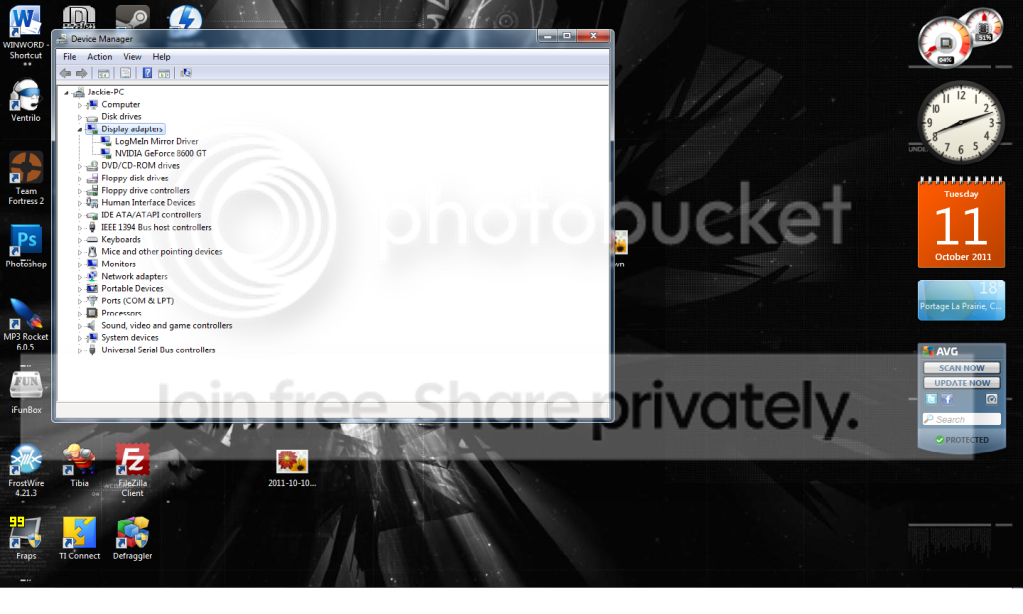
If you can't find a display adapter in Device Manager then it's not turned on in the BIOS.

Post a screen shot of your Device Manager.
 

My Computer My Computer

Computer type
PC/Desktop
Computer Manufacturer/Model Number
Built 2/11/2011
OS
Windows 7 Pro-x64
CPU
i7-2600 3.4GHz - 3.8GHz Turbo
Motherboard
Intel DH67BL-B3
Memory
8Gb - 2x4GB, Muskin 991770 PC3-1333
Graphics Card(s)
Integrated Intel HD 2000
Sound Card
Integrated Intel 10.1 HD, RealTek ALC892
Monitor(s) Displays
Asus LCD VH222H, Haier HL24XSL2a
Screen Resolution
1920x1080, 1920x1080
Hard Drives
Crucial SSD C300-128Gb,
Western Digital WD5002AALX - 500Gb,
Western Digital WD7501AALS - 750Gb
PSU
Seasonic 650W 80+ Gold Modular
Case
Rosewill Defender
Cooling
Stock CPU, Four 120mm case fans, PCH fan added
Keyboard
Logitech EX100 Y-RBH94 Wireless
Mouse
Logitech EX100 M-RCE95 Wireless
Internet Speed
3.0/1.5 Mbs
Antivirus
Microsoft Security Essentials
Browser
Microsoft Internet Explorer 11
Other Info
Antec Veris Premier-Multimedia IR Station,
Cyber Accoustics-3602 Speakers,
AFT XM-5U Card Reader,
Hauppauge TV-HVR-2250,
Sony LX300 USB Turntable
Well there a setting has option for the idg to be in uma or disabled


Device.png
 

My Computer My Computer

OS
Windows 7 Home Premium 64Bit
CPU
AMD Phenom II x4 920 Processor
Motherboard
Gigabyte Technology Co., Ltd. GA-MA785GM-US2H (Socket AM2)
Memory
Corsair 4.0GB Dual-Channel DDR2 @ 401MHz (5-5-5-18)
Graphics Card(s)
GeForce 8600 GT (EVGA)
Sound Card
Realtek High Definition Audio
Monitor(s) Displays
Acer X193W
Screen Resolution
1440 X 900
Hard Drives
244GB Seagate ST3250410AS ATA Device (SATA)
Its not turn on in the BIOS. List word for word the options that are listed in the BIOS for the IGP.
 

My Computer My Computer

Computer Manufacturer/Model Number
Asus
OS
Windows 7 Pro x64 SP1 and Mac OS X 10.8.3
CPU
Intel Core i7-3820 Sandy Bridge-E at 4.75 GHz
Motherboard
ASUS Rampage IV Extreme
Memory
8 x Corsair 8GB DDR3 64 GB Kit @1866 Overclocked @2000
Graphics Card(s)
GTX 580 and MSI R6870
Sound Card
HDMI on GPU and ACL898
Monitor(s) Displays
32" Sony EX-500 120Hz
Screen Resolution
1920x1080P
Hard Drives
1 x Corsair Force Series GT CSSD-F60GBGT-BK (OS)
2 x Western Digital Caviar Black Sata III 750GB (Raid 0)
1 x Western Digital Caviar Black Sata III 1TB (Media)
2 x Western Digital Caviar Black Sata II 640GB (Raid 0)
PSU
Corsair Professional Series Gold AX850
Case
Corsair 800D
Cooling
Corsair H80 High Performance Liquid CPU Cooler
Keyboard
HP Wireless Elite Keyboard
Mouse
HP Wireless Elite Mouse
Internet Speed
Cable, VisionTek Bigfoot Killer 2100 Gaming Network Card
Other Info
4 x GELID Solutions FN-TX12-15 120mm Case Fan with Superior Temperature Control
1 x Corsair 140mm Case Fan
1 x SilverStone FP55B Aluminum front panel 5.25" to a 3.5" bay converter
1 x Ultra Card Reader
1 x Sony Blu-ray Burner BD-5300S-0B
What's "uma"? :confused:

Get the documentation for your BIOS and study it. You won't be able to use the on-board graphics (IDG) if it's not enabled and shows in devices. Once it shows, load the drivers. Then we can go from there.
 

My Computer My Computer

Computer type
PC/Desktop
Computer Manufacturer/Model Number
Built 2/11/2011
OS
Windows 7 Pro-x64
CPU
i7-2600 3.4GHz - 3.8GHz Turbo
Motherboard
Intel DH67BL-B3
Memory
8Gb - 2x4GB, Muskin 991770 PC3-1333
Graphics Card(s)
Integrated Intel HD 2000
Sound Card
Integrated Intel 10.1 HD, RealTek ALC892
Monitor(s) Displays
Asus LCD VH222H, Haier HL24XSL2a
Screen Resolution
1920x1080, 1920x1080
Hard Drives
Crucial SSD C300-128Gb,
Western Digital WD5002AALX - 500Gb,
Western Digital WD7501AALS - 750Gb
PSU
Seasonic 650W 80+ Gold Modular
Case
Rosewill Defender
Cooling
Stock CPU, Four 120mm case fans, PCH fan added
Keyboard
Logitech EX100 Y-RBH94 Wireless
Mouse
Logitech EX100 M-RCE95 Wireless
Internet Speed
3.0/1.5 Mbs
Antivirus
Microsoft Security Essentials
Browser
Microsoft Internet Explorer 11
Other Info
Antec Veris Premier-Multimedia IR Station,
Cyber Accoustics-3602 Speakers,
AFT XM-5U Card Reader,
Hauppauge TV-HVR-2250,
Sony LX300 USB Turntable
Back
Top