Tweak size of Virtual XP logical disk?

bherber

New member
Local time
8:06 PM
Messages
9
I have a couple of drawing programs that I'm having to use in VXP because they aren't 64bit compatible. When I try to open anything that is larger than a relatively small size, it errors out because it says "Not enough space to create scratch files." Is there a way to tweak the size of the logical disk to make it larger?...Or do I have to create a whole new environment?

(Admittedly, I'm not sure I know how to do that because I'm just using the default setup and created environment that it created when I installed it.) But I'll try anything once!
 

My Computer My Computer

At a glance

Windows-7/Professional6GBnVidia
Computer Manufacturer/Model Number
HP Pavilion DV7-1285dx "Entertainment PC" (notebook)
OS
Windows-7/Professional
Memory
6GB
Graphics Card(s)
nVidia
Sound Card
Add-on: Creative X-Fi notebook
Monitor(s) Displays
built-in 17"
Hard Drives
Two 500Gb

My Computer My Computer

At a glance

Windows 7 x64 finally!AMD Athlon II X2 240OCZ Platinum 4GB DDR2 1066 (will not work pas...MSI R4670-MD1G Radeon HD 4670 1GB 128-bit GDDR3
Computer Manufacturer/Model Number
Wally, Innc.
OS
Windows 7 x64 finally!
CPU
AMD Athlon II X2 240
Motherboard
Biostar TA790GX XE
Memory
OCZ Platinum 4GB DDR2 1066 (will not work past 800MHz)
Graphics Card(s)
MSI R4670-MD1G Radeon HD 4670 1GB 128-bit GDDR3
Sound Card
ATI High Definition Audio Device Realtek ALC888
Monitor(s) Displays
HP w19e
Screen Resolution
1440x900
Hard Drives
Western Digital Caviar Green WD5000AADS 500GB SATA
Western Digital Caviar Blue WD5000AAKS 500GB SATA
PSU
Athena Power Micro ATX 400W
Case
HEC 6T 6T10BB Black MicroATX Mini Tower
Cooling
stock
Keyboard
wired, many keys
Mouse
HP wireless, 2 buttons, 1 wheel
Internet Speed
DSL 2Mb (recently getting 1.65M!)
I kind of figured that... Is there a way to just increase the size of the current configuration, or do I have to create a new one? Where do you do that?
 

My Computer My Computer

At a glance

Windows-7/Professional6GBnVidia
Computer Manufacturer/Model Number
HP Pavilion DV7-1285dx "Entertainment PC" (notebook)
OS
Windows-7/Professional
Memory
6GB
Graphics Card(s)
nVidia
Sound Card
Add-on: Creative X-Fi notebook
Monitor(s) Displays
built-in 17"
Hard Drives
Two 500Gb
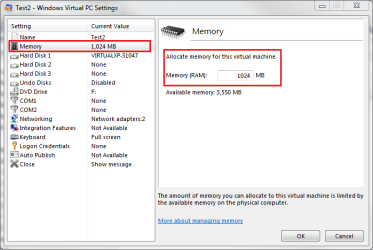
Open Virtual Machines folder, located in your user folder (C:\Users\Your_Username\Virtual Machines). Right click Windows XP Mode, choose Settings. Choose Memory from the list on the left, change the amount of memory you want to allocate for XP Mode on the right.

Kari
 

Attachments

  • XPM_Memory.png
    XPM_Memory.png
    19.9 KB · Views: 32

My Computer My Computer

At a glance

Windows 10 Pro x64 EN-GB1.6 GHz Intel Core i7-720QM Processor6 GBATI Mobility Radeon HD 5850 Graphics
Computer type
Laptop
Computer Manufacturer/Model Number
HP ENVY 17-1150eg
OS
Windows 10 Pro x64 EN-GB
CPU
1.6 GHz Intel Core i7-720QM Processor
Memory
6 GB
Graphics Card(s)
ATI Mobility Radeon HD 5850 Graphics
Sound Card
Beats sound system with integrated subwoofer
Monitor(s) Displays
17" laptop display, 22" LED and 32" Full HD TV through HDMI
Screen Resolution
1600*900 (1), 1920*1080 (2&3)
Hard Drives
Internal: 2 x 500 GB SATA Hard Disk Drive 7200 rpm
External: 2TB for backups, 3TB USB3 network drive for media
Cooling
As Envy runs a bit warm, I have it on a Cooler Master pad
Keyboard
Logitech diNovo Media Desktop Laser (bluetooth)
Mouse
Logitech Performance Mouse MX
Internet Speed
50/10 Mbps VDSL
Antivirus
Windows Defender 4.3.9431.0
Browser
Maxthon 3.5.2., IE11
Thanks! I had found the place where you could change the memory settings, but it was always grayed-out. I finally figured out that it was in a hibernated state instead of shutdown. As soon as I shut it down, then I could manipulate the memory setting. I appreciate your patience... :-)
 

My Computer My Computer

At a glance

Windows-7/Professional6GBnVidia
Computer Manufacturer/Model Number
HP Pavilion DV7-1285dx "Entertainment PC" (notebook)
OS
Windows-7/Professional
Memory
6GB
Graphics Card(s)
nVidia
Sound Card
Add-on: Creative X-Fi notebook
Monitor(s) Displays
built-in 17"
Hard Drives
Two 500Gb
Back
Top