Two different copies of same .dll

glennc

New member
Power User
VIP
Local time
6:56 PM
Messages
1,024
Hello,
Apparently a problem I had thought fixed had resurfaced. Upon investigation I find that 2 programs use the same "delzip179.dll". I have had failures to load errors in Administrative Events. I've found that there are two different copies of the same named (above) .dll. Could this be the cause of a problem? If so, how would one rectify it? Thanks for any assistance.
glennc
 

My Computer My Computer

Computer type
PC/Desktop
Computer Manufacturer/Model Number
Self-Built
OS
Windows 7 Ultimate
CPU
AMD Phenom-II X4 965
Motherboard
Gigabyte GA-MA785GM-US2H
Memory
8192 MB DDR2-SDRAM
Graphics Card(s)
ATI Radeon HD 4200
Sound Card
ATI Radeon HD 4200 High Definition Audo
Monitor(s) Displays
LG Electronics W1943
Screen Resolution
1360 X 768
Hard Drives
C: 500 GB Caviar Black SATA
E: 500 GB Caviar Black SATA
PSU
Ultra LSP 750
Case
Ultra XBlaster
Cooling
2 Fans, CPU Fan, PS Fan
Keyboard
Acer
Mouse
Logitech
Internet Speed
6 MB
Do you use Spybot?
 

My Computer My Computer

Computer type
Laptop
Computer Manufacturer/Model Number
Toshiba P775-S7100
OS
Windows 7 Professional SP1 64-bit
CPU
Intel Core i5-2450M @2.5 GHz
Memory
6 GB DDR3 1333MHz
Graphics Card(s)
Intel HD 3000
Monitor(s) Displays
Built-in 17.3" LED; 22" Insignia NS-L22Q-10A
Screen Resolution
1600x900; 1360x768
Hard Drives
750 GB Hitachi
1TB Seagate FreeAgent External
Internet Speed
Verizon DSL Speed(Down/Up): 3360 Kbps / 800 Kbps
Antivirus
MSE and MBAM Pro
Browser
IE10
Hello Petey7,
I did. I did not use the Spybot uninstaller. I also use a program called Mozbackup which I need. It seems they both use the .dll, but each has a different version. I found this out after I reloaded Spybot. The idea was to use the Spybot uninstaller to get rid of it all. But at this moment I am concerned over the effects of the 2 different versions of the same .dll. I don't have an easy way of doing away with Mozbackup, which backups settings from Firefox and Thunderbird. I've kept copies of important email in these backups. This leaves me at a lose.
Thanks for your reply.
glennc
 

My Computer My Computer

Computer type
PC/Desktop
Computer Manufacturer/Model Number
Self-Built
OS
Windows 7 Ultimate
CPU
AMD Phenom-II X4 965
Motherboard
Gigabyte GA-MA785GM-US2H
Memory
8192 MB DDR2-SDRAM
Graphics Card(s)
ATI Radeon HD 4200
Sound Card
ATI Radeon HD 4200 High Definition Audo
Monitor(s) Displays
LG Electronics W1943
Screen Resolution
1360 X 768
Hard Drives
C: 500 GB Caviar Black SATA
E: 500 GB Caviar Black SATA
PSU
Ultra LSP 750
Case
Ultra XBlaster
Cooling
2 Fans, CPU Fan, PS Fan
Keyboard
Acer
Mouse
Logitech
Internet Speed
6 MB
Right click the DLL and choose properties. Look though it on both carefully. You might be able to find out which is which and delete it. How did you remove spybot?
 

My Computer My Computer

Computer type
Laptop
Computer Manufacturer/Model Number
Toshiba P775-S7100
OS
Windows 7 Professional SP1 64-bit
CPU
Intel Core i5-2450M @2.5 GHz
Memory
6 GB DDR3 1333MHz
Graphics Card(s)
Intel HD 3000
Monitor(s) Displays
Built-in 17.3" LED; 22" Insignia NS-L22Q-10A
Screen Resolution
1600x900; 1360x768
Hard Drives
750 GB Hitachi
1TB Seagate FreeAgent External
Internet Speed
Verizon DSL Speed(Down/Up): 3360 Kbps / 800 Kbps
Antivirus
MSE and MBAM Pro
Browser
IE10
Hello Again Petey7,
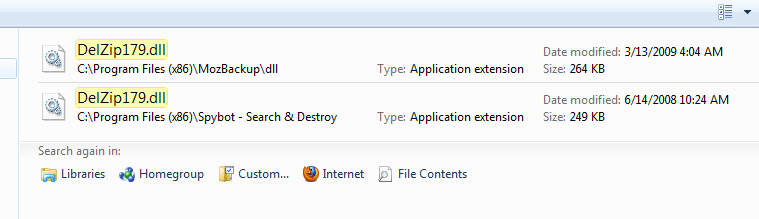
I removed it with Windows uninstaller and then did a Advanced SystemCare to clean up what was left. The next time, as that didn't work, I downloaded Revo Uninstaller Pro, which seems very good. I read that by reinstalling Spybot you would get the .dll for it back, in uncorrupted or whatever condition. I did a search and found one in a Spybot subdirectory and the other one elsewhere. What struck me was the dates were about a year apart. Now with the new Spybot .dll, maybe I can keep it and use it, as well as the Mozbackup. I only uninstalled it to do away with the error to find "delzip179.dll", that mentioned Mozbackup. Since I needed Mozbackup more than Spybot. Without knowledge I have no way to decide what to do next. I guess I can sit around and watch for symptoms. I do know that the last time I installed Spybot as an administrator. It seemed to run as it always did, as does Mozbackup. Extremely confused. Ignorance is a major stumbling block in proper decision making.
Here is what I see and are my choices:

Capture.PNG

Any opinions or ideas are welcome.
glennc
 

My Computer My Computer

Computer type
PC/Desktop
Computer Manufacturer/Model Number
Self-Built
OS
Windows 7 Ultimate
CPU
AMD Phenom-II X4 965
Motherboard
Gigabyte GA-MA785GM-US2H
Memory
8192 MB DDR2-SDRAM
Graphics Card(s)
ATI Radeon HD 4200
Sound Card
ATI Radeon HD 4200 High Definition Audo
Monitor(s) Displays
LG Electronics W1943
Screen Resolution
1360 X 768
Hard Drives
C: 500 GB Caviar Black SATA
E: 500 GB Caviar Black SATA
PSU
Ultra LSP 750
Case
Ultra XBlaster
Cooling
2 Fans, CPU Fan, PS Fan
Keyboard
Acer
Mouse
Logitech
Internet Speed
6 MB
If your not going to use spybot or at least don't have it installed at the moment, try to delete the one that says spybot in the file location.
 

My Computer My Computer

Computer type
Laptop
Computer Manufacturer/Model Number
Toshiba P775-S7100
OS
Windows 7 Professional SP1 64-bit
CPU
Intel Core i5-2450M @2.5 GHz
Memory
6 GB DDR3 1333MHz
Graphics Card(s)
Intel HD 3000
Monitor(s) Displays
Built-in 17.3" LED; 22" Insignia NS-L22Q-10A
Screen Resolution
1600x900; 1360x768
Hard Drives
750 GB Hitachi
1TB Seagate FreeAgent External
Internet Speed
Verizon DSL Speed(Down/Up): 3360 Kbps / 800 Kbps
Antivirus
MSE and MBAM Pro
Browser
IE10
Petey7,
Since I decided to use Spybot, which I am used to, I went the other route. I renamed the copy in the Spybot subdirectory and copied the newer on from Mozbackup, there. Thank you for you help. I am attempting to not view the event viewer for a week. If nothing outwordly shows up, I'll know in a week. If it does, I will delete Spybot with the Spybot uninstaller.
Take care
glennc
 

My Computer My Computer

Computer type
PC/Desktop
Computer Manufacturer/Model Number
Self-Built
OS
Windows 7 Ultimate
CPU
AMD Phenom-II X4 965
Motherboard
Gigabyte GA-MA785GM-US2H
Memory
8192 MB DDR2-SDRAM
Graphics Card(s)
ATI Radeon HD 4200
Sound Card
ATI Radeon HD 4200 High Definition Audo
Monitor(s) Displays
LG Electronics W1943
Screen Resolution
1360 X 768
Hard Drives
C: 500 GB Caviar Black SATA
E: 500 GB Caviar Black SATA
PSU
Ultra LSP 750
Case
Ultra XBlaster
Cooling
2 Fans, CPU Fan, PS Fan
Keyboard
Acer
Mouse
Logitech
Internet Speed
6 MB
Back
Top