Two Local area connections

iceman69493

New member
Local time
6:17 AM
Messages
1
Hi,

Need help with setting up two local area connections using the same ethernet controller. I use my laptop in two different networks, one is DHCP enabled and the other needs static IP. Right now i keep changing the IP settings every time i connect from on to another. So i want to avoid doing this and have to two local area connections for the two different networks. Can this be done, and if so, do let me know the procedure to set up the second local area connections.

Cheers!
 

My Computer

OS
windows 7 64bit
Welcome to the Seven Forums.

You can use NETSH to change between DHCP and a static IP setup.

Look at the 3 batch files that I've attached to this post.

Test them out by manualy setting a static IP address
Right click on the file named "DHCP-netsh.bat"
And select "Run as administrator" from the context menu

That should set your network connection named "Local Area Connection" to use DHCP for the IP address and the DNS servers.

You will need to edit the other two files to use the static IP and gateway that you need.
netsh interface ipv4 set address name="Local Area Connection" static 10.10.0.252 255.255.255.0 10.10.0.1 1

Be sure to leave the " 1" after the gateway.

If you like this way of changing those settings, then I would suggest putting those files somewhere on your hard drive and making a shortcut to them. Then set the shortcut to "Run as administrator" via option six in this tutorial: http://www.sevenforums.com/tutorials/11841-run-administrator.html

That way, you can just double click on the shortcut, answer the UAC if needed and the IP changes will start happening.

edit: how to test your DNS speed: http://www.dslreports.com/faq/15890
 

Attachments

My Computer

Computer type
Laptop
Computer Manufacturer/Model Number
Employer provided Dell Latitude
OS
W7 Pro SP1 64bit
CPU
i7
Memory
8GB
Graphics Card(s)
Intel HD Graphics
Hard Drives
crappy SSD
Antivirus
Employer mandated Symantec Endpoint Protection
Browser
Pale Moon 64bit, IE11 64bit & Chrome 64bit
Hi,

Need help with setting up two local area connections using the same ethernet controller. I use my laptop in two different networks, one is DHCP enabled and the other needs static IP. Right now i keep changing the IP settings every time i connect from on to another. So i want to avoid doing this and have to two local area connections for the two different networks. Can this be done, and if so, do let me know the procedure to set up the second local area connections.

Cheers!

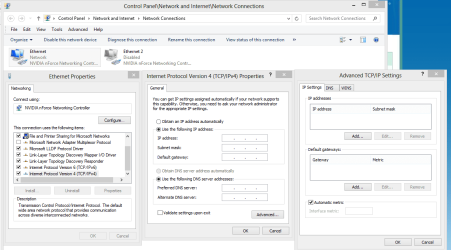
You can easily bind up to 2 static IP's to your network adaptor by going into the Advanced adaptor properties and change to static IP then type in the subnet mask, default gateway, IP, DNS server etc. The picture below shows where to go.

If you go with 2 static connections for both places you can bind both of the static IP's to your Ethernet NIC and then you can automatically connect to both places.
 

Attachments

  • Add Static IP to TCPip.PNG
    Add Static IP to TCPip.PNG
    41 KB · Views: 11

My Computer

Computer type
PC/Desktop
Computer Manufacturer/Model Number
Home built
OS
Windows 7 Ult, Windows 8.1 Pro,
CPU
Q9650-4.275GHz, E8600 4.5GHz, E6750-3.8GHz
Motherboard
Evga 780i FTW
Memory
G.Skill PC2 9600 1200Mhz 5 5 5 15 2T
Graphics Card(s)
GTX480
Sound Card
Asus Xonar D2
Monitor(s) Displays
HannsG
Screen Resolution
1680X1050
Hard Drives
GSkill Phoenix Pro 120GB SSD
PSU
ThermalTake Toughpower 1000Watt modular
Case
ThermalTake XaserV
Cooling
Xigmatek S1283
Keyboard
Logitech G15
Mouse
Logitech G9
Internet Speed
T1
Back
Top