hooterdawg
New member
- Local time
- 8:02 PM
- Messages
- 4
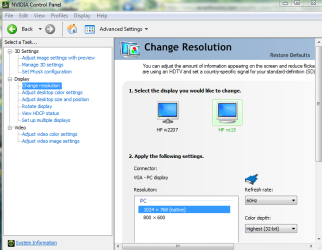
I have a new Windows 7 system to which I want to connect two monitors. One is a 22" 16:9 format, and the other is a 19" 4:3 format. If I set the resolution for the 16:9 [COLOR=#0072bc !important][COLOR=#0072bc !important]HD[/COLOR][/COLOR], nothing but the 'theme' shows on the 4:3 because everything is off the edge of the monitor. My card has dual DVI inputs. Can my 4:3 monitor be somehow set to show the 16:9 content, or do I have to match aspect ratios.
4:3 = 1280 x 1024
16:9 = 1920 x 1080
4:3 = 1280 x 1024
16:9 = 1920 x 1080
My Computer
- Computer Manufacturer/Model Number
- HP e9290f
- OS
- Windows 7
- CPU
- i7 920
- Motherboard
- ASUS
- Memory
- 9GB
- Graphics Card(s)
- nVidia GTX 260
- Monitor(s) Displays
- LG 22" Samsung 19"
- Hard Drives
- 1T