Resolutions in Windows 7

makubex

New member
Local time
1:13 PM
Messages
25
Hi everyone

I use a LCD monitor whose native resolution is 1280x1024. If i reduce my resolution to a lower value, the real estate is reduced to the specified resolution with black covering the rest of the monitor area.

I did some digging and found that "Flat Panel Scaling" dictates this behavior, but since my monitor is connected using an analog cable, so "Flat Panel Scaling" is unavailable in driver settings.

This is rather annoying, is there any way to change this, so that even if I select a lower resolution, the entire monitor area will be used.

Regards
makubex
 

My Computer

OS
Windows
Hi there
sometimes this problem is "gettable aroundable" by just pressing "Auto Resize" on the monitor if your hardware has such a feature. Otherwise you don't have the correct driver for your particular monitor. Probably missing the Intel graphics accelerator drivers -- download from the Intel site.

Cheers
jimbo
 

My Computer

Computer type
PC/Desktop
Computer Manufacturer/Model Number
Custom built, several laptops HP/ASUS
OS
Linux CENTOS 7 / various Windows OS'es and servers
CPU
Intel i7 Intel i5
Memory
8GB, 16GB
Graphics Card(s)
On Motherboard
Sound Card
Realtek HD audio
Monitor(s) Displays
Apple Cinema display, Samsung LCD
Screen Resolution
1920 X 1080
Hard Drives
4 X 1TB SATA
Mouse
Toshiba wireless laser
Internet Speed
> 20MB up
I dont user Intel Graphics Accelerator drivers.

My display adapter is a Geforce 8400 GS, running on Forceware 190.38. I did try "Auto adjust" button on my monitor, but that only makes it worse (screws with the position of the desktop)

As for my monitor drivers, I'm using the driver Windows 7 installed. I tried installing the driver from the CD (which came along with the monitor), but the same thing happens with that one too.
 

My Computer

OS
Windows
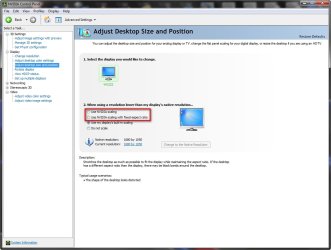
Have you tried going into the Nvidia Control panel and selecting one of these options when setting your resolution?

2009-08-04_222056.jpg
 

My Computer

Computer Manufacturer/Model Number
Home Brew
OS
Windows 7 Ultimate Vista Ultimate x64
CPU
Core 2 Duo E8500 3.16Ghz @ 3.8Ghz
Motherboard
eVGA 750i FTW
Memory
2x2Gigs Patriot PC2-6400 LL
Graphics Card(s)
Inno3D GeForce GTX260 216 SP
Monitor(s) Displays
ASUS VW222U 22" 2ms Response time
Screen Resolution
1680x1050
Hard Drives
SATA 150GB
SATA II 250GB
USB IDE 750GB Ext.
PSU
HYTEC 600W & Thermaltake 650W Toughpower Power Exp
Case
Thermaltake Armor LCS (Liquid Cooling System)
Cooling
Liquid Cooling System
Keyboard
Logitech G15 Gaming Keyboard
Mouse
Logitech G9 Gaming Mouse
@Mr GRiM: I dont have those options in Nvidia Control Panel.

@Antman: I just tried changing resolutions at various refresh rates, no joy :(
 

My Computer

OS
Windows
Let's visit why you lower the resolution. Perhaps you could change the DPI setting. This emulates a lower res, to a degree.
 
I dont need to lower the desktop's resolution. I dont have problems with readability.

But I generally set some games to run at lower resolutions so as to improve performance. That's when it gets annoying.
 

My Computer

OS
Windows
To get the Nvidia control panel just go here and download which it drivers it says you need, probably the 190.38, which unfortunately many have been having problems with . Drivers - Download NVIDIA Drivers

The Nvidia drivers will come with the Nvidia control panel. After that you should be able to setup a custom resolution or make any other adjustments needed to run at lower resolutions.
 

My Computer

Computer type
PC/Desktop
Computer Manufacturer/Model Number
Home built
OS
Windows 7 Ult, Windows 8.1 Pro,
CPU
Q9650-4.275GHz, E8600 4.5GHz, E6750-3.8GHz
Motherboard
Evga 780i FTW
Memory
G.Skill PC2 9600 1200Mhz 5 5 5 15 2T
Graphics Card(s)
GTX480
Sound Card
Asus Xonar D2
Monitor(s) Displays
HannsG
Screen Resolution
1680X1050
Hard Drives
GSkill Phoenix Pro 120GB SSD
PSU
ThermalTake Toughpower 1000Watt modular
Case
ThermalTake XaserV
Cooling
Xigmatek S1283
Keyboard
Logitech G15
Mouse
Logitech G9
Internet Speed
T1
Even if I do set up custom resolutions, will they stretch to fit the entire monitor screen?

Besides I never bothered to setting up custom resolutions anytime before, I'd appreciate it if someone could help me out with it.
 

My Computer

OS
Windows
Back
Top