Two pairs of speakers -analogue and USB - don't work together

Hugo Tromp

New member
Local time
4:11 PM
Messages
6
Hi,

I just bought the Ion Desk Rockers, two USB active monitor speakers and they work perfectly. I also have to Creative speakers with a regular mini-jack plug. Now I have the green mini-jack in my laptop and the Ion Desk Rockers trough USB port. The two speakers work fine, but I can't get them to work both.

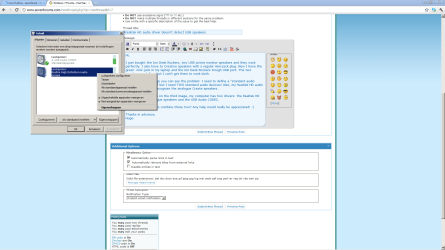
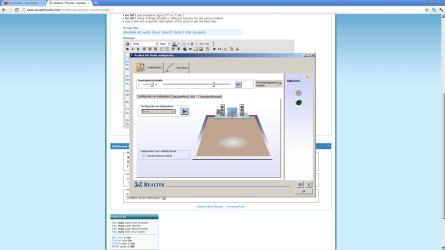
In the attached image you can see the problem: I need to define a ''standard audio device'' in Windows 7 but I need TWO standard audio devices! Also, my Realtek HD audio manager does only recognize the analogue Create speakers.

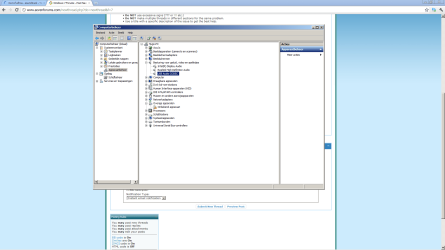
Now, as you can see on the third image, my computer has two drivers: the Realtek HD drivers for the analogue speakers and the USB Audio CODEC.

My question is how to combine those two? Any help would really be appreciated! :)

Thanks in advance,
Hugo.

(My PC language is Dutch by the way but if you want I can change it to English so that you can have a clear view of the problem)
 

Attachments
  • 1.png
    1.png
    49.3 KB · Views: 79
  • 2.png
    2.png
    65.4 KB · Views: 57
  • 3.png
    3.png
    75 KB · Views: 48

My Computer My Computer

At a glance

Windows 7 64bit
OS
Windows 7 64bit
Hugo welcome to the Seven Forums.

There is a very good reason that you can't get them to work together, the USB speakers are treated as (and have their own built in) a separate sound card that in no way has anything to do with the onboard audio. This is a case of either or, as you can't get both to work together.
 

My Computer My Computer

At a glance

Win 7 Ultimate x64FX-8350 @ 4.6 GHz so farADATA XPG V1 Series Black 8GB DDR3 1600Sapphire R9 270x Dual-X
Computer type
PC/Desktop
Computer Manufacturer/Model Number
Me
OS
Win 7 Ultimate x64
CPU
FX-8350 @ 4.6 GHz so far
Motherboard
Asus M5A97 EVO
Memory
ADATA XPG V1 Series Black 8GB DDR3 1600
Graphics Card(s)
Sapphire R9 270x Dual-X
Sound Card
Xonar DGX w/ Corsair Vengence 1300
Monitor(s) Displays
Acer S232HL Abid
Screen Resolution
1920x1080
Hard Drives
120 GB OCZ Vertex 3
500 GB Seagate 7200.12
PSU
Antec Earthwatts 650W Green
Case
Antec Three Hundred
Cooling
Cooler Master 212 EVO
Keyboard
Logitech G510
Mouse
Logitech G500s
Internet Speed
35000/3000

My Computer My Computer

At a glance

Windows 7 Ultimate x64Intel Core i7 740QMG. Skill 8GB (2x4GB) DDR3 @ 1333MHznVidia GeForce GTX 460M
Computer Manufacturer/Model Number
Alienware m15x (my main PC)
OS
Windows 7 Ultimate x64
CPU
Intel Core i7 740QM
Memory
G. Skill 8GB (2x4GB) DDR3 @ 1333MHz
Graphics Card(s)
nVidia GeForce GTX 460M
Sound Card
IDT Integrated HD Audio
Monitor(s) Displays
15.6HDF+ WLED
Screen Resolution
1600 x 900
Hard Drives
240GB OCZ Agility 3 SSD
Mouse
Razer Orochi
Internet Speed
50Mb/s
Other Info
Intel Ultimate N Wi-Fi Link 5300, Bluetooth 2.0
Thanks for your quick reply! However, I still wonder whether I can't get the analogue speakers to work within the USB soundcard. Is there any way?

Thanks in advance,
Hugo.
 

My Computer My Computer

At a glance

Windows 7 64bit
OS
Windows 7 64bit

My Computer My Computer

At a glance

Windows 7 64bit
OS
Windows 7 64bit
Thanks for your quick reply! However, I still wonder whether I can't get the analogue speakers to work within the USB soundcard. Is there any way?

Thanks in advance,
Hugo.
Windows 7 is apparently designed to only output to one audio device at a time, the explanation given is that this basically has something to do with copyright laws. Thus, since your USB speakers are technically another audio device, they will not output audio if the sound card is set to act as the default device.

If you had two pairs of speakers plugged into different ports on the same sound card then it would most likely work fine. However, the USB device is technically its own sound card, so to speak.

I was frustrated by this issue too as I often plug my laptop in to my TV via HDMI to watch movies. Each time I do I need to change the default audio device to HDMI and then back to the speakers when I'm done. Apparently some PCs automatically switch but mine doesn't. I might try out that Virtual Audio Cable software on my laptop when I get home from work today
 

My Computer My Computer

At a glance

Windows 7 Ultimate x64Intel Core i7 740QMG. Skill 8GB (2x4GB) DDR3 @ 1333MHznVidia GeForce GTX 460M
Computer Manufacturer/Model Number
Alienware m15x (my main PC)
OS
Windows 7 Ultimate x64
CPU
Intel Core i7 740QM
Memory
G. Skill 8GB (2x4GB) DDR3 @ 1333MHz
Graphics Card(s)
nVidia GeForce GTX 460M
Sound Card
IDT Integrated HD Audio
Monitor(s) Displays
15.6HDF+ WLED
Screen Resolution
1600 x 900
Hard Drives
240GB OCZ Agility 3 SSD
Mouse
Razer Orochi
Internet Speed
50Mb/s
Other Info
Intel Ultimate N Wi-Fi Link 5300, Bluetooth 2.0
I can't really get it to work.... shit I really wanted this to work fine... and as I do audio editing I can't afford any latency
 

My Computer My Computer

At a glance

Windows 7 64bit
OS
Windows 7 64bit
I can't really get it to work.... shit I really wanted this to work fine... and as I do audio editing I can't afford any latency
You could revert back to XP if you really need it to work LOL
Other then that I guess you could return the speakers for ones with an analog jack
 

My Computer My Computer

At a glance

Windows 7 Ultimate x64Intel Core i7 740QMG. Skill 8GB (2x4GB) DDR3 @ 1333MHznVidia GeForce GTX 460M
Computer Manufacturer/Model Number
Alienware m15x (my main PC)
OS
Windows 7 Ultimate x64
CPU
Intel Core i7 740QM
Memory
G. Skill 8GB (2x4GB) DDR3 @ 1333MHz
Graphics Card(s)
nVidia GeForce GTX 460M
Sound Card
IDT Integrated HD Audio
Monitor(s) Displays
15.6HDF+ WLED
Screen Resolution
1600 x 900
Hard Drives
240GB OCZ Agility 3 SSD
Mouse
Razer Orochi
Internet Speed
50Mb/s
Other Info
Intel Ultimate N Wi-Fi Link 5300, Bluetooth 2.0
Back
Top