Two problems: x264 videos and subtitles

jota

New member
Local time
8:29 PM
Messages
31
Location
Minas Gerais, Brazil
I have two problems with windows media center
1st - I can't see videos with .srt subtitles
2nd - I can't see videos x264 (download from Up! Download de Filmes e Séries na internet!)
And I have the 1st problem in Media Player too...

So what can I do?

OBS: I can see x264 in other players without a problem, I just have trouble playing this videos in Media Center.
 

My Computer My Computer

OS
Windows 7 Build 7000 x86
CPU
AMD Athlon 64 2.0 GHz
Motherboard
Asus A8V
Memory
1,25 GB DDR
Graphics Card(s)
XFX GeForce 6200 512MB AGP 8X DDR2
Sound Card
Realtek AC'97 / VIA Audio Controller
Monitor(s) Displays
LG Flatron ez T910B 19" CRT broken
Hard Drives
2 SATA Seagate Barracuda 80GB
PSU
450W Fan Hug
Keyboard
Multilaser Multimedia Keyboard
Mouse
Microsoft Notebook Optical Mouse
What container are these movies in? mkv, mp4, avi?
 

My Computer My Computer

Computer Manufacturer/Model Number
Dell XPS 420
OS
Windows 7 Beta Build 7100 x86
CPU
Intel Core 2 Quad Q6600
Motherboard
Intel G35
Memory
3GB DDR2-800
Graphics Card(s)
nVidia GeForce 9600 GT
Sound Card
Onboard SPDIF
Monitor(s) Displays
Panasonic TH-50PZ800U
Screen Resolution
1920x1080
Hard Drives
Hitachi 320GB
WD 500GB
Internet Speed
FiOS 20/20
Other Info
3 x ATi External DCT CableCard Tuners
They're in avi
 

My Computer My Computer

OS
Windows 7 Build 7000 x86
CPU
AMD Athlon 64 2.0 GHz
Motherboard
Asus A8V
Memory
1,25 GB DDR
Graphics Card(s)
XFX GeForce 6200 512MB AGP 8X DDR2
Sound Card
Realtek AC'97 / VIA Audio Controller
Monitor(s) Displays
LG Flatron ez T910B 19" CRT broken
Hard Drives
2 SATA Seagate Barracuda 80GB
PSU
450W Fan Hug
Keyboard
Multilaser Multimedia Keyboard
Mouse
Microsoft Notebook Optical Mouse
Resolved in Win7 Beta x64

OK, I have just found the solution to this you need three files. The three files you need are: -

(1) [FONT=Verdana, Arial, Helvetica, sans-serif]Microsoft Visual C++ 2008 Redistributable Package SP1[/FONT] (link on Media Control site);
(2) Codec installation files - here;
(3) Media Control : version 5.4.5 - here (you can also get the codec files here).

All downloads are available on the Media Control site. Make sure you get the right version of [FONT=Verdana, Arial, Helvetica, sans-serif]Microsoft Visual C++ 2008 Redistributable Package SP1[/FONT] i.e. x64/x86 the link on the Media Control site is for x86. Installation instructions are also on the site.

Please don't forget to post after installing for x86 to confirm it is working or not.
 
Last edited:

My Computer My Computer

OS
Windows Se7en Ultimate x64
CPU
AMD Athlon Phenom II 550 (Dual Core at the moment)
Motherboard
DFI LPJR790GX-M2RS
Memory
4GB OCZ reaper DDR2 PC8500 1066
Graphics Card(s)
CrosssFire 2 x Sapphire RADEON HD3650 (512 MB GDDR3)
Sound Card
Built-in
Monitor(s) Displays
Samsung LE-40B551 40 in. HDTV, HP w2007v, Elo Touchscreen
Screen Resolution
1920 x 1080 pixels
Hard Drives
OCZ Agility Series 30GB SATA II 2.5" Solid State Drive
Samsung Spinpoint F3 1TB SATA II
Samsung Spinpoint F1 500GB SATA II
Western Digital Caviar 500GB SATA II
PSU
OCZ 600W StealthXStream
Case
Antec P180 Mini
Cooling
Scythe Ninja Copper Cooler 5th Anniversary Limited Edition
Keyboard
Cordless Desktop® EX 90
Mouse
Cordless Desktop® EX 90
Internet Speed
Hamster-in-a-wheel
Other Info
WinTV-NOVA-T PCI
Altec Lansing ACS56
I'm gonna try.
I'll post the results here when I'm done.
 

My Computer My Computer

OS
Windows 7 Build 7000 x86
CPU
AMD Athlon 64 2.0 GHz
Motherboard
Asus A8V
Memory
1,25 GB DDR
Graphics Card(s)
XFX GeForce 6200 512MB AGP 8X DDR2
Sound Card
Realtek AC'97 / VIA Audio Controller
Monitor(s) Displays
LG Flatron ez T910B 19" CRT broken
Hard Drives
2 SATA Seagate Barracuda 80GB
PSU
450W Fan Hug
Keyboard
Multilaser Multimedia Keyboard
Mouse
Microsoft Notebook Optical Mouse

Attachments

  • MCE mkv and subs.PNG
    MCE mkv and subs.PNG
    105.2 KB · Views: 364

My Computer My Computer

OS
Windows Se7en Ultimate x64
CPU
AMD Athlon Phenom II 550 (Dual Core at the moment)
Motherboard
DFI LPJR790GX-M2RS
Memory
4GB OCZ reaper DDR2 PC8500 1066
Graphics Card(s)
CrosssFire 2 x Sapphire RADEON HD3650 (512 MB GDDR3)
Sound Card
Built-in
Monitor(s) Displays
Samsung LE-40B551 40 in. HDTV, HP w2007v, Elo Touchscreen
Screen Resolution
1920 x 1080 pixels
Hard Drives
OCZ Agility Series 30GB SATA II 2.5" Solid State Drive
Samsung Spinpoint F3 1TB SATA II
Samsung Spinpoint F1 500GB SATA II
Western Digital Caviar 500GB SATA II
PSU
OCZ 600W StealthXStream
Case
Antec P180 Mini
Cooling
Scythe Ninja Copper Cooler 5th Anniversary Limited Edition
Keyboard
Cordless Desktop® EX 90
Mouse
Cordless Desktop® EX 90
Internet Speed
Hamster-in-a-wheel
Other Info
WinTV-NOVA-T PCI
Altec Lansing ACS56
Ok, it didn't worked for me. Or maybe i'm doin' it wrong, can you say step by step what I have to do?
 

My Computer My Computer

OS
Windows 7 Build 7000 x86
CPU
AMD Athlon 64 2.0 GHz
Motherboard
Asus A8V
Memory
1,25 GB DDR
Graphics Card(s)
XFX GeForce 6200 512MB AGP 8X DDR2
Sound Card
Realtek AC'97 / VIA Audio Controller
Monitor(s) Displays
LG Flatron ez T910B 19" CRT broken
Hard Drives
2 SATA Seagate Barracuda 80GB
PSU
450W Fan Hug
Keyboard
Multilaser Multimedia Keyboard
Mouse
Microsoft Notebook Optical Mouse
Here's what I did

OK, I have just found the solution to this you need three files. The three files you need are: -

(1) [FONT=Verdana, Arial, Helvetica, sans-serif]Microsoft Visual C++ 2008 Redistributable Package SP1[/FONT] (link on Media Control site);
(2) Codec installation files - here;
(3) Media Control : version 5.4.5 - here (you can also get the codec files here).

All downloads are available on the Media Control site. Make sure you get the right version of [FONT=Verdana, Arial, Helvetica, sans-serif]Microsoft Visual C++ 2008 Redistributable Package SP1[/FONT] i.e. x64/x86 the link on the Media Control site is for x86. Installation instructions are also on the site.

Please don't forget to post after installing for x86 to confirm it is working or not.

Ok, it didn't worked for me. Or maybe i'm doin' it wrong, can you say step by step what I have to do?

From my post above downloaded and installed (2) and then (1) then (3) and that's it, no tweaks, no nothing.
 

My Computer My Computer

OS
Windows Se7en Ultimate x64
CPU
AMD Athlon Phenom II 550 (Dual Core at the moment)
Motherboard
DFI LPJR790GX-M2RS
Memory
4GB OCZ reaper DDR2 PC8500 1066
Graphics Card(s)
CrosssFire 2 x Sapphire RADEON HD3650 (512 MB GDDR3)
Sound Card
Built-in
Monitor(s) Displays
Samsung LE-40B551 40 in. HDTV, HP w2007v, Elo Touchscreen
Screen Resolution
1920 x 1080 pixels
Hard Drives
OCZ Agility Series 30GB SATA II 2.5" Solid State Drive
Samsung Spinpoint F3 1TB SATA II
Samsung Spinpoint F1 500GB SATA II
Western Digital Caviar 500GB SATA II
PSU
OCZ 600W StealthXStream
Case
Antec P180 Mini
Cooling
Scythe Ninja Copper Cooler 5th Anniversary Limited Edition
Keyboard
Cordless Desktop® EX 90
Mouse
Cordless Desktop® EX 90
Internet Speed
Hamster-in-a-wheel
Other Info
WinTV-NOVA-T PCI
Altec Lansing ACS56
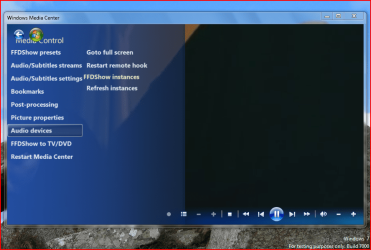
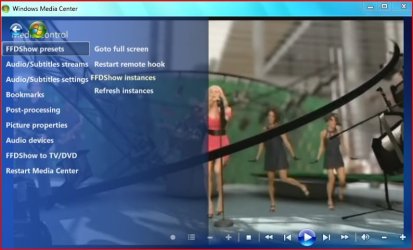
Yeah, it didn't worked. I can see that menu but it does nothing. I still can see subtitles and now, when I open a x264 video I just hear the audio and MCE freezes.
 

Attachments

  • ahh.jpg
    ahh.jpg
    45.4 KB · Views: 166

My Computer My Computer

OS
Windows 7 Build 7000 x86
CPU
AMD Athlon 64 2.0 GHz
Motherboard
Asus A8V
Memory
1,25 GB DDR
Graphics Card(s)
XFX GeForce 6200 512MB AGP 8X DDR2
Sound Card
Realtek AC'97 / VIA Audio Controller
Monitor(s) Displays
LG Flatron ez T910B 19" CRT broken
Hard Drives
2 SATA Seagate Barracuda 80GB
PSU
450W Fan Hug
Keyboard
Multilaser Multimedia Keyboard
Mouse
Microsoft Notebook Optical Mouse
Problems here now

I installed the new shark Windows 7 codec and I am now back to square 1 myself. Can't play mkv files anymore, it is helpfully telling me it can't find them now.
 

My Computer My Computer

OS
Windows Se7en Ultimate x64
CPU
AMD Athlon Phenom II 550 (Dual Core at the moment)
Motherboard
DFI LPJR790GX-M2RS
Memory
4GB OCZ reaper DDR2 PC8500 1066
Graphics Card(s)
CrosssFire 2 x Sapphire RADEON HD3650 (512 MB GDDR3)
Sound Card
Built-in
Monitor(s) Displays
Samsung LE-40B551 40 in. HDTV, HP w2007v, Elo Touchscreen
Screen Resolution
1920 x 1080 pixels
Hard Drives
OCZ Agility Series 30GB SATA II 2.5" Solid State Drive
Samsung Spinpoint F3 1TB SATA II
Samsung Spinpoint F1 500GB SATA II
Western Digital Caviar 500GB SATA II
PSU
OCZ 600W StealthXStream
Case
Antec P180 Mini
Cooling
Scythe Ninja Copper Cooler 5th Anniversary Limited Edition
Keyboard
Cordless Desktop® EX 90
Mouse
Cordless Desktop® EX 90
Internet Speed
Hamster-in-a-wheel
Other Info
WinTV-NOVA-T PCI
Altec Lansing ACS56
Maybe for 64 bit users, they need to load Shark's Vista 64 bit components AFTER running his Windows 7 package. That sounded like the trick for x64 bit users. Afterward its up to the user if they want Media control or not.
 

My Computer My Computer

Computer Manufacturer/Model Number
Dell XPS 420
OS
Windows 7 Beta Build 7100 x86
CPU
Intel Core 2 Quad Q6600
Motherboard
Intel G35
Memory
3GB DDR2-800
Graphics Card(s)
nVidia GeForce 9600 GT
Sound Card
Onboard SPDIF
Monitor(s) Displays
Panasonic TH-50PZ800U
Screen Resolution
1920x1080
Hard Drives
Hitachi 320GB
WD 500GB
Internet Speed
FiOS 20/20
Other Info
3 x ATi External DCT CableCard Tuners
Problema resolvido

Jota eu resolvi o problema das legendas srt, desta maneira:

1- Instale o K-lite codec full (install K-lite codec)
2- No Media Player Classic (MPC) faça isso :


Two solutions:
  • Increase merit of DirectVobSub:
    MPC Options -> External Filter -> click "Add Filter..." -> select "DirectVobSub (auto-loading version)" and click OK -> choose "Prefer"
  • Enable the internal subtitle filter:
    MPC Options -> Playback -> enable "Auto-load subtitles"
Fonte: FAQ - Subtitles

No meu windows 7 funcionou beleza!

Boa sorte!
 

My Computer My Computer

OS
win 7
Jota eu resolvi o problema das legendas srt, desta maneira:

1- Instale o K-lite codec full (install K-lite codec)
2- No Media Player Classic (MPC) faça isso :


Two solutions:
  • Increase merit of DirectVobSub:
    MPC Options -> External Filter -> click "Add Filter..." -> select "DirectVobSub (auto-loading version)" and click OK -> choose "Prefer"
  • Enable the internal subtitle filter:
    MPC Options -> Playback -> enable "Auto-load subtitles"
Fonte: FAQ - Subtitles

No meu windows 7 funcionou beleza!

Boa sorte!
Resolveu o problema das legendas no Media Player Classic, mas ainda não da pra ver legenda no WMP e nem no Media Center

----------------------------------
This solves the problem of the subtitles in Media Player Classic, but I still can't see subtitles in WMP and Media Center.
 

My Computer My Computer

OS
Windows 7 Build 7000 x86
CPU
AMD Athlon 64 2.0 GHz
Motherboard
Asus A8V
Memory
1,25 GB DDR
Graphics Card(s)
XFX GeForce 6200 512MB AGP 8X DDR2
Sound Card
Realtek AC'97 / VIA Audio Controller
Monitor(s) Displays
LG Flatron ez T910B 19" CRT broken
Hard Drives
2 SATA Seagate Barracuda 80GB
PSU
450W Fan Hug
Keyboard
Multilaser Multimedia Keyboard
Mouse
Microsoft Notebook Optical Mouse
Hey Jota... read my tutorial here: (leia meu tutorial:)
SUBTITLE ON MEDIA CENTER and WMP12:

Take ownership to files and folders:
Files:
C:\Windows\System32\mfpmp.exe
C:\Windows\winsxs\x86_microsoft-windows-mediafoundation_31bf3856ad364e35_6.1.7000.0_none_0cc9156848b93f63\mfpmp.exe
C:\windows\system32\mp3mod.dll
C:\Windows\winsxs\x86_microsoft-windows-mp3dmod_31bf3856ad364e35_6.1.7000.0_none_5d85101315a3f5e8\mp3mod.dll

folders:
C:\Windows\winsxs\x86_microsoft-windows-mediafoundation_31bf3856ad364e35_6.1.7000.0_none_0cc9156848b93f63
C:\Windows\winsxs\x86_microsoft-windows-mp3dmod_31bf3856ad364e35_6.1.7000.0_none_5d85101315a3f5e8\
After rename the files:
mp3mod.dll (system32 folder and x86_microsoft-windows-mp3dmod_31bf3856ad364e35_6.1.7000.0_none_5d85101315a3f5e8)
to mp3mod-backup.dll

mfpmp.exe (system32 folder and x86_microsoft-windows-mediafoundation_31bf3856ad364e35_6.1.7000.0_none_0cc9156848b93f63)
to mfpmp-backup.exe

go to FFDShow and setting your configs to:
2v0egc6.jpg


*** IF FUTURE MP3 PROBLEMS ***
2lbclfd.jpg


restart the windows, and rename the file C:\Windows\System32\mfpmp-backup.exe to original file name (mfpmp.exe) the subtitles still remain working and MP3 files i'll back to work again.

sorry my english is bad :p
 

My Computer My Computer

OS
Windows 7
Como eu "Take ownership" dos arquivos e pastas?
Eu uso o Windows 7 x64 e naum achei mp3mod.dll e mfpmp.exe
As legendas aparecem no Media Center somente em arquivos mkv. Nos outros o ffdshow nem aparece.

----------------------------

How do I take ownership of the files and folders?
I use Windows 7 x64 and I didnt find mp3mod.dll e mfpmp.exe
The subtitles appear only in .mkv videos. In the others ffdshow dont even load.
 

My Computer My Computer

OS
Windows 7 Build 7000 x86
CPU
AMD Athlon 64 2.0 GHz
Motherboard
Asus A8V
Memory
1,25 GB DDR
Graphics Card(s)
XFX GeForce 6200 512MB AGP 8X DDR2
Sound Card
Realtek AC'97 / VIA Audio Controller
Monitor(s) Displays
LG Flatron ez T910B 19" CRT broken
Hard Drives
2 SATA Seagate Barracuda 80GB
PSU
450W Fan Hug
Keyboard
Multilaser Multimedia Keyboard
Mouse
Microsoft Notebook Optical Mouse
take ownership tutorial:

siga a segunda forma do tutorial que com certeza você irá conseguir, quanto aos arquivos, vá no para a raiz do seu sistema, e fassa a busca usando o explorer...

outra coisa que se deve observar:

C:\Windows\winsxs\x86_microsoft-windows-mediafoundation_31bf3856ad364e35_6.1.7000.0_none_0cc9156848b93f63\mfpmp.exe

com certeza se você usa x64 já muda o andamento, faça a busca pelo arquivo mfpmp.exe apenas.

acabei de achar outro tutorial:

para versão x64 segue os arquivos:
c:\windows\syswow64\mfpmp.exe
C:\Windows\winsxs\wow64_microsoft-windows-mediafoundation_31bf3856ad364e35_6.1.7000.12_none_db00135280bb7fdf\mfpmp.exe

good luck
 

My Computer My Computer

OS
Windows 7
Ja renomeei todos os mfpmp.exe, já configurei o ffdshow e as legendas só aparecem nos arquivos mkv. Eu consegui fazer aparecer as legendas no WMP instalando o VobSub mas ainda não aparece no WMC.

----------

I already renamed all mfpmp.exe but the subtitles only shows in mkv files. In WMP the subtitles shows in all the videos with vob sub but not in WMC.
 
Last edited:

My Computer My Computer

OS
Windows 7 Build 7000 x86
CPU
AMD Athlon 64 2.0 GHz
Motherboard
Asus A8V
Memory
1,25 GB DDR
Graphics Card(s)
XFX GeForce 6200 512MB AGP 8X DDR2
Sound Card
Realtek AC'97 / VIA Audio Controller
Monitor(s) Displays
LG Flatron ez T910B 19" CRT broken
Hard Drives
2 SATA Seagate Barracuda 80GB
PSU
450W Fan Hug
Keyboard
Multilaser Multimedia Keyboard
Mouse
Microsoft Notebook Optical Mouse
MODS - Isn't this an English forum?

MODS - Isn't this an English forum?
 

My Computer My Computer

OS
Windows Se7en Ultimate x64
CPU
AMD Athlon Phenom II 550 (Dual Core at the moment)
Motherboard
DFI LPJR790GX-M2RS
Memory
4GB OCZ reaper DDR2 PC8500 1066
Graphics Card(s)
CrosssFire 2 x Sapphire RADEON HD3650 (512 MB GDDR3)
Sound Card
Built-in
Monitor(s) Displays
Samsung LE-40B551 40 in. HDTV, HP w2007v, Elo Touchscreen
Screen Resolution
1920 x 1080 pixels
Hard Drives
OCZ Agility Series 30GB SATA II 2.5" Solid State Drive
Samsung Spinpoint F3 1TB SATA II
Samsung Spinpoint F1 500GB SATA II
Western Digital Caviar 500GB SATA II
PSU
OCZ 600W StealthXStream
Case
Antec P180 Mini
Cooling
Scythe Ninja Copper Cooler 5th Anniversary Limited Edition
Keyboard
Cordless Desktop® EX 90
Mouse
Cordless Desktop® EX 90
Internet Speed
Hamster-in-a-wheel
Other Info
WinTV-NOVA-T PCI
Altec Lansing ACS56
Back
Top