

Kged
New member
- Local time
- 11:50 PM
- Messages
- 3
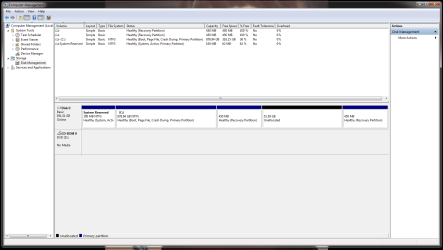
My second attempt to use the free Windows 10 upgrade was another bust. Having been burned by the first attempt, I thought I'd create a partition before I started so I could dual-boot in the event of a second failure. Second failure duly happened (not the issue for today - I've given up trying on Windows 10). So, as per the image, I now have a 50+GB unallocated space which I'd like to reincorporate back into the C drive. But there are now two recovery partitions, and (if I understand this rightly) the one between C and the unallocated space prevents me from expanding C to take the space in. Can I get rid of that recovery partition? I assume the one after the empty partition was created automatically at the same time as the partition, but I don't know if it will serve as a recovery partition for C should I ever need one.
Note: please speak slowly and carefully, as if addressing a small child. I can pick up heavy things, but I'm not very clever.
Note: please speak slowly and carefully, as if addressing a small child. I can pick up heavy things, but I'm not very clever.
Attachments
My Computer
At a glance
Windows 7 Home Premium 64 bitIntel Core i7 950Corsair DDR3 6GbNvidia GTX480 1Mb
- Computer type
- PC/Desktop
- Computer Manufacturer/Model Number
- Custom made by Overclockers UK
- OS
- Windows 7 Home Premium 64 bit
- CPU
- Intel Core i7 950
- Motherboard
- Gigabyte X58A-UD3R
- Memory
- Corsair DDR3 6Gb
- Graphics Card(s)
- Nvidia GTX480 1Mb
- Sound Card
- On-board
- Monitor(s) Displays
- BenQ G2222 HD DVI
- Hard Drives
- Seagate ST31000528AS 1TB
- PSU
- Yes, got one of those.
- Case
- Antec 900 Mk2
- Cooling
- A fan.
- Keyboard
- Corsair K90
- Mouse
- Razer Imperator
- Internet Speed
- Varies
- Antivirus
- Microsoft Security Essentials
- Browser
- Firefox

