Solved Two recovery partitions. One has ~12 GB, the other 100MB

ismemario

New member
Local time
2:26 PM
Messages
6
Hello,

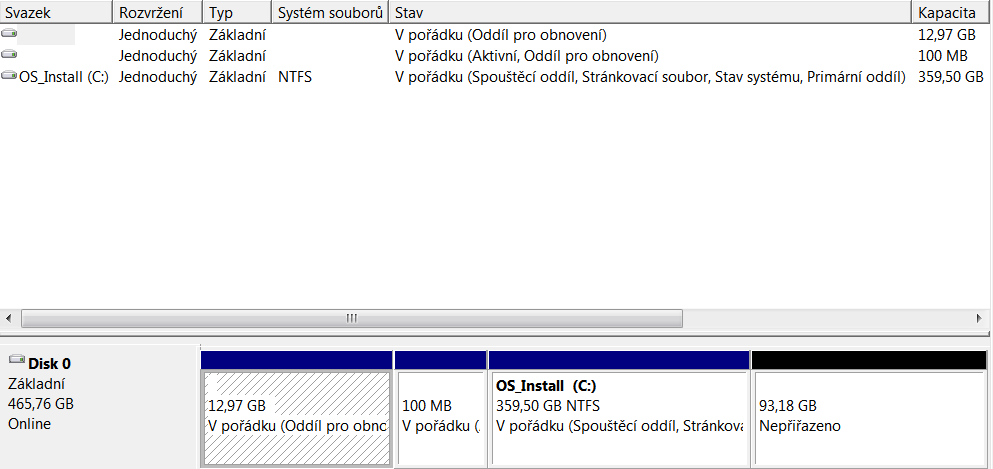
I have recently ran into an issue where I had too many partitions and needed a new one. Looking at the disk manager, I can see that there are two partitions tagged as 'recovery', one of them also tagged as 'active' and I'm wondering why is that and can I get rid of one of them?

tEBFR3B.png


Thank you.
 

My Computer My Computer

At a glance

Windows 7 Home Premium 64-bit
Computer type
Laptop
OS
Windows 7 Home Premium 64-bit
Hi and welcome.

Most likely the 12.97 GB partition is one installed by the computer manufacturer to allow returning your PC to factory original condition.

The 100MB partition is installed by Windows 7. It contains the boot files, among other things.

It appears the you have a 93.18 GB unallocated area that can be used to create the forth partition.
 

My Computer My Computer

At a glance

Windows 10 Pro x64, Windows 8.1 Pro x64, Wind...INTEL i9-7920X LGA 206664 GB (4 X 16 GB) G-Skill V Series DDR4 3200 ...EVGA GTX 1060 SC 3 GB
Computer type
PC/Desktop
Computer Manufacturer/Model Number
Custom Built
OS
Windows 10 Pro x64, Windows 8.1 Pro x64, Windows 7 Ultimate x64 SP1,
CPU
INTEL i9-7920X LGA 2066
Motherboard
Gigabyte X299-WU8 F3
Memory
64 GB (4 X 16 GB) G-Skill V Series DDR4 3200 Quad Channel
Graphics Card(s)
EVGA GTX 1060 SC 3 GB
Sound Card
Realtek Onboard ALC1220
Monitor(s) Displays
2 x Samsung S27E310
Screen Resolution
1920x1080
Hard Drives
Samsung 2 x 970 EVO Plus 500 GB NVMe
1 x 6TB WD 6003FZBX SATA
1 x 6TB WD 60EFRX SATA
12 x 3TB WD 30EFRX SATA
PSU
Seasonic X-1050
Case
Thermaltake Armor+
Cooling
Corsair H80i V2 Liquid AOI Cooler
Keyboard
Logitech G510s
Mouse
Logitech MX Master 2S
Internet Speed
200 Mb/s
Antivirus
ESET NOD32 13.1
Browser
EDGE (Dev, Canary, Beta), Chrome
Other Info
ASUS RT-AC68U router
Malwarebytes 4.0.4
Thanks for the reply.

Yes, I removed my D: partition and created the unallocated space, but I need another one and I'm wondering if those two are necessary.

Is it possible to remove one of these, while not affecting the Windows OS and keeping the ability to do a recovery?
 

My Computer My Computer

At a glance

Windows 7 Home Premium 64-bit
Computer type
Laptop
OS
Windows 7 Home Premium 64-bit
What do you need another partition for? You could make the unallocated space an Extended partition, in which you could create a number of Logical partitions.
 

My Computer My Computer

At a glance

Windows 10 Pro x64, Windows 8.1 Pro x64, Wind...INTEL i9-7920X LGA 206664 GB (4 X 16 GB) G-Skill V Series DDR4 3200 ...EVGA GTX 1060 SC 3 GB
Computer type
PC/Desktop
Computer Manufacturer/Model Number
Custom Built
OS
Windows 10 Pro x64, Windows 8.1 Pro x64, Windows 7 Ultimate x64 SP1,
CPU
INTEL i9-7920X LGA 2066
Motherboard
Gigabyte X299-WU8 F3
Memory
64 GB (4 X 16 GB) G-Skill V Series DDR4 3200 Quad Channel
Graphics Card(s)
EVGA GTX 1060 SC 3 GB
Sound Card
Realtek Onboard ALC1220
Monitor(s) Displays
2 x Samsung S27E310
Screen Resolution
1920x1080
Hard Drives
Samsung 2 x 970 EVO Plus 500 GB NVMe
1 x 6TB WD 6003FZBX SATA
1 x 6TB WD 60EFRX SATA
12 x 3TB WD 30EFRX SATA
PSU
Seasonic X-1050
Case
Thermaltake Armor+
Cooling
Corsair H80i V2 Liquid AOI Cooler
Keyboard
Logitech G510s
Mouse
Logitech MX Master 2S
Internet Speed
200 Mb/s
Antivirus
ESET NOD32 13.1
Browser
EDGE (Dev, Canary, Beta), Chrome
Other Info
ASUS RT-AC68U router
Malwarebytes 4.0.4
Oh, could you please recommend me a way how to make the unallocated space an extended partition?
 

My Computer My Computer

At a glance

Windows 7 Home Premium 64-bit
Computer type
Laptop
OS
Windows 7 Home Premium 64-bit

My Computer My Computer

At a glance

Windows 10 Pro x64, Windows 8.1 Pro x64, Wind...INTEL i9-7920X LGA 206664 GB (4 X 16 GB) G-Skill V Series DDR4 3200 ...EVGA GTX 1060 SC 3 GB
Computer type
PC/Desktop
Computer Manufacturer/Model Number
Custom Built
OS
Windows 10 Pro x64, Windows 8.1 Pro x64, Windows 7 Ultimate x64 SP1,
CPU
INTEL i9-7920X LGA 2066
Motherboard
Gigabyte X299-WU8 F3
Memory
64 GB (4 X 16 GB) G-Skill V Series DDR4 3200 Quad Channel
Graphics Card(s)
EVGA GTX 1060 SC 3 GB
Sound Card
Realtek Onboard ALC1220
Monitor(s) Displays
2 x Samsung S27E310
Screen Resolution
1920x1080
Hard Drives
Samsung 2 x 970 EVO Plus 500 GB NVMe
1 x 6TB WD 6003FZBX SATA
1 x 6TB WD 60EFRX SATA
12 x 3TB WD 30EFRX SATA
PSU
Seasonic X-1050
Case
Thermaltake Armor+
Cooling
Corsair H80i V2 Liquid AOI Cooler
Keyboard
Logitech G510s
Mouse
Logitech MX Master 2S
Internet Speed
200 Mb/s
Antivirus
ESET NOD32 13.1
Browser
EDGE (Dev, Canary, Beta), Chrome
Other Info
ASUS RT-AC68U router
Malwarebytes 4.0.4
Still, I would like to know if I can remove one of the recovery partitions, or somehow make it so that I have only one recovery partition and the C: parititon. Is it possible?
 

My Computer My Computer

At a glance

Windows 7 Home Premium 64-bit
Computer type
Laptop
OS
Windows 7 Home Premium 64-bit
Are you trying to install a second OS on the same drive that you want another open Primary partition? If you change the geometry of the disk at the 100MB (system reserved partition) then your recovery partition might not function properly. You can also enlarge (extend) C into the unallocated space to make it bigger if you want.

I would image your disk if you can with Macrium Reflect first. This does require repairng the BCD after doing this so print out all the steps if this is your only way to access the instructions.
http://www.sevenforums.com/tutorials/71363-system-reserved-partition-delete.html
 

My Computer My Computer

At a glance

10 Pro x64Ryzen 9 3900X64GB(4x16GB) DDR4EVGA 1080ti FTW3
Computer type
PC/Desktop
Computer Manufacturer/Model Number
Custom
OS
10 Pro x64
CPU
Ryzen 9 3900X
Motherboard
Asrock x370 Tachi
Memory
64GB(4x16GB) DDR4
Graphics Card(s)
EVGA 1080ti FTW3
Sound Card
ASUS Xonar Essence STX (V4 Bursons), ODAC rev B, NFB-11, O2
Monitor(s) Displays
3xASUS PB278Q/R, Optoma HD142X
Screen Resolution
3x1440p, 1080p
Hard Drives
512GB 850 EVO(OS, Programs)
4TB (Movies)
3TB (Downloads)
3TB (Programs)
1TB HDD (Games)
2x6TB R1 (videos)
PSU
AX760
Case
Fractal Define R5
Cooling
NH-D15S
Keyboard
Massdrop Ctrl with Box Navy's
Mouse
G903, Alioth XXL Mat
Internet Speed
280/40
Antivirus
MBAM, ESET
Browser
Canary 64 Bit
Other Info
I also own a Thinkpad P50 Xeon 4K, X220T, X1C5
I am indeed. I managed to get everything working. Thanks for your help!
 

My Computer My Computer

At a glance

Windows 7 Home Premium 64-bit
Computer type
Laptop
OS
Windows 7 Home Premium 64-bit
To answer your question the 100 mb IS required because it is a boot partition and not a recovery partition. You wouldn't gain much space by deleting it. The 13 gb recovery partition isn't required but you won't be able to revert to the manufacturer defaults without it. You can always use a windows 7 disk if you have one and the manufacturer might have a tool to put the recovery partition on to a couple of dvds. it will take 2 dual layer dvds or 4 single layer dvds. If you don't care about reverting to the manufacturers default then you don't have to worry about that. The problem with doing that is you probably want to move all of the data to the beginning of the drive to get any real use from it. You could probably do that with easus but I would back up the hard drive first.
 

My Computers My Computers

  • At a glance

    Windows 7 pro/Windows 10 ProIntel i7 860 Quad core 2.8 ghz8 gbATI Radeon HD 5770 1 gb ram
    Computer type
    PC/Desktop
    Computer Manufacturer/Model Number
    HP Pavillion Elite HPE-250f
    OS
    Windows 7 pro/Windows 10 Pro
    CPU
    Intel i7 860 Quad core 2.8 ghz
    Memory
    8 gb
    Graphics Card(s)
    ATI Radeon HD 5770 1 gb ram
    Monitor(s) Displays
    Alienware 25 AW2521HF & Viewsonic
    Screen Resolution
    1920 x1080 & 1680x1050
    Hard Drives
    WD blue 1 tb & 500 gb.
    Browser
    FF of course.
    Other Info
    https://www.bestbuy.com/site/hp-pavilion-elite-desktop-intel-core-i7-processor-8gb-memory-1tb-hard-drive/9921493.p?skuId=9921493
  • At a glance

    Windows 2012 R2 Data center/Linux Minti3 9100 3.6GHz, 8M cache, 4C/4T8GB 2666MT/s DDR4 ECC UDIMM
    Computer type
    PC/Desktop
    System Manufacturer/Model Number
    Dell Poweredge T140
    OS
    Windows 2012 R2 Data center/Linux Mint
    CPU
    i3 9100 3.6GHz, 8M cache, 4C/4T
    Memory
    8GB 2666MT/s DDR4 ECC UDIMM
    Monitor(s) Displays
    Viewsonic
    Screen Resolution
    1680x1050
    Hard Drives
    1 TB & 750 GB
    Other Info
    https://www.dell.com/en-us/work/shop/productdetailstxn/poweredge-t140?~ck=bt
Hi ismemario,

As i cannot interpret the wording, i have to assumed.

Your 2nd partition, if i am not wrong, it the the Booting purpose, as it just required a small space.
The 1st partition, will be the Recovery partition.
Unless you have the Recovery Disc, then it is not necessary.
This mean that you do not have any Recovery Disc, as most manufacturer include it in the Hard disk.

There is this 4th partition which is not use and available to use &or extend.
Meaning, your " OS_Install (C) " can be extend to use the additional 93.18 GB free.
On the C: partition, right-click, there is all the options available.
To extend the (C) right-click "Extend Volume". Total = approximate 450 GB.
To create a new 4th partition which may become extended partition.
Extended partition have 2 steps, (1) Create Extended partitions (2) Create a partition, or more.

Normally, both 1st and 2nd partitions, you cannot do anything, just leave it alone.
You may able to delete, but this may create other issue, if you do it.

It is best to get a external HDD to store your data.

========================================
For info
There is 1 "Active" partition which is the Windows OS.

You have 2 different partition before the "Active" partition.
Both are not name, which is best leave it alone.

The 1st partition of yours will be the Recovery of Original Factory installation.
Unless you have the Recovery CD, then it is not a issue, but best to leave alone.

The 2nd partition is for startup boot, required for boot option, etc.

The 3rd and rest is active partition.

As you have 3 primary partition, the next which is the 4th partition, if you want to have.
For the 4th partition, Windows will take this partition as Extended partition.
Windows can have up to 3 primary partitions and 1 Extended partition.
For Extended partition, you can sub-divide to any number of partitions, from 1 to many more, if needed.

Hence your 4th partition will be the Extended partition.
Extended partition is not for any OS, but it still can be, provided if you want and know how to do it.

As i have 3 partition, namely, Boot, Active, Recovery in this order.
I went to Toshiba service center to buy 2 sets of Recovery disks, for 2 different model Toshiba laptops.
Recovery partition (yours 1st partition) is the same as Recovery Disk.

This type of setting is quite common, as they do not provide any Recovery discs.
If you do not have this Recovery disc, then you cannot delete the 1st partition of 11 GB.
For the Boot partition, it is best not to touch or delete, it is necessary for boot sequence.
But if you have the Recovery Disc, and your hard disk is brand new, boot partition is not necessary.
That is to say, Recovery Disc will create this Boot partition.

Regards,
Eric.

 

My Computer My Computer

At a glance

Windows 7 x64
Computer type
Laptop
Computer Manufacturer/Model Number
Toshiba L630 and L735
OS
Windows 7 x64
Hard Drives
240 GB SSD
I am indeed. I managed to get everything working. Thanks for your help!

If you moved the boot partition into your C partition correctly and you were trying to just get another free Primary partition and thus this is solved please mark the thread as such (solved). Glad you got it working.
 

My Computer My Computer

At a glance

10 Pro x64Ryzen 9 3900X64GB(4x16GB) DDR4EVGA 1080ti FTW3
Computer type
PC/Desktop
Computer Manufacturer/Model Number
Custom
OS
10 Pro x64
CPU
Ryzen 9 3900X
Motherboard
Asrock x370 Tachi
Memory
64GB(4x16GB) DDR4
Graphics Card(s)
EVGA 1080ti FTW3
Sound Card
ASUS Xonar Essence STX (V4 Bursons), ODAC rev B, NFB-11, O2
Monitor(s) Displays
3xASUS PB278Q/R, Optoma HD142X
Screen Resolution
3x1440p, 1080p
Hard Drives
512GB 850 EVO(OS, Programs)
4TB (Movies)
3TB (Downloads)
3TB (Programs)
1TB HDD (Games)
2x6TB R1 (videos)
PSU
AX760
Case
Fractal Define R5
Cooling
NH-D15S
Keyboard
Massdrop Ctrl with Box Navy's
Mouse
G903, Alioth XXL Mat
Internet Speed
280/40
Antivirus
MBAM, ESET
Browser
Canary 64 Bit
Other Info
I also own a Thinkpad P50 Xeon 4K, X220T, X1C5
I actually overwrote the boot partition with GRUB. Okay I will close the thread now.
 

My Computer My Computer

At a glance

Windows 7 Home Premium 64-bit
Computer type
Laptop
OS
Windows 7 Home Premium 64-bit
I actually overwrote the boot partition with GRUB. Okay I will close the thread now.

yup, that's one way to do it too I guess :).
 

My Computer My Computer

At a glance

10 Pro x64Ryzen 9 3900X64GB(4x16GB) DDR4EVGA 1080ti FTW3
Computer type
PC/Desktop
Computer Manufacturer/Model Number
Custom
OS
10 Pro x64
CPU
Ryzen 9 3900X
Motherboard
Asrock x370 Tachi
Memory
64GB(4x16GB) DDR4
Graphics Card(s)
EVGA 1080ti FTW3
Sound Card
ASUS Xonar Essence STX (V4 Bursons), ODAC rev B, NFB-11, O2
Monitor(s) Displays
3xASUS PB278Q/R, Optoma HD142X
Screen Resolution
3x1440p, 1080p
Hard Drives
512GB 850 EVO(OS, Programs)
4TB (Movies)
3TB (Downloads)
3TB (Programs)
1TB HDD (Games)
2x6TB R1 (videos)
PSU
AX760
Case
Fractal Define R5
Cooling
NH-D15S
Keyboard
Massdrop Ctrl with Box Navy's
Mouse
G903, Alioth XXL Mat
Internet Speed
280/40
Antivirus
MBAM, ESET
Browser
Canary 64 Bit
Other Info
I also own a Thinkpad P50 Xeon 4K, X220T, X1C5
Back
Top