Type username in login only on demand.

Vilo

New member
Local time
10:30 PM
Messages
2
Hi,
I've made an Administrative account and I've hidden it.
Some time ago due Windows XP times I was able to have the normal login screen and after using "CTRL + ALT + DEL" hotkey it was changing to classical login method, where I can type both an username and password.

How to do this in Windows 7? I have now typical 7's login screen, I know how to change it to "type username mode" too, but I don't want it by default. Some hotkey that will let me type username?
 

My Computer My Computer

OS
Windows 7 Professional x64 MSDNAA

My Computer My Computer

Computer type
PC/Desktop
Computer Manufacturer/Model Number
Lenovo IdeaCenter 450
OS
Windows 10 Pro X64
CPU
Intel Quad Core i7-4770 @ 3.4Ghz
Memory
16.0GB PC3-12800 DDR3 SDRAM 1600 MHz
Graphics Card(s)
Intel Integrated HD Graphics
Sound Card
Realtek HD Audio
Monitor(s) Displays
HP 22" LCD
Screen Resolution
1680 x 1050
Hard Drives
250GB Samsung EVO SATA-3 SSD
2TB Seagate ST2000DM001 SATA-2
1.5TB Seagate ST3150041AS SATA
Keyboard
Dell USB
Mouse
Lenovo USB
Internet Speed
Cable via Road Runner 3MB Upload, 30MB Download
Antivirus
Windows Defender, MBAM Pro, MBAE
Browser
Seamonkey
Other Info
UEFI/GPT
PLDS DVD-RW DH16AERSH
Ctrl+alt+del

Hi,
I've made an Administrative account and I've hidden it.
Some time ago due Windows XP times I was able to have the normal login screen and after using "CTRL + ALT + DEL" hotkey it was changing to classical login method, where I can type both an username and password.

How to do this in Windows 7? I have now typical 7's login screen, I know how to change it to "type username mode" too, but I don't want it by default. Some hotkey that will let me type username?

If you type "Netplwiz" into the "Start" box (Start>Search programs and files)
You will see "Netplwiz.exe" which when clicked brings up the following:

user1.png


which gives you the option to log-in automatically.

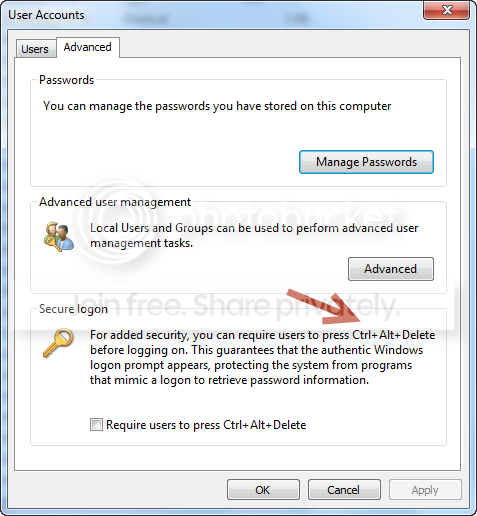
Clicking on the Advanced Tab shows you the following:

user2.png


which proffers you the "CTRL + ALT + DEL" option.

I don't know if this is exactly what you are looking for, but it might help!​
 

My Computer My Computer

OS
Windows 7 Home Premium x64
Thank you and sorry - this is not the solution for the situation I want to achieve.
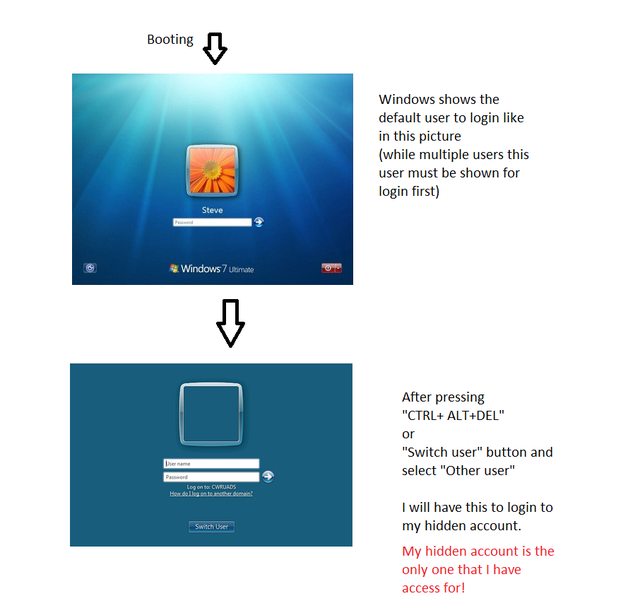
Now I have access to the main Administrative account, called for example "Steve". It will be locked with the password that I will not know.
But I have the "Administrator" hidden account. I was always making them with Windows XP to have security access to all the PC's.

Finally, (after setting unknown for me Steve's password) the situation should look so:


Users documents are encrypted.
 

My Computer My Computer

OS
Windows 7 Professional x64 MSDNAA
Back
Top