Typing/using keyboard briefly disables touchpad

dpitch40

New member
Local time
9:09 PM
Messages
3
I just got a new laptop (Lenovo G770) and am busy configuring Windows on it. I am running into an annoying issue with my input devices. Whenever I type or do anything with my keyboard, it disables my touchpad for about half a second. Since I am an avid user of keyboard shortcuts, this is highly annoying and is messing with my productivity. I can't figure out how to turn it off--when I search for answers I just see lots of threads from people having the opposite problem, who want to disable their touch pad while typing. I currently have the Synaptic driver installed controlling my touch pad, and I can't see any options in its settings to disable this "feature". Can anyone tell me how to do this?
 

My Computer

OS
Windows 7 Home Premium 64bit
Hello pitch, and welcome to Sevenforums.

Type "Mouse" without quotes into the start menu search bar, and click on "Mouse". On the first tab, you should be able to select change touchpad settings, to which you will need to look around for a setting that disables mouse while typing... Hope this helps
 

My Computer

Computer type
PC/Desktop
Computer Manufacturer/Model Number
Custom Asus Build
OS
Microsoft Windows 8.1 Pro 64-bit
CPU
Intel(R) Core(TM) i3-4130 CPU @ 3.40GHz
Motherboard
B85M-E
Memory
8.00 GB
Graphics Card(s)
None
Sound Card
Realtek High Definition Audio
Monitor(s) Displays
Asus 23.6" Monitor
Screen Resolution
1920 x 1080 x 32 bits (4294967296 colors) @ 60 Hz
Hard Drives
INTEL SSDSC2BW180A4
Samsung SSD 840 PRO Series
PSU
Seasonic S12II-380Bronze
Case
Lian Li
Cooling
Fan, Passive
Keyboard
Logitech K120
Mouse
Microsoft Touch Mouse
Internet Speed
4ms Ping, 19.0 Mbps Download, 19.0 Mbps Upload
Antivirus
Eset Endpoint
Browser
Internet Explorer, Chrome
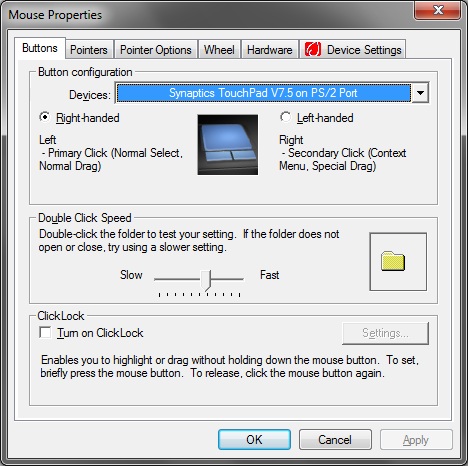
Nope, this is all I get.

SViVj.jpg


You'd think there would be an option enabling this somewhere...
 

My Computer

OS
Windows 7 Home Premium 64bit
Go to your computer's website and install the most recent driver for the touchpad and try again. You might uninstall the one you have now before you install the new one. Doubtful, but perhaps the keyboard settings have such an option? Other than that, I'm not sure

You don't have any programs installed that might be doing this, such as touchfreeze or such do you?
 

My Computer

Computer type
PC/Desktop
Computer Manufacturer/Model Number
Custom Asus Build
OS
Microsoft Windows 8.1 Pro 64-bit
CPU
Intel(R) Core(TM) i3-4130 CPU @ 3.40GHz
Motherboard
B85M-E
Memory
8.00 GB
Graphics Card(s)
None
Sound Card
Realtek High Definition Audio
Monitor(s) Displays
Asus 23.6" Monitor
Screen Resolution
1920 x 1080 x 32 bits (4294967296 colors) @ 60 Hz
Hard Drives
INTEL SSDSC2BW180A4
Samsung SSD 840 PRO Series
PSU
Seasonic S12II-380Bronze
Case
Lian Li
Cooling
Fan, Passive
Keyboard
Logitech K120
Mouse
Microsoft Touch Mouse
Internet Speed
4ms Ping, 19.0 Mbps Download, 19.0 Mbps Upload
Antivirus
Eset Endpoint
Browser
Internet Explorer, Chrome
Again, this is a brand-new laptop and a clean installation of Windows 7. I tried uninstalling the Synaptic driver and reinstalling the very latest one downloaded from Lenovo's website, same problem. If I uninstall the Synaptic driver, the problem goes away, though I can no longer turn off tapping to click. So basically, Synaptic is trying to ruin my productivity. Could I install some other, better touch pad driver software instead?
 

My Computer

OS
Windows 7 Home Premium 64bit
Even a reinstall of windows can load "junk" programs onto a computer, depending upon what kind of installation CD you have.

Someone else may have an answer to another driver or program for your computer to fix this, but I do not.

I do not mean to offend, but are you sure you searched through all of those settings for the mouse? Other than that, I am not sure how to help you :(
 

My Computer

Computer type
PC/Desktop
Computer Manufacturer/Model Number
Custom Asus Build
OS
Microsoft Windows 8.1 Pro 64-bit
CPU
Intel(R) Core(TM) i3-4130 CPU @ 3.40GHz
Motherboard
B85M-E
Memory
8.00 GB
Graphics Card(s)
None
Sound Card
Realtek High Definition Audio
Monitor(s) Displays
Asus 23.6" Monitor
Screen Resolution
1920 x 1080 x 32 bits (4294967296 colors) @ 60 Hz
Hard Drives
INTEL SSDSC2BW180A4
Samsung SSD 840 PRO Series
PSU
Seasonic S12II-380Bronze
Case
Lian Li
Cooling
Fan, Passive
Keyboard
Logitech K120
Mouse
Microsoft Touch Mouse
Internet Speed
4ms Ping, 19.0 Mbps Download, 19.0 Mbps Upload
Antivirus
Eset Endpoint
Browser
Internet Explorer, Chrome
It actually might be a setting in the bios for that feature.
 

My Computer

Computer Manufacturer/Model Number
HAL-9000
OS
Windows 7 Ultimate 64bit
CPU
Intel i7 3770K
Motherboard
Asus Sabertooth Z77
Memory
16GB DDR3 1333 Corsair XMS3
Graphics Card(s)
XFX HD6950 2GB EyeFinity
Sound Card
Logitech G35 & Sennheiser PC135 & VIA HD
Monitor(s) Displays
23" HP 2310e, 23" Samsung B2230, 21.5" Viewsonic
Screen Resolution
5760x1080
Hard Drives
16TB of Storage
128GB & 256GB Crucial M4 SSD's, 2X 1TB WD Black, 3x 2TB WD, 3x 2TB Samsung F4, 1.5TB Seagate, WD 500GB,
PSU
Antec True Power New 650watt
Case
Cooler Master HAF-932
Cooling
Corsair H60 Hydro Cooler, 3x 230mm Fans, 2x120mm Fan
Keyboard
Logitech G15 and G13
Mouse
Logitech G700 Gaming Mouse
Internet Speed
50/10 Mbit
Other Info
Speakers : Alesis M1 Active Mk2 Studio Monitors , APC RS 1200 UPS, HP 4500DN Color Laser, HP P1006 mono Laser, Kodak 8500 Dye-Sub, Epson 1280 inkjet, Epson Worforce 610 MFC
Back
Top