UAC shortcut to run as NON-administrator?

catalogue

New member
Member
VIP
Local time
9:39 AM
Messages
108
Every time I open certain programs, User Account Control gives me a pop-up window asking "Do you want to allow this program to make changes to your computer?".

Is there a way to stop this for one particular program so the answer is always "no"?

Please note - there already are instructions on this site for when you want the answer to be "yes" - that is, when you want the program to always have elevated, Run As Administrator access.

That is *not* what I want! I want non-elevated, non-Administrator access for the one particular program. (I don't know what the word is for the opposite of 'elevated'!)

The 'elevated program shortcut' instructions are here: http://www.sevenforums.com/tutorials/11949-elevated-program-shortcut-without-uac-prompt-create.html

Win 7 Pro 64 Bit
 
Last edited:

My Computer My Computer

At a glance

7 Pro 64Intel Core i5-2540M 2.6 GHz6 GB RAM
Computer type
Laptop
Computer Manufacturer/Model Number
Lenovo Thinkpad T520
OS
7 Pro 64
CPU
Intel Core i5-2540M 2.6 GHz
Memory
6 GB RAM
Hard Drives
1 Tb

My Computer My Computer

At a glance

64-bit Windows 11 Pro for WorkstationsIntel i7-8700K OC'd to 5 GHz64 GB (4x16GB) G.SKILL TridentZ RGB DDR4 3600...ASUS ROG-STRIX-GTX1080TI-O11G-GAMING
Computer type
PC/Desktop
Computer Manufacturer/Model Number
Self built custom
OS
64-bit Windows 11 Pro for Workstations
CPU
Intel i7-8700K OC'd to 5 GHz
Motherboard
ASUS ROG Maximus XI Formula Z390
Memory
64 GB (4x16GB) G.SKILL TridentZ RGB DDR4 3600 MHz
Graphics Card(s)
ASUS ROG-STRIX-GTX1080TI-O11G-GAMING
Sound Card
Integrated
Monitor(s) Displays
2 x Samsung Odyssey G7 27"
Screen Resolution
2560x1440
Hard Drives
1TB Samsung 990 PRO M.2,
4TB Samsung 990 PRO PRO M.2,
TerraMaster F8 SSD Plus NAS
PSU
Seasonic Prime Titanium 850W
Case
Thermaltake Core P3
Cooling
Corsair Hydro H115i
Keyboard
Logitech wireless K800
Mouse
Logitech MX Master 4
Internet Speed
2 Gb/s Download and 100 Mb/s Upload
Antivirus
Malwarebyte Anti-Malware Premium
Browser
Google Chrome
Other Info
Logitech Z625 speaker system,
Logitech BRIO 4K Pro webcam,
HP Color LaserJet Pro MFP M477fdn,
APC SMART-UPS RT 1000 XL - SURT1000XLI,
Galaxy S23 Plus phone
If a program requires elevated rights to run properly, then there's no way around that.l

The program does not require elevated rights. I click 'no' 100% of the time and it runs perfectly 100% of the time. The computer has only one user and one account - me - no one else uses it, it's my own computer, I live alone, there is no network, there are no other accounts.

To clarify:

CURRENT SITUATION: Every time the program starts, the UAC message pops up asking if I want to allow the program to make changes to the computer, then I click "no", then the program runs fine.

WHAT I WANT: Start this one program; don't get any pop-up; have the program always be blocked from "making any changes to the computer".

I figure, since there is way to automate clicking on "yes" (described in my link) there should be a way to automate clicking on "no".

Also I should point out, there are several threads on the site where people asked how to automate clicking on 'yes' (that is, always run a single specific program as administrator) and were told it's not possible, which is wrong. It *is* possible using the procedure in my link. Apparently the procedure is not well known, given how many replies there have been by people who are unaware of it.
 

My Computer My Computer

At a glance

7 Pro 64Intel Core i5-2540M 2.6 GHz6 GB RAM
Computer type
Laptop
Computer Manufacturer/Model Number
Lenovo Thinkpad T520
OS
7 Pro 64
CPU
Intel Core i5-2540M 2.6 GHz
Memory
6 GB RAM
Hard Drives
1 Tb
Can I make a non-elevated, non-admin shortcut?

What if I want a shortcut to run *not* as administrator?

What I am trying to do is make it so for one particular program I don't have to click "no" every time it starts and the pop-up asks "Do you want to allow this program to make changes to the computer?"

Maybe under step 4 I could leave the "Run with highest privileges" box unchecked?

The computer has only one account, my own, which is administrator. This is my home computer and no one uses it besides me. I've been told it's absolutely non-negotiably essential to have the UAC level set to "Notify me...", for security reasons. Which is okay, because the "make changes?" pop-up is tolerable (but annoying) for occasional programs, but a massive pain for one or two that I open many times each day.

Win 7 Pro 64 bit
 
Last edited by a moderator:

My Computer My Computer

At a glance

7 Pro 64Intel Core i5-2540M 2.6 GHz6 GB RAM
Computer type
Laptop
Computer Manufacturer/Model Number
Lenovo Thinkpad T520
OS
7 Pro 64
CPU
Intel Core i5-2540M 2.6 GHz
Memory
6 GB RAM
Hard Drives
1 Tb
The procedures in both links is basically just a workaround to allow an elevated (run as administrator) program to run elevated without getting the UAC prompt.

It doesn't actually automatically click on Yes or No in the UAC prompt though.

The two links above are the only way that I know of to get close to what you want, but the program will run elevated.

You might also check to see if the program may be using compatibility mode where you can uncheck the "Run as administrator" option.

http://www.sevenforums.com/tutorials/11841-run-administrator.html
 

My Computer My Computer

At a glance

64-bit Windows 11 Pro for WorkstationsIntel i7-8700K OC'd to 5 GHz64 GB (4x16GB) G.SKILL TridentZ RGB DDR4 3600...ASUS ROG-STRIX-GTX1080TI-O11G-GAMING
Computer type
PC/Desktop
Computer Manufacturer/Model Number
Self built custom
OS
64-bit Windows 11 Pro for Workstations
CPU
Intel i7-8700K OC'd to 5 GHz
Motherboard
ASUS ROG Maximus XI Formula Z390
Memory
64 GB (4x16GB) G.SKILL TridentZ RGB DDR4 3600 MHz
Graphics Card(s)
ASUS ROG-STRIX-GTX1080TI-O11G-GAMING
Sound Card
Integrated
Monitor(s) Displays
2 x Samsung Odyssey G7 27"
Screen Resolution
2560x1440
Hard Drives
1TB Samsung 990 PRO M.2,
4TB Samsung 990 PRO PRO M.2,
TerraMaster F8 SSD Plus NAS
PSU
Seasonic Prime Titanium 850W
Case
Thermaltake Core P3
Cooling
Corsair Hydro H115i
Keyboard
Logitech wireless K800
Mouse
Logitech MX Master 4
Internet Speed
2 Gb/s Download and 100 Mb/s Upload
Antivirus
Malwarebyte Anti-Malware Premium
Browser
Google Chrome
Other Info
Logitech Z625 speaker system,
Logitech BRIO 4K Pro webcam,
HP Color LaserJet Pro MFP M477fdn,
APC SMART-UPS RT 1000 XL - SURT1000XLI,
Galaxy S23 Plus phone
Thanks. I guess I don't know the difference between running a program as administrator, and elevated, and "allowing program to make changes to the computer". (Are any of those synonymous? I'm confused.) What I am trying to do is block one particular program from making any changes. I don't know if that has any connection to running it as admin and I have no need to get involved with running as admin unless they are connected.

I've never dealt with any of this because this is my home computer with only one account (which must be admin, right?) and no one else besides me ever uses it. So I have never had any other accounts or any involvement with administrator rights vs non-adminstrator rights and so forth.
 

My Computer My Computer

At a glance

7 Pro 64Intel Core i5-2540M 2.6 GHz6 GB RAM
Computer type
Laptop
Computer Manufacturer/Model Number
Lenovo Thinkpad T520
OS
7 Pro 64
CPU
Intel Core i5-2540M 2.6 GHz
Memory
6 GB RAM
Hard Drives
1 Tb
Yep, "Run as administrator" and "Elevated" is the same.

As far as allowing the program to make changes to the computer, the only way is to not allow the program to run.

Some programs require to "Run as administrator". If you haven't already, check using the tutorial below to see if the program may be using compatibility mode where you can uncheck the "Run as administrator" option to not have the program run elevated anymore.

Run as Administrator
 

My Computer My Computer

At a glance

64-bit Windows 11 Pro for WorkstationsIntel i7-8700K OC'd to 5 GHz64 GB (4x16GB) G.SKILL TridentZ RGB DDR4 3600...ASUS ROG-STRIX-GTX1080TI-O11G-GAMING
Computer type
PC/Desktop
Computer Manufacturer/Model Number
Self built custom
OS
64-bit Windows 11 Pro for Workstations
CPU
Intel i7-8700K OC'd to 5 GHz
Motherboard
ASUS ROG Maximus XI Formula Z390
Memory
64 GB (4x16GB) G.SKILL TridentZ RGB DDR4 3600 MHz
Graphics Card(s)
ASUS ROG-STRIX-GTX1080TI-O11G-GAMING
Sound Card
Integrated
Monitor(s) Displays
2 x Samsung Odyssey G7 27"
Screen Resolution
2560x1440
Hard Drives
1TB Samsung 990 PRO M.2,
4TB Samsung 990 PRO PRO M.2,
TerraMaster F8 SSD Plus NAS
PSU
Seasonic Prime Titanium 850W
Case
Thermaltake Core P3
Cooling
Corsair Hydro H115i
Keyboard
Logitech wireless K800
Mouse
Logitech MX Master 4
Internet Speed
2 Gb/s Download and 100 Mb/s Upload
Antivirus
Malwarebyte Anti-Malware Premium
Browser
Google Chrome
Other Info
Logitech Z625 speaker system,
Logitech BRIO 4K Pro webcam,
HP Color LaserJet Pro MFP M477fdn,
APC SMART-UPS RT 1000 XL - SURT1000XLI,
Galaxy S23 Plus phone
As far as allowing the program to make changes to the computer, the only way is to not allow the program to run.

I know what you're saying, but according to Windows jargon you are wrong. You're saying that running anything of any kind always makes changes to the computer, which is true. But according to Windows - which as we all know flies in the face of the most basic logic and English semantics - that's not the case.

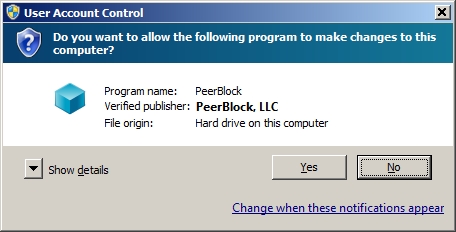
UAC gives you the choice of allowing or forbidding programs from "making changes to the computer" - Windows' words, not mine. See the screengrab. I've never had the slightest problem from choosing "no" (for certain programs in certain situations -- I don't choose it for *all* programs!)

9pVVSYR.jpg


All I want to do is make this "no" choice permanent for one program - like by creating a force-non-elevated-running shortcut, if such a thing is possible. (Not for PeerBlock, which of course always need "Yes".)

check using the tutorial below to see if the program may be using compatibility mode where you can uncheck the "Run as administrator" option to not have the program run elevated anymore.

"Run as as administrator" already was unchecked there.
 
Last edited by a moderator:

My Computer My Computer

At a glance

7 Pro 64Intel Core i5-2540M 2.6 GHz6 GB RAM
Computer type
Laptop
Computer Manufacturer/Model Number
Lenovo Thinkpad T520
OS
7 Pro 64
CPU
Intel Core i5-2540M 2.6 GHz
Memory
6 GB RAM
Hard Drives
1 Tb
Sorry, but that's just not possible when the program is designed to run elevated. :(

The UAC prompt in your screenshot is for you to say Yes/No to allow the program to run elevated (run as administrator).

If you say no, then the program will just simply not run. You can't run the program without elevation since it was designed to run elevated. Only the program developers can change that.
 

My Computer My Computer

At a glance

64-bit Windows 11 Pro for WorkstationsIntel i7-8700K OC'd to 5 GHz64 GB (4x16GB) G.SKILL TridentZ RGB DDR4 3600...ASUS ROG-STRIX-GTX1080TI-O11G-GAMING
Computer type
PC/Desktop
Computer Manufacturer/Model Number
Self built custom
OS
64-bit Windows 11 Pro for Workstations
CPU
Intel i7-8700K OC'd to 5 GHz
Motherboard
ASUS ROG Maximus XI Formula Z390
Memory
64 GB (4x16GB) G.SKILL TridentZ RGB DDR4 3600 MHz
Graphics Card(s)
ASUS ROG-STRIX-GTX1080TI-O11G-GAMING
Sound Card
Integrated
Monitor(s) Displays
2 x Samsung Odyssey G7 27"
Screen Resolution
2560x1440
Hard Drives
1TB Samsung 990 PRO M.2,
4TB Samsung 990 PRO PRO M.2,
TerraMaster F8 SSD Plus NAS
PSU
Seasonic Prime Titanium 850W
Case
Thermaltake Core P3
Cooling
Corsair Hydro H115i
Keyboard
Logitech wireless K800
Mouse
Logitech MX Master 4
Internet Speed
2 Gb/s Download and 100 Mb/s Upload
Antivirus
Malwarebyte Anti-Malware Premium
Browser
Google Chrome
Other Info
Logitech Z625 speaker system,
Logitech BRIO 4K Pro webcam,
HP Color LaserJet Pro MFP M477fdn,
APC SMART-UPS RT 1000 XL - SURT1000XLI,
Galaxy S23 Plus phone
I think what he means is that this program doesn't really make any changes to the computer, at least not at a level that affects the program or the computer in any way were it to make those changes or not.

However, I've noticed only programs that I put in my main \Program Files\ folder (not the (x86)) will UAC rear its head. Okay, a few more of them in the (x86), but still.

One game I had would always bring up UAC, but then I moved it outside of the \Program Files\ folder, and it didn't bring it up anymore; maybe give that a try?

Oh, but be sure to make a back-up, first. And this is just a shot in the dark but it worked for me.

\Chikken\
 

My Computer My Computer

At a glance

Windows 7 Home Premium (32-Bit)IntelCan't rememberNVidia 650-Ti
Computer type
PC/Desktop
Computer Manufacturer/Model Number
Custon Build
OS
Windows 7 Home Premium (32-Bit)
CPU
Intel
Motherboard
Gigabyte
Memory
Can't remember
Graphics Card(s)
NVidia 650-Ti
Hard Drives
One, some old ~500Gb HDD, going to get more.
Antivirus
Norton
Browser
Mozilla
Sorry, but that's just not possible when the program is designed to run elevated.

Oh poo :( but thanks


If you say no, then the program will just simply not run. You can't run the program without elevation since it was designed to run elevated. Only the program developers can change that.

I strongly suspect that a lot of confusion in the discussion was due to the fact - which I just realized right now - that the UAC yes/no pop-up that I want to set on permanent "no" is for a sort of hidden sub-program, namely, the *updater* for a particular program. You never see this updater as a separate program when you install the main program; it's not in Windows "Programs and Features" or "Add/Remove Programs".

I think this is one of those "we're both right" situations:

The reason I kept saying the program runs fine is that I was referring to the main program (because I had no idea the updater needs to be considered as an entirely separate program). And Brink was also correct, because the updater presumably won't run at all when I click "no" - which is what I want, to disable auto-updates.

In other words, I always click "no" yet I see the (main) program start and run fine. Yes, definitely I am seeing for a different program where I *want* to click yes, I sometimes click "no" by accident and then the thing simply doesn't start, as Brink says.
 

My Computer My Computer

At a glance

7 Pro 64Intel Core i5-2540M 2.6 GHz6 GB RAM
Computer type
Laptop
Computer Manufacturer/Model Number
Lenovo Thinkpad T520
OS
7 Pro 64
CPU
Intel Core i5-2540M 2.6 GHz
Memory
6 GB RAM
Hard Drives
1 Tb
One game I had would always bring up UAC, but then I moved it outside of the \Program Files\ folder, and it didn't bring it up anymore; maybe give that a try?

Oh, but be sure to make a back-up, first. And this is just a shot in the dark but it worked for me.

Worth a try. Thanks
 

My Computer My Computer

At a glance

7 Pro 64Intel Core i5-2540M 2.6 GHz6 GB RAM
Computer type
Laptop
Computer Manufacturer/Model Number
Lenovo Thinkpad T520
OS
7 Pro 64
CPU
Intel Core i5-2540M 2.6 GHz
Memory
6 GB RAM
Hard Drives
1 Tb
If you say no, then the program will just simply not run. You can't run the program without elevation since it was designed to run elevated.

I just found a case where that's not true. The UAC "Allow changes to this computer?" pop-up shows up in the middle of running my file manager, Xplorer2. You can click "no" and the program runs fine. This is not a case of an updater or anything like that. You get the UAC when you try to open the folder C:\PerfLogs. If you say yes, you can open the folder and if no, you can't. I can't detect any other impact on the program.

The same thing sometimes happens when you try to browse C:\Config.msi.
 

My Computer My Computer

At a glance

7 Pro 64Intel Core i5-2540M 2.6 GHz6 GB RAM
Computer type
Laptop
Computer Manufacturer/Model Number
Lenovo Thinkpad T520
OS
7 Pro 64
CPU
Intel Core i5-2540M 2.6 GHz
Memory
6 GB RAM
Hard Drives
1 Tb
Hmm, odd.
 

My Computer My Computer

At a glance

64-bit Windows 11 Pro for WorkstationsIntel i7-8700K OC'd to 5 GHz64 GB (4x16GB) G.SKILL TridentZ RGB DDR4 3600...ASUS ROG-STRIX-GTX1080TI-O11G-GAMING
Computer type
PC/Desktop
Computer Manufacturer/Model Number
Self built custom
OS
64-bit Windows 11 Pro for Workstations
CPU
Intel i7-8700K OC'd to 5 GHz
Motherboard
ASUS ROG Maximus XI Formula Z390
Memory
64 GB (4x16GB) G.SKILL TridentZ RGB DDR4 3600 MHz
Graphics Card(s)
ASUS ROG-STRIX-GTX1080TI-O11G-GAMING
Sound Card
Integrated
Monitor(s) Displays
2 x Samsung Odyssey G7 27"
Screen Resolution
2560x1440
Hard Drives
1TB Samsung 990 PRO M.2,
4TB Samsung 990 PRO PRO M.2,
TerraMaster F8 SSD Plus NAS
PSU
Seasonic Prime Titanium 850W
Case
Thermaltake Core P3
Cooling
Corsair Hydro H115i
Keyboard
Logitech wireless K800
Mouse
Logitech MX Master 4
Internet Speed
2 Gb/s Download and 100 Mb/s Upload
Antivirus
Malwarebyte Anti-Malware Premium
Browser
Google Chrome
Other Info
Logitech Z625 speaker system,
Logitech BRIO 4K Pro webcam,
HP Color LaserJet Pro MFP M477fdn,
APC SMART-UPS RT 1000 XL - SURT1000XLI,
Galaxy S23 Plus phone
It all depends on the way the program is coded. The program could be badly written, and Some older programs that do not recognize UAC run in weird ways with uac turned on. I believe that is the cause for the clicking no and the program still launching.
 

My Computer My Computer

At a glance

Windows 10 ProAMD Ryzen 5 2400G Processor with Radeon RX Ve...G.SKILL Ripjaws V Series 16GB (2 x 8GB) 288-P...2047MB NVIDIA GeForce GTX 1060 6GB (EVGA)
Computer type
PC/Desktop
Computer Manufacturer/Model Number
Custom Built
OS
Windows 10 Pro
CPU
AMD Ryzen 5 2400G Processor with Radeon RX Vega 11 Graphics
Motherboard
ASRock X470 Master SLI/AC AM4 AMD Promontory X470 SATA 6Gb/s
Memory
G.SKILL Ripjaws V Series 16GB (2 x 8GB) 288-Pin DDR4 SDRAM D
Graphics Card(s)
2047MB NVIDIA GeForce GTX 1060 6GB (EVGA)
Sound Card
Motherboard Built in
Monitor(s) Displays
Acer R240HY bidx 23.8-Inch IPS HDMI DVI VGA (1920 x 1080) Wi
Screen Resolution
1920 x 1080
Hard Drives
1TB Sandisk SSD PLUS (Main drive)
500 GB Seagate 7200 RPM (Games)
500 GB Western Digital 7200 RPM (Virtual Machines)
PSU
CORSAIR TX Series TX650M 650W 80+ Gold Modular Power Supply
Case
CORSAIR CARBIDE SPEC-02 Mid-Tower Gaming Case, Red LED Fan
Cooling
220mm, two 120mm, and four 60mm fans
Keyboard
Wired Dell keyboard
Mouse
Wireless Logitech mouse
Internet Speed
250mb down, 30mb up
Antivirus
Panda Cloud Antivirus
Browser
Chrome-ish x64
Other Info
Your awesome for reading this.
Back
Top