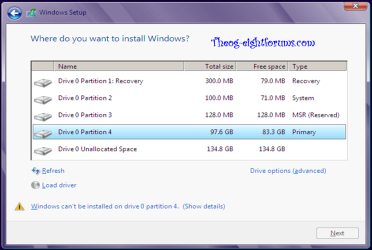
UEFI BIOS Option

Hey Guys.
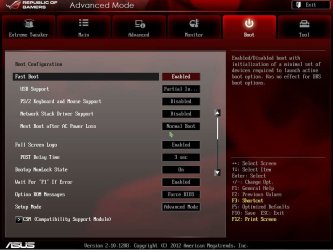
Essenbe is a lucky dog that has a motherboard with UEFI BIOS that the manufacturer included the beautiful GUI BIOS Settings.

My daughter's Asus laptop, and a few others I have seen, with a UEFI bios, has BIOS Settings that look just like legacy BIOS settings. No pretty screens, no mouse, just black and blue and white.

So there is no special key to get what Essenbe has, and it is definitely not Windows. That is what he gets when he turns on his computer. We get that old stuff. It's like I said: up to the manufacturer.

If anyone reading this has a LAPTOP with a GUI BIOS, one you can use a mouse in, please let us know. I have not seen one....yet. Just on desktop boards.

Well, I'm not a 'lucky dog', I paid dearly for it.
 

My Computers My Computers

  • At a glance

    Windows 11 ProRyzen 9 5900X32GB G Skill DDR4-3600EVGA RTX 3080 FTW 3 Ultra
    Computer type
    PC/Desktop
    Computer Manufacturer/Model Number
    ALWAYS UNDER CONSTRUCTION
    OS
    Windows 11 Pro
    CPU
    Ryzen 9 5900X
    Motherboard
    Asus X570 Crosshair Viii Hero
    Memory
    32GB G Skill DDR4-3600
    Graphics Card(s)
    EVGA RTX 3080 FTW 3 Ultra
    Sound Card
    On Board/Sennheiser PC37X Headset
    Monitor(s) Displays
    3 X Asus 27"
    Screen Resolution
    2560x1440
    Hard Drives
    2 X 1 TB NVME drives
    PSU
    EVGA 850
    Case
    Phanteks Eclipse P400A
    Cooling
    EVGA 280 AIO
    Keyboard
    Logitech G510s/ Logitech G13
    Mouse
    Logitech G502
    Internet Speed
    24/1
    Antivirus
    ESET/MBAM Pro/SAS Pro
    Browser
    Chrome/ Firefox/ Edge
  • At a glance

    Windows 11 ProIntel Ultra 9 288V32 GB LPDDR5X 8533
    Computer type
    Laptop
    System Manufacturer/Model Number
    Dell 16 Plus
    OS
    Windows 11 Pro
    CPU
    Intel Ultra 9 288V
    Memory
    32 GB LPDDR5X 8533
    Monitor(s) Displays
    16" Mini-LED HDR600 Touch 90 Hz
    Screen Resolution
    2560X1600
    Hard Drives
    1 TB NVME

My Computer My Computer

At a glance

Windows 7 64 Bit Home Premium SP1i7-3820GSkill F3-14900CL9Q - 16GBEVGA GeForce GTX660 - Driver 352.86
Computer type
PC/Desktop
Computer Manufacturer/Model Number
Home Built - Jan 2013
OS
Windows 7 64 Bit Home Premium SP1
CPU
i7-3820
Motherboard
Asus P9X79-PRO - Bios 4608
Memory
GSkill F3-14900CL9Q - 16GB
Graphics Card(s)
EVGA GeForce GTX660 - Driver 352.86
Sound Card
On board Realtek ALC898
Monitor(s) Displays
Acer S271HL
Screen Resolution
1920 x 1080
Hard Drives
#1- Samsung 840 Pro Series
#2- Western Digital WD1002FAEX Sata3 Black
#3- Western Digital WD1002FAEX Sata3 Black
PSU
Corsair CMPSU-850TX-V2 - 850 watt (by Seasonic)
Case
Corsair Obsidian 550D
Cooling
Standard 3 120mm case fans, Cooler Master Hyper 212 EVO
Keyboard
MS KC-0405
Mouse
Intellimouse 5-button
Internet Speed
56 Mbits/Sec (on a good day)
Antivirus
Avast & Malwarebytes
Browser
Firefox
Other Info
Asus DVD - DRW-24B1ST 24X
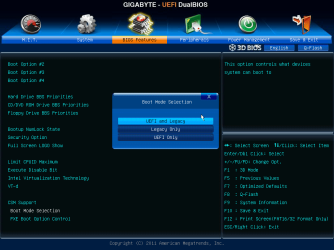
The UEFI interface for Gigabyte GA-Z77X-UP5 TH with BIOS version F11:

Gigabyte F11 UEFI.png

The boot mode selection options are shown over the inteface.

The UEFI supports basic mouse operation, such as click and double click, but does not support the scroll wheel on my Logitec mouse. It's still nice to have the mouse in the BIOS.

The interface is nice to have, but the best feature of the UEFI is speed...
 

My Computer My Computer

At a glance

Windows 7 64-bit, Windows 8.1 64-bit, OSX El ...Intel i5-3350P 3.1 GHz16 GBs GSkill SniperRadeon HD 7850
Computer type
PC/Desktop
Computer Manufacturer/Model Number
Custom built at Home
OS
Windows 7 64-bit, Windows 8.1 64-bit, OSX El Capitan, Windows 10 (VMware)
CPU
Intel i5-3350P 3.1 GHz
Motherboard
Gigabyte GA-Z77X-UP5 TH
Memory
16 GBs GSkill Sniper
Graphics Card(s)
Radeon HD 7850
Sound Card
VIA HD Audio
Monitor(s) Displays
Dell U2410 24"
Screen Resolution
1920x1200
Hard Drives
1 x Intel 520 240 GBs
1 x Seagate 1TBs SATA 2.0,
1 x Seagate 1TBs eSATA 2.0
PSU
Thermaltake 850W
Case
Antec P183
Cooling
Noctua NH-D14 Heatsink 2 x 120mm fans, 4 x 120mm case fans
Keyboard
Dell Multimedia keyboard
Mouse
Logitech Trackball
Internet Speed
28.5 Mb/s
Where is the recovery partition on your windows 7 install?

As far as I know, only OEM machines like your Toshiba have a Recovery Partition. This is a custom build and due to my using diskpart to partition and format the drive during install I also don't have the System Reserved, it is included as part of the C:\ partition.


:DEXCELLENT indeed Bob, as I suspected my drives are MBR with UEFI being my only BIOS as is essenbe's board.
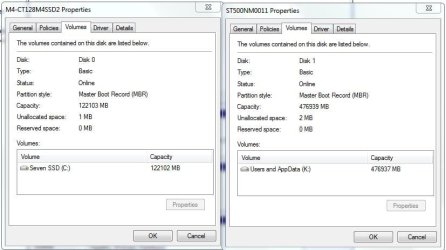
MBR.JPG

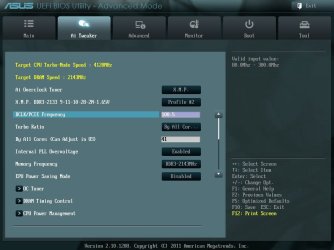
My UEFI overclocking screen.

UEFI.jpg
 

My Computer My Computer

At a glance

Windows 7 Ultimate X64 SP1Intel i5-2550K, Differing ~4.4-4.8GHz No buil...16GB G.Skill Sniper 1866MHz @ 2133MHz 2x8GBASUS GTX650TIB-DC2OC-2GD5, (650TI Boost)
Computer type
PC/Desktop
Computer Manufacturer/Model Number
Home Built Desktop By DataTech
OS
Windows 7 Ultimate X64 SP1
CPU
Intel i5-2550K, Differing ~4.4-4.8GHz No built in GPU
Motherboard
ASUS P8Z68-V PRO/GEN3
Memory
16GB G.Skill Sniper 1866MHz @ 2133MHz 2x8GB
Graphics Card(s)
ASUS GTX650TIB-DC2OC-2GD5, (650TI Boost)
Sound Card
Onboard Realtek 5-1
Monitor(s) Displays
Samsung P2570HD
Screen Resolution
1920x1080
Hard Drives
Samsung 840 Pro 256GB SSD for OS, 500GB Seagate Constellation (Enterprise drive) for Data
PSU
Corsair HX650W
Case
Inwin Dragon Rider
Cooling
Hyper 212 EVO w/two Noctua fans, push-pull, @1300 RPM
Keyboard
E-Z Eyes, bright yellow keys with large characters
Mouse
steelseries SENSEI Laser Pro Gaming
Internet Speed
48-51Mbs Mbs down, 11 Mbs up Xfinity Cable
Antivirus
Norton Internet Security 2013
Browser
IE 10, Opera, Pale Moon if needed
Other Info
4 case fans, LG BluRay-RE, ASUS DVD-RW, Mr. Fusion power supply, 1.21 gigawatts.
One point I feel I need to make (sorry), regarding the thing that adds the most confusion to any discussion regarding UEFI, is that we need to separate the GUI from UEFI. They are not one in the same.

You can have an UEFI system without a Graphical User Interface.
But you can't have a GUI without UEFI (or the ESP).
 

My Computer My Computer

At a glance

Windows 7 64 Bit Home Premium SP1i7-3820GSkill F3-14900CL9Q - 16GBEVGA GeForce GTX660 - Driver 352.86
Computer type
PC/Desktop
Computer Manufacturer/Model Number
Home Built - Jan 2013
OS
Windows 7 64 Bit Home Premium SP1
CPU
i7-3820
Motherboard
Asus P9X79-PRO - Bios 4608
Memory
GSkill F3-14900CL9Q - 16GB
Graphics Card(s)
EVGA GeForce GTX660 - Driver 352.86
Sound Card
On board Realtek ALC898
Monitor(s) Displays
Acer S271HL
Screen Resolution
1920 x 1080
Hard Drives
#1- Samsung 840 Pro Series
#2- Western Digital WD1002FAEX Sata3 Black
#3- Western Digital WD1002FAEX Sata3 Black
PSU
Corsair CMPSU-850TX-V2 - 850 watt (by Seasonic)
Case
Corsair Obsidian 550D
Cooling
Standard 3 120mm case fans, Cooler Master Hyper 212 EVO
Keyboard
MS KC-0405
Mouse
Intellimouse 5-button
Internet Speed
56 Mbits/Sec (on a good day)
Antivirus
Avast & Malwarebytes
Browser
Firefox
Other Info
Asus DVD - DRW-24B1ST 24X
So let me see if I can get this straight.

Step one: Format SSD to GPT
Step two: Clone current operating system to SSD
Step three: Install SSD
Step four: Change bios to UEFI and boot.

Is this correct or do I have to do change the bios first .. boot from Windows 7 Dvd and do a fresh install?

Thank You
 

My Computer My Computer

At a glance

Windows 7 Premium 64 BitOpteron 1854 gig OCZ High Performance Dual Channel @ 500...ATI Radeon HD 5450 (Direct X11)
Computer type
PC/Desktop
Computer Manufacturer/Model Number
Master Control (25 plus year old custom build)
OS
Windows 7 Premium 64 Bit
CPU
Opteron 185
Motherboard
DFI Lanparty N4 Ultra-d
Memory
4 gig OCZ High Performance Dual Channel @ 500 Mhz
Graphics Card(s)
ATI Radeon HD 5450 (Direct X11)
Sound Card
Creative SB Audigy Audio 2 ZS
Monitor(s) Displays
Dell 2208WFP (Digital)
Screen Resolution
1680 x 1050
Hard Drives
Plextor M3 Pro 128 Gb Sata 6 SSD (Main)

Western Digital Blue 320 Gb IDE 7200 RPM Internal Daily (Backup Drive)

Western Digital 2 TB RE4 SATA 3 Gb/s 7200 RPM 64 MB Cache Enterprise Hard Drive (External Data & Backup Drive).
PSU
OCZ GameXStream 850 Watt PSU.
Case
Antec Performance Series
Cooling
Working on it.
Keyboard
Saitek Eclipse II
Mouse
Kensington SlimBlade
Internet Speed
50 Gb
Antivirus
Microsoft Security Essentials
Browser
From Netscape to Internet Explorer.
Other Info
Got a mix of old and new hardware. Sound card hooked up to a 250 watt per channel Harman Kardon Amp to a pair of Dak 5 way old school acoustically suspended speakers.
You must change the bios to UEFI first .. boot from Windows 7 Dvd ... and do a fresh install.

Follow the instructions in theogs post #22 for Windows 7 very carefully.

To have a disk that is all unallocated space (as per instructions) you will need to do a Clean All from Diskpart to wipe *everything* off your hard drive first. So be sure to make all your necessary backups!

If you want step by step for Diskpart or any other preparation just ask, you got a lot of experienced eyes here.

If you clone the drive you will only have the exact same setup you have now.... only on an SSD.
 

My Computer My Computer

At a glance

Windows 7 64 Bit Home Premium SP1i7-3820GSkill F3-14900CL9Q - 16GBEVGA GeForce GTX660 - Driver 352.86
Computer type
PC/Desktop
Computer Manufacturer/Model Number
Home Built - Jan 2013
OS
Windows 7 64 Bit Home Premium SP1
CPU
i7-3820
Motherboard
Asus P9X79-PRO - Bios 4608
Memory
GSkill F3-14900CL9Q - 16GB
Graphics Card(s)
EVGA GeForce GTX660 - Driver 352.86
Sound Card
On board Realtek ALC898
Monitor(s) Displays
Acer S271HL
Screen Resolution
1920 x 1080
Hard Drives
#1- Samsung 840 Pro Series
#2- Western Digital WD1002FAEX Sata3 Black
#3- Western Digital WD1002FAEX Sata3 Black
PSU
Corsair CMPSU-850TX-V2 - 850 watt (by Seasonic)
Case
Corsair Obsidian 550D
Cooling
Standard 3 120mm case fans, Cooler Master Hyper 212 EVO
Keyboard
MS KC-0405
Mouse
Intellimouse 5-button
Internet Speed
56 Mbits/Sec (on a good day)
Antivirus
Avast & Malwarebytes
Browser
Firefox
Other Info
Asus DVD - DRW-24B1ST 24X
:DEXCELLENT indeed Bob, as I suspected my drives are MBR with UEFI being my only BIOS as is essenbe's board.
All motherboards have a a single BIOS, even the ones with the UEFI interface.

Having the drives with MBR and boots with the UEFI BIOS means that the boot option is set to "Enable both..." under "UEFI/Legacy boot" settings. Asus does the same as Gigabyte, which is UEFI first and then legacy; Asus just name it differently, but it does the same.
 

My Computer My Computer

At a glance

Windows 7 64-bit, Windows 8.1 64-bit, OSX El ...Intel i5-3350P 3.1 GHz16 GBs GSkill SniperRadeon HD 7850
Computer type
PC/Desktop
Computer Manufacturer/Model Number
Custom built at Home
OS
Windows 7 64-bit, Windows 8.1 64-bit, OSX El Capitan, Windows 10 (VMware)
CPU
Intel i5-3350P 3.1 GHz
Motherboard
Gigabyte GA-Z77X-UP5 TH
Memory
16 GBs GSkill Sniper
Graphics Card(s)
Radeon HD 7850
Sound Card
VIA HD Audio
Monitor(s) Displays
Dell U2410 24"
Screen Resolution
1920x1200
Hard Drives
1 x Intel 520 240 GBs
1 x Seagate 1TBs SATA 2.0,
1 x Seagate 1TBs eSATA 2.0
PSU
Thermaltake 850W
Case
Antec P183
Cooling
Noctua NH-D14 Heatsink 2 x 120mm fans, 4 x 120mm case fans
Keyboard
Dell Multimedia keyboard
Mouse
Logitech Trackball
Internet Speed
28.5 Mb/s
Oh Boy,

This means I have to contact Toshiba again and see if I can talk to someone about getting the correct application to re-install the most current and needed drivers without trying to navigate their website.

They have one utility for Windows 8 so I hope they also have one for Windows 7.

Thanks Again
 

My Computer My Computer

At a glance

Windows 7 Premium 64 BitOpteron 1854 gig OCZ High Performance Dual Channel @ 500...ATI Radeon HD 5450 (Direct X11)
Computer type
PC/Desktop
Computer Manufacturer/Model Number
Master Control (25 plus year old custom build)
OS
Windows 7 Premium 64 Bit
CPU
Opteron 185
Motherboard
DFI Lanparty N4 Ultra-d
Memory
4 gig OCZ High Performance Dual Channel @ 500 Mhz
Graphics Card(s)
ATI Radeon HD 5450 (Direct X11)
Sound Card
Creative SB Audigy Audio 2 ZS
Monitor(s) Displays
Dell 2208WFP (Digital)
Screen Resolution
1680 x 1050
Hard Drives
Plextor M3 Pro 128 Gb Sata 6 SSD (Main)

Western Digital Blue 320 Gb IDE 7200 RPM Internal Daily (Backup Drive)

Western Digital 2 TB RE4 SATA 3 Gb/s 7200 RPM 64 MB Cache Enterprise Hard Drive (External Data & Backup Drive).
PSU
OCZ GameXStream 850 Watt PSU.
Case
Antec Performance Series
Cooling
Working on it.
Keyboard
Saitek Eclipse II
Mouse
Kensington SlimBlade
Internet Speed
50 Gb
Antivirus
Microsoft Security Essentials
Browser
From Netscape to Internet Explorer.
Other Info
Got a mix of old and new hardware. Sound card hooked up to a 250 watt per channel Harman Kardon Amp to a pair of Dak 5 way old school acoustically suspended speakers.
:DEXCELLENT indeed Bob, as I suspected my drives are MBR with UEFI being my only BIOS as is essenbe's board.
All motherboards have a a single BIOS, even the ones with the UEFI interface.

Having the drives with MBR and boots with the UEFI BIOS means that the boot option is set to "Enable both..." under "UEFI/Legacy boot" settings. Asus does the same as Gigabyte, which is UEFI first and then legacy; Asus just name it differently, but it does the same.
tell me where the setting is to change the type of boot mine does. I've not seen it. Gigabyte uses very different things than other soo, I've had one before.
 

My Computer My Computer

At a glance

Windows 7 Ultimate X64 SP1Intel i5-2550K, Differing ~4.4-4.8GHz No buil...16GB G.Skill Sniper 1866MHz @ 2133MHz 2x8GBASUS GTX650TIB-DC2OC-2GD5, (650TI Boost)
Computer type
PC/Desktop
Computer Manufacturer/Model Number
Home Built Desktop By DataTech
OS
Windows 7 Ultimate X64 SP1
CPU
Intel i5-2550K, Differing ~4.4-4.8GHz No built in GPU
Motherboard
ASUS P8Z68-V PRO/GEN3
Memory
16GB G.Skill Sniper 1866MHz @ 2133MHz 2x8GB
Graphics Card(s)
ASUS GTX650TIB-DC2OC-2GD5, (650TI Boost)
Sound Card
Onboard Realtek 5-1
Monitor(s) Displays
Samsung P2570HD
Screen Resolution
1920x1080
Hard Drives
Samsung 840 Pro 256GB SSD for OS, 500GB Seagate Constellation (Enterprise drive) for Data
PSU
Corsair HX650W
Case
Inwin Dragon Rider
Cooling
Hyper 212 EVO w/two Noctua fans, push-pull, @1300 RPM
Keyboard
E-Z Eyes, bright yellow keys with large characters
Mouse
steelseries SENSEI Laser Pro Gaming
Internet Speed
48-51Mbs Mbs down, 11 Mbs up Xfinity Cable
Antivirus
Norton Internet Security 2013
Browser
IE 10, Opera, Pale Moon if needed
Other Info
4 case fans, LG BluRay-RE, ASUS DVD-RW, Mr. Fusion power supply, 1.21 gigawatts.
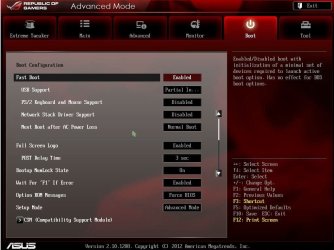
Gary, mine is under the boot tab.

boot.JPG
 

My Computers My Computers

  • At a glance

    Windows 11 ProRyzen 9 5900X32GB G Skill DDR4-3600EVGA RTX 3080 FTW 3 Ultra
    Computer type
    PC/Desktop
    Computer Manufacturer/Model Number
    ALWAYS UNDER CONSTRUCTION
    OS
    Windows 11 Pro
    CPU
    Ryzen 9 5900X
    Motherboard
    Asus X570 Crosshair Viii Hero
    Memory
    32GB G Skill DDR4-3600
    Graphics Card(s)
    EVGA RTX 3080 FTW 3 Ultra
    Sound Card
    On Board/Sennheiser PC37X Headset
    Monitor(s) Displays
    3 X Asus 27"
    Screen Resolution
    2560x1440
    Hard Drives
    2 X 1 TB NVME drives
    PSU
    EVGA 850
    Case
    Phanteks Eclipse P400A
    Cooling
    EVGA 280 AIO
    Keyboard
    Logitech G510s/ Logitech G13
    Mouse
    Logitech G502
    Internet Speed
    24/1
    Antivirus
    ESET/MBAM Pro/SAS Pro
    Browser
    Chrome/ Firefox/ Edge
  • At a glance

    Windows 11 ProIntel Ultra 9 288V32 GB LPDDR5X 8533
    Computer type
    Laptop
    System Manufacturer/Model Number
    Dell 16 Plus
    OS
    Windows 11 Pro
    CPU
    Intel Ultra 9 288V
    Memory
    32 GB LPDDR5X 8533
    Monitor(s) Displays
    16" Mini-LED HDR600 Touch 90 Hz
    Screen Resolution
    2560X1600
    Hard Drives
    1 TB NVME
To have a disk that is all unallocated space (as per instructions) you will need to do a Clean All from Diskpart to wipe *everything* off your hard drive first. So be sure to make all your necessary backups!

^This is wrong^ (Thanks Essenbe for pointing it out to me)
I forgot that you were going to install on a new SSD, which will be blank unallocated space already. Sorry

Do not use the Clean All command on an SSD. Ever. Bad Idea.
Spinners, yes.
 

My Computer My Computer

At a glance

Windows 7 64 Bit Home Premium SP1i7-3820GSkill F3-14900CL9Q - 16GBEVGA GeForce GTX660 - Driver 352.86
Computer type
PC/Desktop
Computer Manufacturer/Model Number
Home Built - Jan 2013
OS
Windows 7 64 Bit Home Premium SP1
CPU
i7-3820
Motherboard
Asus P9X79-PRO - Bios 4608
Memory
GSkill F3-14900CL9Q - 16GB
Graphics Card(s)
EVGA GeForce GTX660 - Driver 352.86
Sound Card
On board Realtek ALC898
Monitor(s) Displays
Acer S271HL
Screen Resolution
1920 x 1080
Hard Drives
#1- Samsung 840 Pro Series
#2- Western Digital WD1002FAEX Sata3 Black
#3- Western Digital WD1002FAEX Sata3 Black
PSU
Corsair CMPSU-850TX-V2 - 850 watt (by Seasonic)
Case
Corsair Obsidian 550D
Cooling
Standard 3 120mm case fans, Cooler Master Hyper 212 EVO
Keyboard
MS KC-0405
Mouse
Intellimouse 5-button
Internet Speed
56 Mbits/Sec (on a good day)
Antivirus
Avast & Malwarebytes
Browser
Firefox
Other Info
Asus DVD - DRW-24B1ST 24X
tell me where the setting is to change the type of boot mine does. I've not seen it. Gigabyte uses very different things than other soo, I've had one before.
Without knowing the UEFI settings for your motherboard, I cannot. If you cannot find it, maybe your motherboard does not have options for UEFI boot only. Maybe it has "UEFI first and then legacy" by default that cannot be changed.

With UEFI only boot option the system cannot boot an MBR partition, it needs a GPT partition to boot. Conversely, UEFI needs to boot the MBR partition by the legacy function. While both the MBR and GPT partitions have boot sectors, they are different and require the correct UEFI boot option. Otherwise, the OS will not boot.

The wording in the UEFI is different between motherboard manufacturer, for better or worse. In either case UEFI is a standard where the GUI/mouse is part of among others, such as booting GPT drives, load drivers, etc. Just because the motherboard has a UEFI interface doesn't necessarily means that all functionalities of the UEFI are in place. In theory it should, but it is a modular design after all...
 

My Computer My Computer

At a glance

Windows 7 64-bit, Windows 8.1 64-bit, OSX El ...Intel i5-3350P 3.1 GHz16 GBs GSkill SniperRadeon HD 7850
Computer type
PC/Desktop
Computer Manufacturer/Model Number
Custom built at Home
OS
Windows 7 64-bit, Windows 8.1 64-bit, OSX El Capitan, Windows 10 (VMware)
CPU
Intel i5-3350P 3.1 GHz
Motherboard
Gigabyte GA-Z77X-UP5 TH
Memory
16 GBs GSkill Sniper
Graphics Card(s)
Radeon HD 7850
Sound Card
VIA HD Audio
Monitor(s) Displays
Dell U2410 24"
Screen Resolution
1920x1200
Hard Drives
1 x Intel 520 240 GBs
1 x Seagate 1TBs SATA 2.0,
1 x Seagate 1TBs eSATA 2.0
PSU
Thermaltake 850W
Case
Antec P183
Cooling
Noctua NH-D14 Heatsink 2 x 120mm fans, 4 x 120mm case fans
Keyboard
Dell Multimedia keyboard
Mouse
Logitech Trackball
Internet Speed
28.5 Mb/s

My Computer My Computer

At a glance

Windows 7 Ultimate X64 SP1Intel i5-2550K, Differing ~4.4-4.8GHz No buil...16GB G.Skill Sniper 1866MHz @ 2133MHz 2x8GBASUS GTX650TIB-DC2OC-2GD5, (650TI Boost)
Computer type
PC/Desktop
Computer Manufacturer/Model Number
Home Built Desktop By DataTech
OS
Windows 7 Ultimate X64 SP1
CPU
Intel i5-2550K, Differing ~4.4-4.8GHz No built in GPU
Motherboard
ASUS P8Z68-V PRO/GEN3
Memory
16GB G.Skill Sniper 1866MHz @ 2133MHz 2x8GB
Graphics Card(s)
ASUS GTX650TIB-DC2OC-2GD5, (650TI Boost)
Sound Card
Onboard Realtek 5-1
Monitor(s) Displays
Samsung P2570HD
Screen Resolution
1920x1080
Hard Drives
Samsung 840 Pro 256GB SSD for OS, 500GB Seagate Constellation (Enterprise drive) for Data
PSU
Corsair HX650W
Case
Inwin Dragon Rider
Cooling
Hyper 212 EVO w/two Noctua fans, push-pull, @1300 RPM
Keyboard
E-Z Eyes, bright yellow keys with large characters
Mouse
steelseries SENSEI Laser Pro Gaming
Internet Speed
48-51Mbs Mbs down, 11 Mbs up Xfinity Cable
Antivirus
Norton Internet Security 2013
Browser
IE 10, Opera, Pale Moon if needed
Other Info
4 case fans, LG BluRay-RE, ASUS DVD-RW, Mr. Fusion power supply, 1.21 gigawatts.
Yours may be different or called something different. It's the last entry, CSM (Compatibility support module)

z.JPG
 

My Computers My Computers

  • At a glance

    Windows 11 ProRyzen 9 5900X32GB G Skill DDR4-3600EVGA RTX 3080 FTW 3 Ultra
    Computer type
    PC/Desktop
    Computer Manufacturer/Model Number
    ALWAYS UNDER CONSTRUCTION
    OS
    Windows 11 Pro
    CPU
    Ryzen 9 5900X
    Motherboard
    Asus X570 Crosshair Viii Hero
    Memory
    32GB G Skill DDR4-3600
    Graphics Card(s)
    EVGA RTX 3080 FTW 3 Ultra
    Sound Card
    On Board/Sennheiser PC37X Headset
    Monitor(s) Displays
    3 X Asus 27"
    Screen Resolution
    2560x1440
    Hard Drives
    2 X 1 TB NVME drives
    PSU
    EVGA 850
    Case
    Phanteks Eclipse P400A
    Cooling
    EVGA 280 AIO
    Keyboard
    Logitech G510s/ Logitech G13
    Mouse
    Logitech G502
    Internet Speed
    24/1
    Antivirus
    ESET/MBAM Pro/SAS Pro
    Browser
    Chrome/ Firefox/ Edge
  • At a glance

    Windows 11 ProIntel Ultra 9 288V32 GB LPDDR5X 8533
    Computer type
    Laptop
    System Manufacturer/Model Number
    Dell 16 Plus
    OS
    Windows 11 Pro
    CPU
    Intel Ultra 9 288V
    Memory
    32 GB LPDDR5X 8533
    Monitor(s) Displays
    16" Mini-LED HDR600 Touch 90 Hz
    Screen Resolution
    2560X1600
    Hard Drives
    1 TB NVME
Here are my entire boot screen options put together as one snip. Maybe this is a cheap board.

UEFI 1.jpg
 

My Computer My Computer

At a glance

Windows 7 Ultimate X64 SP1Intel i5-2550K, Differing ~4.4-4.8GHz No buil...16GB G.Skill Sniper 1866MHz @ 2133MHz 2x8GBASUS GTX650TIB-DC2OC-2GD5, (650TI Boost)
Computer type
PC/Desktop
Computer Manufacturer/Model Number
Home Built Desktop By DataTech
OS
Windows 7 Ultimate X64 SP1
CPU
Intel i5-2550K, Differing ~4.4-4.8GHz No built in GPU
Motherboard
ASUS P8Z68-V PRO/GEN3
Memory
16GB G.Skill Sniper 1866MHz @ 2133MHz 2x8GB
Graphics Card(s)
ASUS GTX650TIB-DC2OC-2GD5, (650TI Boost)
Sound Card
Onboard Realtek 5-1
Monitor(s) Displays
Samsung P2570HD
Screen Resolution
1920x1080
Hard Drives
Samsung 840 Pro 256GB SSD for OS, 500GB Seagate Constellation (Enterprise drive) for Data
PSU
Corsair HX650W
Case
Inwin Dragon Rider
Cooling
Hyper 212 EVO w/two Noctua fans, push-pull, @1300 RPM
Keyboard
E-Z Eyes, bright yellow keys with large characters
Mouse
steelseries SENSEI Laser Pro Gaming
Internet Speed
48-51Mbs Mbs down, 11 Mbs up Xfinity Cable
Antivirus
Norton Internet Security 2013
Browser
IE 10, Opera, Pale Moon if needed
Other Info
4 case fans, LG BluRay-RE, ASUS DVD-RW, Mr. Fusion power supply, 1.21 gigawatts.
The thing we all need to keep in mind is that one of the main features of UEFI is that the Setup Program (formerly known as BIOS, but we keep using the term because what else do we have?) is configurable.

Manufacturers can add or remove features at will. So if Gigabyte wants to let you have a hybrid BIOS they can. If Asus thinks that is not necessary they can remove that module.

We old timers grew up with "the one BIOS", so we will be sure to have a hard time adjusting to "BIOS, The Next Generation". We've got to start thinking of the "BIOS" as the "Setup Program" and treat it the same way we do about any other class of software. Different software does the same thing differently.
 

My Computer My Computer

At a glance

Windows 7 64 Bit Home Premium SP1i7-3820GSkill F3-14900CL9Q - 16GBEVGA GeForce GTX660 - Driver 352.86
Computer type
PC/Desktop
Computer Manufacturer/Model Number
Home Built - Jan 2013
OS
Windows 7 64 Bit Home Premium SP1
CPU
i7-3820
Motherboard
Asus P9X79-PRO - Bios 4608
Memory
GSkill F3-14900CL9Q - 16GB
Graphics Card(s)
EVGA GeForce GTX660 - Driver 352.86
Sound Card
On board Realtek ALC898
Monitor(s) Displays
Acer S271HL
Screen Resolution
1920 x 1080
Hard Drives
#1- Samsung 840 Pro Series
#2- Western Digital WD1002FAEX Sata3 Black
#3- Western Digital WD1002FAEX Sata3 Black
PSU
Corsair CMPSU-850TX-V2 - 850 watt (by Seasonic)
Case
Corsair Obsidian 550D
Cooling
Standard 3 120mm case fans, Cooler Master Hyper 212 EVO
Keyboard
MS KC-0405
Mouse
Intellimouse 5-button
Internet Speed
56 Mbits/Sec (on a good day)
Antivirus
Avast & Malwarebytes
Browser
Firefox
Other Info
Asus DVD - DRW-24B1ST 24X
At the current time UEFI and BIOS names are interchangable, but will fade away with time. Having UEFI supporting many BIOS features doesn't help either, but technological advances will eliminate the need for backward compatibility.

Currently, all UEFI boards support BIOS features, some of them more than others. While Gigabyte calls theirs "UEFI DUAL BIOS", it isn't dual at all, nor is it BIOS. My motherboard has two "BIOS ROMs" as the marketing material calls it. They could've called it UEFI ROM for all practical purposes...

The UEFI DUAL BIOS actually one is active, while the other is backup ROM. The backup cannot boot the system; however, the end user can save UEFI settings in the backup. The system also backs up a number of last know successful boot configuration, similarly as Windows does. The difference is that the end user would need to load the saved UEFI settings from the backup to the active ROM, if needed to.

We old timers didn't grow up with one BIOS, it had gone through number of changes since the beginning. We'll just need get used of the UEFI acronym as the interface for managing computer hardware. It's an OS on its own, much more than the BIOS used to be...

This discussion on this subject certaily helped me to understand UEFI and through that, quite a few things about my new motherboard. Thanks guys...
 

My Computer My Computer

At a glance

Windows 7 64-bit, Windows 8.1 64-bit, OSX El ...Intel i5-3350P 3.1 GHz16 GBs GSkill SniperRadeon HD 7850
Computer type
PC/Desktop
Computer Manufacturer/Model Number
Custom built at Home
OS
Windows 7 64-bit, Windows 8.1 64-bit, OSX El Capitan, Windows 10 (VMware)
CPU
Intel i5-3350P 3.1 GHz
Motherboard
Gigabyte GA-Z77X-UP5 TH
Memory
16 GBs GSkill Sniper
Graphics Card(s)
Radeon HD 7850
Sound Card
VIA HD Audio
Monitor(s) Displays
Dell U2410 24"
Screen Resolution
1920x1200
Hard Drives
1 x Intel 520 240 GBs
1 x Seagate 1TBs SATA 2.0,
1 x Seagate 1TBs eSATA 2.0
PSU
Thermaltake 850W
Case
Antec P183
Cooling
Noctua NH-D14 Heatsink 2 x 120mm fans, 4 x 120mm case fans
Keyboard
Dell Multimedia keyboard
Mouse
Logitech Trackball
Internet Speed
28.5 Mb/s
Here are my entire boot screen options put together as one snip. Maybe this is a cheap board.
It doesn't seem that your motherboard's boot options include UEFI boot options, but it is certainly not a cheap board. It natively support greater than 2.2 TBs drives with 64-bit OS and may or may not be able to boot GPT partitions.

The chances are that you will not need booting booting GPT partitions anytime soon. It'll take some time before everyone is getting greater than 2.2 TBs SSD drives....;)
 

My Computer My Computer

At a glance

Windows 7 64-bit, Windows 8.1 64-bit, OSX El ...Intel i5-3350P 3.1 GHz16 GBs GSkill SniperRadeon HD 7850
Computer type
PC/Desktop
Computer Manufacturer/Model Number
Custom built at Home
OS
Windows 7 64-bit, Windows 8.1 64-bit, OSX El Capitan, Windows 10 (VMware)
CPU
Intel i5-3350P 3.1 GHz
Motherboard
Gigabyte GA-Z77X-UP5 TH
Memory
16 GBs GSkill Sniper
Graphics Card(s)
Radeon HD 7850
Sound Card
VIA HD Audio
Monitor(s) Displays
Dell U2410 24"
Screen Resolution
1920x1200
Hard Drives
1 x Intel 520 240 GBs
1 x Seagate 1TBs SATA 2.0,
1 x Seagate 1TBs eSATA 2.0
PSU
Thermaltake 850W
Case
Antec P183
Cooling
Noctua NH-D14 Heatsink 2 x 120mm fans, 4 x 120mm case fans
Keyboard
Dell Multimedia keyboard
Mouse
Logitech Trackball
Internet Speed
28.5 Mb/s
Back
Top