Uknown device in Network map??

brusse01

New member
Local time
5:46 AM
Messages
84
Location
Michigan
Hi all,

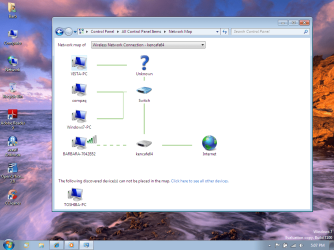
I have installed Windows 7 RC on 3 computers and setup the network as a home network... skipped creating "homegroup" I have 2 XP systems on same network that I need to access. Anyway, I cant seem to figure out why/what this unkown device in my network map is??? It shows up on all the computers that have the RC installed. I have attached a pic of this....

Any ideas?? and thx for help
 

Attachments
  • unknown network.png
    unknown network.png
    185.8 KB · Views: 513

My Computer

Computer Manufacturer/Model Number
Custom built
OS
Windows 7
CPU
Athlon 64x2 5600+ dual core
Motherboard
Biostar A770+
Memory
2GB
Graphics Card(s)
ATI Radeon 4350 512 MB
Sound Card
Onboard Realtek HD
Hard Drives
Seagate 500 GB SATA
Keyboard
Logitech Wireless
Mouse
Logitech Wireless
I dunno. Did you install anything that might alter the network stack or something like that...like a 3rd party firewall or similar?
 

My Computer

Computer Manufacturer/Model Number
self built
OS
7600.20510 x86
CPU
P4 550 3.4 GHz HT running at 3.5 GHz
Motherboard
MSI PM8M3-V (MS-7211 v1.x) Micro-ATX mainboard
Memory
OCZ 2 GB(2x1GB) DDR400mHz running @ 414 mHz
Graphics Card(s)
HIS Radeon HD 3850 IceQ 3 Turbo HDMI Dual DL-DVI AGP
Sound Card
MOTU Traveler firewire studio interface 192 kHz 24 bit
Monitor(s) Displays
22" widescreen Acer X223W LCD, 17" Compaq P75 CRT
Screen Resolution
1680x1050 and 1280x1024
Hard Drives
SATA I x2 WD, 400 GB and 120 GB, SATA 2 WD Caviar Black 1 TB
PSU
350W generic
Case
Cybertronpc, it glows blue
Cooling
stock cpu fan, Ice-Q 3 gpu and system, many case fans
Keyboard
Logitch Classical Keyboard 200
Mouse
Logitech Mediaplay cordless
Internet Speed
1792/448 kbits/sec
Other Info
SATA II PCI fake RAID adapter, 1 GB Readyboost, original ATI Remote Wonder (even works with WMC perfectly), Logitech Rumblepad 2 game controller x2
nope... the only change I made is I disabled IPV6 on the all the network adapters. (wireless and wired). I use windows firewall... had the same setup in the Beta and didnt have a issue .... ?? strange??


The XP systems see the network just fine. No unknown is listed at all.... ??
I also have no prob accessing any of the computers over the network...wish I could just figure out what this "unknown" is lol.....
 
Last edited:

My Computer

Computer Manufacturer/Model Number
Custom built
OS
Windows 7
CPU
Athlon 64x2 5600+ dual core
Motherboard
Biostar A770+
Memory
2GB
Graphics Card(s)
ATI Radeon 4350 512 MB
Sound Card
Onboard Realtek HD
Hard Drives
Seagate 500 GB SATA
Keyboard
Logitech Wireless
Mouse
Logitech Wireless
did you create something on the switch like a VLAN or such? kinda suprised it doesnt label your switch as well. what make/model... just for my own curiosity so i can crosss out, no bridged connections or ICS, right? DHCP on network? static IP on switch? gateways and dns configured correctly both on machines and network router/switch?
 

My Computer

Computer Manufacturer/Model Number
CUSTOM
OS
XP/win7 x86 build 7127
CPU
Athlon64 X2 DUAL 4200+ 2.21ghz
Motherboard
ASUS K8 PRO SLI
Memory
2GB Dual Chan DDR2 Corsair
Graphics Card(s)
Nvidia 6800GT
Sound Card
nvidia
Monitor(s) Displays
19' LCD
Screen Resolution
1280x1024
Hard Drives
WD 250, 2x500, 2x1TB IDE/USB
WD 250 SATA (system)
SEAGATE 120 Sata
PSU
coolermaster 450
Case
SUPERFLOWER
Cooling
1 HDD bay fan, 5x80mm Case Fans, AEROGATE II Fan/Temp
Keyboard
MS wireless
Mouse
MS Wireless
Internet Speed
fassssssssst
No VLAN . Hmmm.... my wireless router is a Linksys WRT54GS w/ Speedbooster. Comcast supplied RCA cable modem. DCHP enabled on the linksys router. No static ip being used. Everything shows configured correctly with DNS. No bridge connections. And I have 2 desktops that are wired into port 1 and 2 on the Linksys. No ICS. All network traffic uses the gateway.

Wireless setup uses WPA2 security, mac filtering...etc. I have 3 laptops that use the wireless. All 3 laptops have Windows RC running flawlessly. No connection issues. but the unknown device shows up on them as well.

Very wierd.... ? I would expect this kinda quirkiness in the Beta not the RC lol
When the Beta was installed... no "unknown" listed in network map....

my 2 XP systems list the network correctly. Sees all pc's and there is no unknown at all..

thx for input and your ideas :-)

here is a network map with all the pc's on network.... the toshiba laptop is sleepin lol think that is why it shows up at the bottom of screen
 

Attachments

  • network map.png
    network map.png
    165.2 KB · Views: 348
Last edited:

My Computer

Computer Manufacturer/Model Number
Custom built
OS
Windows 7
CPU
Athlon 64x2 5600+ dual core
Motherboard
Biostar A770+
Memory
2GB
Graphics Card(s)
ATI Radeon 4350 512 MB
Sound Card
Onboard Realtek HD
Hard Drives
Seagate 500 GB SATA
Keyboard
Logitech Wireless
Mouse
Logitech Wireless
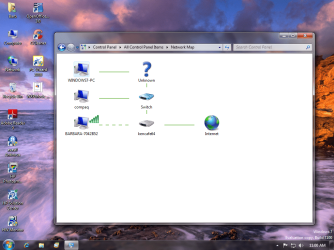
weird, just by comparing your two shots taken, at one point the 7 machine was connected to the unknown device, now its not, the vista is. Am wondering if you are dual booting a machine and switching back and forth between OS's while the other machines are still on the network, being this could be the cause for the confusion of the mapping. I dont think this lil feature is quited debugged either, tho it seems as they are working on it since it looks different slightly in beta 7000
 

My Computer

Computer Manufacturer/Model Number
CUSTOM
OS
XP/win7 x86 build 7127
CPU
Athlon64 X2 DUAL 4200+ 2.21ghz
Motherboard
ASUS K8 PRO SLI
Memory
2GB Dual Chan DDR2 Corsair
Graphics Card(s)
Nvidia 6800GT
Sound Card
nvidia
Monitor(s) Displays
19' LCD
Screen Resolution
1280x1024
Hard Drives
WD 250, 2x500, 2x1TB IDE/USB
WD 250 SATA (system)
SEAGATE 120 Sata
PSU
coolermaster 450
Case
SUPERFLOWER
Cooling
1 HDD bay fan, 5x80mm Case Fans, AEROGATE II Fan/Temp
Keyboard
MS wireless
Mouse
MS Wireless
Internet Speed
fassssssssst
hey Digger... I think I might have figured it out....

I decided to check and compare the settings on all the computers in the network and sharing center. It seems the Windows7-PC had joined a "homegroup.... all the other computers had "Ready to Create" . Hmmm.. so I left the "homegroup"... rebooted and the big ? in network map is gone. see pic

After I left homegroup I double checked network connections and such. I can still access all the computers/files. Really not sure why the Windows7-PC decided to join a homegroup when I thought I skipped that option when setting up network.... maybe I had fat fingers and hit a wrong key lol

thanks again for your help.... on a side note.. none of the computers are setup for dual booting...
 

Attachments

  • network map 2.png
    network map 2.png
    200.4 KB · Views: 279

My Computer

Computer Manufacturer/Model Number
Custom built
OS
Windows 7
CPU
Athlon 64x2 5600+ dual core
Motherboard
Biostar A770+
Memory
2GB
Graphics Card(s)
ATI Radeon 4350 512 MB
Sound Card
Onboard Realtek HD
Hard Drives
Seagate 500 GB SATA
Keyboard
Logitech Wireless
Mouse
Logitech Wireless
Am wondering if you are dual booting a machine and switching back and forth between OS's while the other machines are still on the network, being this could be the cause for the confusion of the mapping.

Even though that wasn't it, that's good thinking anyhow. Kind of like a ghost connection in IRC.
 

My Computer

Computer Manufacturer/Model Number
self built
OS
7600.20510 x86
CPU
P4 550 3.4 GHz HT running at 3.5 GHz
Motherboard
MSI PM8M3-V (MS-7211 v1.x) Micro-ATX mainboard
Memory
OCZ 2 GB(2x1GB) DDR400mHz running @ 414 mHz
Graphics Card(s)
HIS Radeon HD 3850 IceQ 3 Turbo HDMI Dual DL-DVI AGP
Sound Card
MOTU Traveler firewire studio interface 192 kHz 24 bit
Monitor(s) Displays
22" widescreen Acer X223W LCD, 17" Compaq P75 CRT
Screen Resolution
1680x1050 and 1280x1024
Hard Drives
SATA I x2 WD, 400 GB and 120 GB, SATA 2 WD Caviar Black 1 TB
PSU
350W generic
Case
Cybertronpc, it glows blue
Cooling
stock cpu fan, Ice-Q 3 gpu and system, many case fans
Keyboard
Logitch Classical Keyboard 200
Mouse
Logitech Mediaplay cordless
Internet Speed
1792/448 kbits/sec
Other Info
SATA II PCI fake RAID adapter, 1 GB Readyboost, original ATI Remote Wonder (even works with WMC perfectly), Logitech Rumblepad 2 game controller x2
Hi Torrentg,

yep... would have to agree... good thinking... makes me wonder if a dual boot would actually create a "ghost connection'....
things that make ya go hmmm......

seems like I always catch the "wierd" bugs lol
 

My Computer

Computer Manufacturer/Model Number
Custom built
OS
Windows 7
CPU
Athlon 64x2 5600+ dual core
Motherboard
Biostar A770+
Memory
2GB
Graphics Card(s)
ATI Radeon 4350 512 MB
Sound Card
Onboard Realtek HD
Hard Drives
Seagate 500 GB SATA
Keyboard
Logitech Wireless
Mouse
Logitech Wireless
well, i mentioned this, since i am actually still dual err triple booting xp, beta 7 and RC 7, still wanted the beta to go back and check things...

this is sorta what happened to me while i was upgrading this pc while the laptop was still connected and still on beta, then i joined the original HG from the desktop, which joined them both again, one on beta other on RC. Desktop could see the HG shares on the laptop, but not vice versa. Then i upgraded the laptop to RC and then ran into the exact same HG join "ready to create" "ghost HG" type of issue.
 

My Computer

Computer Manufacturer/Model Number
CUSTOM
OS
XP/win7 x86 build 7127
CPU
Athlon64 X2 DUAL 4200+ 2.21ghz
Motherboard
ASUS K8 PRO SLI
Memory
2GB Dual Chan DDR2 Corsair
Graphics Card(s)
Nvidia 6800GT
Sound Card
nvidia
Monitor(s) Displays
19' LCD
Screen Resolution
1280x1024
Hard Drives
WD 250, 2x500, 2x1TB IDE/USB
WD 250 SATA (system)
SEAGATE 120 Sata
PSU
coolermaster 450
Case
SUPERFLOWER
Cooling
1 HDD bay fan, 5x80mm Case Fans, AEROGATE II Fan/Temp
Keyboard
MS wireless
Mouse
MS Wireless
Internet Speed
fassssssssst
Back
Top