
Ultimate to Home Premium Questions

shablah

New member
Local time
1:16 AM
Messages
29
Hi, Savvy Sevenoids.

I need to replace my current install of 7 Ultimate x64. I was victimized by a dirtbag shop owner/builder. My copy is not pirated, but it's of a nature that I'm unauthorized to have. Let's leave it at that.

I've bought Home Premium x64 (at least I HOPE it's x64; forgot to ask) from the MS WGA victims department, God bless them. I neither asked for nor needed Ultimate from that shop owner. I'd *love* to be able to change over to Home without wiping and reinstalling, especially for the sake of my drivers.

I see in this thread here on this site that it can be done, or at least could back in April 2010 when the thread was written. Can it still be done using the steps in the link provided in that thread? And if it can, or if there is another way, is it absolutely legal to switch it out instead of reinstalling?

Thanks a million!
 

My Computer My Computer

At a glance

Windows 7 Home Premium x64 SP 1Intel Core2 Quad Q6600 2.4 GHz4 GB DDR2
Computer Manufacturer/Model Number
Shop build desktop/tower
OS
Windows 7 Home Premium x64 SP 1
CPU
Intel Core2 Quad Q6600 2.4 GHz
Motherboard
Gigabyte Technology Co., Ltd. G31M-ES2L
Memory
4 GB DDR2
Hard Drives
Two Seagate Barracudas
Case
Ultra mid-tower
Keyboard
PS/2
Mouse
PS/2
Internet Speed
DSL 1.5
Other Info
BIOS: Award Software International, Inc. F8 02/05/2009
Another quick question -- if I tried to just switch keys, and it went wrong, could I then do a clean install? As in, is there a limit as to how many times I can attempt (or do) installs/reinstalls on the same computer with a retail copy directly from MS? Thanks!
 

My Computer My Computer

At a glance

Windows 7 Home Premium x64 SP 1Intel Core2 Quad Q6600 2.4 GHz4 GB DDR2
Computer Manufacturer/Model Number
Shop build desktop/tower
OS
Windows 7 Home Premium x64 SP 1
CPU
Intel Core2 Quad Q6600 2.4 GHz
Motherboard
Gigabyte Technology Co., Ltd. G31M-ES2L
Memory
4 GB DDR2
Hard Drives
Two Seagate Barracudas
Case
Ultra mid-tower
Keyboard
PS/2
Mouse
PS/2
Internet Speed
DSL 1.5
Other Info
BIOS: Award Software International, Inc. F8 02/05/2009
Retail disks can be reinstalled an unlimited number of times.
 

My Computer My Computer

At a glance

Windows 7 Home Premium SP1, 64-bitIntel Skylake i5-6600K, not overclocked8 GB HyperX DDR4-2666 (2 x 4 GB)none; graphics are integrated on CPU
Computer type
PC/Desktop
Computer Manufacturer/Model Number
Ignatz Special; 4 speed manual gearbox; factory air conditioning; one of one
OS
Windows 7 Home Premium SP1, 64-bit
CPU
Intel Skylake i5-6600K, not overclocked
Motherboard
AsRock Z170M Extreme 4, micro ATX
Memory
8 GB HyperX DDR4-2666 (2 x 4 GB)
Graphics Card(s)
none; graphics are integrated on CPU
Sound Card
onboard: Realtek ALC1150; external: USB Behringer UF0-202
Monitor(s) Displays
Dell S2340M 23 inch IPS
Screen Resolution
1600 x 900
Hard Drives
System: Crucial MX100 series SSD, 128 GB;
Data: Samsung Spinpoint 103SJ, 1 TB;
Backup: WD Caviar Green WD30EZRX-00D8PB0, 3 TB
PSU
Rosewill SilentNight 500 watt fanless, semi-modular
Case
Antec Solo II
Cooling
Noctua NH-U12S; Noctua F12 intake, Noctua S12A exhaust
Keyboard
Microsoft 200 6JH-00001 USB
Mouse
Dell or Microsoft optical wired; USB
Antivirus
Microsoft Security Essentials and Malwarebytes Premium
Browser
Pale Moon
Other Info
All fans PWM; speeds at idle: CPU circa 500 rpm; intake circa 600 rpm; exhaust circa 600 rpm; CPU temps 27 idle and 47 C load in a warm room (27 C/81 F) when running Intel Extreme Tuning Utility stress test.
Awesome. Hopefully I can switch my Ultimate key to Home Premium, but if that goes wrong, this is good to know. Thanks a lot.
 

My Computer My Computer

At a glance

Windows 7 Home Premium x64 SP 1Intel Core2 Quad Q6600 2.4 GHz4 GB DDR2
Computer Manufacturer/Model Number
Shop build desktop/tower
OS
Windows 7 Home Premium x64 SP 1
CPU
Intel Core2 Quad Q6600 2.4 GHz
Motherboard
Gigabyte Technology Co., Ltd. G31M-ES2L
Memory
4 GB DDR2
Hard Drives
Two Seagate Barracudas
Case
Ultra mid-tower
Keyboard
PS/2
Mouse
PS/2
Internet Speed
DSL 1.5
Other Info
BIOS: Award Software International, Inc. F8 02/05/2009
Hello shablah, welcome to Seven Forums!


Give the registry workaround a go, if it doesn't work, it just doesn't work and if you've created a system restore point first, you have almost nothing to lose; though I will say when I tried it, I couldn't get it to work at all.


Here's a lot of useful info if you have to reinstall, which I'll bet you have to do in the long-run.

It would be best to do a complete wipe of the Hard Disk Drive / Solid State Drive and then start the installation process again, have a look at Step One of the Optimize tutorial below; after you have copied out or made back-ups of the data you need to save to external media, then boot the Windows 7 installation media to do the wipe secure erase to the HDD / SSD and be sure to post back with any further questions you may have and to keep us informed.

:info: Whether you use diskpart to run either the clean all command to completely wipe a HDD / SSD or just the clean command to remove the format configuration data and don't use diskpart to create at least a single partition to do the installation to, letting the Windows installer do the format, the new Windows 7 System Reserved partition will be automatically issued, if you want to make your own decision whether this partition is added, study these two (2) options below.
  • If you do not want to create the new Windows 7 "System Reserved" partition use the outline in Step Two #2 to create, format and mark Active a single 100GB partition to do the installation to.
  • If you do want to create the "System Reserved" partition use the outline in Step Two #3 to create, format and mark Active the System Reserved partition and then create and format the 100GB partition to do the installation to.
Either way, running the clean all then creating and formatting the partition(s) using diskpart will get you the best possible space to do a clean install of Windows 7 to; you can always extend the Windows partition to include the remaining unallocated space on the HDD / SSD or create additional Primary partitions or an Extended partition after the installation completes if you choose.

SSD / HDD : Optimize for Windows Reinstallation

DISKPART : At PC Startup

Do a Clean Install with a Upgrade Windows 7 Version
 

My Computer My Computer

At a glance

W 7 64-bit UltimateIntel Q9550 Yorkfield8GB Dominator 8500C5DATI : XFX 5870
Computer Manufacturer/Model Number
* BFK Customs *
OS
W 7 64-bit Ultimate
CPU
Intel Q9550 Yorkfield
Motherboard
ASUS P5Q Pro
Memory
8GB Dominator 8500C5D
Graphics Card(s)
ATI : XFX 5870
Sound Card
Realtek HD Audio 7-1
Monitor(s) Displays
1x 47" LCD HDMI & 3x 26" LCD HDMI
Screen Resolution
1920x1080P & 1920x1200
Hard Drives
1x 80GB Intel X25-M G2 SSD : 1x 500GB & 1x 640GB WD Caviar Black(s)
PSU
Corsair 620HX
Case
Cooler Master RC-690
Cooling
Tuniq Tower 120, 2x 140mm and 3x 120mm case fans
Keyboard
Microsoft 500
Mouse
Razer Diamondback 3G
Internet Speed
14 Mb/s
Other Info
1x Koutech 3Gb/s SATA HDD Hot Swap Rack
Great! I'm O/C about system restore points, and I'm glad to hear that I'd have nothing to lose. I'm also O/C about my colors, fonts, etc., and I'd hate to lose them. lol If I can get past that and the fear of driver reinstall problems (even though I have them rounded up by DriverMax), I may do a clean wipe/install.

Thanks so much for all of the great further info. Everybody's help is much appreciated!
 

My Computer My Computer

At a glance

Windows 7 Home Premium x64 SP 1Intel Core2 Quad Q6600 2.4 GHz4 GB DDR2
Computer Manufacturer/Model Number
Shop build desktop/tower
OS
Windows 7 Home Premium x64 SP 1
CPU
Intel Core2 Quad Q6600 2.4 GHz
Motherboard
Gigabyte Technology Co., Ltd. G31M-ES2L
Memory
4 GB DDR2
Hard Drives
Two Seagate Barracudas
Case
Ultra mid-tower
Keyboard
PS/2
Mouse
PS/2
Internet Speed
DSL 1.5
Other Info
BIOS: Award Software International, Inc. F8 02/05/2009

My Computer My Computer

At a glance

W 7 64-bit UltimateIntel Q9550 Yorkfield8GB Dominator 8500C5DATI : XFX 5870
Computer Manufacturer/Model Number
* BFK Customs *
OS
W 7 64-bit Ultimate
CPU
Intel Q9550 Yorkfield
Motherboard
ASUS P5Q Pro
Memory
8GB Dominator 8500C5D
Graphics Card(s)
ATI : XFX 5870
Sound Card
Realtek HD Audio 7-1
Monitor(s) Displays
1x 47" LCD HDMI & 3x 26" LCD HDMI
Screen Resolution
1920x1080P & 1920x1200
Hard Drives
1x 80GB Intel X25-M G2 SSD : 1x 500GB & 1x 640GB WD Caviar Black(s)
PSU
Corsair 620HX
Case
Cooler Master RC-690
Cooling
Tuniq Tower 120, 2x 140mm and 3x 120mm case fans
Keyboard
Microsoft 500
Mouse
Razer Diamondback 3G
Internet Speed
14 Mb/s
Other Info
1x Koutech 3Gb/s SATA HDD Hot Swap Rack
Thanks for that. I've been using the backup/system image tool that's in the 7 control panel, but I'll look into Macrium.
 
Last edited:

My Computer My Computer

At a glance

Windows 7 Home Premium x64 SP 1Intel Core2 Quad Q6600 2.4 GHz4 GB DDR2
Computer Manufacturer/Model Number
Shop build desktop/tower
OS
Windows 7 Home Premium x64 SP 1
CPU
Intel Core2 Quad Q6600 2.4 GHz
Motherboard
Gigabyte Technology Co., Ltd. G31M-ES2L
Memory
4 GB DDR2
Hard Drives
Two Seagate Barracudas
Case
Ultra mid-tower
Keyboard
PS/2
Mouse
PS/2
Internet Speed
DSL 1.5
Other Info
BIOS: Award Software International, Inc. F8 02/05/2009
You'll have less heart-ache using Macrium!
 

My Computer My Computer

At a glance

W 7 64-bit UltimateIntel Q9550 Yorkfield8GB Dominator 8500C5DATI : XFX 5870
Computer Manufacturer/Model Number
* BFK Customs *
OS
W 7 64-bit Ultimate
CPU
Intel Q9550 Yorkfield
Motherboard
ASUS P5Q Pro
Memory
8GB Dominator 8500C5D
Graphics Card(s)
ATI : XFX 5870
Sound Card
Realtek HD Audio 7-1
Monitor(s) Displays
1x 47" LCD HDMI & 3x 26" LCD HDMI
Screen Resolution
1920x1080P & 1920x1200
Hard Drives
1x 80GB Intel X25-M G2 SSD : 1x 500GB & 1x 640GB WD Caviar Black(s)
PSU
Corsair 620HX
Case
Cooler Master RC-690
Cooling
Tuniq Tower 120, 2x 140mm and 3x 120mm case fans
Keyboard
Microsoft 500
Mouse
Razer Diamondback 3G
Internet Speed
14 Mb/s
Other Info
1x Koutech 3Gb/s SATA HDD Hot Swap Rack
Thanks. I won't be transferring computers, but it looks like some of those tips would be helpful if I need to reinstall. I appreciate it.
 

My Computer My Computer

At a glance

Windows 7 Home Premium x64 SP 1Intel Core2 Quad Q6600 2.4 GHz4 GB DDR2
Computer Manufacturer/Model Number
Shop build desktop/tower
OS
Windows 7 Home Premium x64 SP 1
CPU
Intel Core2 Quad Q6600 2.4 GHz
Motherboard
Gigabyte Technology Co., Ltd. G31M-ES2L
Memory
4 GB DDR2
Hard Drives
Two Seagate Barracudas
Case
Ultra mid-tower
Keyboard
PS/2
Mouse
PS/2
Internet Speed
DSL 1.5
Other Info
BIOS: Award Software International, Inc. F8 02/05/2009
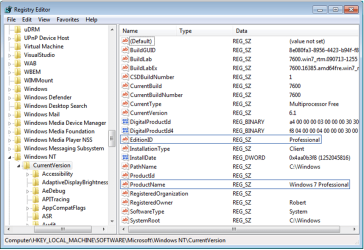
The workaround still works regularly here. You set a System Restore Point - Create then type regedit in Start Search box, rightclick on Registry Editor to Run As Admin, change the two registry keys shown below to read exactly HOMEPREMIUM for the EditionID, and Windows 7 HOMEPREMIUM for the ProductName:

regkeys.PNG

Then run a Repair Install from the desktop. The reg edit tricks the installer into thinking it is the same version which is always allowed.

You will be prompted at the beginning if any issues need to be resolved before the Repair Install, including possibly needing to uninstall SP1. This can be avoided by using a Home Premium installer with SP1 (not slipstreamed). uninstall Windows 7 Service Pack 1 (SP1)
 
Back
Top