Ultimate x64 won't boot, error 0xc0000225, 0xc00000e9

7fan

New member
Local time
7:21 PM
Messages
8
My SSD ran out of space or system ran out of memory during cleanup. I got BSOD with corrupted system files. I got error 0xc0000225 and Ultimate won't boot. I tried using a USB stick (with Win 7 clean install inside) to restore Win 7 but to no avail. I managed to get to the black screen with mouse cursor screen and then it stalled. Now I got error 0xc00000e9. The best I can do is getting to the blue hummingbird screen before stalling. I tried using a Black X USB dock to read the SSD on an old Win 7 32bit laptop but it can't read anything off it. I'm looking to backup my data files before doing anything drastic. Any suggestion? Thanks.
 

My Computer My Computer

At a glance

Windows 7 Ultimate x64
Computer type
PC/Desktop
Computer Manufacturer/Model Number
Dell
OS
Windows 7 Ultimate x64
Hard Drives
Samsung Evo 840 SSD
Hi 7fan, welcome to the Forum.

If the system crashed because you ran out of disc space during a clean up, then there will certainly be corrupted files & it seems that some are the Boot Configuration Data files (error 0xc0000225). This can usually be fixed by running Start Up Repair 3 times, but you need a means of being able to do that.

You are trying to do that from a USB stick & unless you computer has the ability to run a USB from the BIOS you wont be able to use it (error 0xc00000e9). You could burn the USB to a DVD & use that to repair the computer start up, if your computer has a CD/DVD drive installed.
 

My Computer My Computer

At a glance

Windows 7 Home Premium 64 bit sp1Intel i5 3570 3.4Ghz Ivy Bridge SKT 1155 quad...G-Skill Rip Jaws 16Gb (8x2) DDR3 -1600 PC3 12...Gigabyte NVIDIA GT610 1Gb DDR3 810/1200 PCI-E...
Computer type
PC/Desktop
Computer Manufacturer/Model Number
Self built using existing case
OS
Windows 7 Home Premium 64 bit sp1
CPU
Intel i5 3570 3.4Ghz Ivy Bridge SKT 1155 quad core
Motherboard
Gigabyte Z77-HD3 SKT 1155 2xSata 3, 4x USB 3.0
Memory
G-Skill Rip Jaws 16Gb (8x2) DDR3 -1600 PC3 12800 CL 10 red
Graphics Card(s)
Gigabyte NVIDIA GT610 1Gb DDR3 810/1200 PCI-E 2.0 Silent
Sound Card
NVIDIA High Definition & Realtech High Definition Audio
Monitor(s) Displays
2 x Philips 226V4L 16:9 aspect ratio
Screen Resolution
1920 x 1080 HD
Hard Drives
Samsung 840 Pro 256gb SSD, SATA 3.
Hitachi Touro Portable 1tb, USB 3.0 HDD used for image b/ups.
PSU
Corsair VS450
Case
Codeng
Cooling
PSU fan & CPU fan
Keyboard
Logitech
Mouse
Logitech Wireless trackball M570
Internet Speed
Wireless 3G. 3mg down & 550kb up.
Antivirus
Bitdefender Internet Security 2020
Browser
Opera (Current Version) & Firefox
Other Info
MS Office 2013 Pro. Davis weather station software. MGE Nova 600 avr UPS.
My desktop is a Dell workstation. I can change the boot sequence in the BIOS to start with USB first. I'm having problem getting to the repair install screen on the USB stick.

I'm trying to rescue my data files on the corrupted SSD. Do I need a 64 bit machine to do it because my old 32 bit Win 7 laptop can't read anything off it with BlacX USB external drive docking station for some reason?
 

My Computer My Computer

At a glance

Windows 7 Ultimate x64
Computer type
PC/Desktop
Computer Manufacturer/Model Number
Dell
OS
Windows 7 Ultimate x64
Hard Drives
Samsung Evo 840 SSD
Hi 7fan, welcome to Seven Forums,

Just a thought!

Maybe the Windows 7 on the USB is corrupted in some way. Can you either get hold of a genuine Windows 7 SP1 installation disc or get hold of an up to date Windows 7 SP1 ISO and burn that to a DVD and try that?

I hope this helps!
 

My Computer My Computer

At a glance

Win 7 HP SP1 64-bit Vista HB SP2 32-bit Linux...Intel(R) Pentium(R) CPU P6200 @ 2.13GHz4.00 GBIntel(R) Graphics Media Accelerator HD
Computer type
Laptop
Computer Manufacturer/Model Number
Fujitsu LIFEBOOK
OS
Win 7 HP SP1 64-bit Vista HB SP2 32-bit Linux Mint 18.3
CPU
Intel(R) Pentium(R) CPU P6200 @ 2.13GHz
Motherboard
FUJITSU FJNBB06
Memory
4.00 GB
Graphics Card(s)
Intel(R) Graphics Media Accelerator HD
Sound Card
[1] Realtek High Definition Audio [2] Intel(R) Display Audio
Screen Resolution
1366 x 768 x 32 bits (4294967296 colors) @ 59 Hz
Hard Drives
TOSHIBA MK5076GSX
Antivirus
AVG FREE
If you know where your data folders and files are located, another alternative might be handy -- on another computer, making a puppy linux boot utility (USB or DVD or one of each), booting same, and using its file manager to copy data folders and files onto any reliable affordable external media.
 

My Computer My Computer

At a glance

Windows 7 Professional 64-bitDesktop i5; Acers i5 & i7desktop 16GB; 1 Acer 8GB & 1 Acer 16GB
Computer type
PC/Desktop
Computer Manufacturer/Model Number
Antec desktop; Acer Aspire laptops
OS
Windows 7 Professional 64-bit
CPU
Desktop i5; Acers i5 & i7
Memory
desktop 16GB; 1 Acer 8GB & 1 Acer 16GB
Hard Drives
1TB split into 2 equal partitions [OS and data] usable by RJS
Internet Speed
AT&T DSL
Browser
FF, GChrome, msIE
Other Info
Windows 7 Firewall, Emsisoft AM/AV, MSE [scan-only], SpywareBlaster, Ruiware/BillP combine
It turns out my SSD is failing. A quick drive test in Puppy Linux shows a couple of "pre-fails". How should I rescue my data files before they are gone for good?
 

My Computer My Computer

At a glance

Windows 7 Ultimate x64
Computer type
PC/Desktop
Computer Manufacturer/Model Number
Dell
OS
Windows 7 Ultimate x64
Hard Drives
Samsung Evo 840 SSD
Hi 7fan, welcome to Seven Forums,

Just a thought!

Maybe the Windows 7 on the USB is corrupted in some way. Can you either get hold of a genuine Windows 7 SP1 installation disc or get hold of an up to date Windows 7 SP1 ISO and burn that to a DVD and try that?

I hope this helps!

I downloaded the Ultimate x64 SP1 ISO from here. Burned the DVD and gave it a try. I managed to get the "repair your computer" option but then it stalled at the blue hummingbird wallpaper screen with movable mouse cursor. What should I do? Manually turn off the PC by holding the power switch and start over?

https://www.pcsteps.com/45-download-windows-7-iso-legally-free-digital-river/
 

My Computer My Computer

At a glance

Windows 7 Ultimate x64
Computer type
PC/Desktop
Computer Manufacturer/Model Number
Dell
OS
Windows 7 Ultimate x64
Hard Drives
Samsung Evo 840 SSD
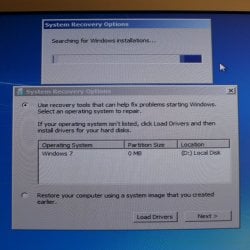
I left it running overnight and then see this screen. It's been like this forever. Can't click the next button with the searching for Win installations bar moving nonstop at the background. Am I SOL? :(
 

Attachments

  • win7.JPG
    win7.JPG
    447.4 KB · Views: 0

My Computer My Computer

At a glance

Windows 7 Ultimate x64
Computer type
PC/Desktop
Computer Manufacturer/Model Number
Dell
OS
Windows 7 Ultimate x64
Hard Drives
Samsung Evo 840 SSD
Puppy Linux's internal folder & file manager can be used to copy your HD's data folders and files onto any reliable affordable external media as long as the HD physically still works aok.
 

My Computer My Computer

At a glance

Windows 7 Professional 64-bitDesktop i5; Acers i5 & i7desktop 16GB; 1 Acer 8GB & 1 Acer 16GB
Computer type
PC/Desktop
Computer Manufacturer/Model Number
Antec desktop; Acer Aspire laptops
OS
Windows 7 Professional 64-bit
CPU
Desktop i5; Acers i5 & i7
Memory
desktop 16GB; 1 Acer 8GB & 1 Acer 16GB
Hard Drives
1TB split into 2 equal partitions [OS and data] usable by RJS
Internet Speed
AT&T DSL
Browser
FF, GChrome, msIE
Other Info
Windows 7 Firewall, Emsisoft AM/AV, MSE [scan-only], SpywareBlaster, Ruiware/BillP combine
I tried to run Clonezilla on the SSD to copy everything on to a new regular HDD but it failed with error something like "not cleanly unmounted". I clean installed Win 7 on another new HDD but the PC keeps reading the old bad SSD and stalls if they both run on SATA on the same mobo. How can I make the SSD "non bootable" on SATA? If I put the SSD on a USB docking station, Win 7 keeps asking me to format the SSD in order to read it. What should I do? Thanks.
 

My Computer My Computer

At a glance

Windows 7 Ultimate x64
Computer type
PC/Desktop
Computer Manufacturer/Model Number
Dell
OS
Windows 7 Ultimate x64
Hard Drives
Samsung Evo 840 SSD
As RolandJS indicated Puppy Linux, for that matter all Linux distros can read Windows files and folders, if you use Puppy or another Linux Distro, you can mount/unmount the drive with right-click context menu option (not sure if you have that option with clonezilla only used it a few times.) Personally, I like Linux Lite by Jerry Bezencon, looks and acts most like Win7.
Nic
 

My Computer My Computer

At a glance

Win 10 x64, Linux Lite, Win 7 x64, BlackArch,...
Computer type
PC/Desktop
Computer Manufacturer/Model Number
HP Desktop & Compaq Laptop
OS
Win 10 x64, Linux Lite, Win 7 x64, BlackArch, & Kali
Hard Drives
Samsung 850 Pro 256Gb,
Hitachi HDD 1Tb,
Crucial MX SSD 250Gb
Segate 3Tb USB 3.0 Ext. Backup HDD
Internet Speed
150Mbps dn, 20Mbps up
Antivirus
Avast Free, Malwarebytes Anti-Exploit & Anti-Ransomware
Browser
Firefox, Chrome, Opera, & VPN
Back
Top