Solved Unable to boot - error code 0xc0000225

graveller39

New member
Local time
6:56 PM
Messages
34
hi folks,

I'm hoping there's still a few Windows 7 users out there that know a lot more than I do...

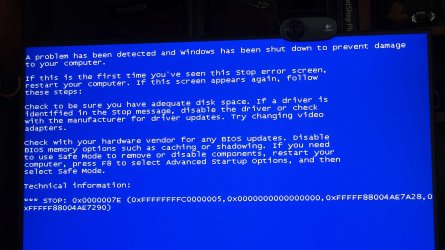
Last night my PC decided not to boot up - I received the 0xc0000225 error code and tried a repair with the installation disk. Not sure if it made any changes or not, but the repair did not work. The first time I tried, my OS was located, but now the repair no longer finds any Windows 7 installation.

I have several drives installed and it appears the MBR may be located on the D drive - I have no idea if its always been there or not. When I look in the BIOS, I notice that the Windows Boot Manager shows the C drive in P4 (not sure if that's Position 4? its an ASUS motherboard), but in the Boot List, the C drive is in P3. Seems a bit odd to me, but I don't know how to work with the Boot Manager to repair it - if that is in fact a problem.

I've since disconnected all of the drives except the C drive and now the Installation Disk says its not compatible with my system. I reconnected the D drive and still get the same incompatibility message.

I have no idea what to do from here. Most everything I've found on the internet suggests to use the Installation Disk to repair the MBR or Boot Loader or Boot Manager - I'm pretty confused as to what is what by now. I do have a backup image created with EaseUS - I've not tried a recovery with it yet because its almost 2 years old (although that's not as bad as it sounds) and I'm wondering if its a Boot Loader problem, maybe I'll still have the same problem after doing a recovery?

I know I've not given many details about my system, but I don't really know what might be relevant. The system is Windows 7 Pro x64 installed on an SSD. All of my data is stored on a combination of 4 other drives, so I don't have much concern about losing anything important. If I can avoid a fresh install, I'd be happy as it could take weeks before I'd have everything customized to my liking and all the programs re-installed.

Any help or ideas would be much appreciated.

Cheers
 

My Computers

System One System Two

  • Computer type
    PC/Desktop
    OS
    Windows 7 Pro
    CPU
    AMD FX-8350
    Motherboard
    ASUS M5A99X EVO R2.0 V2
    Memory
    2 x 8 GB G. Skill Sniper
    Graphics Card(s)
    ASUS
    Monitor(s) Displays
    Dell 2415
    Hard Drives
    (250GB SanDisk SSD plus several data drives
    PSU
    650W or so (I've forgotten)
    Case
    Antec SLK1650B
    Cooling
    3 or 4 case fans
    Antivirus
    ESET
  • Antivirus
    ESET Internet Security
it appears the MBR may be located on the D drive

The mbr is at the start of the disk. It is not on a partition.

You can borrow my boot media so you can see what you are doing and post screenshots.

17514x64v30.iso

extract the above iso file to create bootable usb stick using View attachment Usb7ice.zip
 

My Computers

System One System Two

  • Computer type
    PC/Desktop
    OS
    7 X64
    CPU
    i5 8400
    Motherboard
    gigabyte b365m ds3h
    Memory
    2x8gb 3200mhz
    Hard Drives
    various
    PSU
    pure power 11 400w cm
    Case
    Coolermaster
    Cooling
    cryorig m9i
  • Computer type
    PC/Desktop
    OS
    7x64
    CPU
    g5400
    Motherboard
    ga b365m ds3h
    Memory
    8gb ddr4 2400
    PSU
    xfx pro 450w
Thanks for the quick reply SIW2,

I booted up with the media you provided and was met with the attached screen. I haven't rebooted yet.

- - - Updated - - -

quick update -

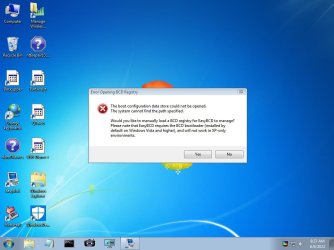
I went ahead and rebooted and this time it booted into the desktop with a few utilities. Not sure where to go from here. I see EasyBcd is one of programs - should I try looking at that one?
 

Attachments

  • Screenshot 1.jpg
    Screenshot 1.jpg
    254.5 KB · Views: 0

My Computers

System One System Two

  • Computer type
    PC/Desktop
    OS
    Windows 7 Pro
    CPU
    AMD FX-8350
    Motherboard
    ASUS M5A99X EVO R2.0 V2
    Memory
    2 x 8 GB G. Skill Sniper
    Graphics Card(s)
    ASUS
    Monitor(s) Displays
    Dell 2415
    Hard Drives
    (250GB SanDisk SSD plus several data drives
    PSU
    650W or so (I've forgotten)
    Case
    Antec SLK1650B
    Cooling
    3 or 4 case fans
    Antivirus
    ESET
  • Antivirus
    ESET Internet Security
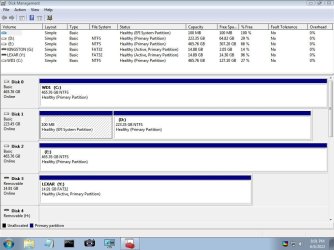
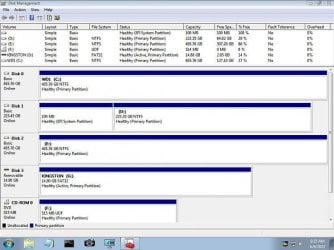
You could take some screenshots of disk management, save it to the usb stick and post it up here.

Also run diskgenius and take a picture of it for everybody to have a look at.

there is a camera icon on the taskbar. Also running chkdsk is a good idea at this stage.
 

My Computers

System One System Two

  • Computer type
    PC/Desktop
    OS
    7 X64
    CPU
    i5 8400
    Motherboard
    gigabyte b365m ds3h
    Memory
    2x8gb 3200mhz
    Hard Drives
    various
    PSU
    pure power 11 400w cm
    Case
    Coolermaster
    Cooling
    cryorig m9i
  • Computer type
    PC/Desktop
    OS
    7x64
    CPU
    g5400
    Motherboard
    ga b365m ds3h
    Memory
    8gb ddr4 2400
    PSU
    xfx pro 450w
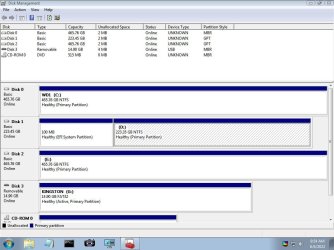
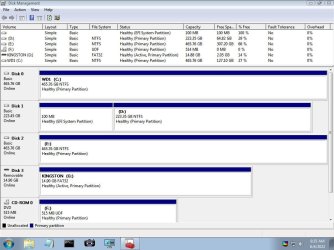
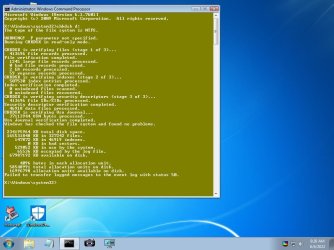
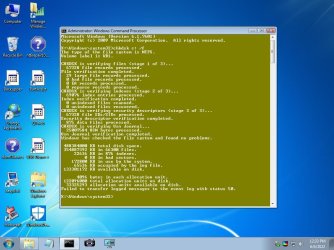
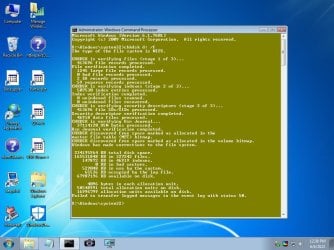
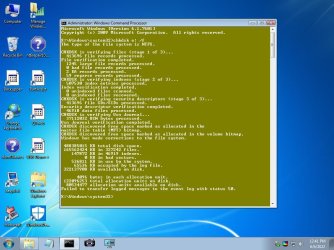
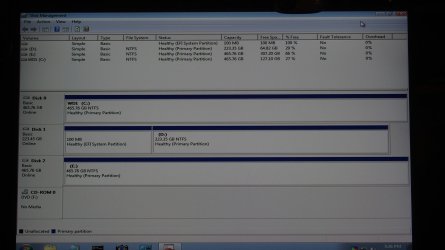
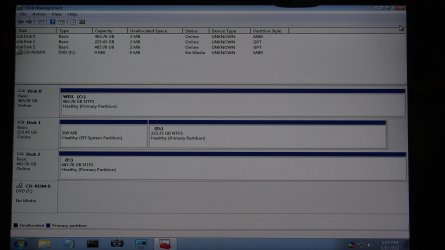
So I ran chkdsk and I've also attached a couple of screenshots from Disk Management and EasyBcd. I don't see diskgenius anywhere though.
 

Attachments

  • EasyBcd.jpg
    EasyBcd.jpg
    72.6 KB · Views: 0
  • Disk Management 2.jpg
    Disk Management 2.jpg
    117.9 KB · Views: 0
  • Disk Management 1.jpg
    Disk Management 1.jpg
    122.8 KB · Views: 0
  • CHKDSK.jpg
    CHKDSK.jpg
    109.5 KB · Views: 0

My Computers

System One System Two

  • Computer type
    PC/Desktop
    OS
    Windows 7 Pro
    CPU
    AMD FX-8350
    Motherboard
    ASUS M5A99X EVO R2.0 V2
    Memory
    2 x 8 GB G. Skill Sniper
    Graphics Card(s)
    ASUS
    Monitor(s) Displays
    Dell 2415
    Hard Drives
    (250GB SanDisk SSD plus several data drives
    PSU
    650W or so (I've forgotten)
    Case
    Antec SLK1650B
    Cooling
    3 or 4 case fans
    Antivirus
    ESET
  • Antivirus
    ESET Internet Security
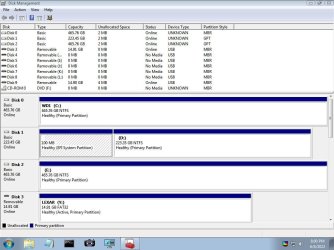
1. X: is the ramdrive the boot media is currently using. It is not on your hard disk.

run chkdsk against the hard disk partitions

e.g.

chkdsk c: /f
chkdsk d: /f
chkdsk e: /f

the /f switch tells it to try and fix any problems.

2. the boot media usually autoassigns letter Y to the usb stick. It doesn't seem to have done that, so you can browse to the usb stick, rt click on Uprogs.ini and select "pecmd load" from the context menu.

The boot media is meant to be run from usb stick, not from cd/dvd.

then you will find diskgenius under the start menu \disktools\
 

My Computers

System One System Two

  • Computer type
    PC/Desktop
    OS
    7 X64
    CPU
    i5 8400
    Motherboard
    gigabyte b365m ds3h
    Memory
    2x8gb 3200mhz
    Hard Drives
    various
    PSU
    pure power 11 400w cm
    Case
    Coolermaster
    Cooling
    cryorig m9i
  • Computer type
    PC/Desktop
    OS
    7x64
    CPU
    g5400
    Motherboard
    ga b365m ds3h
    Memory
    8gb ddr4 2400
    PSU
    xfx pro 450w
thanks again SIW2...

I ran chkdsk /f on all three internal discs and attached the results.

To clarify,
Drive c: is a HDD with data only (Drive D when booted into Windows)
Drive d: is a SSD with the Windows 7 OS (Drive C when booted into Windows)
Drive e: is a second SSD that I cloned from the C drive while running a EaseUS boot disc - I did this after the boot problem first arose.

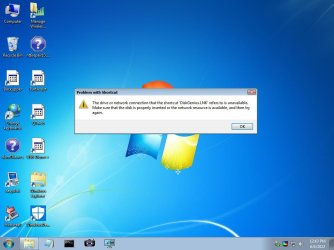
I also attempted to run DiskGenius, but it failed to start.
 

Attachments

  • chkdsk C.jpg
    chkdsk C.jpg
    122.2 KB · Views: 0
  • chkdsk D.jpg
    chkdsk D.jpg
    131.3 KB · Views: 0
  • chkdsk E.jpg
    chkdsk E.jpg
    129.6 KB · Views: 0
  • DiskGenius.jpg
    DiskGenius.jpg
    67.9 KB · Views: 0

My Computers

System One System Two

  • Computer type
    PC/Desktop
    OS
    Windows 7 Pro
    CPU
    AMD FX-8350
    Motherboard
    ASUS M5A99X EVO R2.0 V2
    Memory
    2 x 8 GB G. Skill Sniper
    Graphics Card(s)
    ASUS
    Monitor(s) Displays
    Dell 2415
    Hard Drives
    (250GB SanDisk SSD plus several data drives
    PSU
    650W or so (I've forgotten)
    Case
    Antec SLK1650B
    Cooling
    3 or 4 case fans
    Antivirus
    ESET
  • Antivirus
    ESET Internet Security
It means the drive letter the .lnk was pointing at has changed since you ran Uprogs.ini

Are you running it from dvd or from usb stick?

You could just run diskgenius.exe directly. It is in the folder Uprograms\Diskgenius
 

My Computers

System One System Two

  • Computer type
    PC/Desktop
    OS
    7 X64
    CPU
    i5 8400
    Motherboard
    gigabyte b365m ds3h
    Memory
    2x8gb 3200mhz
    Hard Drives
    various
    PSU
    pure power 11 400w cm
    Case
    Coolermaster
    Cooling
    cryorig m9i
  • Computer type
    PC/Desktop
    OS
    7x64
    CPU
    g5400
    Motherboard
    ga b365m ds3h
    Memory
    8gb ddr4 2400
    PSU
    xfx pro 450w
I'm running the boot media from a USB stick.

I can't find diskgenius.exe anywhere on the X drive. There is no folder called Uprograms - I did a search for diskgenius.exe as well.

I also rebooted the machine and had to try 7 or 8 attempts before it finally rebooted into the USB stick. During the process I received 0xc0000185 and 0xc00000e9 errors as well as "MBR Error 1 Press any key to boot from floppy..."

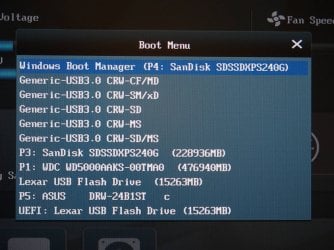
For what its worth, I've attached a foto of my Boot Menu - is it a problem that the Windows Boot Manager shows the Sandisk (C drive) as P4, but further in the list it is shown as P3?
 

Attachments

  • Boot Menu.jpg
    Boot Menu.jpg
    423.7 KB · Views: 0

My Computers

System One System Two

  • Computer type
    PC/Desktop
    OS
    Windows 7 Pro
    CPU
    AMD FX-8350
    Motherboard
    ASUS M5A99X EVO R2.0 V2
    Memory
    2 x 8 GB G. Skill Sniper
    Graphics Card(s)
    ASUS
    Monitor(s) Displays
    Dell 2415
    Hard Drives
    (250GB SanDisk SSD plus several data drives
    PSU
    650W or so (I've forgotten)
    Case
    Antec SLK1650B
    Cooling
    3 or 4 case fans
    Antivirus
    ESET
  • Antivirus
    ESET Internet Security
I can't find diskgenius.exe anywhere on the X drive.

The X: is in random access memory. Diskgenius is not supposd to be there. It is on the usb stick

Your usb stick will have a different letter.

You can see it in your earlier screenshot

KIngston G:

Disk Management 1.jpg

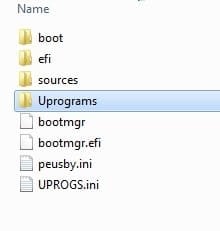
There is something odd about what you are doing. When the boot media loads from the usb stick, it should automatically assign letter Y to the usb stick. And then it creates shortcuts on the desktop which point at the programs in Y:\ Uprograms

This is what is on the usb stick:

17514usb-contents.jpg

- - - Updated - - -

is it a problem that the Windows Boot Manager shows the Sandisk (C drive) as P4, but further in the list it is shown as P3?

To boot from the usb in EFI mode Select: Windows Boot Manager P4 Sandisk

To boot from the usb in Bios mode Select: P3 Sandisk

Your disk management screenshot shows an EFI system partition on Disk1. And there are no Active partitions shown ( except the removable usb stick).

therefore it appears your installation is EFI and most likely using the gpt partition style.
 

My Computers

System One System Two

  • Computer type
    PC/Desktop
    OS
    7 X64
    CPU
    i5 8400
    Motherboard
    gigabyte b365m ds3h
    Memory
    2x8gb 3200mhz
    Hard Drives
    various
    PSU
    pure power 11 400w cm
    Case
    Coolermaster
    Cooling
    cryorig m9i
  • Computer type
    PC/Desktop
    OS
    7x64
    CPU
    g5400
    Motherboard
    ga b365m ds3h
    Memory
    8gb ddr4 2400
    PSU
    xfx pro 450w
I don't know what to say... the computer is certainly doing something odd.

Sorry if I have confused things, but to be clear,
The Kingston is not the USB with the boot media - it is the stick I used to save the screenshots to.
The SanDisk is the drive with the OS.
The boot media is on the Lexar stick.

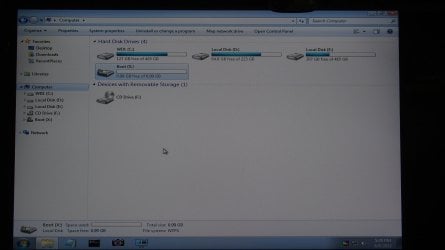
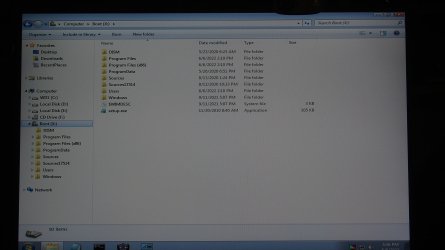
I don't know why the Lexar is not showing up as Drive Y - there is no drive Y shown in File Explorer, just drive X. The Lexar is also not showing up on Disk Management - again, I do not know why.

I took a few more pics of Disk Management and File Explorer without the Kingston drive and the DVD drive empty. As you can see, there is no drive Y and I don't see the Lexar in Disk Management.

So Disk 1 (the SanDisk with the Windows 7 installation) shows an EFI system partition, but you say there are no active partitions shown. Is that part of the problem?
 

Attachments

  • Disk Management 3.jpg
    Disk Management 3.jpg
    328.1 KB · Views: 0
  • Disk Management 4.jpg
    Disk Management 4.jpg
    413.7 KB · Views: 0
  • File Explorer - Computer.jpg
    File Explorer - Computer.jpg
    370.8 KB · Views: 0
  • File Explorer - Boot (X).jpg
    File Explorer - Boot (X).jpg
    365 KB · Views: 0

My Computers

System One System Two

  • Computer type
    PC/Desktop
    OS
    Windows 7 Pro
    CPU
    AMD FX-8350
    Motherboard
    ASUS M5A99X EVO R2.0 V2
    Memory
    2 x 8 GB G. Skill Sniper
    Graphics Card(s)
    ASUS
    Monitor(s) Displays
    Dell 2415
    Hard Drives
    (250GB SanDisk SSD plus several data drives
    PSU
    650W or so (I've forgotten)
    Case
    Antec SLK1650B
    Cooling
    3 or 4 case fans
    Antivirus
    ESET
  • Antivirus
    ESET Internet Security
So Disk 1 (the SanDisk with the Windows 7 installation) shows an EFI system partition, but you say there are no active partitions shown. Is that part of the problem?

For an efi installation you won't usually have a partition marked active.

I don't know why the Lexar is not showing up as Drive Y - there is no drive Y shown in File Explorer, just drive X. The Lexar is also not showing up on Disk Management

Are you using a usb2 or usb3 port ? The media does contain usb3 drivers, but they might not be the correct ones for your machine.

Try the boot media usb stick in a usb2 port.
 
Last edited:

My Computers

System One System Two

  • Computer type
    PC/Desktop
    OS
    7 X64
    CPU
    i5 8400
    Motherboard
    gigabyte b365m ds3h
    Memory
    2x8gb 3200mhz
    Hard Drives
    various
    PSU
    pure power 11 400w cm
    Case
    Coolermaster
    Cooling
    cryorig m9i
  • Computer type
    PC/Desktop
    OS
    7x64
    CPU
    g5400
    Motherboard
    ga b365m ds3h
    Memory
    8gb ddr4 2400
    PSU
    xfx pro 450w
Okay - that makes a difference! I believe that was the problem - I now have the USB booted from a USB2 port.

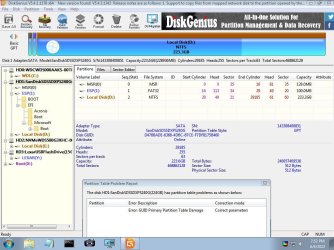
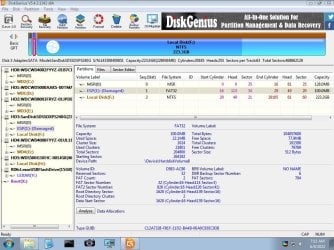
DiskGenius seems to have identified problems with the GPT on the SanDisk. I haven't done anything yet - hoping you can let me know the best way to proceed.

Note: I imagine you can ignore the removable drives shown in Disk Management - they're all from a memory card reader.
 

Attachments

  • Disk Management - Volume.jpg
    Disk Management - Volume.jpg
    122.1 KB · Views: 0
  • Disk Management - Disk.jpg
    Disk Management - Disk.jpg
    120.6 KB · Views: 0
  • DiskGenius 1.jpg
    DiskGenius 1.jpg
    140.3 KB · Views: 0

My Computers

System One System Two

  • Computer type
    PC/Desktop
    OS
    Windows 7 Pro
    CPU
    AMD FX-8350
    Motherboard
    ASUS M5A99X EVO R2.0 V2
    Memory
    2 x 8 GB G. Skill Sniper
    Graphics Card(s)
    ASUS
    Monitor(s) Displays
    Dell 2415
    Hard Drives
    (250GB SanDisk SSD plus several data drives
    PSU
    650W or so (I've forgotten)
    Case
    Antec SLK1650B
    Cooling
    3 or 4 case fans
    Antivirus
    ESET
  • Antivirus
    ESET Internet Security
If you need any of the files on that gpt disk, copy them somewhere else, just in case of cock up. Looks like you have space on disk2.

Then tell diskgenius to correct the problem. After diskgenius has tried the correction, you probably need to click Save All at top left
 

My Computers

System One System Two

  • Computer type
    PC/Desktop
    OS
    7 X64
    CPU
    i5 8400
    Motherboard
    gigabyte b365m ds3h
    Memory
    2x8gb 3200mhz
    Hard Drives
    various
    PSU
    pure power 11 400w cm
    Case
    Coolermaster
    Cooling
    cryorig m9i
  • Computer type
    PC/Desktop
    OS
    7x64
    CPU
    g5400
    Motherboard
    ga b365m ds3h
    Memory
    8gb ddr4 2400
    PSU
    xfx pro 450w
Thanks so much - the repair worked! No obvious issues with the system as far as I can see.

Any idea what would cause such a problem? There were no issues when I shutdown the computer the other day, but the very next it didn't boot...
 

My Computers

System One System Two

  • Computer type
    PC/Desktop
    OS
    Windows 7 Pro
    CPU
    AMD FX-8350
    Motherboard
    ASUS M5A99X EVO R2.0 V2
    Memory
    2 x 8 GB G. Skill Sniper
    Graphics Card(s)
    ASUS
    Monitor(s) Displays
    Dell 2415
    Hard Drives
    (250GB SanDisk SSD plus several data drives
    PSU
    650W or so (I've forgotten)
    Case
    Antec SLK1650B
    Cooling
    3 or 4 case fans
    Antivirus
    ESET
  • Antivirus
    ESET Internet Security

My Computers

System One System Two

  • Computer type
    PC/Desktop
    OS
    7 X64
    CPU
    i5 8400
    Motherboard
    gigabyte b365m ds3h
    Memory
    2x8gb 3200mhz
    Hard Drives
    various
    PSU
    pure power 11 400w cm
    Case
    Coolermaster
    Cooling
    cryorig m9i
  • Computer type
    PC/Desktop
    OS
    7x64
    CPU
    g5400
    Motherboard
    ga b365m ds3h
    Memory
    8gb ddr4 2400
    PSU
    xfx pro 450w
Not sure what happened...

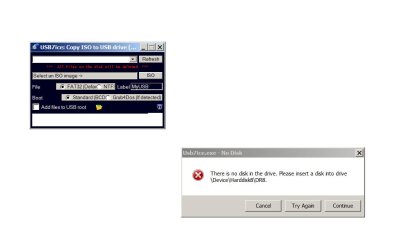
I was getting some different messages when I launched Usb7ice, but was able to ignore them and copy the 17514x64v32 ISO to the USB stick. However, when I rebooted, the USB was not shown as an option in the Boot Menu.

I booted back into Windows and the light on USB stick started flashing continuously as though it were being written to or reading from. The graphics started slowing down and behaving a bit erratic. I was unable to eject the USB drive without shutting down the computer.

I used FAT32 as I did with the previous ISO.
 

Attachments

  • SS1.jpg
    SS1.jpg
    108.2 KB · Views: 0

My Computers

System One System Two

  • Computer type
    PC/Desktop
    OS
    Windows 7 Pro
    CPU
    AMD FX-8350
    Motherboard
    ASUS M5A99X EVO R2.0 V2
    Memory
    2 x 8 GB G. Skill Sniper
    Graphics Card(s)
    ASUS
    Monitor(s) Displays
    Dell 2415
    Hard Drives
    (250GB SanDisk SSD plus several data drives
    PSU
    650W or so (I've forgotten)
    Case
    Antec SLK1650B
    Cooling
    3 or 4 case fans
    Antivirus
    ESET
  • Antivirus
    ESET Internet Security
Don't know. maybe your usb stick has given up the ghost. They are not very reliable.
 

My Computers

System One System Two

  • Computer type
    PC/Desktop
    OS
    7 X64
    CPU
    i5 8400
    Motherboard
    gigabyte b365m ds3h
    Memory
    2x8gb 3200mhz
    Hard Drives
    various
    PSU
    pure power 11 400w cm
    Case
    Coolermaster
    Cooling
    cryorig m9i
  • Computer type
    PC/Desktop
    OS
    7x64
    CPU
    g5400
    Motherboard
    ga b365m ds3h
    Memory
    8gb ddr4 2400
    PSU
    xfx pro 450w
I tried copying the 17514x64v32 ISO to the USB stick again - this time on my laptop with Windows 10. It copied without any issues.

Again, the USB did not show up in the Boot Menu of my Windows 7 machine when inserted into the USB3 port. I was still able to boot from a USB2 port and for what its worth, I opened DiskGenius and its now indicating the ESP partition on the SanDisk is damaged. Presumably this is still a problem? I'm still able to boot into Windows as well though, so I don't know what to think.
 

Attachments

  • DiskGenius 2.jpg
    DiskGenius 2.jpg
    154.4 KB · Views: 0

My Computers

System One System Two

  • Computer type
    PC/Desktop
    OS
    Windows 7 Pro
    CPU
    AMD FX-8350
    Motherboard
    ASUS M5A99X EVO R2.0 V2
    Memory
    2 x 8 GB G. Skill Sniper
    Graphics Card(s)
    ASUS
    Monitor(s) Displays
    Dell 2415
    Hard Drives
    (250GB SanDisk SSD plus several data drives
    PSU
    650W or so (I've forgotten)
    Case
    Antec SLK1650B
    Cooling
    3 or 4 case fans
    Antivirus
    ESET
  • Antivirus
    ESET Internet Security
1.
the USB did not show up in the Boot Menu of my Windows 7 machine when inserted into the USB3 port

The motherboard boot menu has nothing to do with the usb3 drivers inside the wim file.

Perhaps the port is a bit dicky.


2. Are you able to boot into windows with only the sandisk attached and no other disks?
 

My Computers

System One System Two

  • Computer type
    PC/Desktop
    OS
    7 X64
    CPU
    i5 8400
    Motherboard
    gigabyte b365m ds3h
    Memory
    2x8gb 3200mhz
    Hard Drives
    various
    PSU
    pure power 11 400w cm
    Case
    Coolermaster
    Cooling
    cryorig m9i
  • Computer type
    PC/Desktop
    OS
    7x64
    CPU
    g5400
    Motherboard
    ga b365m ds3h
    Memory
    8gb ddr4 2400
    PSU
    xfx pro 450w
Back
Top