freelancer91
New member
- Local time
- 11:37 AM
- Messages
- 71
Hello,
This problem has evaded all solutions offered by me and by my company's technical support.
I am about to move to a new work computer. In order to facilitate this move, I wanted to move as many files onto my shared network drive that I have with the company. Before I sent them over the company network, I thought it would be a good idea to compress them to allow for a quicker transfer and to reduce the use of resources on the shared drive.
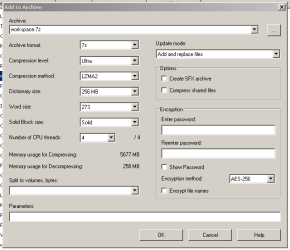
The that end I used 7zip to compress 4 folders, each into their own archive, using these settings.

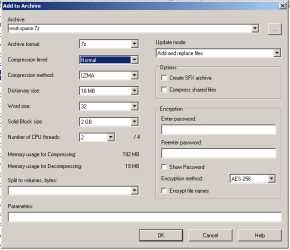
These are not the standard settings for 7zip. The compression settings that 7zip defaults to are theses.

So once all of the files were compressed and ready to go, I copied them onto my shared network drive as shown here.

I then decided to remove the files from my local drive because they would just slow the mandatory company backup process that is required for all laptop moves. At this point, the only copies of these files now existed on the shared drive (they aren't in the recycling bin either).
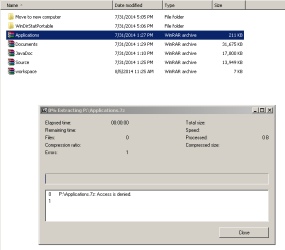
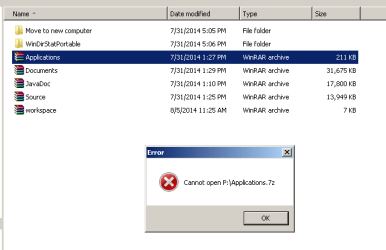
Later on, I found I needed to access an item that I had stored in one of the archives. I went to the P drive and clicked on the archive that contained the file. I got this message.

I then tried to open it with all of the applicable archive programs and got similar error messages.
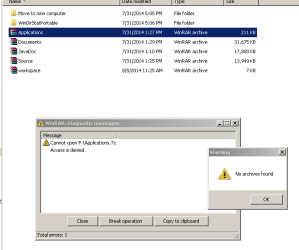
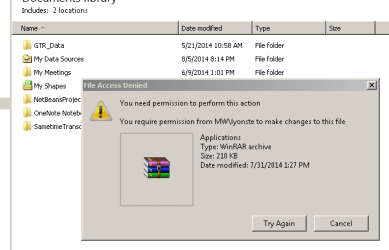
Then I tried to copy it from the shared drive back onto my local machine and I got this message.

This is telling me that I need permission from MYSELF to access MY files (I am lyonste).
I got similar results for all of the other files that used the special compression settings I provided.
All of these files were accessible on my local machine, but once placed onto the shared drive, they became untouchable.
This is where things get interesting. I tried compressing another folder WITH STANDARD 7ZIP COMPRESSION SETTINGS. This time, the archive was fine. I was able to manipulate it on the shared drive and copy it back and forth between machines.
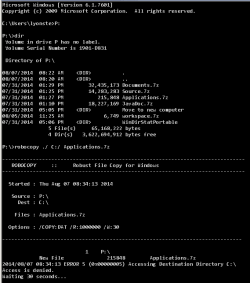
I have tried other tricks too. For example, in cmd, I tried using robocopy to copy over the archive files to my local machine. No luck.

I'd really like these files back. Does anyone know of a way to get these files back onto my local machine?
This problem has evaded all solutions offered by me and by my company's technical support.
I am about to move to a new work computer. In order to facilitate this move, I wanted to move as many files onto my shared network drive that I have with the company. Before I sent them over the company network, I thought it would be a good idea to compress them to allow for a quicker transfer and to reduce the use of resources on the shared drive.
The that end I used 7zip to compress 4 folders, each into their own archive, using these settings.
These are not the standard settings for 7zip. The compression settings that 7zip defaults to are theses.
So once all of the files were compressed and ready to go, I copied them onto my shared network drive as shown here.
I then decided to remove the files from my local drive because they would just slow the mandatory company backup process that is required for all laptop moves. At this point, the only copies of these files now existed on the shared drive (they aren't in the recycling bin either).
Later on, I found I needed to access an item that I had stored in one of the archives. I went to the P drive and clicked on the archive that contained the file. I got this message.
I then tried to open it with all of the applicable archive programs and got similar error messages.
Then I tried to copy it from the shared drive back onto my local machine and I got this message.
This is telling me that I need permission from MYSELF to access MY files (I am lyonste).
I got similar results for all of the other files that used the special compression settings I provided.
All of these files were accessible on my local machine, but once placed onto the shared drive, they became untouchable.
This is where things get interesting. I tried compressing another folder WITH STANDARD 7ZIP COMPRESSION SETTINGS. This time, the archive was fine. I was able to manipulate it on the shared drive and copy it back and forth between machines.
I have tried other tricks too. For example, in cmd, I tried using robocopy to copy over the archive files to my local machine. No luck.
I'd really like these files back. Does anyone know of a way to get these files back onto my local machine?
Attachments

My Computer
At a glance
DT and LT: Windows 7 and Fedora 14DT: Intel QX9770, LT: Intel P8600DT: 8GB OCZ DDR3 PC3-10666 Gold Edition LT: 4...DT: BFG Geforce GTX 295 (B), LT: NVidia Gefor...
- Computer Manufacturer/Model Number
- Custom Desktop, Dell Studio XPS 1340 laptop
- OS
- DT and LT: Windows 7 and Fedora 14
- CPU
- DT: Intel QX9770, LT: Intel P8600
- Motherboard
- DT: Intel DX48BT2
- Memory
- DT: 8GB OCZ DDR3 PC3-10666 Gold Edition LT: 4GB DDR3-1066
- Graphics Card(s)
- DT: BFG Geforce GTX 295 (B), LT: NVidia Geforce 9400M G
- Sound Card
- DT: Integrated LT: Integrated
- Monitor(s) Displays
- DT: Acer 23 inch 1920x1080 monitors, LT: 13 inch
- Screen Resolution
- DT: 3840x1080 LT: 1280x800
- Hard Drives
- DT: Samsung SpinPoint 1TB HD103UJ 7200RPM HDD+Fantom Drives 2TB 7200rpm External+OCZ Vertex Series 30GB SSD (boot)
LT: Seagate Momentus 7200RPM 320GB 2.5'' HDD
- PSU
- DT: Rosewill Bronze Series 1000W LT: 6 cell 62837mWh Li-ion
- Case
- DT:Thermaltake Armor Series LCS, LT:Dell Black Studio XPS 13
- Cooling
- DT: Custom watercooling setup
- Keyboard
- DT: Kengsinton PC/Mac LT: Integrated backlit keyboard
- Mouse
- DT: Logitech USB Optical Mouse LT: Integrated Track Pad
- Internet Speed
- 380KB/s download on a good day...
- Other Info
- DT: CD/DVDRW Drive: Hp dvd1140, Multifunction front panel w/ 4 USB ports (2 Powered with 5V and 12V), Powered External SATA, 25-in-1 card reader, and audio ports
LT: Integrated Webcam with Microphone array, 8-in-1 card reader