Unable to access simple shared folder on "media center"

Pollux

New member
Local time
11:35 PM
Messages
34
Hey guys

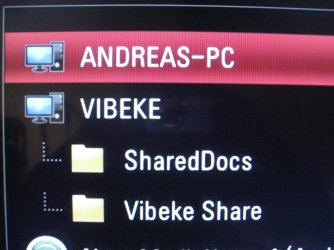
I cant get my media center (LG BD390) to show my shared folders on my pc.
It displays my pc, but doesn't attach those shared folders that are supposed to be shared.
If i access my computer from another windows pc there is no problem at all.

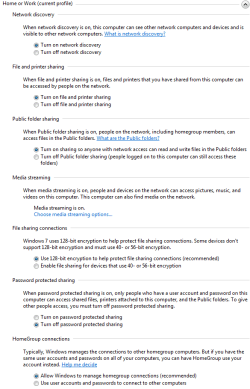
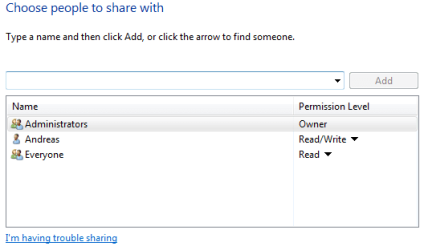
I have altered the share configurations every possible way imaginable but nothing will get it to work.

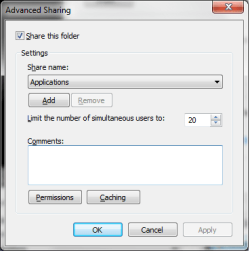
As you can see on the pic ive attached my pc is "ANDREAS-PC" my gf's is "VIBEKE", her pc is displaying her shared with no problem.

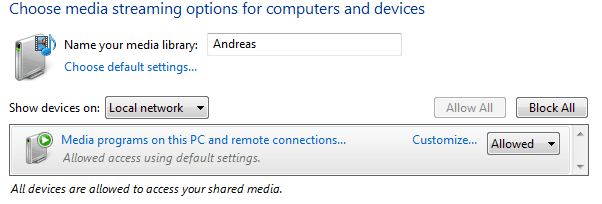
The wierd thing about this issue is its only the simple "share this folder" that does'nt work. Because on the pic attached you can see both the "ANDREAS-PC: Andreas" which is the windows media player (if im not mistaken) and the "Nero MediaHome 4".
MediaHome can share whatever i like from my pc, but by doing so it takes endless amount of resources and cannot display subtitles for video files. Thats why i don't wanna use that instead of simple windows folder share.

Things ive tried out:

Altered every single option in the sharing center. like turn on network discovering and such (for public netowrk too)
Reinstalled windows 7
Factory defaults on my router and my LG bd390.

Does anyone have an idea about what could be wrong?

Thanks in advance ppl :)
 

Attachments

  • IMG_2302.jpg
    IMG_2302.jpg
    828.6 KB · Views: 26
  • Capture.PNG
    Capture.PNG
    22 KB · Views: 59
  • Capture2.PNG
    Capture2.PNG
    8.6 KB · Views: 32
  • Capture3.PNG
    Capture3.PNG
    5.2 KB · Views: 25
  • capture4.png
    capture4.png
    9.9 KB · Views: 21

My Computer My Computer

OS
Windows 7 Ultimate x64
One thing i should add.
It has worked before, but suddenly without me changing anything ("yeah right" you probably say) it just started behaving like this.

Does anyone have any idea what could be wrong?, its driving me mad :(
 

My Computer My Computer

OS
Windows 7 Ultimate x64
Shameless bump
 

My Computer My Computer

OS
Windows 7 Ultimate x64
Open - Network and Sharing Center
Click - Homegroup and sharing options
Click - Change advanced sharing options
From this point, there are '2' separate settings, Home or Work | Public
do the next instruction for both networks mentioned above

Under the heading - Password protect sharing
select - [x] Turn off password protect sharing
 

My Computer My Computer

Computer Manufacturer/Model Number
Selfbuilt
OS
Windows 7 Ultimate 64bit
CPU
i7 2600k
Motherboard
asus P8Z68-V LE
Memory
16GB (4x4) corsair vengeance
Graphics Card(s)
Intel HD3000 iGPU / AMD HD6870 1024MB
Sound Card
bitstreamed to an Onkyo 609
Monitor(s) Displays
Asus VE278 27" LED / Bravia EX7 60" LED
Screen Resolution
native 1080p x2
Hard Drives
4x 2TB int. + 2x 2TB external and a SSD for the boot drive.
PSU
650w Antec
Case
NZXT tempest evo
Cooling
air/stock
Keyboard
Dell
Mouse
logitech m505
Internet Speed
dual: cable/blackberry tether for travel use
Other Info
BD re-writer //
asus notebook G73Jw
Open - Network and Sharing Center
Click - Homegroup and sharing options
Click - Change advanced sharing options
From this point, there are '2' separate settings, Home or Work | Public
do the next instruction for both networks mentioned above

Under the heading - Password protect sharing
select - [x] Turn off password protect sharing
Sadly that option is allready set to "off" :(
 

My Computer My Computer

OS
Windows 7 Ultimate x64
You are not alone.

I have exactly the same problem and it is driving me nuts...
Time to make a phonecall to LG-sweden.

//Lorryquai
 

My Computer My Computer

Computer Manufacturer/Model Number
Custom
OS
Windows 7 Ultimate x64
CPU
Intel I7
Motherboard
Gigabyte usb3.0
Memory
8gb
Graphics Card(s)
Gtx460oc
Sound Card
Edirol
Monitor(s) Displays
Syncmaster 245b
Hard Drives
Corsair ssd 60gb + several spindrives 1tb+.
Cooling
Corsair
You are not alone.

I have exactly the same problem and it is driving me nuts...
Time to make a phonecall to LG-sweden.

//Lorryquai
It seems that this problem appeared when people updated the firmware to the XXXX42 version. But downgrading the firmware does'nt fix the problem.

Im looking forward to hear what you can get LG to say about this problem.
 
Last edited:

My Computer My Computer

OS
Windows 7 Ultimate x64
Sadly LG, didnt have any recommendations for this.

But the good thing is that shark007´s guide worked for me. I have the latest firmware in my 390
 

My Computer My Computer

Computer Manufacturer/Model Number
Custom
OS
Windows 7 Ultimate x64
CPU
Intel I7
Motherboard
Gigabyte usb3.0
Memory
8gb
Graphics Card(s)
Gtx460oc
Sound Card
Edirol
Monitor(s) Displays
Syncmaster 245b
Hard Drives
Corsair ssd 60gb + several spindrives 1tb+.
Cooling
Corsair
Have you set up your network connection as Home or Work? 'Work' will force sharing via workgroup and not Win 7 Libraries. This can sometimes solve this type of issue, if all PC's are changed. There is no other security issues that I'm aware of.

Regards
UKMedia
 

My Computer My Computer

Computer Manufacturer/Model Number
Self Build
OS
Windows 7 Ultimate 64Bit (SP 1)
CPU
Intel Core i7 4770K OC
Motherboard
ASUS Maximus VII Ranger
Memory
32GB 1600Mhz DDR3
Graphics Card(s)
MSI GTX580 Twin Frozr II/OC and NVIDIA GTX 970
Sound Card
On-Board and Soundblaster Recon 3 D headset
Monitor(s) Displays
x2 Flat screen 21" LG displays + x1 LG W2363D (3D)
Hard Drives
5 internal Hard Drives:
1 x WD 120GB Solid State
4 x WD 1TB (CAVIAR BLACK 1TB 32MB 7200 SATA) as Raid 5 array
PSU
Dark Power Pro 10 1200W
Case
CoolerMaster HAF 932 Case - Black
Cooling
Thermaltake Contac21 cooler
Keyboard
Cyborg
Mouse
Razor Mamba
Internet Speed
0.5 Mb - (Benefits of rural location!) & 24 MB Sat
Antivirus
MSE
Other Info
Teaming 2 GB network connection to Wired 1GB switch.
Connected to 37TB (Raid 5) of network storage on a wired 1GB lan.
(Mixture of internal hard drives, 1TB, 2TB, 4TB & 16TB Terastations)
Have you set up your network connection as Home or Work? 'Work' will force sharing via workgroup and not Win 7 Libraries. This can sometimes solve this type of issue, if all PC's are changed. There is no other security issues that I'm aware of.

Regards
UKMedia

The windows 7 pc's in my home is neither in a workgroup or is set as work network :(
 

My Computer My Computer

OS
Windows 7 Ultimate x64
Have you tried changing the Network settings to add a workgroup and change the network type? Let me know if you don't know how to do this.

Regards
UKMedia
 
Last edited:

My Computer My Computer

Computer Manufacturer/Model Number
Self Build
OS
Windows 7 Ultimate 64Bit (SP 1)
CPU
Intel Core i7 4770K OC
Motherboard
ASUS Maximus VII Ranger
Memory
32GB 1600Mhz DDR3
Graphics Card(s)
MSI GTX580 Twin Frozr II/OC and NVIDIA GTX 970
Sound Card
On-Board and Soundblaster Recon 3 D headset
Monitor(s) Displays
x2 Flat screen 21" LG displays + x1 LG W2363D (3D)
Hard Drives
5 internal Hard Drives:
1 x WD 120GB Solid State
4 x WD 1TB (CAVIAR BLACK 1TB 32MB 7200 SATA) as Raid 5 array
PSU
Dark Power Pro 10 1200W
Case
CoolerMaster HAF 932 Case - Black
Cooling
Thermaltake Contac21 cooler
Keyboard
Cyborg
Mouse
Razor Mamba
Internet Speed
0.5 Mb - (Benefits of rural location!) & 24 MB Sat
Antivirus
MSE
Other Info
Teaming 2 GB network connection to Wired 1GB switch.
Connected to 37TB (Raid 5) of network storage on a wired 1GB lan.
(Mixture of internal hard drives, 1TB, 2TB, 4TB & 16TB Terastations)
Believe it or not, this issue got solved by uninstalling everything associated with "Windows Live Essentials" + restart of the pc.
Sounds stupid but its true.

My thanks to everyone who have tried to help me out.
 

My Computer My Computer

OS
Windows 7 Ultimate x64
HELP!

I was having exactly the same problem as Pollux here.

I have a Windows 7 Home PC, with Shared folders that I access using a LGBD570 Wi-Fi Blu Ray player. When I had XP this worked perfectly, but when I bought the new Win7 PC, the shares disappeared.

After days of reading up, and fiddling with network settings, I was told to totally uninstall Windows Live Essentials, this worked as it did for Pollux.This was in October. No real issues since then, and I last used it on Thursday (12 Jan)

Then...yesterday (14 Jan), I settled down to watch a film. Nothing. Normally, restarting everything and hitting refresh server list a few times works. Still nothing. I checked no Windows Live Essentials things had crept in. No. I uninstalled every update since I last new it was working. Nothing. I checked the BD570 firmware. No change there. I looked for help in various online places, but there do not appear to be any changes. So now, I am totally stuck again, and my BD570 and PC are useless. Please not that the BD570 can see the PC - it shows the Windows Media Player Icon, but I need it to show the PC icon with the folders underneath.

NOW this is where it gets extra frustrating. I also have an HP Windows 7 Laptop. The BD570 see the shares on that perfectly. And the laptop has Live Essentials still on it.

I do not use media server software, as a) I find it slow and stuttery in playback, b) it is awkward about file types and c) it doesn't play subtitles, which cuts out about half my video library!

SOMEBODY PLEASE HELP!
 

My Computer My Computer

Computer Manufacturer/Model Number
Packard Bell
OS
Windows 7 Home Premium 64 Bit
Back
Top