Unable to access simple shared folders on streaming client

Pollux

New member
Local time
2:59 PM
Messages
34
Hey guys

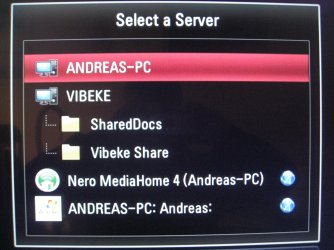
I cant get my streaming client (LG BD390) to show my shared folders on my pc.
It displays my pc, but doesn't attach those shared folders that are supposed to be shared.
If i access my computer from another windows pc there is no problem at all.

I have altered the share configurations every possible way imaginable but nothing will get it to work.

As you can see on the pic ive attached my pc is "ANDREAS-PC" my gf's is "VIBEKE", her pc is displaying her shared with no problem.

The wierd thing about this issue is its only the simple "share this folder" that does'nt work. Because on the pic attached you can see both the "ANDREAS-PC: Andreas" which is the windows media player (if im not mistaken) and the "Nero MediaHome 4".
MediaHome can share whatever i like from my pc, but by doing so it takes endless amount of resources and cannot display subtitles for video files. Thats why i don't wanna use that instead of simple windows folder share.

Things ive tried out:

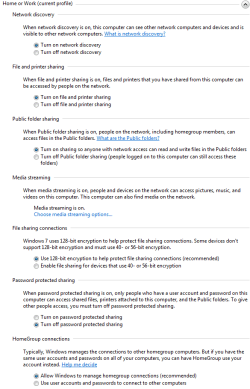
Altered every single option in the sharing center. like turn on network discovering and such (for public netowrk too)
Reinstalled windows 7
Factory defaults on my router and my LG bd390.

Does anyone have an idea about what could be wrong?

Thanks in advance ppl :)
 

Attachments

  • IMG_2301.jpg
    IMG_2301.jpg
    780.8 KB · Views: 9
  • Capture.PNG
    Capture.PNG
    22 KB · Views: 38
  • Capture3.PNG
    Capture3.PNG
    5.2 KB · Views: 9
  • capture4.png
    capture4.png
    9.9 KB · Views: 9

My Computer My Computer

At a glance

Windows 7 Ultimate x64
OS
Windows 7 Ultimate x64
This is from newegg reviews.

none.gif
Rating: 2/5Beware Windows 7 64 Bit Users!


Pros: Blu Ray, Upscaling, Netflix, Media share can use Orb, Windows Sharing or Nero MediaHome. Ripped DVD VOB files can be streamed right to your TV. You can't really navigate too well but the quality is very nice.
Cons: The media sharing has a pretty clunky interface but is otherwise usable. Nero MediaHome CD that comes with this unit is not compatible with 64 Bit operating systems. Neither LG or Nero claim responsibility for this. To resolve this issue you can pay $1.29 a minute for phone support to Nero to have them tell you to buy the full version. The Full version does work (Seems like a scam to get you to spend more.) So if you are willing to pay more for the full version of the Mediahome software then you can get this to work.

You couldn't pay me enough to use Nero. Your A/V software can also cause this problem. You will also need to update the firmware on this disk player. Also if you are using a Dlink router you may need to update the firmware.

You can read through the reviews in the link below. These reviews give good clues on how to fix problems..
Newegg.com - LG Blu-ray Player BD390
 

My Computer My Computer

At a glance

Windows 7 Ult, Windows 8.1 Pro,Q9650-4.275GHz, E8600 4.5GHz, E6750-3.8GHzG.Skill PC2 9600 1200Mhz 5 5 5 15 2TGTX480
Computer type
PC/Desktop
Computer Manufacturer/Model Number
Home built
OS
Windows 7 Ult, Windows 8.1 Pro,
CPU
Q9650-4.275GHz, E8600 4.5GHz, E6750-3.8GHz
Motherboard
Evga 780i FTW
Memory
G.Skill PC2 9600 1200Mhz 5 5 5 15 2T
Graphics Card(s)
GTX480
Sound Card
Asus Xonar D2
Monitor(s) Displays
HannsG
Screen Resolution
1680X1050
Hard Drives
GSkill Phoenix Pro 120GB SSD
PSU
ThermalTake Toughpower 1000Watt modular
Case
ThermalTake XaserV
Cooling
Xigmatek S1283
Keyboard
Logitech G15
Mouse
Logitech G9
Internet Speed
T1
This is from newegg reviews.

none.gif
Rating: 2/5Beware Windows 7 64 Bit Users!


Pros: Blu Ray, Upscaling, Netflix, Media share can use Orb, Windows Sharing or Nero MediaHome. Ripped DVD VOB files can be streamed right to your TV. You can't really navigate too well but the quality is very nice.
Cons: The media sharing has a pretty clunky interface but is otherwise usable. Nero MediaHome CD that comes with this unit is not compatible with 64 Bit operating systems. Neither LG or Nero claim responsibility for this. To resolve this issue you can pay $1.29 a minute for phone support to Nero to have them tell you to buy the full version. The Full version does work (Seems like a scam to get you to spend more.) So if you are willing to pay more for the full version of the Mediahome software then you can get this to work.

You couldn't pay me enough to use Nero. Your A/V software can also cause this problem. You will also need to update the firmware on this disk player. Also if you are using a Dlink router you may need to update the firmware.

You can read through the reviews in the link below. These reviews give good clues on how to fix problems..
Newegg.com - LG Blu-ray Player BD390
Hi, thanks for trying to help me out, but my problem has nothing to do with Nero MediaHome, its with the simple folder sharing feature in windows 7.

Does anyone have any idea what could be wrong? its driving me mad :(
 

My Computer My Computer

At a glance

Windows 7 Ultimate x64
OS
Windows 7 Ultimate x64
There isn't anything wrong with simple file sharing in Windows 7 although there were many complaints about that bluray player not working right with Win 7 unless you update the firmware.
 

My Computer My Computer

At a glance

Windows 7 Ult, Windows 8.1 Pro,Q9650-4.275GHz, E8600 4.5GHz, E6750-3.8GHzG.Skill PC2 9600 1200Mhz 5 5 5 15 2TGTX480
Computer type
PC/Desktop
Computer Manufacturer/Model Number
Home built
OS
Windows 7 Ult, Windows 8.1 Pro,
CPU
Q9650-4.275GHz, E8600 4.5GHz, E6750-3.8GHz
Motherboard
Evga 780i FTW
Memory
G.Skill PC2 9600 1200Mhz 5 5 5 15 2T
Graphics Card(s)
GTX480
Sound Card
Asus Xonar D2
Monitor(s) Displays
HannsG
Screen Resolution
1680X1050
Hard Drives
GSkill Phoenix Pro 120GB SSD
PSU
ThermalTake Toughpower 1000Watt modular
Case
ThermalTake XaserV
Cooling
Xigmatek S1283
Keyboard
Logitech G15
Mouse
Logitech G9
Internet Speed
T1
There isn't anything wrong with simple file sharing in Windows 7 although there were many complaints about that bluray player not working right with Win 7 unless you update the firmware.
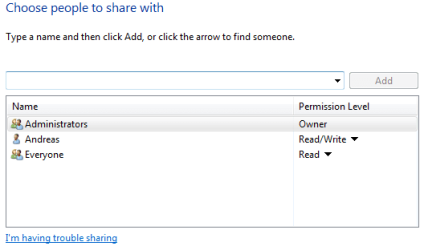
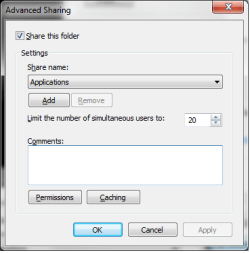
Ok so the settings in the images ive attached is as they should be?
It just does'nt make any sense, because it has worked before, then from one day to the other it just stopped working...
Tonight i tried connecting another pc with windows 7 with some shares, but it turned out to be the exact same problem.

Maybe it is because ive updated the firmware on the player, because as i said it has worked like a charm like 2 weeks ago.. :/
 

My Computer My Computer

At a glance

Windows 7 Ultimate x64
OS
Windows 7 Ultimate x64
Shameless bump
 

My Computer My Computer

At a glance

Windows 7 Ultimate x64
OS
Windows 7 Ultimate x64
Problem fixed, allthough it may sound strange.
Solutions is as follows
Uninstall every program associated with "Windows Live Essentials", then restart.
Ths has worked for me and a couple of others with the same problem.
 

My Computer My Computer

At a glance

Windows 7 Ultimate x64
OS
Windows 7 Ultimate x64
Back
Top