Solved Unable to associate newly-installed Excel with .xls files

450125

New member
Power User
Local time
6:25 PM
Messages
281
I've installed plenty of software, and changed the default associations governing what the software opens, and what file extensions are opened by it.

But I'm over a barrel dissociating old .xls files from Excel 2000, so a newer Excel opens them.

Background:

I actually ran the same Office 2000 on my computers from when I first got the software in 2000, to earlier this month. It got the job done, though with increasing issues, none of them show-stoppers.

But I discovered that I had other open seats on my volume-licensed Office 2016 from work, so figured I'd install that on my home computer.

Word behaves as wanted and expected. It opens the old .doc and the newer .docx files by default. No intervention needed from me.

For Excel though, it will open .xlsx files by default, but double-clicking on a .xls file will launch Excel 2000.

I have not been able to fix this with either the context menu "open with" option, or through the control panel.

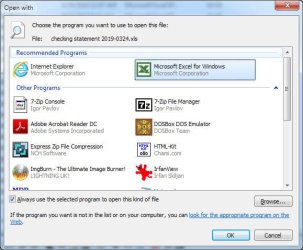
If I go through the context menu - see below - the desired (new) Excel program does not appear in the recommended or "other" programs list. So I browse to the location of the .exe file using the browse option, double-click the icon, or single-click it and click "open" - and - nothing. It's like I didn't even do anything.

408866d1564343706-unable-associate-newly-installed-excel-xls-files-context-menu.jpg


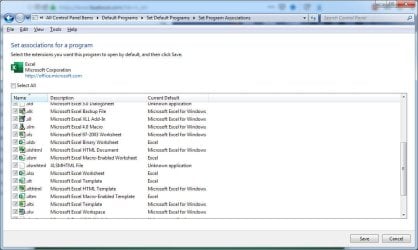
If I go through the control panel - see below - it's hard to see here, but the checkboxes for the file extensions are grayed out, and nothing changes if I click on a box, or click "select all."

408867d1564343706-unable-associate-newly-installed-excel-xls-files-xls.jpg


There's also a "set associations" option in the control panel, but that works just like the context menu that I described above. Same thing if I right-click on a .xls file, pick "properties," then use the "open with" option to change the associated program.

There are two solutions I can think of, but neither appeals to me.

One is to uninstall Office 2000. It's illogical but I like the "crutch" of having it on my machine. And I've had other work computers where my Office 2000 coexisted fine with later (post-2007) versions of Office, and there weren't these file association problems.

The other is to edit things in the registry. Which I don't mind doing, but don't know what to edit here. And I'd think the normal Windows user interface should be able to do this.

Insight, please?
 

Attachments
  • Context menu.jpg
    Context menu.jpg
    44.5 KB · Views: 48
  • XLS.jpg
    XLS.jpg
    78.2 KB · Views: 50

My Computer My Computer

At a glance

Win7 Professional 64Intel I3 550 (3.2 GHz)8 gig (2x4gig Kingston DDR 3)Intel HD graphics (from CPU)
Computer Manufacturer/Model Number
custom-built
OS
Win7 Professional 64
CPU
Intel I3 550 (3.2 GHz)
Motherboard
GIGABYTE|GA-H55M-S2V H55 1156 R
Memory
8 gig (2x4gig Kingston DDR 3)
Graphics Card(s)
Intel HD graphics (from CPU)
Sound Card
Realtek ALC888B
Monitor(s) Displays
ViewSonic
Screen Resolution
1280x1024
Hard Drives
Seagate ST3250310CS (250 gig C drive for OS and programs)
WDC WD5000AAKS-00V1A0 (2x500 gig drives, software mirrored in a RAID 1 configuration, as a D drive, for documents and data)
Internet Speed
download > 15 mbps; upload approx 1 mbps
Under default programs | set associations, can you not double click the xls extension, navigate to the new Excel path? Seems like you mention that but I want to be sure. It should take and once done opening any xls file should open in the new Excel.

You have to browse to the correct path to the new Excel though. Don't just click what Excel they show.
 

My Computer My Computer

At a glance

Windows 7 Ultimate x64
Computer type
PC/Desktop
OS
Windows 7 Ultimate x64
Under default programs | set associations, can you not double click the xls extension, navigate to the new Excel path? Seems like you mention that but I want to be sure. It should take and once done opening any xls file should open in the new Excel.

You have to browse to the correct path to the new Excel though. Don't just click what Excel they show.
Thanks. This is covered in the red portion of my original post.

I can navigate to the correct Excel exe. But when I double-click it or click "open," nothing happens. I am returned to the "open with" menu, which has not been populated with that as a choice. Note that "Other Programs" are listed alphabetically, and Excel (file name of current version) is not listed.

408866d1564343706-unable-associate-newly-installed-excel-xls-files-context-menu.jpg


When I originally posted, I'd been doing a lot on my computer that day, so part of me hoped that this setting the association would work as advertised after a fresh start. But I tried this morning, within ten minutes of a reboot, and got the same results as described here and in the original post.
 

My Computer My Computer

At a glance

Win7 Professional 64Intel I3 550 (3.2 GHz)8 gig (2x4gig Kingston DDR 3)Intel HD graphics (from CPU)
Computer Manufacturer/Model Number
custom-built
OS
Win7 Professional 64
CPU
Intel I3 550 (3.2 GHz)
Motherboard
GIGABYTE|GA-H55M-S2V H55 1156 R
Memory
8 gig (2x4gig Kingston DDR 3)
Graphics Card(s)
Intel HD graphics (from CPU)
Sound Card
Realtek ALC888B
Monitor(s) Displays
ViewSonic
Screen Resolution
1280x1024
Hard Drives
Seagate ST3250310CS (250 gig C drive for OS and programs)
WDC WD5000AAKS-00V1A0 (2x500 gig drives, software mirrored in a RAID 1 configuration, as a D drive, for documents and data)
Internet Speed
download > 15 mbps; upload approx 1 mbps
So when you click browse and go to the directory of the new Excel install nothing happens when you select that .exe?

When you click browse, are you sure you are navigating to the right path of the new Excel install in the programs folder?
 

My Computer My Computer

At a glance

Windows 7 Ultimate x64
Computer type
PC/Desktop
OS
Windows 7 Ultimate x64
So when you click browse and go to the directory of the new Excel install nothing happens when you select that .exe?

When you click browse, are you sure you are navigating to the right path of the new Excel install in the programs folder?

Yes, I am 100% sure.

First, I've done this - and it's worked for other apps/file types - dozens or hundreds of times, so I know how it's supposed to work.

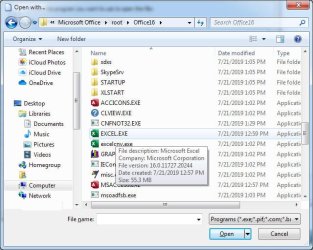
Second, right, I select that exe, in the correct folder, be it by double-clicking, or highlighting and picking "open," and nothing happens. It just throws me back to the screen shot I posted.

Third, yes, navigating to the right path:

  1. Folder and subfolder creation dates all match when I installed the newer Office
  2. Exe file is called "Excel"
  3. Exe icon matches the icon of the new Excel, not the icon of Excel 2000
Below is a screen shot of the exe file I'm selecting:

attachment.php
 

Attachments

  • Excel EXE.jpg
    Excel EXE.jpg
    59.3 KB · Views: 17
Last edited:

My Computer My Computer

At a glance

Win7 Professional 64Intel I3 550 (3.2 GHz)8 gig (2x4gig Kingston DDR 3)Intel HD graphics (from CPU)
Computer Manufacturer/Model Number
custom-built
OS
Win7 Professional 64
CPU
Intel I3 550 (3.2 GHz)
Motherboard
GIGABYTE|GA-H55M-S2V H55 1156 R
Memory
8 gig (2x4gig Kingston DDR 3)
Graphics Card(s)
Intel HD graphics (from CPU)
Sound Card
Realtek ALC888B
Monitor(s) Displays
ViewSonic
Screen Resolution
1280x1024
Hard Drives
Seagate ST3250310CS (250 gig C drive for OS and programs)
WDC WD5000AAKS-00V1A0 (2x500 gig drives, software mirrored in a RAID 1 configuration, as a D drive, for documents and data)
Internet Speed
download > 15 mbps; upload approx 1 mbps

My Computer My Computer

At a glance

Windows 7 Home Premium 64 bit sp1Intel i5 3570 3.4Ghz Ivy Bridge SKT 1155 quad...G-Skill Rip Jaws 16Gb (8x2) DDR3 -1600 PC3 12...Gigabyte NVIDIA GT610 1Gb DDR3 810/1200 PCI-E...
Computer type
PC/Desktop
Computer Manufacturer/Model Number
Self built using existing case
OS
Windows 7 Home Premium 64 bit sp1
CPU
Intel i5 3570 3.4Ghz Ivy Bridge SKT 1155 quad core
Motherboard
Gigabyte Z77-HD3 SKT 1155 2xSata 3, 4x USB 3.0
Memory
G-Skill Rip Jaws 16Gb (8x2) DDR3 -1600 PC3 12800 CL 10 red
Graphics Card(s)
Gigabyte NVIDIA GT610 1Gb DDR3 810/1200 PCI-E 2.0 Silent
Sound Card
NVIDIA High Definition & Realtech High Definition Audio
Monitor(s) Displays
2 x Philips 226V4L 16:9 aspect ratio
Screen Resolution
1920 x 1080 HD
Hard Drives
Samsung 840 Pro 256gb SSD, SATA 3.
Hitachi Touro Portable 1tb, USB 3.0 HDD used for image b/ups.
PSU
Corsair VS450
Case
Codeng
Cooling
PSU fan & CPU fan
Keyboard
Logitech
Mouse
Logitech Wireless trackball M570
Internet Speed
Wireless 3G. 3mg down & 550kb up.
Antivirus
Bitdefender Internet Security 2020
Browser
Opera (Current Version) & Firefox
Other Info
MS Office 2013 Pro. Davis weather station software. MGE Nova 600 avr UPS.
Does this YouTube video help you.

YouTube

Or perhaps this website might help as well.

Open Office 97/2003 xls files in Excel 2016 , 365 / 2019 | EasyTweaks.com
I appreciate this, but my problem isn't converting file formats. It's simply being able to tell Windows to open .xls files with the newer Excel.

Excel opens the files if I open Excel first, then open them. But if I double-click on the files, it opens the older Excel 2000.

This is explained in more detail in the original post.
 

My Computer My Computer

At a glance

Win7 Professional 64Intel I3 550 (3.2 GHz)8 gig (2x4gig Kingston DDR 3)Intel HD graphics (from CPU)
Computer Manufacturer/Model Number
custom-built
OS
Win7 Professional 64
CPU
Intel I3 550 (3.2 GHz)
Motherboard
GIGABYTE|GA-H55M-S2V H55 1156 R
Memory
8 gig (2x4gig Kingston DDR 3)
Graphics Card(s)
Intel HD graphics (from CPU)
Sound Card
Realtek ALC888B
Monitor(s) Displays
ViewSonic
Screen Resolution
1280x1024
Hard Drives
Seagate ST3250310CS (250 gig C drive for OS and programs)
WDC WD5000AAKS-00V1A0 (2x500 gig drives, software mirrored in a RAID 1 configuration, as a D drive, for documents and data)
Internet Speed
download > 15 mbps; upload approx 1 mbps
Can you explain a bit more about what you see when you try Open With right-mouse context menu?

You can use Open With to change the default program (ie from Excel2000 to Excel2016).


My Computer My Computer

At a glance

Windows 7 x64, Vista x64, 8.1 smartphoneIntel E8400 65W 64-bitDDR2 2 x 2GB, 1GB x 2XFX Radeon HD5750
Computer type
PC/Desktop
OS
Windows 7 x64, Vista x64, 8.1 smartphone
CPU
Intel E8400 65W 64-bit
Motherboard
Gigabyte EP45-UD3LR
Memory
DDR2 2 x 2GB, 1GB x 2
Graphics Card(s)
XFX Radeon HD5750
Sound Card
AMD High Definition Audio; Realtek High Definition Audio
Monitor(s) Displays
iiyama prolite X2377HDS
Screen Resolution
1920 x 1080
Hard Drives
500GB 7200 rpm Seagate ST3500413AS 16MB, 500GB 5400 rpm Toshiba MQ02ABF050H 32MB, 200GB 7200 rpm Seagate ST3200820AS 8MB, 2TB 7200 rpm Western Digital WD20EZRX 64MB
PSU
Enermax Liberty Modular
Case
Antec P193 Midi Tower
Keyboard
Mionix ZIBAL 60
Mouse
Razer USB 2.0 Diamondback Mouse or Huion Graphics Tablet
Browser
Internet Explorer, Lunascape, Firefox, Opera, Avast Safezone
Can you explain a bit more about what you see when you try Open With right-mouse context menu?

You can use Open With to change the default program (ie from Excel2000 to Excel2016).
Although I thought I documented that sufficiently in my original post and subsequent replies, here goes, annotating from Open With - Change Default Program
3. To Select a Program that is Not Listed in Context Menu
NOTE: This option will allow you to be able to select to have the file type to always open with the selected program by default if you like.
A) After you have expanded Open with, select Choose default program. (see screenshot below step 1) (no problems doing this)

B) Under Other Programs, click on the drop down arrow to the far right to exapnd it and see more programs to select from. (See screenshot below) (no problems doing this)
13285d1244188930-open-change-default-program-step2.jpg

C) Select the program that you want to open the file with. (See screenshot above)
NOTE: If the program you wanted to select is still not listed, then click on the Browse button and navigate to the program's exe file. (I do this correctly) Select it, and click on the Open button (no problems doing this) to add it to be able to select it (FAIL! The correct Excel program does not add to the list - see Unable to associate newly-installed Excel with .xls files).


D) To Always Open this File Type with the Selected Program by Default
  • Check the Always use the selected program to open this kind of file box. (See screenshot below step 3B)
  • Go to step 3F.
E) To Only Open this File Type with the Selected Program for Just this One Time
  • Uncheck the Always use the selected program to open this kind of file box. (See screenshot below step 3B)
F) Click on OK. (See screenshot below step 3B)
4. The file will now be opened by the selected program. (Not true - D/E/F above did not apply, and read read annotations)
 

My Computer My Computer

At a glance

Win7 Professional 64Intel I3 550 (3.2 GHz)8 gig (2x4gig Kingston DDR 3)Intel HD graphics (from CPU)
Computer Manufacturer/Model Number
custom-built
OS
Win7 Professional 64
CPU
Intel I3 550 (3.2 GHz)
Motherboard
GIGABYTE|GA-H55M-S2V H55 1156 R
Memory
8 gig (2x4gig Kingston DDR 3)
Graphics Card(s)
Intel HD graphics (from CPU)
Sound Card
Realtek ALC888B
Monitor(s) Displays
ViewSonic
Screen Resolution
1280x1024
Hard Drives
Seagate ST3250310CS (250 gig C drive for OS and programs)
WDC WD5000AAKS-00V1A0 (2x500 gig drives, software mirrored in a RAID 1 configuration, as a D drive, for documents and data)
Internet Speed
download > 15 mbps; upload approx 1 mbps
My Computer My Computer

At a glance

Windows 7 x64, Vista x64, 8.1 smartphoneIntel E8400 65W 64-bitDDR2 2 x 2GB, 1GB x 2XFX Radeon HD5750
Computer type
PC/Desktop
OS
Windows 7 x64, Vista x64, 8.1 smartphone
CPU
Intel E8400 65W 64-bit
Motherboard
Gigabyte EP45-UD3LR
Memory
DDR2 2 x 2GB, 1GB x 2
Graphics Card(s)
XFX Radeon HD5750
Sound Card
AMD High Definition Audio; Realtek High Definition Audio
Monitor(s) Displays
iiyama prolite X2377HDS
Screen Resolution
1920 x 1080
Hard Drives
500GB 7200 rpm Seagate ST3500413AS 16MB, 500GB 5400 rpm Toshiba MQ02ABF050H 32MB, 200GB 7200 rpm Seagate ST3200820AS 8MB, 2TB 7200 rpm Western Digital WD20EZRX 64MB
PSU
Enermax Liberty Modular
Case
Antec P193 Midi Tower
Keyboard
Mionix ZIBAL 60
Mouse
Razer USB 2.0 Diamondback Mouse or Huion Graphics Tablet
Browser
Internet Explorer, Lunascape, Firefox, Opera, Avast Safezone
Thanks for taking the trouble to explain and annotate the problem which you are experiencing.

You might like to try to download and run this Fixit from Microsoft for the current Office installation: Double-clicking an Office file fails to open it in the correct Office program | Office Support
We're getting somewhere! However incrementally.

The fixit did seem to associate .xls with the correct Excel exe. It also populated the correct Excel EXE into the "open with" choices.

BUT... we are not there yet.

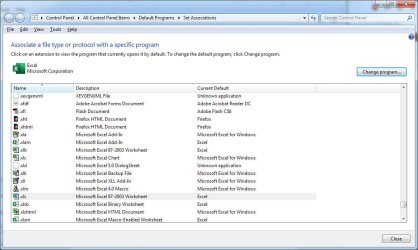
If you look at the screen below, "Excel" - not "Microsoft Excel for Windows" - is the default program for .xls. You can even see the correct icon for the correct program right below "click on an extension" in the screen shot.

attachment.php


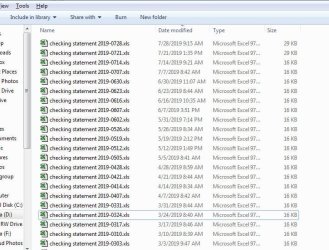
But in the description (or file type) column, it says "Microsoft Excel 97-2003 Worksheet" for .xls - and I think that is what is driving Windows to open it using Excel 2000, even though supposedly Excel is supposed to open it.

I think there's something in the registry I can edit, to change the "type" of file .xls files are. But I am not sure where this is.

Below you can see a listing from a folder containing several .xls sheets. And they're all listed as "Microsoft Excel 97-2003 Worksheet" types.

attachment.php


So, again, my hunch is that if I can somehow tell the O/S that .xls files are "Excel" types, not "Microsoft Excel 97-2003 Worksheet," I will solve my problem.
 

Attachments

  • Associate File Type.jpg
    Associate File Type.jpg
    79.4 KB · Views: 17
  • File List 20190729.jpg
    File List 20190729.jpg
    81.4 KB · Views: 17

My Computer My Computer

At a glance

Win7 Professional 64Intel I3 550 (3.2 GHz)8 gig (2x4gig Kingston DDR 3)Intel HD graphics (from CPU)
Computer Manufacturer/Model Number
custom-built
OS
Win7 Professional 64
CPU
Intel I3 550 (3.2 GHz)
Motherboard
GIGABYTE|GA-H55M-S2V H55 1156 R
Memory
8 gig (2x4gig Kingston DDR 3)
Graphics Card(s)
Intel HD graphics (from CPU)
Sound Card
Realtek ALC888B
Monitor(s) Displays
ViewSonic
Screen Resolution
1280x1024
Hard Drives
Seagate ST3250310CS (250 gig C drive for OS and programs)
WDC WD5000AAKS-00V1A0 (2x500 gig drives, software mirrored in a RAID 1 configuration, as a D drive, for documents and data)
Internet Speed
download > 15 mbps; upload approx 1 mbps
Update - I am still not there, so I'm going to wait for someone more expert to come along.

I edited my registry, exporting the .xlsx key from HKEY_CLASSES_ROOT to an editable file, and changing all the instances of .xlsx in it to be .xls

Then I renamed the .xls key in the registry to .xls_old and imported the edited xlsx key, renaming it to .xls

Quitting regedit, I'd have hoped that after restarting my machine, the .xls file type would be treated exactly like the .xls file type.

Nope.

Then I went in and outright deleted the .xls key and started the machine again.

No change. It still views .xls files as being "Microsoft Excel 97-2003 Worksheet." And double-clicking on those files starts Excel 2000, not Excel 2016.
 

My Computer My Computer

At a glance

Win7 Professional 64Intel I3 550 (3.2 GHz)8 gig (2x4gig Kingston DDR 3)Intel HD graphics (from CPU)
Computer Manufacturer/Model Number
custom-built
OS
Win7 Professional 64
CPU
Intel I3 550 (3.2 GHz)
Motherboard
GIGABYTE|GA-H55M-S2V H55 1156 R
Memory
8 gig (2x4gig Kingston DDR 3)
Graphics Card(s)
Intel HD graphics (from CPU)
Sound Card
Realtek ALC888B
Monitor(s) Displays
ViewSonic
Screen Resolution
1280x1024
Hard Drives
Seagate ST3250310CS (250 gig C drive for OS and programs)
WDC WD5000AAKS-00V1A0 (2x500 gig drives, software mirrored in a RAID 1 configuration, as a D drive, for documents and data)
Internet Speed
download > 15 mbps; upload approx 1 mbps
And, another fail.

After implementing the last few suggestions, then right-clicking on a .xls file and picking properties and changing "opens with" to Excel (not Excel 2000), the file type for my .xls files lists as "Microsoft Excel Worksheet," and not "Microsoft Excel 97-2003 Worksheet." Good.

Also good is that double-clicking on an xls file will launch the Excel that I want (not Excel 2000).

But bad is that it just launches Excel. It doesn't automatically open the selected file. I have to, once in Excel, browse to the selected file and open it. Total pain. In fact, now it doesn't even open xlsx files when I click on them. It just launches Excel. At least before, it would open xlsx files correctly.

Running the fixit from #11 above found no problems.

So this time, I'm going to just stand down until a good suggestion arrives.
 

My Computer My Computer

At a glance

Win7 Professional 64Intel I3 550 (3.2 GHz)8 gig (2x4gig Kingston DDR 3)Intel HD graphics (from CPU)
Computer Manufacturer/Model Number
custom-built
OS
Win7 Professional 64
CPU
Intel I3 550 (3.2 GHz)
Motherboard
GIGABYTE|GA-H55M-S2V H55 1156 R
Memory
8 gig (2x4gig Kingston DDR 3)
Graphics Card(s)
Intel HD graphics (from CPU)
Sound Card
Realtek ALC888B
Monitor(s) Displays
ViewSonic
Screen Resolution
1280x1024
Hard Drives
Seagate ST3250310CS (250 gig C drive for OS and programs)
WDC WD5000AAKS-00V1A0 (2x500 gig drives, software mirrored in a RAID 1 configuration, as a D drive, for documents and data)
Internet Speed
download > 15 mbps; upload approx 1 mbps
I guess I have it solved, if not figured out (why any of this was happening in the first place).

Navigating to the change or remove a program control panel, I selected my newer (not Office 2000) installation and picked "change" which launched the repair program/process.

Repair ran for sometime between 30 and 60 minutes, but when it was done, the xls (and xlsx) files had proper associations, and all opened with new Excel, be it from double-clicking, or from the "recent files" list.

After a restart and getting on to the computer this morning, it still works.

So - and maybe doing this at the start would have fixed it, who knows - repairing Office from the "change or remove a program" control panel did the trick.
 

My Computer My Computer

At a glance

Win7 Professional 64Intel I3 550 (3.2 GHz)8 gig (2x4gig Kingston DDR 3)Intel HD graphics (from CPU)
Computer Manufacturer/Model Number
custom-built
OS
Win7 Professional 64
CPU
Intel I3 550 (3.2 GHz)
Motherboard
GIGABYTE|GA-H55M-S2V H55 1156 R
Memory
8 gig (2x4gig Kingston DDR 3)
Graphics Card(s)
Intel HD graphics (from CPU)
Sound Card
Realtek ALC888B
Monitor(s) Displays
ViewSonic
Screen Resolution
1280x1024
Hard Drives
Seagate ST3250310CS (250 gig C drive for OS and programs)
WDC WD5000AAKS-00V1A0 (2x500 gig drives, software mirrored in a RAID 1 configuration, as a D drive, for documents and data)
Internet Speed
download > 15 mbps; upload approx 1 mbps
The only thing you have to do is open the "Microsoft Excel 97-2003 Worksheet." and have Excel convert it to the new format. I did the same when I upgraded to office 10. you still have the old XLS file and the new XLSX. You then can delete the old file
Sven
 

My Computer My Computer

At a glance

windows 7 ultimate x64AMD FX 6 CORE PROCESSOR16 GBon MB
Computer type
PC/Desktop
Computer Manufacturer/Model Number
Custom Build
OS
windows 7 ultimate x64
CPU
AMD FX 6 CORE PROCESSOR
Memory
16 GB
Graphics Card(s)
on MB
Sound Card
on MB
Monitor(s) Displays
Acer
Screen Resolution
1920x1080
Hard Drives
Seagate ( C:\)
Case
mini tower
Keyboard
Logitech wireless
Mouse
Logitech wireless
Antivirus
MSE
Browser
IE11
The only thing you have to do is open the "Microsoft Excel 97-2003 Worksheet." and have Excel convert it to the new format. I did the same when I upgraded to office 10. you still have the old XLS file and the new XLSX. You then can delete the old file
Sven
I know this is an option, but for practical purposes, it would be like accidentally installing Windows using a different language, and relying on some online translator to make the pages readable.

That solution forces the user to do extra steps every time he or she wants to take an action.

Whereas the desired and sought solution is one that is applied one single time, that prevents all further occurrences of the issue.

Which, as shown in post 14 above, I was finally able to do, solving my problem.
 

My Computer My Computer

At a glance

Win7 Professional 64Intel I3 550 (3.2 GHz)8 gig (2x4gig Kingston DDR 3)Intel HD graphics (from CPU)
Computer Manufacturer/Model Number
custom-built
OS
Win7 Professional 64
CPU
Intel I3 550 (3.2 GHz)
Motherboard
GIGABYTE|GA-H55M-S2V H55 1156 R
Memory
8 gig (2x4gig Kingston DDR 3)
Graphics Card(s)
Intel HD graphics (from CPU)
Sound Card
Realtek ALC888B
Monitor(s) Displays
ViewSonic
Screen Resolution
1280x1024
Hard Drives
Seagate ST3250310CS (250 gig C drive for OS and programs)
WDC WD5000AAKS-00V1A0 (2x500 gig drives, software mirrored in a RAID 1 configuration, as a D drive, for documents and data)
Internet Speed
download > 15 mbps; upload approx 1 mbps
Back
Top