Unable to backup

The Good news first: I've managed to backup the full system onto the external drive without any reported problems.

The bad news: The destination drive got full and it asked me for a different one to continue. So, now I have the image split up in two diffrent drives in the same external hard disc.

Then, the next problem is that I don't really know how to use it. I suppose this will only work in Windows7.

That means very regular backups until the HD collapses totally. Having said that, as the backup worked without problems could it be that the problem is elsewhere, like the registry rather than the drive itself.

I am very grateful for your help.
 

My Computer My Computer

At a glance

windows 7 Home premium 64 bit
OS
windows 7 Home premium 64 bit
{imageid} is different all the time, so no problem. Why didn't you select all partitions on samsumg together? That way all partitions go to 1 image. Anyway... you can restore using a recover dvd. The winpe recovery disk is the best http://www.sevenforums.com/tutorials/73828-imaging-free-macrium.html it has a link to the pre made recovery disk. Burn that ISO and boot from it. Then you can perform the restore.
 

My Computer My Computer

At a glance

Microsoft Windows 7 Home Premium 64-bits 7601...Intel(R) Core(TM) i3 CPU M 370 @ 2.40GHz4,00 GBATI Mobility Radeon HD 5400 Series
Computer type
Laptop
Computer Manufacturer/Model Number
ACER ASPIRE 5742G
OS
Microsoft Windows 7 Home Premium 64-bits 7601 Multiprocessor Free Service Pack 1
CPU
Intel(R) Core(TM) i3 CPU M 370 @ 2.40GHz
Motherboard
Acer Aspire 5742G
Memory
4,00 GB
Graphics Card(s)
ATI Mobility Radeon HD 5400 Series
Sound Card
(1) AMD High Definition Audio Device (2) Realtek High Defi
Screen Resolution
1366 x 768 x 32 bits (4294967296 colors) @ 60 Hz
Hard Drives
WDC WD5000BEVT-22ZAT0
Thanks

Could we explore some other answers for the reason MS backup does not work? Like the registry?

And my other. earlier questin: I take it the restore will not work on xp, right?

Thanks
 

My Computer My Computer

At a glance

windows 7 Home premium 64 bit
OS
windows 7 Home premium 64 bit
Thanks


And my other. earlier questin: I take it the restore will not work on xp, right?

Thanks
macrium reflect can be run within win7/vista/winxp/win8. Even from winpe recovery environment (rescue dvd). But why do you want to restore C on another machine?

Could we explore some other answers for the reason MS backup does not work? Like the registry?
I don't know
 

My Computer My Computer

At a glance

Microsoft Windows 7 Home Premium 64-bits 7601...Intel(R) Core(TM) i3 CPU M 370 @ 2.40GHz4,00 GBATI Mobility Radeon HD 5400 Series
Computer type
Laptop
Computer Manufacturer/Model Number
ACER ASPIRE 5742G
OS
Microsoft Windows 7 Home Premium 64-bits 7601 Multiprocessor Free Service Pack 1
CPU
Intel(R) Core(TM) i3 CPU M 370 @ 2.40GHz
Motherboard
Acer Aspire 5742G
Memory
4,00 GB
Graphics Card(s)
ATI Mobility Radeon HD 5400 Series
Sound Card
(1) AMD High Definition Audio Device (2) Realtek High Defi
Screen Resolution
1366 x 768 x 32 bits (4294967296 colors) @ 60 Hz
Hard Drives
WDC WD5000BEVT-22ZAT0
Ok, you're right!

The prog found problems: see attachment

The computer/hrd disk is less than 2 years old. Should I run the DOS version of SeaTools?
I want to see the logfile... so what is wrong with the drive!

Seatools for DOS can check internal SATA drives (I just did test it). Please post camshot of main screen (after booting to seatools for DOS)
 

My Computer My Computer

At a glance

Microsoft Windows 7 Home Premium 64-bits 7601...Intel(R) Core(TM) i3 CPU M 370 @ 2.40GHz4,00 GBATI Mobility Radeon HD 5400 Series
Computer type
Laptop
Computer Manufacturer/Model Number
ACER ASPIRE 5742G
OS
Microsoft Windows 7 Home Premium 64-bits 7601 Multiprocessor Free Service Pack 1
CPU
Intel(R) Core(TM) i3 CPU M 370 @ 2.40GHz
Motherboard
Acer Aspire 5742G
Memory
4,00 GB
Graphics Card(s)
ATI Mobility Radeon HD 5400 Series
Sound Card
(1) AMD High Definition Audio Device (2) Realtek High Defi
Screen Resolution
1366 x 768 x 32 bits (4294967296 colors) @ 60 Hz
Hard Drives
WDC WD5000BEVT-22ZAT0
But why do you want to restore C on another machine?

Well, if the HD relly goes, at the mom all I have is an old Toshiba running on XP. The alternative is to do a daily backuo, which in this free version takes 2 1/2 hours.

I want to see the logfile... so what is wrong with the drive!

Seatools for DOS can check internal SATA drives (I just did test it). Please post camshot of main screen (after booting to seatools for DOS)

You mentioned earlier on that I should have addeed something to the CD. i did not quite understand what. I am not sure if I can get a screen shot of Seatool for DOS as it seems to load before windows.
 

My Computer My Computer

At a glance

windows 7 Home premium 64 bit
OS
windows 7 Home premium 64 bit
You mentioned earlier on that I should have addeed something to the CD. i did not quite understand what. I am not sure if I can get a screen shot of Seatool for DOS as it seems to load before windows.
Don't add anything to the CD.

Post a camshot (make photo with smartphone or camera)
 

My Computer My Computer

At a glance

Microsoft Windows 7 Home Premium 64-bits 7601...Intel(R) Core(TM) i3 CPU M 370 @ 2.40GHz4,00 GBATI Mobility Radeon HD 5400 Series
Computer type
Laptop
Computer Manufacturer/Model Number
ACER ASPIRE 5742G
OS
Microsoft Windows 7 Home Premium 64-bits 7601 Multiprocessor Free Service Pack 1
CPU
Intel(R) Core(TM) i3 CPU M 370 @ 2.40GHz
Motherboard
Acer Aspire 5742G
Memory
4,00 GB
Graphics Card(s)
ATI Mobility Radeon HD 5400 Series
Sound Card
(1) AMD High Definition Audio Device (2) Realtek High Defi
Screen Resolution
1366 x 768 x 32 bits (4294967296 colors) @ 60 Hz
Hard Drives
WDC WD5000BEVT-22ZAT0
But shall I use the same cd as before? You mentioned something about adding Sata.
 

My Computer My Computer

At a glance

windows 7 Home premium 64 bit
OS
windows 7 Home premium 64 bit

My Computer My Computer

At a glance

Microsoft Windows 7 Home Premium 64-bits 7601...Intel(R) Core(TM) i3 CPU M 370 @ 2.40GHz4,00 GBATI Mobility Radeon HD 5400 Series
Computer type
Laptop
Computer Manufacturer/Model Number
ACER ASPIRE 5742G
OS
Microsoft Windows 7 Home Premium 64-bits 7601 Multiprocessor Free Service Pack 1
CPU
Intel(R) Core(TM) i3 CPU M 370 @ 2.40GHz
Motherboard
Acer Aspire 5742G
Memory
4,00 GB
Graphics Card(s)
ATI Mobility Radeon HD 5400 Series
Sound Card
(1) AMD High Definition Audio Device (2) Realtek High Defi
Screen Resolution
1366 x 768 x 32 bits (4294967296 colors) @ 60 Hz
Hard Drives
WDC WD5000BEVT-22ZAT0
If the hard drive goes, you buy another one and re install windows from the image you created.

Just a question, but why are you using the backup feature, you should be backing up your pc manually, and not letting a program do it.

If your drive is relatively new, you should be using Seatools for Windows not DOS, but I think you are.

Also use Crystal Disk to check your drives.

http://crystalmark.info/software/CrystalDiskInfo/index-e.html
 

My Computer My Computer

At a glance

Windows 10 Pro x64Intel Core i7 6700KGSkill TridentZ RGB 16GB 3600 16-16-16-36EVGA GTX 980 Ti SC x2
Computer type
PC/Desktop
Computer Manufacturer/Model Number
Skylake Special #666
OS
Windows 10 Pro x64
CPU
Intel Core i7 6700K
Motherboard
Asus Sabertooth Z170 Mark 1
Memory
GSkill TridentZ RGB 16GB 3600 16-16-16-36
Graphics Card(s)
EVGA GTX 980 Ti SC x2
Sound Card
Realtek High Definition
Monitor(s) Displays
AOC G2460PG
Screen Resolution
1920 x 1080 144Hz
Hard Drives
Samsung 860 Pro 256GB, Seagate Barracuda 4TB x2
PSU
EVGA 1000 P2, EVGA White Custom Braided Cables
Case
Corsair Vengeance C70 Gunmetal Black
Cooling
Corsair H100i v2, Corsair ML120 x2, Thermal Grizzly Kryonaut
Keyboard
Logitech G910 Orion Spectrum
Mouse
Logitech G700s
Internet Speed
Verizon Fios Quantum Gateway 75/75
Antivirus
Windows Defender, Malwarebytes Free 3.8.3
Browser
Chrome
Other Info
Corsair SP120 x4, LG Blu-ray Drive, Durabrand HT-395 100 Watt Dolby Digital Amp, Corsair H2100 Wireless 7.1 Headset
hi kaktussoft

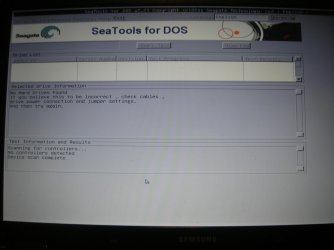
No joy

after leaving the prog it mentioned that the log should be in the c: directory, but at the C: prompt I could only find log files dating back to 2012

I am attaching the pic of what I saw on screen
 

Attachments

  • DSCN9168.jpg
    DSCN9168.jpg
    238 KB · Views: 0

My Computer My Computer

At a glance

windows 7 Home premium 64 bit
OS
windows 7 Home premium 64 bit
Just a question, but why are you using the backup feature, you should be backing up your pc manually, and not letting a program do it.

Hi thanks

But what do you mean by doing it manually? Copying folder by folder onto an external device?
 

My Computer My Computer

At a glance

windows 7 Home premium 64 bit
OS
windows 7 Home premium 64 bit
Put in BIOS the SATA mode to IDE or LEGACY. Which modes are available? Put back later otherwise win7 won't boot. Try seatools for DOS again afterwards
 

My Computer My Computer

At a glance

Microsoft Windows 7 Home Premium 64-bits 7601...Intel(R) Core(TM) i3 CPU M 370 @ 2.40GHz4,00 GBATI Mobility Radeon HD 5400 Series
Computer type
Laptop
Computer Manufacturer/Model Number
ACER ASPIRE 5742G
OS
Microsoft Windows 7 Home Premium 64-bits 7601 Multiprocessor Free Service Pack 1
CPU
Intel(R) Core(TM) i3 CPU M 370 @ 2.40GHz
Motherboard
Acer Aspire 5742G
Memory
4,00 GB
Graphics Card(s)
ATI Mobility Radeon HD 5400 Series
Sound Card
(1) AMD High Definition Audio Device (2) Realtek High Defi
Screen Resolution
1366 x 768 x 32 bits (4294967296 colors) @ 60 Hz
Hard Drives
WDC WD5000BEVT-22ZAT0
Now, you've got me worried...what if it fails to boot up?

From the last 2 espriences with the Seatool I get a Dos screen with info about log files, asking to retrieve the CD and press ctrl/Alt/del and then it goes into Windows.

Anyway, I suppose that the computer will ALWAYS restart and then gives me achance to go into Bios by pressing F2. That's right, no?

I lloked at Bios earlier on and under Boot device Prioirity I found thies, which baffled me...

NumLock
TouchPad Mouse
Internal ?am
PXE OPROM

Nothing about which drive should take priority. I mus have looked in the wrong tab.
 

My Computer My Computer

At a glance

windows 7 Home premium 64 bit
OS
windows 7 Home premium 64 bit
Hi

Before going to bed last night I tried again a Windows7 backup. This morning was presented with a box saying that the backup had completed successfully!

Yet, when I looked at drive d:, which is where I backed up to, the only thing I can find with yesterday's (and today's) date is a folder called "WondowsImageBackup dated 20/04/12 which is when I bought this computer, and inside another folder with the name of this pc dated yesterday. Inside this last folder there are 3 further folders and a file:
Backup 2014-02-15 214507
catalog
SPPMetadataCache
MediaId

Even though the Properties of the folders show they all have 0 bytes, there are a number of files inside which lead me to believe that the backup was indeed successful.

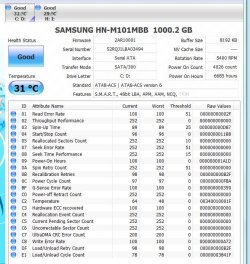
I also ran, as suggested by AddRAM, the CrystalDiskInfo and it returned a clean bill of health on all drives.

I will wait for your reply before going ahead with changing the bios.
 

Attachments

  • crystal.JPG
    crystal.JPG
    100.7 KB · Views: 0

My Computer My Computer

At a glance

windows 7 Home premium 64 bit
OS
windows 7 Home premium 64 bit
Click on "Show Details" in the error message. It will probably tell you which file couldn't be created. It may not be under your user authority or some such.
 

My Computer My Computer

At a glance

Windows 7 Pro-x64i7-2600 3.4GHz - 3.8GHz Turbo8Gb - 2x4GB, Muskin 991770 PC3-1333Integrated Intel HD 2000
Computer type
PC/Desktop
Computer Manufacturer/Model Number
Built 2/11/2011
OS
Windows 7 Pro-x64
CPU
i7-2600 3.4GHz - 3.8GHz Turbo
Motherboard
Intel DH67BL-B3
Memory
8Gb - 2x4GB, Muskin 991770 PC3-1333
Graphics Card(s)
Integrated Intel HD 2000
Sound Card
Integrated Intel 10.1 HD, RealTek ALC892
Monitor(s) Displays
Asus LCD VH222H, Haier HL24XSL2a
Screen Resolution
1920x1080, 1920x1080
Hard Drives
Crucial SSD C300-128Gb,
Western Digital WD5002AALX - 500Gb,
Western Digital WD7501AALS - 750Gb
PSU
Seasonic 650W 80+ Gold Modular
Case
Rosewill Defender
Cooling
Stock CPU, Four 120mm case fans, PCH fan added
Keyboard
Logitech EX100 Y-RBH94 Wireless
Mouse
Logitech EX100 M-RCE95 Wireless
Internet Speed
3.0/1.5 Mbs
Antivirus
Microsoft Security Essentials
Browser
Microsoft Internet Explorer 11
Other Info
Antec Veris Premier-Multimedia IR Station,
Cyber Accoustics-3602 Speakers,
AFT XM-5U Card Reader,
Hauppauge TV-HVR-2250,
Sony LX300 USB Turntable
Have you tried another backup program?

There are a lot of them out there?
 

My Computer My Computer

At a glance

Windows `10 Professional 64bitIntel i5 [email protected]Corsair Vengeance DDR3 1600 16GNVIDIA GeForce GT520 1GHz
Computer type
PC/Desktop
Computer Manufacturer/Model Number
Home Built
OS
Windows `10 Professional 64bit
CPU
Intel i5 [email protected]
Motherboard
MSI P67A-GD55 (MS7681)
Memory
Corsair Vengeance DDR3 1600 16G
Graphics Card(s)
NVIDIA GeForce GT520 1GHz
Sound Card
Realtek High Definition Audio
Monitor(s) Displays
Haans G 241
Screen Resolution
1600X1024
Hard Drives
Crucial MX100 256GB SSD
PSU
OCZ ModXStream Modular High Performance 500 Watt
Case
Rosewill Challenger-U3
Cooling
Just Fans
Keyboard
Kensington K64338B
Mouse
Microsoft wheel mouse 1.1A
Internet Speed
240.0 Mbps
Antivirus
ESET Internet Security
Browser
Firefox
Other Info
SuperAntiSpyware-Pro
Malwarebytes (Premium)
Kerish Doctor
Hi carwiz

Which prog are you referring to? Windows?
 

My Computer My Computer

At a glance

windows 7 Home premium 64 bit
OS
windows 7 Home premium 64 bit
Hi

Before going to bed last night I tried again a Windows7 backup. This morning was presented with a box saying that the backup had completed successfully!

Yet, when I looked at drive d:, which is where I backed up to, the only thing I can find with yesterday's (and today's) date is a folder called "WondowsImageBackup dated 20/04/12 which is when I bought this computer, and inside another folder with the name of this pc dated yesterday. Inside this last folder there are 3 further folders and a file:
Backup 2014-02-15 214507
catalog
SPPMetadataCache
MediaId

Even though the Properties of the folders show they all have 0 bytes, there are a number of files inside which lead me to believe that the backup was indeed successful.

I also ran, as suggested by AddRAM, the CrystalDiskInfo and it returned a clean bill of health on all drives.

I will wait for your reply before going ahead with changing the bios.
SEATOOLS for windows told you there were dirve/controller errors. There still is something wrong.
 

My Computer My Computer

At a glance

Microsoft Windows 7 Home Premium 64-bits 7601...Intel(R) Core(TM) i3 CPU M 370 @ 2.40GHz4,00 GBATI Mobility Radeon HD 5400 Series
Computer type
Laptop
Computer Manufacturer/Model Number
ACER ASPIRE 5742G
OS
Microsoft Windows 7 Home Premium 64-bits 7601 Multiprocessor Free Service Pack 1
CPU
Intel(R) Core(TM) i3 CPU M 370 @ 2.40GHz
Motherboard
Acer Aspire 5742G
Memory
4,00 GB
Graphics Card(s)
ATI Mobility Radeon HD 5400 Series
Sound Card
(1) AMD High Definition Audio Device (2) Realtek High Defi
Screen Resolution
1366 x 768 x 32 bits (4294967296 colors) @ 60 Hz
Hard Drives
WDC WD5000BEVT-22ZAT0
Hi Kaktussoft

I want to go ahead with the test based on Seatools for Dos as you asked me to do, but I am worried and waited for your reply regarding my earlier post.

dankjewel
 

My Computer My Computer

At a glance

windows 7 Home premium 64 bit
OS
windows 7 Home premium 64 bit
Back
Top