
Solved Unable to boot from disc

Sorry. I want to be sure. Anyway its done now. Should I try to boot form the disc now?
 

My Computer My Computer

Computer type
PC/Desktop
Computer Manufacturer/Model Number
Custom Build
OS
Windows 7 Professional SP1 x64
CPU
AMD FX6300 3.6GHz (4.1GHz Turbo) 6 core Black Edition
Motherboard
ASRock 960GM/U3S3 FX Socket AM3+
Memory
Crucial Ballistix Tactial 8GB (2x4GB) 1866MHz
Graphics Card(s)
ASUS Radeon HD6850 1GB
Monitor(s) Displays
HP 22xi 21.5" Monitor
Screen Resolution
1920x1080p
Hard Drives
Western Digital 1TB SATA6 64MB Cache WD10EZEX
PSU
Corsair CX500 500W (Non modular)
Case
Fractal Design Define Mini
Cooling
2x Fractal Design 120MM 1200RPM, GPU fan, CPU fan, PSU fan
Keyboard
Logitech EX100 Keyboard
Mouse
Logitech MX Revoloution
Internet Speed
~37Mbps down, ~15Mbps up
Antivirus
Avast Anti-virus
Browser
Google Chrome
Other Info
Wireless card: TP-Link TL-WN781ND 150Mbps PCI-E Card

It also has a nice blue power button (Yay)
follow the instructions given by Greg and you can not go wrong.
 

My Computer My Computer

Computer Manufacturer/Model Number
Toshiba Satellite S875D-S7239 laptop
OS
MS Windows 7 Ultimate SP1 64-bit
CPU
AMD A10-4600M
Motherboard
AMD Pumori (Socket FT1)
Memory
6.00 GB Dual-Channel DDR3 @ 798MHz (11-11-12-28)
Graphics Card(s)
AMD Radeon HD 7660G
Sound Card
High Definition Audio Device
Monitor(s) Displays
Generic PnP Monitor (1600x900@60Hz)
Screen Resolution
1600x900@60Hz
Hard Drives
SSD 119GB Corsair CSSD-V128GB2 ATA Device
Keyboard
Standard PS/2 Keyboard
Mouse
HP Wireless Optical Mobile Mouse Model FHA-3410
Internet Speed
What the local pub, local coffee shop offers.
Other Info
Optical Drive:MATSHITA BD-CMB UJ160B ATA Device


Also have an Asus ha1002xp netbook with Win 7 Ultimate installed.
Tom -

Remove EFI listing from BIOS Boot Order by moving the DVD drive into first position and the HD into second position, so that EFI listing falls to third or lower. You will see which keys to use to move the devices up or down nearby. Once it is correct, save and exit.

Next if the HD is GPT disk, run the Clean command followed by command to Convert MBR as suggested. If you're not sure if it's GPT or MBR disk run the commands anyway.

You can find your Manual at any time on the computer model's Support Downloads webpage if you need help or to understand better how it works.

Have you tried setting SATA controller to IDE setting?

On such modern hardware I'd get a perfect Win7 installation and then virtualize XP.

I've finished theses instructions. I can't see any more after those.
 

My Computer My Computer

Computer type
PC/Desktop
Computer Manufacturer/Model Number
Custom Build
OS
Windows 7 Professional SP1 x64
CPU
AMD FX6300 3.6GHz (4.1GHz Turbo) 6 core Black Edition
Motherboard
ASRock 960GM/U3S3 FX Socket AM3+
Memory
Crucial Ballistix Tactial 8GB (2x4GB) 1866MHz
Graphics Card(s)
ASUS Radeon HD6850 1GB
Monitor(s) Displays
HP 22xi 21.5" Monitor
Screen Resolution
1920x1080p
Hard Drives
Western Digital 1TB SATA6 64MB Cache WD10EZEX
PSU
Corsair CX500 500W (Non modular)
Case
Fractal Design Define Mini
Cooling
2x Fractal Design 120MM 1200RPM, GPU fan, CPU fan, PSU fan
Keyboard
Logitech EX100 Keyboard
Mouse
Logitech MX Revoloution
Internet Speed
~37Mbps down, ~15Mbps up
Antivirus
Avast Anti-virus
Browser
Google Chrome
Other Info
Wireless card: TP-Link TL-WN781ND 150Mbps PCI-E Card

It also has a nice blue power button (Yay)
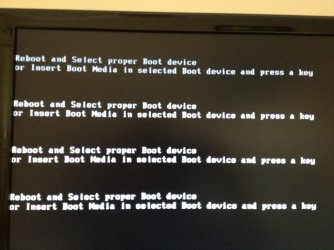
So what happens when you boot XP disk to install?

Full format an NTFS partition during install.
 
It won't acknowledge the disc.
 

Attachments

  • ImageUploadedBySevenForums1340040615.983567.jpg
    ImageUploadedBySevenForums1340040615.983567.jpg
    74.5 KB · Views: 1

My Computer My Computer

Computer type
PC/Desktop
Computer Manufacturer/Model Number
Custom Build
OS
Windows 7 Professional SP1 x64
CPU
AMD FX6300 3.6GHz (4.1GHz Turbo) 6 core Black Edition
Motherboard
ASRock 960GM/U3S3 FX Socket AM3+
Memory
Crucial Ballistix Tactial 8GB (2x4GB) 1866MHz
Graphics Card(s)
ASUS Radeon HD6850 1GB
Monitor(s) Displays
HP 22xi 21.5" Monitor
Screen Resolution
1920x1080p
Hard Drives
Western Digital 1TB SATA6 64MB Cache WD10EZEX
PSU
Corsair CX500 500W (Non modular)
Case
Fractal Design Define Mini
Cooling
2x Fractal Design 120MM 1200RPM, GPU fan, CPU fan, PSU fan
Keyboard
Logitech EX100 Keyboard
Mouse
Logitech MX Revoloution
Internet Speed
~37Mbps down, ~15Mbps up
Antivirus
Avast Anti-virus
Browser
Google Chrome
Other Info
Wireless card: TP-Link TL-WN781ND 150Mbps PCI-E Card

It also has a nice blue power button (Yay)
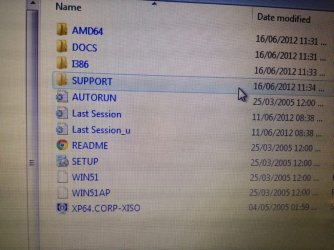
Do you have CD drive set first to boot in BIOS setup, or are using the one-time BIOS Boot menu key at boot and it clearly provides a choice for a CD (not DVD) drive?

If you are selecting this choice correctly and it doesn't prompt to "Press any key..." then it is a problem with the CD or burn. Did you use nlite to slipstream the IDE and/or SATA driver correctly as shown in SATA Drivers - Slipstream into Windows XP CD ? Did you burn CD with that tool or ImgBurn?
 
Yes it is set as the first to boot, and on a side note I can't get W7 to boot, it just comes up with the 'reboot and select...' even when I select a differnet boot device. Yes I did use nLite to slip in the drivers just for the sata drive. It never comes up with the 'press any key to boot from CD' thing.
 

My Computer My Computer

Computer type
PC/Desktop
Computer Manufacturer/Model Number
Custom Build
OS
Windows 7 Professional SP1 x64
CPU
AMD FX6300 3.6GHz (4.1GHz Turbo) 6 core Black Edition
Motherboard
ASRock 960GM/U3S3 FX Socket AM3+
Memory
Crucial Ballistix Tactial 8GB (2x4GB) 1866MHz
Graphics Card(s)
ASUS Radeon HD6850 1GB
Monitor(s) Displays
HP 22xi 21.5" Monitor
Screen Resolution
1920x1080p
Hard Drives
Western Digital 1TB SATA6 64MB Cache WD10EZEX
PSU
Corsair CX500 500W (Non modular)
Case
Fractal Design Define Mini
Cooling
2x Fractal Design 120MM 1200RPM, GPU fan, CPU fan, PSU fan
Keyboard
Logitech EX100 Keyboard
Mouse
Logitech MX Revoloution
Internet Speed
~37Mbps down, ~15Mbps up
Antivirus
Avast Anti-virus
Browser
Google Chrome
Other Info
Wireless card: TP-Link TL-WN781ND 150Mbps PCI-E Card

It also has a nice blue power button (Yay)
The program my mate is trying to run doesn't work on W7. No idea why, it just doesn't. Also, he's just said that the W7 partition can be deleted so it doesn't need to be recovered right now. Do you think its just a badly burnt disc, and that's all?
 

My Computer My Computer

Computer type
PC/Desktop
Computer Manufacturer/Model Number
Custom Build
OS
Windows 7 Professional SP1 x64
CPU
AMD FX6300 3.6GHz (4.1GHz Turbo) 6 core Black Edition
Motherboard
ASRock 960GM/U3S3 FX Socket AM3+
Memory
Crucial Ballistix Tactial 8GB (2x4GB) 1866MHz
Graphics Card(s)
ASUS Radeon HD6850 1GB
Monitor(s) Displays
HP 22xi 21.5" Monitor
Screen Resolution
1920x1080p
Hard Drives
Western Digital 1TB SATA6 64MB Cache WD10EZEX
PSU
Corsair CX500 500W (Non modular)
Case
Fractal Design Define Mini
Cooling
2x Fractal Design 120MM 1200RPM, GPU fan, CPU fan, PSU fan
Keyboard
Logitech EX100 Keyboard
Mouse
Logitech MX Revoloution
Internet Speed
~37Mbps down, ~15Mbps up
Antivirus
Avast Anti-virus
Browser
Google Chrome
Other Info
Wireless card: TP-Link TL-WN781ND 150Mbps PCI-E Card

It also has a nice blue power button (Yay)
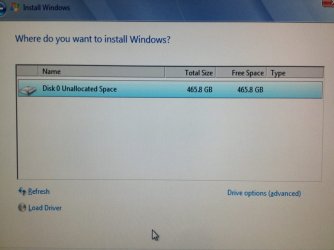
Could any of the files on the disc be disrupting the boot up process?
 

Attachments

  • ImageUploadedBySevenForums1340042955.094079.jpg
    ImageUploadedBySevenForums1340042955.094079.jpg
    85.6 KB · Views: 1

My Computer My Computer

Computer type
PC/Desktop
Computer Manufacturer/Model Number
Custom Build
OS
Windows 7 Professional SP1 x64
CPU
AMD FX6300 3.6GHz (4.1GHz Turbo) 6 core Black Edition
Motherboard
ASRock 960GM/U3S3 FX Socket AM3+
Memory
Crucial Ballistix Tactial 8GB (2x4GB) 1866MHz
Graphics Card(s)
ASUS Radeon HD6850 1GB
Monitor(s) Displays
HP 22xi 21.5" Monitor
Screen Resolution
1920x1080p
Hard Drives
Western Digital 1TB SATA6 64MB Cache WD10EZEX
PSU
Corsair CX500 500W (Non modular)
Case
Fractal Design Define Mini
Cooling
2x Fractal Design 120MM 1200RPM, GPU fan, CPU fan, PSU fan
Keyboard
Logitech EX100 Keyboard
Mouse
Logitech MX Revoloution
Internet Speed
~37Mbps down, ~15Mbps up
Antivirus
Avast Anti-virus
Browser
Google Chrome
Other Info
Wireless card: TP-Link TL-WN781ND 150Mbps PCI-E Card

It also has a nice blue power button (Yay)
The disk isn't even prompting to Press Any Key to Boot Disk so it's either the ISO integrity or the CD burn.

Has your friend tried installing the program in XP SP2 or earlier Compatibility Mode?
 
I may not have explained it very well. The program appears to install correctly, and open correctly, but when a file is opened in the program it crashes. There are no signs that anything is wrong with it, but the program runs fine on other systems running XP. That's not the only reason my mate wants XP though.
 

My Computer My Computer

Computer type
PC/Desktop
Computer Manufacturer/Model Number
Custom Build
OS
Windows 7 Professional SP1 x64
CPU
AMD FX6300 3.6GHz (4.1GHz Turbo) 6 core Black Edition
Motherboard
ASRock 960GM/U3S3 FX Socket AM3+
Memory
Crucial Ballistix Tactial 8GB (2x4GB) 1866MHz
Graphics Card(s)
ASUS Radeon HD6850 1GB
Monitor(s) Displays
HP 22xi 21.5" Monitor
Screen Resolution
1920x1080p
Hard Drives
Western Digital 1TB SATA6 64MB Cache WD10EZEX
PSU
Corsair CX500 500W (Non modular)
Case
Fractal Design Define Mini
Cooling
2x Fractal Design 120MM 1200RPM, GPU fan, CPU fan, PSU fan
Keyboard
Logitech EX100 Keyboard
Mouse
Logitech MX Revoloution
Internet Speed
~37Mbps down, ~15Mbps up
Antivirus
Avast Anti-virus
Browser
Google Chrome
Other Info
Wireless card: TP-Link TL-WN781ND 150Mbps PCI-E Card

It also has a nice blue power button (Yay)
Going back to the disc, I tried another installation disc and that one booted absolutly fine, and that didn't come up with 'press any key to boot'. Also still can't boot to W7.
 

My Computer My Computer

Computer type
PC/Desktop
Computer Manufacturer/Model Number
Custom Build
OS
Windows 7 Professional SP1 x64
CPU
AMD FX6300 3.6GHz (4.1GHz Turbo) 6 core Black Edition
Motherboard
ASRock 960GM/U3S3 FX Socket AM3+
Memory
Crucial Ballistix Tactial 8GB (2x4GB) 1866MHz
Graphics Card(s)
ASUS Radeon HD6850 1GB
Monitor(s) Displays
HP 22xi 21.5" Monitor
Screen Resolution
1920x1080p
Hard Drives
Western Digital 1TB SATA6 64MB Cache WD10EZEX
PSU
Corsair CX500 500W (Non modular)
Case
Fractal Design Define Mini
Cooling
2x Fractal Design 120MM 1200RPM, GPU fan, CPU fan, PSU fan
Keyboard
Logitech EX100 Keyboard
Mouse
Logitech MX Revoloution
Internet Speed
~37Mbps down, ~15Mbps up
Antivirus
Avast Anti-virus
Browser
Google Chrome
Other Info
Wireless card: TP-Link TL-WN781ND 150Mbps PCI-E Card

It also has a nice blue power button (Yay)
You wiped the HD so Win7 is no longer there.

Seems you've confirmed the XP CD is bad.
 
Last edited:
Yes sorry, I wasn't sure how to do that without booting into the OS, mark the partition as active that is. Could you please tell me? And I presume I do the system repairs from the installation disc.
 

My Computer My Computer

Computer type
PC/Desktop
Computer Manufacturer/Model Number
Custom Build
OS
Windows 7 Professional SP1 x64
CPU
AMD FX6300 3.6GHz (4.1GHz Turbo) 6 core Black Edition
Motherboard
ASRock 960GM/U3S3 FX Socket AM3+
Memory
Crucial Ballistix Tactial 8GB (2x4GB) 1866MHz
Graphics Card(s)
ASUS Radeon HD6850 1GB
Monitor(s) Displays
HP 22xi 21.5" Monitor
Screen Resolution
1920x1080p
Hard Drives
Western Digital 1TB SATA6 64MB Cache WD10EZEX
PSU
Corsair CX500 500W (Non modular)
Case
Fractal Design Define Mini
Cooling
2x Fractal Design 120MM 1200RPM, GPU fan, CPU fan, PSU fan
Keyboard
Logitech EX100 Keyboard
Mouse
Logitech MX Revoloution
Internet Speed
~37Mbps down, ~15Mbps up
Antivirus
Avast Anti-virus
Browser
Google Chrome
Other Info
Wireless card: TP-Link TL-WN781ND 150Mbps PCI-E Card

It also has a nice blue power button (Yay)
Whoops didn't notice the colour change, thanks for that. I'll try to re-burn the disc and get the existing OS to boot later.
 

My Computer My Computer

Computer type
PC/Desktop
Computer Manufacturer/Model Number
Custom Build
OS
Windows 7 Professional SP1 x64
CPU
AMD FX6300 3.6GHz (4.1GHz Turbo) 6 core Black Edition
Motherboard
ASRock 960GM/U3S3 FX Socket AM3+
Memory
Crucial Ballistix Tactial 8GB (2x4GB) 1866MHz
Graphics Card(s)
ASUS Radeon HD6850 1GB
Monitor(s) Displays
HP 22xi 21.5" Monitor
Screen Resolution
1920x1080p
Hard Drives
Western Digital 1TB SATA6 64MB Cache WD10EZEX
PSU
Corsair CX500 500W (Non modular)
Case
Fractal Design Define Mini
Cooling
2x Fractal Design 120MM 1200RPM, GPU fan, CPU fan, PSU fan
Keyboard
Logitech EX100 Keyboard
Mouse
Logitech MX Revoloution
Internet Speed
~37Mbps down, ~15Mbps up
Antivirus
Avast Anti-virus
Browser
Google Chrome
Other Info
Wireless card: TP-Link TL-WN781ND 150Mbps PCI-E Card

It also has a nice blue power button (Yay)
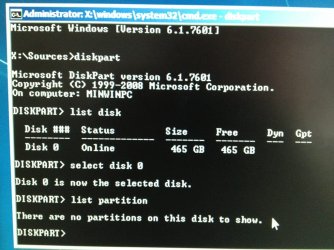
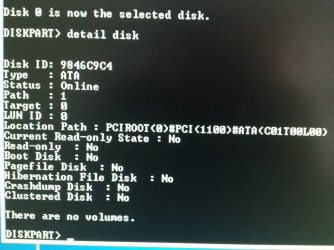
Um, there are apparently no partitions. Does that W7 has gone?
 

Attachments

  • ImageUploadedBySevenForums1340097517.058112.jpg
    ImageUploadedBySevenForums1340097517.058112.jpg
    91.9 KB · Views: 0

My Computer My Computer

Computer type
PC/Desktop
Computer Manufacturer/Model Number
Custom Build
OS
Windows 7 Professional SP1 x64
CPU
AMD FX6300 3.6GHz (4.1GHz Turbo) 6 core Black Edition
Motherboard
ASRock 960GM/U3S3 FX Socket AM3+
Memory
Crucial Ballistix Tactial 8GB (2x4GB) 1866MHz
Graphics Card(s)
ASUS Radeon HD6850 1GB
Monitor(s) Displays
HP 22xi 21.5" Monitor
Screen Resolution
1920x1080p
Hard Drives
Western Digital 1TB SATA6 64MB Cache WD10EZEX
PSU
Corsair CX500 500W (Non modular)
Case
Fractal Design Define Mini
Cooling
2x Fractal Design 120MM 1200RPM, GPU fan, CPU fan, PSU fan
Keyboard
Logitech EX100 Keyboard
Mouse
Logitech MX Revoloution
Internet Speed
~37Mbps down, ~15Mbps up
Antivirus
Avast Anti-virus
Browser
Google Chrome
Other Info
Wireless card: TP-Link TL-WN781ND 150Mbps PCI-E Card

It also has a nice blue power button (Yay)
Do a detail disk at the Diskpart command prompt.
 

My Computer My Computer

OS
Windows 7 Ultimate x64
Ok, disk check... The first photo sort of proves that the OS is gone.
 

Attachments

  • ImageUploadedBySevenForums1340097637.925202.jpg
    ImageUploadedBySevenForums1340097637.925202.jpg
    54.2 KB · Views: 1
  • ImageUploadedBySevenForums1340098473.922026.jpg
    ImageUploadedBySevenForums1340098473.922026.jpg
    86.6 KB · Views: 2

My Computer My Computer

Computer type
PC/Desktop
Computer Manufacturer/Model Number
Custom Build
OS
Windows 7 Professional SP1 x64
CPU
AMD FX6300 3.6GHz (4.1GHz Turbo) 6 core Black Edition
Motherboard
ASRock 960GM/U3S3 FX Socket AM3+
Memory
Crucial Ballistix Tactial 8GB (2x4GB) 1866MHz
Graphics Card(s)
ASUS Radeon HD6850 1GB
Monitor(s) Displays
HP 22xi 21.5" Monitor
Screen Resolution
1920x1080p
Hard Drives
Western Digital 1TB SATA6 64MB Cache WD10EZEX
PSU
Corsair CX500 500W (Non modular)
Case
Fractal Design Define Mini
Cooling
2x Fractal Design 120MM 1200RPM, GPU fan, CPU fan, PSU fan
Keyboard
Logitech EX100 Keyboard
Mouse
Logitech MX Revoloution
Internet Speed
~37Mbps down, ~15Mbps up
Antivirus
Avast Anti-virus
Browser
Google Chrome
Other Info
Wireless card: TP-Link TL-WN781ND 150Mbps PCI-E Card

It also has a nice blue power button (Yay)
As long as I can reinstall 7 even after installing XP, there's no real need to worry right now, but it is puzzling...
 

My Computer My Computer

Computer type
PC/Desktop
Computer Manufacturer/Model Number
Custom Build
OS
Windows 7 Professional SP1 x64
CPU
AMD FX6300 3.6GHz (4.1GHz Turbo) 6 core Black Edition
Motherboard
ASRock 960GM/U3S3 FX Socket AM3+
Memory
Crucial Ballistix Tactial 8GB (2x4GB) 1866MHz
Graphics Card(s)
ASUS Radeon HD6850 1GB
Monitor(s) Displays
HP 22xi 21.5" Monitor
Screen Resolution
1920x1080p
Hard Drives
Western Digital 1TB SATA6 64MB Cache WD10EZEX
PSU
Corsair CX500 500W (Non modular)
Case
Fractal Design Define Mini
Cooling
2x Fractal Design 120MM 1200RPM, GPU fan, CPU fan, PSU fan
Keyboard
Logitech EX100 Keyboard
Mouse
Logitech MX Revoloution
Internet Speed
~37Mbps down, ~15Mbps up
Antivirus
Avast Anti-virus
Browser
Google Chrome
Other Info
Wireless card: TP-Link TL-WN781ND 150Mbps PCI-E Card

It also has a nice blue power button (Yay)
Back
Top