Solved Unable to connect to Internet

BJC1992

Member
Member
Local time
10:59 PM
Messages
97
I'm writing this on behalf of my grandad. He has a HP Compaq nc6320 (originally a Windows XP laptop now running Windows 7).
It has previously been connected to neighbours Wi-Fi no trouble. But now he has got his own broadband set up a few days ago with Vodafone.
When I go to connect it wants an 8 digit code, which I don't have. When I contact Vodafone they've never come across this. I can connect other devices such as my phone without any issue, its just the laptop that's the problem.
Is it just a case of a 20 year old laptop isn't compatible with the new WiFi 6 fibre. Is it just time for a new laptop, or is there a way around it?
 

My Computer My Computer

At a glance

Windows 7 32 BitAMD Sempron(tm) 140 Processor 2.70Ghz4GB (3.12GB Usable)Nvidia GeForce 210
Computer type
PC/Desktop
Computer Manufacturer/Model Number
Advent SE 1101
OS
Windows 7 32 Bit
CPU
AMD Sempron(tm) 140 Processor 2.70Ghz
Memory
4GB (3.12GB Usable)
Graphics Card(s)
Nvidia GeForce 210
Sound Card
Nvidia High Definition Audio
Monitor(s) Displays
Compaq 7500
Hard Drives
320GB
Keyboard
Standard PS/2 Keyboard
Mouse
Microsoft PS/2 Mouse
Antivirus
Avast Antivirus Free
Browser
Google Chrome
Other Info
ACPI x86 Based PC
Sounds like it's something specific to their system. Maybe see this? https://www.vodafone.co.uk/vodafone-uk/forms/unlock-code-request/ Sounds like they don't want you using other networks once you're signed up with them. Please take a screenshot so we can see if this is something they installed compared to a windows prompt.
 

My Computers My Computers

  • At a glance

    Windows 7 pro/Windows 10 ProIntel i7 860 Quad core 2.8 ghz8 gbATI Radeon HD 5770 1 gb ram
    Computer type
    PC/Desktop
    Computer Manufacturer/Model Number
    HP Pavillion Elite HPE-250f
    OS
    Windows 7 pro/Windows 10 Pro
    CPU
    Intel i7 860 Quad core 2.8 ghz
    Memory
    8 gb
    Graphics Card(s)
    ATI Radeon HD 5770 1 gb ram
    Monitor(s) Displays
    Alienware 25 AW2521HF & Viewsonic
    Screen Resolution
    1920 x1080 & 1680x1050
    Hard Drives
    WD blue 1 tb & 500 gb.
    Browser
    FF of course.
    Other Info
    https://www.bestbuy.com/site/hp-pavilion-elite-desktop-intel-core-i7-processor-8gb-memory-1tb-hard-drive/9921493.p?skuId=9921493
  • At a glance

    Windows 2012 R2 Data center/Linux Minti3 9100 3.6GHz, 8M cache, 4C/4T8GB 2666MT/s DDR4 ECC UDIMM
    Computer type
    PC/Desktop
    System Manufacturer/Model Number
    Dell Poweredge T140
    OS
    Windows 2012 R2 Data center/Linux Mint
    CPU
    i3 9100 3.6GHz, 8M cache, 4C/4T
    Memory
    8GB 2666MT/s DDR4 ECC UDIMM
    Monitor(s) Displays
    Viewsonic
    Screen Resolution
    1680x1050
    Hard Drives
    1 TB & 750 GB
    Other Info
    https://www.dell.com/en-us/work/shop/productdetailstxn/poweredge-t140?~ck=bt
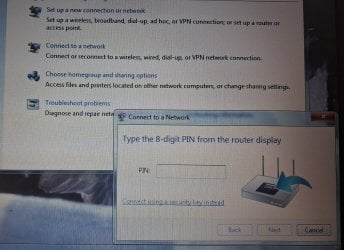
I also took the laptop home to see if it would connect to our internet, we are with TalkTalk and it does something slightly different by asking for a security key, which again I don't have. So wherever I go its not as simple as just putting in the Wi-Fi password. The screenshot below is what happens when attempting to connect to the Vodafone Internet.
20260719_110214.jpg
 

My Computer My Computer

At a glance

Windows 7 32 BitAMD Sempron(tm) 140 Processor 2.70Ghz4GB (3.12GB Usable)Nvidia GeForce 210
Computer type
PC/Desktop
Computer Manufacturer/Model Number
Advent SE 1101
OS
Windows 7 32 Bit
CPU
AMD Sempron(tm) 140 Processor 2.70Ghz
Memory
4GB (3.12GB Usable)
Graphics Card(s)
Nvidia GeForce 210
Sound Card
Nvidia High Definition Audio
Monitor(s) Displays
Compaq 7500
Hard Drives
320GB
Keyboard
Standard PS/2 Keyboard
Mouse
Microsoft PS/2 Mouse
Antivirus
Avast Antivirus Free
Browser
Google Chrome
Other Info
ACPI x86 Based PC
It's looking for a pin on the modem. There isn't one there? If not you'll have to get it from them. I don't know of a work around and I'm not familiar with them at all.
 

My Computers My Computers

  • At a glance

    Windows 7 pro/Windows 10 ProIntel i7 860 Quad core 2.8 ghz8 gbATI Radeon HD 5770 1 gb ram
    Computer type
    PC/Desktop
    Computer Manufacturer/Model Number
    HP Pavillion Elite HPE-250f
    OS
    Windows 7 pro/Windows 10 Pro
    CPU
    Intel i7 860 Quad core 2.8 ghz
    Memory
    8 gb
    Graphics Card(s)
    ATI Radeon HD 5770 1 gb ram
    Monitor(s) Displays
    Alienware 25 AW2521HF & Viewsonic
    Screen Resolution
    1920 x1080 & 1680x1050
    Hard Drives
    WD blue 1 tb & 500 gb.
    Browser
    FF of course.
    Other Info
    https://www.bestbuy.com/site/hp-pavilion-elite-desktop-intel-core-i7-processor-8gb-memory-1tb-hard-drive/9921493.p?skuId=9921493
  • At a glance

    Windows 2012 R2 Data center/Linux Minti3 9100 3.6GHz, 8M cache, 4C/4T8GB 2666MT/s DDR4 ECC UDIMM
    Computer type
    PC/Desktop
    System Manufacturer/Model Number
    Dell Poweredge T140
    OS
    Windows 2012 R2 Data center/Linux Mint
    CPU
    i3 9100 3.6GHz, 8M cache, 4C/4T
    Memory
    8GB 2666MT/s DDR4 ECC UDIMM
    Monitor(s) Displays
    Viewsonic
    Screen Resolution
    1680x1050
    Hard Drives
    1 TB & 750 GB
    Other Info
    https://www.dell.com/en-us/work/shop/productdetailstxn/poweredge-t140?~ck=bt
It looks like the router is trying to connect to the laptop using WPS. WPS can ask for a 8-digit PIN or security key. The purpose of WPS is to allow easy connections of nearby devices that are assumed to be trusted. Sometimes if the router supports WPS you press a button on the router to start it. Once you do that you start WPS on the device. Within a minute they will automatically connect. You will have to check with the manual for your router for how to use WPS with it.

A WPS (Wi-Fi Protected Setup) security key is either an 8-digit PIN used to bypass manual password entry, or the actual physical push-button used to pair devices. It is typically found on a physical sticker on your router or in the device's wireless network settings.

I sometime use WPS to initially connect my printer to the router. It does not use a PIN but only supports the automatic method starting WPS on the router and WPS on the printer. It is not hard once you have done it a few times.

Does your router have a WPS button? If so you may be able to press it and start the automatic connection process without have to use a PIN or security key.

BTW, my router has 3 Wi-Fi bands: 2.4GHz, 5GHz and 6GHz.

Each band supports 3 Network Security Modes:
* WPA3-Personal
* WPA3-Personal-Transition (Default)
* WPA2

Most new computers, phones, and printers use WPA3-Personal.

I also have a 20 year old laptop that came with Windows XP. The laptop only supports the 2.4GHz Wi-Fi band. At first I couldn't get it to connect. The way I solved that was to force the 2.4GHz band to use the WPA2 security mode.

BTW, the laptop was upgraded to Windows 7. I liked it that way but eventually settled on Windows 10 because that works best on the Internet. I just have to live with the laptop being slow with Windows 10.
 

My Computers My Computers

  • At a glance

    Windows 7 Professional 64bit / Windows 10 Hom...AMD FX-8350GSKILL Ripjaw-X PC3 12800 12GB (2x4GB, 2x2GB)ASUS ENGTX560 DCII OC/2DI/1GD5 1GB
    Computer type
    PC/Desktop
    Computer Manufacturer/Model Number
    Custom build
    OS
    Windows 7 Professional 64bit / Windows 10 Home 64bit
    CPU
    AMD FX-8350
    Motherboard
    Gigabyte GA-990FXA-UD3 (AM3+) Rev. 4.0
    Memory
    GSKILL Ripjaw-X PC3 12800 12GB (2x4GB, 2x2GB)
    Graphics Card(s)
    ASUS ENGTX560 DCII OC/2DI/1GD5 1GB
    Sound Card
    Integrated
    Monitor(s) Displays
    Asus VE228H (21.5-in)
    Screen Resolution
    1920x1080 60Hz
    Hard Drives
    SAMSUNG 870 EVO 1TB (2.5" SATA SSD)
    SAMSUNG 870 EVO 500GB (2.5" SATA SSD)
    PSU
    Antec TruePower (new) TP-650 (650 watts)
    Case
    Antec Three Hundred
    Cooling
    AMD stock (plan to upgrade to Cooler Master Hyper 212 EVO)
    Keyboard
    Logitech K540 (wireless)
    Mouse
    Logitech M310 (wireless)
    Internet Speed
    Comcast Gigabit X2 Internet (2100Mbps down / 300Mbps up)
    Browser
    Firefox, Edge, Chrome
    Other Info
    Optical drive: ASUS DRW-24B3ST/BLK/G (Black) (24X)
    External hard drives: 2TB & 6TB
    Internet Gateway: Comcast XB8
  • Computer type
    PC/Desktop
I managed to get it sorted. I had to access router settings and enable compatability mode, and it basically creates a different username and password that I would click in the wifi menu as this is a wavelength older devices can connect to. The router does have a wps button but I didn't need to press it on this occasion.
 

My Computer My Computer

At a glance

Windows 7 32 BitAMD Sempron(tm) 140 Processor 2.70Ghz4GB (3.12GB Usable)Nvidia GeForce 210
Computer type
PC/Desktop
Computer Manufacturer/Model Number
Advent SE 1101
OS
Windows 7 32 Bit
CPU
AMD Sempron(tm) 140 Processor 2.70Ghz
Memory
4GB (3.12GB Usable)
Graphics Card(s)
Nvidia GeForce 210
Sound Card
Nvidia High Definition Audio
Monitor(s) Displays
Compaq 7500
Hard Drives
320GB
Keyboard
Standard PS/2 Keyboard
Mouse
Microsoft PS/2 Mouse
Antivirus
Avast Antivirus Free
Browser
Google Chrome
Other Info
ACPI x86 Based PC
Back
Top