Solved Unable to connect to Virtual Disk Service, no path?

robdabob

New member
Local time
7:17 PM
Messages
2
So ive checked a lot of threads here, trying to get this god forsaken system to work so i can format my latest ssd. i went into Services.msc and looked up Virtual disk, wasnt on, only said manual.

So i try to start it up right, i get this message: "Windows could not start the Virtual Disk service on Local Computer Error 3: The system cannot find the path specified."

Its a Samsung EVO with 1 TB, i went into the Samsung magician and pressed something so increase maximum performance. I don't know if this had anything to do with it?

It's the first time this happens to me, im so lost.
 

My Computer My Computer

At a glance

Windows 7 Ultimate x64
Computer type
PC/Desktop
OS
Windows 7 Ultimate x64
Solved, Had to watch for the exact name and string to use in <regedit> the registry.

This page helped me in making the correct steps, creating a IMAGEPATH by yourself.

Start/Stop Virtual Disk service in Windows 7 from Services, Regedit or CMD

Simply put, i had to create a path from the virtual disk service myself because somehow it disappeared? and after i did this in the registry everything worked as usual.
 

My Computer My Computer

At a glance

Windows 7 Ultimate x64
Computer type
PC/Desktop
OS
Windows 7 Ultimate x64
More detail?

Is there any possibility robdabob can post exactly what it was he/she typed into the registry to recreate the missing path for the virtual disk service? I apologize for my lack of experience. Many thanks
 

My Computer My Computer

At a glance

Windows 7 Home Premium 64 bitAMD Athlon II X2 250 (3.00 ghz)16 gbnVidia 9400GT (2)
Computer type
PC/Desktop
Computer Manufacturer/Model Number
Custom build
OS
Windows 7 Home Premium 64 bit
CPU
AMD Athlon II X2 250 (3.00 ghz)
Motherboard
ASROCK 870 Extreme 3
Memory
16 gb
Graphics Card(s)
nVidia 9400GT (2)
Hard Drives
Kingston 240 gb SSD
Antivirus
Avira
Browser
Chrome
Oops - solved my own problem

Many thanks to robdabob for solving this path problem. I took a short course on just how to edit the registry and found it easy enough to implement robdabob's solution which worked for me. After editing the registry as robdabo suggested, I was able to finally get "storage management" and backup to work once again. I think running a registry cleaner removed the path entry.
 

My Computer My Computer

At a glance

Windows 7 Home Premium 64 bitAMD Athlon II X2 250 (3.00 ghz)16 gbnVidia 9400GT (2)
Computer type
PC/Desktop
Computer Manufacturer/Model Number
Custom build
OS
Windows 7 Home Premium 64 bit
CPU
AMD Athlon II X2 250 (3.00 ghz)
Motherboard
ASROCK 870 Extreme 3
Memory
16 gb
Graphics Card(s)
nVidia 9400GT (2)
Hard Drives
Kingston 240 gb SSD
Antivirus
Avira
Browser
Chrome
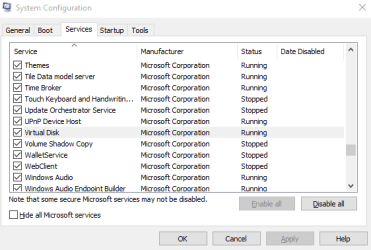
Just suggested, the another ways is goto start button and search for msconfig and enter.. See the services tab, look for virtual disk, you must enable it. Sorry for the bad english... :)
 

Attachments

  • Screenshot_244.png
    Screenshot_244.png
    8.6 KB · Views: 7
Last edited:

My Computer My Computer

At a glance

Windows 7 Ultimate x64Intel i3 2.5GHz4GB RAMIntel Graphics HD
Computer type
Laptop
Computer Manufacturer/Model Number
Acer
OS
Windows 7 Ultimate x64
CPU
Intel i3 2.5GHz
Memory
4GB RAM
Graphics Card(s)
Intel Graphics HD
Antivirus
Microsoft Security Essential
Browser
Chrome
Back
Top