Solved Unable to create desktop slideshow

steimpunk

New member
A while ago, I tried out DreamScene & DeskScapes, and now I can't set up a desktop slideshow. I've already checked MANY forums, but was unable to find a solution. :banghead:

• ATTEMPTS AT FIXING
Uninstalled them and even used their uninstall patches.
Checked power settings (animations are enabled, even in power settings)
Tried sticking to Aero themes

• THIS IS WHAT I DO
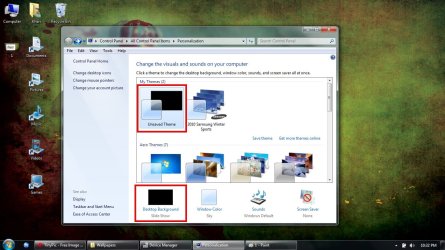
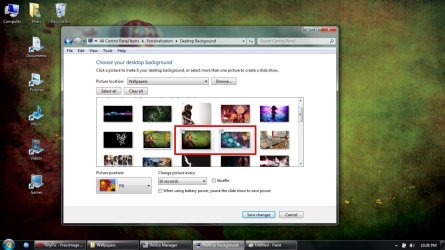
1. Select 2 wallpapers to alternate (both are my screen size [1366 x 768])
2. Make sure that it says slideshow (note that the "my theme" pic has a black background, don't know why)
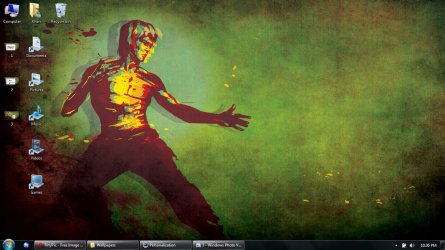
3. Wait for my background to alternate (never happens)
4. Click 'next background' to manually alternate (still won't change)]
 

Attachments
  • 1.jpg
    1.jpg
    322.9 KB · Views: 12
  • 2.jpg
    2.jpg
    320.2 KB · Views: 9
  • 3.jpg
    3.jpg
    372 KB · Views: 12
  • 4.jpg
    4.jpg
    376.9 KB · Views: 8

My Computer

Computer Manufacturer/Model Number
Acer Aspire 5742
OS
Windows 7 Home Premium 64bit SP1
CPU
Intel Core (i3)
Memory
4 GB
Monitor(s) Displays
1366 x 768
Hello Steimpunk, and welcome to Seven Forums.

You might see if running a sfc /scannow command may be able to help if it's a corrupted system file is the cause.

If not, and it hasn't been to long ago, you might consider doing a system restore using a restore point dated before having this issue after installing the programs to hopefully fix it.

Hope this helps,
Shawn
 

My Computer

Computer type
PC/Desktop
Computer Manufacturer/Model Number
Self built custom
OS
64-bit Windows 11 Pro for Workstations
CPU
Intel i7-8700K OC'd to 5 GHz
Motherboard
ASUS ROG Maximus XI Formula Z390
Memory
64 GB (4x16GB) G.SKILL TridentZ RGB DDR4 3600 MHz
Graphics Card(s)
ASUS ROG-STRIX-GTX1080TI-O11G-GAMING
Sound Card
Integrated
Monitor(s) Displays
2 x Samsung Odyssey G7 27"
Screen Resolution
2560x1440
Hard Drives
1TB Samsung 990 PRO M.2,
4TB Samsung 990 PRO PRO M.2,
TerraMaster F8 SSD Plus NAS
PSU
Seasonic Prime Titanium 850W
Case
Thermaltake Core P3
Cooling
Corsair Hydro H115i
Keyboard
Logitech wireless K800
Mouse
Logitech MX Master 4
Internet Speed
2 Gb/s Download and 100 Mb/s Upload
Antivirus
Malwarebyte Anti-Malware Premium
Browser
Google Chrome
Other Info
Logitech Z625 speaker system,
Logitech BRIO 4K Pro webcam,
HP Color LaserJet Pro MFP M477fdn,
APC SMART-UPS RT 1000 XL - SURT1000XLI,
Galaxy S23 Plus phone
Hello Brink, and thank you.
I just tried the sfc /scannow, but it didn't solve the problem... and I don't have a restore disk (shame on me)
 

My Computer

Computer Manufacturer/Model Number
Acer Aspire 5742
OS
Windows 7 Home Premium 64bit SP1
CPU
Intel Core (i3)
Memory
4 GB
Monitor(s) Displays
1366 x 768
You do not need a restore disk to do a system restore if you do it from within Windows 7, just a restore point. :)
 

My Computer

Computer type
PC/Desktop
Computer Manufacturer/Model Number
Self built custom
OS
64-bit Windows 11 Pro for Workstations
CPU
Intel i7-8700K OC'd to 5 GHz
Motherboard
ASUS ROG Maximus XI Formula Z390
Memory
64 GB (4x16GB) G.SKILL TridentZ RGB DDR4 3600 MHz
Graphics Card(s)
ASUS ROG-STRIX-GTX1080TI-O11G-GAMING
Sound Card
Integrated
Monitor(s) Displays
2 x Samsung Odyssey G7 27"
Screen Resolution
2560x1440
Hard Drives
1TB Samsung 990 PRO M.2,
4TB Samsung 990 PRO PRO M.2,
TerraMaster F8 SSD Plus NAS
PSU
Seasonic Prime Titanium 850W
Case
Thermaltake Core P3
Cooling
Corsair Hydro H115i
Keyboard
Logitech wireless K800
Mouse
Logitech MX Master 4
Internet Speed
2 Gb/s Download and 100 Mb/s Upload
Antivirus
Malwarebyte Anti-Malware Premium
Browser
Google Chrome
Other Info
Logitech Z625 speaker system,
Logitech BRIO 4K Pro webcam,
HP Color LaserJet Pro MFP M477fdn,
APC SMART-UPS RT 1000 XL - SURT1000XLI,
Galaxy S23 Plus phone
Oh, okay - let's see...

EDIT: Sadly, none of the restore points helped.
 

My Computer

Computer Manufacturer/Model Number
Acer Aspire 5742
OS
Windows 7 Home Premium 64bit SP1
CPU
Intel Core (i3)
Memory
4 GB
Monitor(s) Displays
1366 x 768
Still no luck.

If it helps, the Personalization window still says "Slide Show" under the "Desktop Backround" setting like in step #2, even when I only select one wallpaper.

EDIT: Might this have anything to do with that .ini file or anything in my [Resources > Themes] folder?
 

My Computer

Computer Manufacturer/Model Number
Acer Aspire 5742
OS
Windows 7 Home Premium 64bit SP1
CPU
Intel Core (i3)
Memory
4 GB
Monitor(s) Displays
1366 x 768
Hmm, as a test, create a new administrator user account to see if it works properly in it.
 

My Computer

Computer type
PC/Desktop
Computer Manufacturer/Model Number
Self built custom
OS
64-bit Windows 11 Pro for Workstations
CPU
Intel i7-8700K OC'd to 5 GHz
Motherboard
ASUS ROG Maximus XI Formula Z390
Memory
64 GB (4x16GB) G.SKILL TridentZ RGB DDR4 3600 MHz
Graphics Card(s)
ASUS ROG-STRIX-GTX1080TI-O11G-GAMING
Sound Card
Integrated
Monitor(s) Displays
2 x Samsung Odyssey G7 27"
Screen Resolution
2560x1440
Hard Drives
1TB Samsung 990 PRO M.2,
4TB Samsung 990 PRO PRO M.2,
TerraMaster F8 SSD Plus NAS
PSU
Seasonic Prime Titanium 850W
Case
Thermaltake Core P3
Cooling
Corsair Hydro H115i
Keyboard
Logitech wireless K800
Mouse
Logitech MX Master 4
Internet Speed
2 Gb/s Download and 100 Mb/s Upload
Antivirus
Malwarebyte Anti-Malware Premium
Browser
Google Chrome
Other Info
Logitech Z625 speaker system,
Logitech BRIO 4K Pro webcam,
HP Color LaserJet Pro MFP M477fdn,
APC SMART-UPS RT 1000 XL - SURT1000XLI,
Galaxy S23 Plus phone
Good, idea.
It works on the new administrator user. I'm not sure what that means, but I'm kind of relieved.
 

My Computer

Computer Manufacturer/Model Number
Acer Aspire 5742
OS
Windows 7 Home Premium 64bit SP1
CPU
Intel Core (i3)
Memory
4 GB
Monitor(s) Displays
1366 x 768
That's good news. If you like, you could copy over any files and shortcuts you want from the old user account's user folders and Start Menu shortcuts to the new one. After everything still checks out ok for a day or two, you could delete the old user account.
 

My Computer

Computer type
PC/Desktop
Computer Manufacturer/Model Number
Self built custom
OS
64-bit Windows 11 Pro for Workstations
CPU
Intel i7-8700K OC'd to 5 GHz
Motherboard
ASUS ROG Maximus XI Formula Z390
Memory
64 GB (4x16GB) G.SKILL TridentZ RGB DDR4 3600 MHz
Graphics Card(s)
ASUS ROG-STRIX-GTX1080TI-O11G-GAMING
Sound Card
Integrated
Monitor(s) Displays
2 x Samsung Odyssey G7 27"
Screen Resolution
2560x1440
Hard Drives
1TB Samsung 990 PRO M.2,
4TB Samsung 990 PRO PRO M.2,
TerraMaster F8 SSD Plus NAS
PSU
Seasonic Prime Titanium 850W
Case
Thermaltake Core P3
Cooling
Corsair Hydro H115i
Keyboard
Logitech wireless K800
Mouse
Logitech MX Master 4
Internet Speed
2 Gb/s Download and 100 Mb/s Upload
Antivirus
Malwarebyte Anti-Malware Premium
Browser
Google Chrome
Other Info
Logitech Z625 speaker system,
Logitech BRIO 4K Pro webcam,
HP Color LaserJet Pro MFP M477fdn,
APC SMART-UPS RT 1000 XL - SURT1000XLI,
Galaxy S23 Plus phone
Thank you Brinks, thank you!
I also appreciate everyone else's help, and apologize if I wasted your time by overlooking this. :p
 

My Computer

Computer Manufacturer/Model Number
Acer Aspire 5742
OS
Windows 7 Home Premium 64bit SP1
CPU
Intel Core (i3)
Memory
4 GB
Monitor(s) Displays
1366 x 768
Thank you Brinks, thank you!
I also appreciate everyone else's help, and apologize if I wasted your time by overlooking this. :p

You're most welcome Steimpunk. It has not been a waste of time at all. :)
 
Last edited:

My Computer

Computer type
PC/Desktop
Computer Manufacturer/Model Number
Self built custom
OS
64-bit Windows 11 Pro for Workstations
CPU
Intel i7-8700K OC'd to 5 GHz
Motherboard
ASUS ROG Maximus XI Formula Z390
Memory
64 GB (4x16GB) G.SKILL TridentZ RGB DDR4 3600 MHz
Graphics Card(s)
ASUS ROG-STRIX-GTX1080TI-O11G-GAMING
Sound Card
Integrated
Monitor(s) Displays
2 x Samsung Odyssey G7 27"
Screen Resolution
2560x1440
Hard Drives
1TB Samsung 990 PRO M.2,
4TB Samsung 990 PRO PRO M.2,
TerraMaster F8 SSD Plus NAS
PSU
Seasonic Prime Titanium 850W
Case
Thermaltake Core P3
Cooling
Corsair Hydro H115i
Keyboard
Logitech wireless K800
Mouse
Logitech MX Master 4
Internet Speed
2 Gb/s Download and 100 Mb/s Upload
Antivirus
Malwarebyte Anti-Malware Premium
Browser
Google Chrome
Other Info
Logitech Z625 speaker system,
Logitech BRIO 4K Pro webcam,
HP Color LaserJet Pro MFP M477fdn,
APC SMART-UPS RT 1000 XL - SURT1000XLI,
Galaxy S23 Plus phone
Just an update to this information

I uninstalled a program called Dreamscene Player and it fixed this issue. I am certain there are others out there that create movies for you to play on the desktop. Uninstall them and it should work the way it was intended.
 

My Computer

OS
Windows 7 Ultimate 64 bit
Back
Top