
Unable to create New Simple Volume of a 3.7 TB RAID disk

FunkyWalker

New member
Local time
10:10 AM
Messages
3
Location
Naples, FL
I just recently did a Windows 7 re install so I would have a clean slate when using a new raid setup. (LSI 9211-8i with (4) 2 TB WD Red) I am new to RAID's but everything seams to be working fine. I used 4, 2 TB WD Reds in a RAID 10 and got the expected 3.7 TB of space. I run my OS on a small 120 GB SSD and put all my user accounts on a different drive as shown here.

http://www.sevenforums.com/tutorials/124198-user-profiles-create-move-during-windows-7-installation.html

So to get back to the problem at hand, when I went to create a new simple volume initially to do this it would only allow me to put 2048 GB in a volume. Not a big deal because I though that I would be able to set up a new simple with the rest of it later. The problem that I'm wondering about is that now that it is all set up and running I can use the rest of the space. When I am in disk management and right click on the unallocated space everything is grayed out except for Properties and Help.

I'm not sure what to do about this . Although I don't need the s[ace right now I don't like the idea of 1.5 TB sitting there unusable. If I'm going to do something about this I would rather do it now than later.
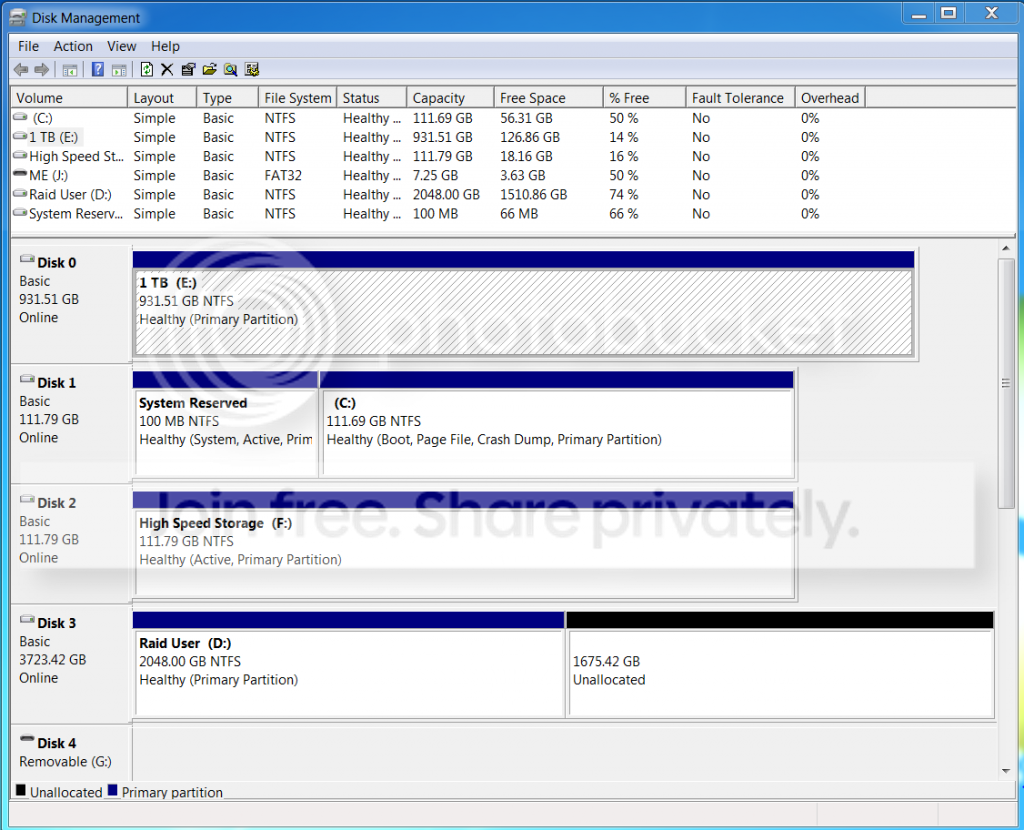


-Josh
 

My Computer My Computer

At a glance

Windows 7 Ultimate 64 bitIntel i7 960Corsair Core i7 Dominator DDR3Galaxy GeForce GTX 550 Ti (Fermi)
Computer type
PC/Desktop
Computer Manufacturer/Model Number
Custom Build
OS
Windows 7 Ultimate 64 bit
CPU
Intel i7 960
Motherboard
MSI X58M Motherboard
Memory
Corsair Core i7 Dominator DDR3
Graphics Card(s)
Galaxy GeForce GTX 550 Ti (Fermi)
Hard Drives
OS - Intel 510 Series (Elm Crest) 120GB -
User Profiles - (4) 2 TB WD Red in RAID 10
Games - OCZ Vertex 3 Series 120G
Spare - 1 TB WD Black
Antivirus
BitDefender
Browser
Chrome
If you want to use more than 2.2GB, you have to convert the MBR disk to a GPT disk.
 

My Computer My Computer

At a glance

Vista, Windows7, Mint Mate, Zorin, Windows 8from 1.6GHz Duo to i7
Computer Manufacturer/Model Number
HP, Dell, Gateway, Toshiba - 4 laptops and 2 desktops
OS
Vista, Windows7, Mint Mate, Zorin, Windows 8
CPU
from 1.6GHz Duo to i7
Monitor(s) Displays
2x HP w2207
Hard Drives
5x HDD, 7x SSD, 12x Externals
Keyboard
with trackball - no mices
Mouse
Trackball mice
Internet Speed
DSL 6000
Thank you whs! I didn't know about the two different disk formats. Did a little looking into it and it looks like it is possible to convert with out starting over but it might be a little complicated. Would you recommend redoing my partition or trying to convert the volume? One place recommended AOMEI Partition Assistant and might give that a shot.
 

My Computer My Computer

At a glance

Windows 7 Ultimate 64 bitIntel i7 960Corsair Core i7 Dominator DDR3Galaxy GeForce GTX 550 Ti (Fermi)
Computer type
PC/Desktop
Computer Manufacturer/Model Number
Custom Build
OS
Windows 7 Ultimate 64 bit
CPU
Intel i7 960
Motherboard
MSI X58M Motherboard
Memory
Corsair Core i7 Dominator DDR3
Graphics Card(s)
Galaxy GeForce GTX 550 Ti (Fermi)
Hard Drives
OS - Intel 510 Series (Elm Crest) 120GB -
User Profiles - (4) 2 TB WD Red in RAID 10
Games - OCZ Vertex 3 Series 120G
Spare - 1 TB WD Black
Antivirus
BitDefender
Browser
Chrome

My Computer My Computer

At a glance

Vista, Windows7, Mint Mate, Zorin, Windows 8from 1.6GHz Duo to i7
Computer Manufacturer/Model Number
HP, Dell, Gateway, Toshiba - 4 laptops and 2 desktops
OS
Vista, Windows7, Mint Mate, Zorin, Windows 8
CPU
from 1.6GHz Duo to i7
Monitor(s) Displays
2x HP w2207
Hard Drives
5x HDD, 7x SSD, 12x Externals
Keyboard
with trackball - no mices
Mouse
Trackball mice
Internet Speed
DSL 6000
We see nothing but problems here with RAID. What did you hope to gain by using RAID? If you lose one HD you'll lose all your data, even often times on mirrored. It is a dated technology that offers no benefits except for those who work with huge files like video editing.

Convert MBR Disk to GPT Disk - Windows 7 Forums

Be sure to back up your data first as this is a destructive conversion.
 
You should be fine to perform non destructive conversion with a third party tool like Aomei. That assumes it is a storage disk. Boot disk is more complicated. They do a great free imaging program as well.

Free Partition Manager Software
 

My Computers My Computers

  • At a glance

    7 X64i5 84002x8gb 3200mhz
    Computer type
    PC/Desktop
    OS
    7 X64
    CPU
    i5 8400
    Motherboard
    gigabyte b365m ds3h
    Memory
    2x8gb 3200mhz
    Hard Drives
    various
    PSU
    pure power 11 400w cm
    Case
    Coolermaster
    Cooling
    cryorig m9i
  • At a glance

    7x64g54008gb ddr4 2400
    Computer type
    PC/Desktop
    OS
    7x64
    CPU
    g5400
    Motherboard
    ga b365m ds3h
    Memory
    8gb ddr4 2400
    PSU
    xfx pro 450w
I'll be honest and didn't realize that they were dated, even when mirrored. I did it because I had all the drives that I was going to try and use for a home server as a learning experience that never worked out. So I thought that with this I could get a large volume that was safe and fairly fast. If they're really not worth it I suppose I would rather have all the space for all my raw picture files and sell the raid card.
 

My Computer My Computer

At a glance

Windows 7 Ultimate 64 bitIntel i7 960Corsair Core i7 Dominator DDR3Galaxy GeForce GTX 550 Ti (Fermi)
Computer type
PC/Desktop
Computer Manufacturer/Model Number
Custom Build
OS
Windows 7 Ultimate 64 bit
CPU
Intel i7 960
Motherboard
MSI X58M Motherboard
Memory
Corsair Core i7 Dominator DDR3
Graphics Card(s)
Galaxy GeForce GTX 550 Ti (Fermi)
Hard Drives
OS - Intel 510 Series (Elm Crest) 120GB -
User Profiles - (4) 2 TB WD Red in RAID 10
Games - OCZ Vertex 3 Series 120G
Spare - 1 TB WD Black
Antivirus
BitDefender
Browser
Chrome
Back
Top